best performance and safety system

Daniel

New member
Local time
7:11 PM
Messages
3
Location
Bavaria
Hi all,

after reading so many threads in this forum i will open my first one to tell you guys my thoughts about my system. At least i just want to know if im right or wrong.

I use

2x Western Digital Raptor 740 ADFD (74GB)
1x Western Digital 3200 AAKS (320GB)

The first Raptor i will use for Windows 7 C:, the next Raptor for Backup and Virtual Memory D: cause its low use of space and only few backups per week. And the last one 320GB will be used for images of Programs, Movies or whatever and kind of all Files i need for Work. Do u guys think thats the best i can do or is there anyone out who think im wrong and i could get more logical use of my drives?

At last i have some trouble with the Virtual memory and Windows 7.

I use 2x 2GB OCZ Titanium

That means the Recommended space for the paging file is 6139MB. I choose initial size 6139 and max size the same. The only Problem is i can only set it up in the safe mode of windows 7. When i change back to the normal mode it tells me 6139-6139MB usage on the correct drive like i wanted.

Is there any Chance to check out if this pagefile will be used? and no others.


Thanks a lot
Daniel
 

My Computer

OS
Windows 7 x64 Beta
CPU
Intel Core 2 Duo E8400 3,0@3,6GHz 6MB and Zalman CNPS9500 AT
Motherboard
Asus P5N32-E SLI
Memory
4GB (2x2) DDR2 PC2-6400 800MHz OCZ Titanium Dual Channel
Graphics Card(s)
GeForce 8800 GT EVGA 512MB and Zalman VF1000 CU L
Sound Card
HD-Audio (ADI 1988B 8-Channel)
Monitor(s) Displays
22" LG L227W
Screen Resolution
1680x1050
Hard Drives
2x Western Digital Raptor SATA 74GB 10k RPM 8MB and Western Digital SATA 320GB 7,2k RPM 16MB
PSU
NitroX Rev. 2.0 500 Watt Dual Fan
Case
Miditower Chieftec CH-01-SL-SL-B
Cooling
2x 92mm and 120mm SilenX iXtrema
Keyboard
Labtec
Mouse
Logitech MX510
Hello Daniel, and welcome to Seven Forums.

As long as you have no other drive selected to have a page file on, then it should only use the one on the D: drive you have mentioned above. This tutorial is for Vista, but it should be the same in Windows 7. You might see if it can help anymore as well.

Virtual Memory Paging File - Change - Vista Forums

Hope this helps,
Shawn
 

My Computer

Computer type
PC/Desktop
Computer Manufacturer/Model Number
Self built custom
OS
64-bit Windows 11 Pro for Workstations
CPU
Intel i7-8700K OC'd to 5 GHz
Motherboard
ASUS ROG Maximus XI Formula Z390
Memory
64 GB (4x16GB) G.SKILL TridentZ RGB DDR4 3600 MHz
Graphics Card(s)
ASUS ROG-STRIX-GTX1080TI-O11G-GAMING
Sound Card
Integrated
Monitor(s) Displays
2 x Samsung Odyssey G7 27"
Screen Resolution
2560x1440
Hard Drives
1TB Samsung 990 PRO M.2,
4TB Samsung 990 PRO PRO M.2,
TerraMaster F8 SSD Plus NAS
PSU
Seasonic Prime Titanium 850W
Case
Thermaltake Core P3
Cooling
Corsair Hydro H115i
Keyboard
Logitech wireless K800
Mouse
Logitech MX Master 4
Internet Speed
2 Gb/s Download and 100 Mb/s Upload
Antivirus
Malwarebyte Anti-Malware Premium
Browser
Google Chrome
Other Info
Logitech Z625 speaker system,
Logitech BRIO 4K Pro webcam,
HP Color LaserJet Pro MFP M477fdn,
APC SMART-UPS RT 1000 XL - SURT1000XLI,
Galaxy S23 Plus phone
Hello Brink, :shock:

that was a really fast answer. Yes, this is a nice Post how it works. But maybe u noticed that the change of Virtual memory in Windows 7 will end at no response of this ability. Set no pagefile at all drives is easy and works without any problem. After that i can only change the size and location of the pagefile in safety mode. Thats why i asked how i can check the usage of the Virtual memory.

If you want you can check it and tell me what u think about ;)

I have read some Threads in here where ppl had the same problem but no clearly statement if this works that way. After at all in normal mode it tells me the correct drive and size but i cant believe it.

Many people visit and post here i think thats my new homeforum. :huh:

Greetings
Daniel
 

My Computer

OS
Windows 7 x64 Beta
CPU
Intel Core 2 Duo E8400 3,0@3,6GHz 6MB and Zalman CNPS9500 AT
Motherboard
Asus P5N32-E SLI
Memory
4GB (2x2) DDR2 PC2-6400 800MHz OCZ Titanium Dual Channel
Graphics Card(s)
GeForce 8800 GT EVGA 512MB and Zalman VF1000 CU L
Sound Card
HD-Audio (ADI 1988B 8-Channel)
Monitor(s) Displays
22" LG L227W
Screen Resolution
1680x1050
Hard Drives
2x Western Digital Raptor SATA 74GB 10k RPM 8MB and Western Digital SATA 320GB 7,2k RPM 16MB
PSU
NitroX Rev. 2.0 500 Watt Dual Fan
Case
Miditower Chieftec CH-01-SL-SL-B
Cooling
2x 92mm and 120mm SilenX iXtrema
Keyboard
Labtec
Mouse
Logitech MX510
Daniel,

I wish I could test it for you, but my D: drive does not show up as a option. The C: drive the only option I have. :(

I suppose that you could look in Task Manager under the Performance tab, then under Physical Memory, you can see how much Cached memory is currently being used.
 

My Computer

Computer type
PC/Desktop
Computer Manufacturer/Model Number
Self built custom
OS
64-bit Windows 11 Pro for Workstations
CPU
Intel i7-8700K OC'd to 5 GHz
Motherboard
ASUS ROG Maximus XI Formula Z390
Memory
64 GB (4x16GB) G.SKILL TridentZ RGB DDR4 3600 MHz
Graphics Card(s)
ASUS ROG-STRIX-GTX1080TI-O11G-GAMING
Sound Card
Integrated
Monitor(s) Displays
2 x Samsung Odyssey G7 27"
Screen Resolution
2560x1440
Hard Drives
1TB Samsung 990 PRO M.2,
4TB Samsung 990 PRO PRO M.2,
TerraMaster F8 SSD Plus NAS
PSU
Seasonic Prime Titanium 850W
Case
Thermaltake Core P3
Cooling
Corsair Hydro H115i
Keyboard
Logitech wireless K800
Mouse
Logitech MX Master 4
Internet Speed
2 Gb/s Download and 100 Mb/s Upload
Antivirus
Malwarebyte Anti-Malware Premium
Browser
Google Chrome
Other Info
Logitech Z625 speaker system,
Logitech BRIO 4K Pro webcam,
HP Color LaserJet Pro MFP M477fdn,
APC SMART-UPS RT 1000 XL - SURT1000XLI,
Galaxy S23 Plus phone
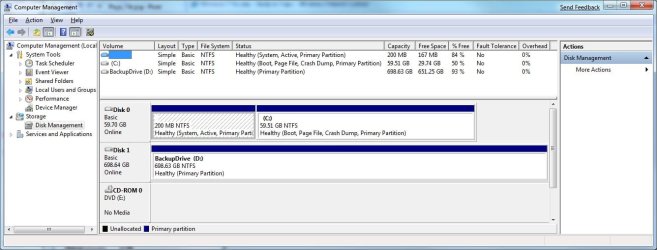
Question. I've seen this posted before that the pagefile is on the 200MB hidden system partition. How is it possible to have a 3-6GB pagefile on a 200MB partition? Doesn't make sense to me. :confused:


Gary
 

My Computer

Computer Manufacturer/Model Number
Dell XPS420
OS
Vista Ult 64 bit Seven Ult RTM x64
CPU
Intel Core2 Quad Q6600 2.40 gigahertz
Memory
Crucial Ballistix 4x2GB PC2 6400
Graphics Card(s)
NVIDIA GeForce 8600 GTS 256 MB
Sound Card
Creative SB X-Fi audio
Monitor(s) Displays
HP w2207 + HPvs15
Screen Resolution
1680x1050 + 1024x768
Hard Drives
2-WD5000AAKS-500 GB
WD5000AAV-500 GB external
Keyboard
Microsoft Comfort Curve
Mouse
MX Revolution
Other Info
Wacom Intuos 2 Graphics Tablet
Experience Index=5.5
Hi Gary,

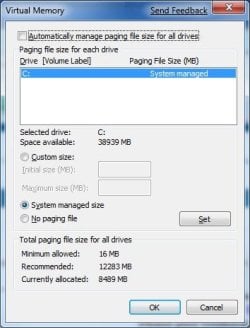
I would not think so either. Strange thing is that my selection to what drive to place the page file was blank, but now it shows as on the C: drive with no option for the separate D: drive. Wierd, but makes more sense than blank. :confused::huh:

Page_File.jpg

Disk_Management.jpg
 

My Computer

Computer type
PC/Desktop
Computer Manufacturer/Model Number
Self built custom
OS
64-bit Windows 11 Pro for Workstations
CPU
Intel i7-8700K OC'd to 5 GHz
Motherboard
ASUS ROG Maximus XI Formula Z390
Memory
64 GB (4x16GB) G.SKILL TridentZ RGB DDR4 3600 MHz
Graphics Card(s)
ASUS ROG-STRIX-GTX1080TI-O11G-GAMING
Sound Card
Integrated
Monitor(s) Displays
2 x Samsung Odyssey G7 27"
Screen Resolution
2560x1440
Hard Drives
1TB Samsung 990 PRO M.2,
4TB Samsung 990 PRO PRO M.2,
TerraMaster F8 SSD Plus NAS
PSU
Seasonic Prime Titanium 850W
Case
Thermaltake Core P3
Cooling
Corsair Hydro H115i
Keyboard
Logitech wireless K800
Mouse
Logitech MX Master 4
Internet Speed
2 Gb/s Download and 100 Mb/s Upload
Antivirus
Malwarebyte Anti-Malware Premium
Browser
Google Chrome
Other Info
Logitech Z625 speaker system,
Logitech BRIO 4K Pro webcam,
HP Color LaserJet Pro MFP M477fdn,
APC SMART-UPS RT 1000 XL - SURT1000XLI,
Galaxy S23 Plus phone
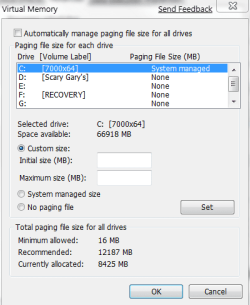
Mine looked like that until I hit the dot. Then it all woke up :)
Haven't moved it as it won't be on another drive, just another partition.

pagefile.PNG
 

My Computer

Computer Manufacturer/Model Number
Dell XPS420
OS
Vista Ult 64 bit Seven Ult RTM x64
CPU
Intel Core2 Quad Q6600 2.40 gigahertz
Memory
Crucial Ballistix 4x2GB PC2 6400
Graphics Card(s)
NVIDIA GeForce 8600 GTS 256 MB
Sound Card
Creative SB X-Fi audio
Monitor(s) Displays
HP w2207 + HPvs15
Screen Resolution
1680x1050 + 1024x768
Hard Drives
2-WD5000AAKS-500 GB
WD5000AAV-500 GB external
Keyboard
Microsoft Comfort Curve
Mouse
MX Revolution
Other Info
Wacom Intuos 2 Graphics Tablet
Experience Index=5.5
It still only shows the C: drive for me, but I'm not planning on moving the page file either since the C: drive is a SSD drive and the D: drive is just a SATA HDD.
 

My Computer

Computer type
PC/Desktop
Computer Manufacturer/Model Number
Self built custom
OS
64-bit Windows 11 Pro for Workstations
CPU
Intel i7-8700K OC'd to 5 GHz
Motherboard
ASUS ROG Maximus XI Formula Z390
Memory
64 GB (4x16GB) G.SKILL TridentZ RGB DDR4 3600 MHz
Graphics Card(s)
ASUS ROG-STRIX-GTX1080TI-O11G-GAMING
Sound Card
Integrated
Monitor(s) Displays
2 x Samsung Odyssey G7 27"
Screen Resolution
2560x1440
Hard Drives
1TB Samsung 990 PRO M.2,
4TB Samsung 990 PRO PRO M.2,
TerraMaster F8 SSD Plus NAS
PSU
Seasonic Prime Titanium 850W
Case
Thermaltake Core P3
Cooling
Corsair Hydro H115i
Keyboard
Logitech wireless K800
Mouse
Logitech MX Master 4
Internet Speed
2 Gb/s Download and 100 Mb/s Upload
Antivirus
Malwarebyte Anti-Malware Premium
Browser
Google Chrome
Other Info
Logitech Z625 speaker system,
Logitech BRIO 4K Pro webcam,
HP Color LaserJet Pro MFP M477fdn,
APC SMART-UPS RT 1000 XL - SURT1000XLI,
Galaxy S23 Plus phone
Maybe the SSD is the reason the other drives don't show. It doesn't want to use the slower drive for the pagefile.
 

My Computer

Computer Manufacturer/Model Number
Dell XPS420
OS
Vista Ult 64 bit Seven Ult RTM x64
CPU
Intel Core2 Quad Q6600 2.40 gigahertz
Memory
Crucial Ballistix 4x2GB PC2 6400
Graphics Card(s)
NVIDIA GeForce 8600 GTS 256 MB
Sound Card
Creative SB X-Fi audio
Monitor(s) Displays
HP w2207 + HPvs15
Screen Resolution
1680x1050 + 1024x768
Hard Drives
2-WD5000AAKS-500 GB
WD5000AAV-500 GB external
Keyboard
Microsoft Comfort Curve
Mouse
MX Revolution
Other Info
Wacom Intuos 2 Graphics Tablet
Experience Index=5.5
LOL, could be. ;)

My motherboard also has two southbridge chips, and I have the SSD and HDD on separate chips so that they can read and write from each other simultaneously. That could also be a factor in it, but I haven't bothered to try them on the same chip to see if both would then show up there though. :o
 

My Computer

Computer type
PC/Desktop
Computer Manufacturer/Model Number
Self built custom
OS
64-bit Windows 11 Pro for Workstations
CPU
Intel i7-8700K OC'd to 5 GHz
Motherboard
ASUS ROG Maximus XI Formula Z390
Memory
64 GB (4x16GB) G.SKILL TridentZ RGB DDR4 3600 MHz
Graphics Card(s)
ASUS ROG-STRIX-GTX1080TI-O11G-GAMING
Sound Card
Integrated
Monitor(s) Displays
2 x Samsung Odyssey G7 27"
Screen Resolution
2560x1440
Hard Drives
1TB Samsung 990 PRO M.2,
4TB Samsung 990 PRO PRO M.2,
TerraMaster F8 SSD Plus NAS
PSU
Seasonic Prime Titanium 850W
Case
Thermaltake Core P3
Cooling
Corsair Hydro H115i
Keyboard
Logitech wireless K800
Mouse
Logitech MX Master 4
Internet Speed
2 Gb/s Download and 100 Mb/s Upload
Antivirus
Malwarebyte Anti-Malware Premium
Browser
Google Chrome
Other Info
Logitech Z625 speaker system,
Logitech BRIO 4K Pro webcam,
HP Color LaserJet Pro MFP M477fdn,
APC SMART-UPS RT 1000 XL - SURT1000XLI,
Galaxy S23 Plus phone
Hi all,

I checked up with my dad today in the morning as he get up. He told me also that he had problems to change the Virtual memory drive and size. But he figured out that it only depends on Kaspersky.

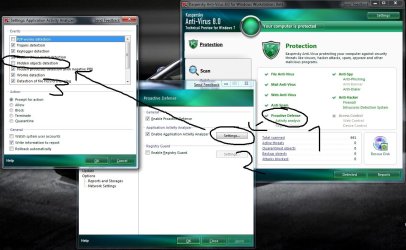
After that i just wanted to know wich exactly settings will terminate the service. Here is what i have found and the way to do it on screenshots.

There are 2 ways to do it wich one you prefer doesnt matter both work great.

The first one is to deactivate "Hidden objects detection".
1. Open Kaspersky and go for the "Proactive Defense" settings
2. Next step is to open the "Application Activity Analyzer" settings
3. And the last one deactivate "Hidden objects detection"
After that u can easily change Virtual memory drive and size without any problems.

The second one is just to make the hidden data visible.
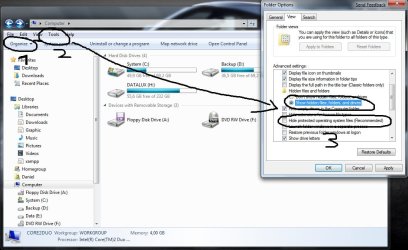
1. Open your Explorer and you can just click on "Organize" then "Layout" and activate "Menue Bar" or just hit the "ALT" Key on your Keyboard to show
2. The second one is to click on "Tools" and open the "Folder Options"
3. Inside the "Folder Options" choose "View" and activate "Show hidden files, folders and drives" and deactivate "Hide protected operating system files (Recommended)"

Thats all about it. No need to change into safe mode...


Greetings
Daniel
 

Attachments

  • virtual.jpg
    virtual.jpg
    121 KB · Views: 29
  • virtual2.jpg
    virtual2.jpg
    93.9 KB · Views: 21

My Computer

OS
Windows 7 x64 Beta
CPU
Intel Core 2 Duo E8400 3,0@3,6GHz 6MB and Zalman CNPS9500 AT
Motherboard
Asus P5N32-E SLI
Memory
4GB (2x2) DDR2 PC2-6400 800MHz OCZ Titanium Dual Channel
Graphics Card(s)
GeForce 8800 GT EVGA 512MB and Zalman VF1000 CU L
Sound Card
HD-Audio (ADI 1988B 8-Channel)
Monitor(s) Displays
22" LG L227W
Screen Resolution
1680x1050
Hard Drives
2x Western Digital Raptor SATA 74GB 10k RPM 8MB and Western Digital SATA 320GB 7,2k RPM 16MB
PSU
NitroX Rev. 2.0 500 Watt Dual Fan
Case
Miditower Chieftec CH-01-SL-SL-B
Cooling
2x 92mm and 120mm SilenX iXtrema
Keyboard
Labtec
Mouse
Logitech MX510
Daniel,

I'm happy to hear that you got it sorted out. :)

Shawn
 

My Computer

Computer type
PC/Desktop
Computer Manufacturer/Model Number
Self built custom
OS
64-bit Windows 11 Pro for Workstations
CPU
Intel i7-8700K OC'd to 5 GHz
Motherboard
ASUS ROG Maximus XI Formula Z390
Memory
64 GB (4x16GB) G.SKILL TridentZ RGB DDR4 3600 MHz
Graphics Card(s)
ASUS ROG-STRIX-GTX1080TI-O11G-GAMING
Sound Card
Integrated
Monitor(s) Displays
2 x Samsung Odyssey G7 27"
Screen Resolution
2560x1440
Hard Drives
1TB Samsung 990 PRO M.2,
4TB Samsung 990 PRO PRO M.2,
TerraMaster F8 SSD Plus NAS
PSU
Seasonic Prime Titanium 850W
Case
Thermaltake Core P3
Cooling
Corsair Hydro H115i
Keyboard
Logitech wireless K800
Mouse
Logitech MX Master 4
Internet Speed
2 Gb/s Download and 100 Mb/s Upload
Antivirus
Malwarebyte Anti-Malware Premium
Browser
Google Chrome
Other Info
Logitech Z625 speaker system,
Logitech BRIO 4K Pro webcam,
HP Color LaserJet Pro MFP M477fdn,
APC SMART-UPS RT 1000 XL - SURT1000XLI,
Galaxy S23 Plus phone
Back
Top