Best Performance Settings for Windows 7 32bit and 64bit

...with 1600 DDR3 4GB ...
Am I missing something? Isn't the singlemost effective tweak here 6GB? Or 3GB?

First of all, the OP has a Core2Quad CPU, which means Intel LGA 775 socket architecture, which in turn means dual-channel memory controller...
I tried to fit this knew perspective into my knowledgebase, but there is no P2Q mobo at the Asus site.

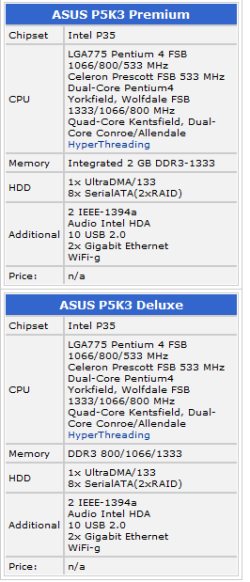
But this pic of a P5K3 put it all into perspective. I still do not find specific statement that addresses how many sticks are most efficient. It is likely a moot point. I did learn.
Not so moot tbh, dual channel can only use 2 or 4 sticks for greatest efficiency. ALL LGA775 systems are dual channel incl the mobo you pictured above. And the 2 or 4 sticks must consist of matched PAIRS of ram (of either DDR2 or DDR3 if supported) to make use of the dual channels higher bandwidth. You perhaps are confusing LGA1366 which can make use of triple channel (and only DDR3) where 3 or 6 sticks best apply to give 3, 6 or 12gb total ram. You can use 2 or 4 sticks in LGA775 systems to get 3 or 6gb ram though and with DDR3 on compatible LGA775 chipsets/mobos, but that doesnt make it any more or less efficient. :)
 

My Computer My Computer

At a glance

W7 x64
OS
W7 x64
Not so moot tbh, dual channel can only use 2 or 4 sticks for greatest efficiency. ALL LGA775 systems are dual channel incl the mobo you pictured above. And the 2 or 4 sticks must consist of matched PAIRS of ram (of either DDR2 or DDR3 if supported) to make use of the dual channels higher bandwidth. You perhaps are confusing LGA1366 which can make use of triple channel (and only DDR3) where 3 or 6 sticks best apply to give 3, 6 or 12gb total ram. You can use 2 or 4 sticks in LGA775 systems to get 3 or 6gb ram though and with DDR3 on compatible LGA775 chipsets/mobos, but that doesnt make it any more or less efficient. :)
The board pictured, with a P35 chip, is a DDR3 board. With two pairs of matched slots.

Seems we are both confused. As is the OP. Still can't find the mobo he lists.
 

Attachments

  • Capture.PNG
    Capture.PNG
    9.7 KB · Views: 46
...with 1600 DDR3 4GB ...
Am I missing something? Isn't the singlemost effective tweak here 6GB? Or 3GB?

Not so moot tbh, dual channel can only use 2 or 4 sticks for greatest efficiency. ALL LGA775 systems are dual channel incl the mobo you pictured above. And the 2 or 4 sticks must consist of matched PAIRS of ram (of either DDR2 or DDR3 if supported) to make use of the dual channels higher bandwidth. You perhaps are confusing LGA1366 which can make use of triple channel (and only DDR3) where 3 or 6 sticks best apply to give 3, 6 or 12gb total ram. You can use 2 or 4 sticks in LGA775 systems to get 3 or 6gb ram though and with DDR3 on compatible LGA775 chipsets/mobos, but that doesnt make it any more or less efficient. :)
The board pictured, with a P35 chip, is a DDR3 board. With two pairs of matched slots.

Seems we are both confused. As is the OP. Still can't find the mobo he lists.
Nope, that board is DDR2. But you probably looked at Intels P35 datasheet to arrive at your assumption that its DDR3, but seems you misunderstood it. The P35 chipset is the first Intel chipset to support "new technologies" that include DDR3 ram, but in fact very few P35 boards are compatible with DDR3 ram. The vast majority of P35 boards use only DDR2 ram. Those that do use DDR3 are rare but also support DDR2 and usually have 6 slots to accomodate the different ram notches of DDR2 and DDR3 sticks. So any P35 board with 4 ram slots is in all probability a DDR2 board. Reason is, that the P35 boards came out when DDR3 ram was still rare and very expensive, so most only supported DDR2 ram slots (despite the p35 chipset supporting both), or else they would not have been able to sell them.
 

My Computer My Computer

At a glance

W7 x64
OS
W7 x64
Actually, if you look at the Asus Global site you'll see that theonly P35 boards they made were Socket 775 - and there is a mix of DDR2 and DDR3 boards.

ASUSTeK Computer Inc.

In the US the P5K corresponds to the globally sold P2Q series, and the P5K3 mobos came in both DDR2 and DDR3 varieties - as do the P2Q3 series as well.

ASUSTeK Computer Inc. DDR3
ASUSTeK Computer Inc. DDR2
ASUSTeK Computer Inc. DDR3
ASUSTeK Computer Inc. DDR2

However, blued is correct - the majority are DDR2.
 

My Computers My Computers

  • At a glance

    Windows 11 21H2 Current buildAMD Ryzen 9 3950X4 * 32 GB - Corsair Vengeance 3600 MHzEVGA GeForce RTX 3080 Ti XC3 ULTRA GAMING (12...
    Computer type
    PC/Desktop
    Computer Manufacturer/Model Number
    The Beast Model A (homebrew)
    OS
    Windows 11 21H2 Current build
    CPU
    AMD Ryzen 9 3950X
    Motherboard
    MSI MEG X570 GODLIKE
    Memory
    4 * 32 GB - Corsair Vengeance 3600 MHz
    Graphics Card(s)
    EVGA GeForce RTX 3080 Ti XC3 ULTRA GAMING (12G-P5-3955-KR)
    Sound Card
    Realtek® ALC1220 Codec
    Monitor(s) Displays
    2x Eve Spectrum ES07D03 4K Gaming Monitor (Matte) | Eve Spec
    Screen Resolution
    3x 3840 x 2160
    Hard Drives
    3x Samsung 980 Pro NVMe PCIe 4 M.2 2 TB SSD (MZ-V8P2T0B/AM) } 3x Sabrent Rocket NVMe 4.0 1 TB SSD
    PSU
    PC Power & Cooling’s Silencer Series 1050 Watt, 80 Plus Plat
    Case
    Fractal Design Define 7 XL Dark ATX Full Tower Case
    Cooling
    SteelSeries Apex Pro Wired Gaming Keyboard
    Keyboard
    SteelSeries Apex Pro
    Mouse
    Logitech MX Master 3S | MX Master 3 for business
    Internet Speed
    AT&T LightSpeed Gigabit Duplex Ftth
    Antivirus
    Windows Defender + MB 3
    Browser
    Nightly (default) + Firefox (stable),Chrome, Edge
  • At a glance

    ChromeOS Flex Dev Channel (current)Intel(R) Core(TM) i5-6300U CPU @ 2.40GHz, 250...16 GBIntel(R) HD Graphics 520
    Computer type
    PC/Desktop
    System Manufacturer/Model Number
    Dell Latitude E5470
    OS
    ChromeOS Flex Dev Channel (current)
    CPU
    Intel(R) Core(TM) i5-6300U CPU @ 2.40GHz, 2501 Mhz, 2 Core(s), 4 Logical Processor(s)
    Motherboard
    Dell
    Memory
    16 GB
    Graphics Card(s)
    Intel(R) HD Graphics 520
    Sound Card
    Intel(R) HD Graphics 520 + RealTek Audio
    Monitor(s) Displays
    Dell laptop display 15"
    Screen Resolution
    1920 * 1080
    Hard Drives
    Toshiba 128GB M.2 22300 drive
    INTEL Cherryville 520 Series SSDSC2CW180A 180 GB SATA III SSD
    PSU
    Dell
    Case
    Dell
    Cooling
    Dell
    Keyboard
    Dell
    Mouse
    Logitech MX Master 3S (shared w. Sys 1) | Dell TouchPad
    Internet Speed
    AT&T LightSpeed Gigabit Duplex Ftth
Thank you John Galt. I could not find the P2Q board - something in my browser I guess.

(notice the OP isn't around)

I only address this again to correct the following:

Nope, that board is DDR2. But you probably looked at Intels P35 datasheet to arrive at your assumption that its DDR3, but seems you misunderstood it. ...

I assumed nothing. I misunderstood nothing. I even provided a source document of sorts.

10-7
 
My apologies to you antman. The P5K3 is indeed a DDR3 board. Although I looked closely at the ram slot notches which appeared to be DDR2, hence my earlier reply.

ram_kadakam.jpg
 

My Computer My Computer

At a glance

W7 x64
OS
W7 x64
Back
Top