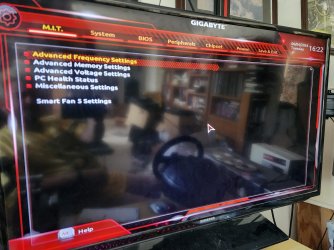
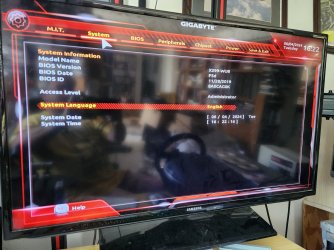
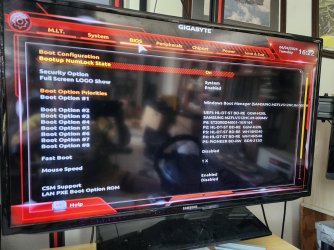
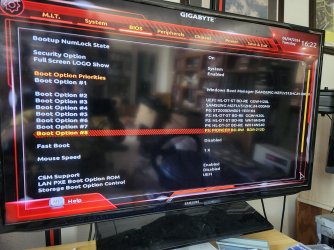
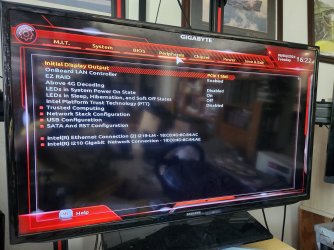
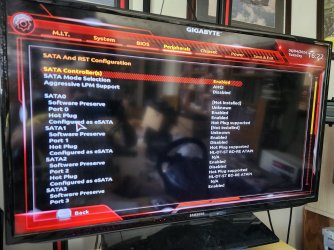
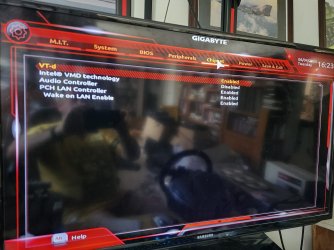
Bios settings for Gygabyte 299 for windows 7

rudolfhorak

New member
Local time
11:11 AM
Messages
6
I had my Win 7 working with my Gigabyte 299X. Now I can't even get into safe mode before it blue screens. What are the settings that I should have in my bios using windows 7?

Just to test this I made a new clean installation Windows 7 on another computer then moved the drive over to this one and it is the exact same error. This makes me think there is a BIOS setting that got changed. Any help would be greatly appreciated. Also a side question to UFI or not UFI?
 

My Computers My Computers

  • At a glance

    Windows 7 Ultimate 64i9
    Computer type
    PC/Desktop
    Computer Manufacturer/Model Number
    Gigabyte
    OS
    Windows 7 Ultimate 64
    CPU
    i9
    Motherboard
    299X
  • Computer type
    PC/Desktop
Welcome to the forum. There isnt really an answer the bios has to match the windows so if you installed with uefi and then changed it to legacy or visversa so if you have moved a disk what are the setting on the pc you installed it on uefi,secure boot etc?
 

My Computer My Computer

At a glance

win 8 32 bit
Computer type
PC/Desktop
OS
win 8 32 bit
Ok but modern Bios...

I agree and thanks for the warm welcome. I have a good a Ron's backup of my setup so I can experiment .

I have been building computers for over 20 years and the regular non miserable enabled bios I could navigate very well. This is my first graphical one and I onow there has to be certain settings to make wi. 7 work while enabling other ones is guaranteed to break my windows 7.

So if I go non ufi what should my settings be?

- - - Updated - - -

I am getting the following BSOD

0x0007b
Oxffffs97c8
Oxfffffc0034
 

My Computers My Computers

  • At a glance

    Windows 7 Ultimate 64i9
    Computer type
    PC/Desktop
    Computer Manufacturer/Model Number
    Gigabyte
    OS
    Windows 7 Ultimate 64
    CPU
    i9
    Motherboard
    299X
  • Computer type
    PC/Desktop
Each bios is different but legacy mode is most common often in the bios choose safe defaults will be good is the battery ok I would change it while your doing it if it low it could have lost settings that whats caused the problem
 

My Computer My Computer

At a glance

win 8 32 bit
Computer type
PC/Desktop
OS
win 8 32 bit
What else could cause this

Any idea what could cause this error? Fix for it?
 

My Computers My Computers

  • At a glance

    Windows 7 Ultimate 64i9
    Computer type
    PC/Desktop
    Computer Manufacturer/Model Number
    Gigabyte
    OS
    Windows 7 Ultimate 64
    CPU
    i9
    Motherboard
    299X
  • Computer type
    PC/Desktop
stop 7b is usually a driver

does it say 0x0000007B (INACCESSIBLE_BOOT_DEVICE) or something similar
 

My Computers My Computers

  • At a glance

    7 X64i5 84002x8gb 3200mhz
    Computer type
    PC/Desktop
    OS
    7 X64
    CPU
    i5 8400
    Motherboard
    gigabyte b365m ds3h
    Memory
    2x8gb 3200mhz
    Hard Drives
    various
    PSU
    pure power 11 400w cm
    Case
    Coolermaster
    Cooling
    cryorig m9i
  • At a glance

    7x64g54008gb ddr4 2400
    Computer type
    PC/Desktop
    OS
    7x64
    CPU
    g5400
    Motherboard
    ga b365m ds3h
    Memory
    8gb ddr4 2400
    PSU
    xfx pro 450w
The drive can be moved to a different pc and it works there ....

stop 7b is usually a driver
What are these files? How are they used? I am running Win7 64. The weird part is that I can take this drive out and put it in another computer and it boots up fine, finds the new hard ware and works. As soon as I put it back it BSOD again
does it say 0x0000007B (INACCESSIBLE_BOOT_DEVICE) or something similar

The funny part is that I can move this hard drive to a different pc and it works fine finds new hardware. Once I switch it back it goes back to BSOD

I also created a blank WIn7 on the problem computer and that works fine as well

- - - Updated - - -

It just days stop: ox0000007b (0xffffff88009a97e8,
 

My Computers My Computers

  • At a glance

    Windows 7 Ultimate 64i9
    Computer type
    PC/Desktop
    Computer Manufacturer/Model Number
    Gigabyte
    OS
    Windows 7 Ultimate 64
    CPU
    i9
    Motherboard
    299X
  • Computer type
    PC/Desktop
I found out some more information. It looks like the 7b is generated when you switch bios settings form SATA or IDE to AHCI. My Gigabyte board only has AHCI or some intel based version. My issue is I cannot locate these exact keys. I am wondering if anyone has issues like this where it was a controller problem. Here are the details...

[FONT=&quot]Ok, I did some research on my issue and here is where I need some help. I found you switch over to AHCI ( I had to since this board does not have IDE or SATA option), it will generate a 7b fault. This is simular to WinXp when you moved it to another machine you had to delete the had disk controller and have windows find it again in the new computer. I found several procedures where you edit the registry \Services\PCiide and \masahci or lastorV values. I found the masahci but mine did not have the values listed. Does anyone know more about this? Is there another controller that could be doing this?[/FONT]

- - - Updated - - -

I am not seeing the lastorV or masahci values in the registry. Could it be another type of controller?

- - - Updated - - -

Nothing from anyone one this? I can't possibly be the only person that has a AHCI only bios and is trying to run win 7
 

My Computers My Computers

  • At a glance

    Windows 7 Ultimate 64i9
    Computer type
    PC/Desktop
    Computer Manufacturer/Model Number
    Gigabyte
    OS
    Windows 7 Ultimate 64
    CPU
    i9
    Motherboard
    299X
  • Computer type
    PC/Desktop
Never heard of masahci


msahci start type 0

pciide start type 0

you might not have iaStorV it is a 3rd party driver from intel
 

My Computers My Computers

  • At a glance

    7 X64i5 84002x8gb 3200mhz
    Computer type
    PC/Desktop
    OS
    7 X64
    CPU
    i5 8400
    Motherboard
    gigabyte b365m ds3h
    Memory
    2x8gb 3200mhz
    Hard Drives
    various
    PSU
    pure power 11 400w cm
    Case
    Coolermaster
    Cooling
    cryorig m9i
  • At a glance

    7x64g54008gb ddr4 2400
    Computer type
    PC/Desktop
    OS
    7x64
    CPU
    g5400
    Motherboard
    ga b365m ds3h
    Memory
    8gb ddr4 2400
    PSU
    xfx pro 450w
Sorry I can't spell here but I only have the PCIIDE and I did set it to 0 and still BSOD1.jpg2.jpg3.jpg4.jpg5.jpg6.jpg7.jpg
 

My Computers My Computers

  • At a glance

    Windows 7 Ultimate 64i9
    Computer type
    PC/Desktop
    Computer Manufacturer/Model Number
    Gigabyte
    OS
    Windows 7 Ultimate 64
    CPU
    i9
    Motherboard
    299X
  • Computer type
    PC/Desktop
Back
Top