Best way to format HDD for dual booting with Linux

medwatt

New member
Local time
2:54 AM
Messages
16
Hello,
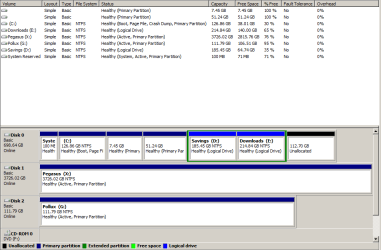
I've been unsuccessfully trying to dual boot my laptop with a Linux distro. Grub2 never installs and so even though the distro is installed, I cannot boot into it. I have asked on several Linux forums and they suggested there might be some problem with the way my hard drive is partition.
file.php

So, I've decided to format my HDD completely and install Win7 and Linux Mint from scratch. So I'd like to know the best way to format the HDD so that after installing Win7, Grub2 will be able to find the MBR file and overwrite it. I'm asking this because during the installation of Win7, when trying to partition the HDD, windows always creates a "system reserved" partition as "sda1" and then another partition with the chosen size as "sda2". The reason I think GRUB2 isn't installing might be due to the MBR file being located in "sda2" and not in "sda1" because usually, when installing Mint, the installer detects Win7 but in my case it never does which doesn't make sense because Win7 is installed in "sda2". So, I hope someone can advice me on formatting my HDD so that the Mint installer can detect Win7 and properly install Grub.

Thanks
 

My Computer My Computer

At a glance

Windows 6 Ultimate x64i5-24506GBNvidia Cuda
Computer type
Laptop
Computer Manufacturer/Model Number
Lenovo
OS
Windows 6 Ultimate x64
CPU
i5-2450
Memory
6GB
Graphics Card(s)
Nvidia Cuda
Here you go.
 

Attachments

  • dskmgm.png
    dskmgm.png
    17.4 KB · Views: 9

My Computer My Computer

At a glance

Windows 6 Ultimate x64i5-24506GBNvidia Cuda
Computer type
Laptop
Computer Manufacturer/Model Number
Lenovo
OS
Windows 6 Ultimate x64
CPU
i5-2450
Memory
6GB
Graphics Card(s)
Nvidia Cuda
So, I've decided to format my HDD completely and install Win7 and Linux Mint from scratch. So I'd like to know the best way to format the HDD so that after installing Win7, Grub2 will be able to find the MBR file and overwrite it.
The only thing I can think of is to run a CLEAN ALL from DISKPART before installing Windows 7. The install Mint as per the tutorial Greg has linked to, skipping the EASYBCD step since you want GRUB to be dominant.

I've never had an issue getting Linux installed next to Windows 7. What type of partitioning are you doing during the Linux install? See the tutorial that Greg linked for a suggestion.
 

My Computer My Computer

At a glance

Windows 10 Pro x64 ; Xubuntu x64Intel i7 860 @ 2.80 GHz O/C'ed to 4.0GHz16GB Corsair Vengance DDR3 @ 661 MHz Dual Cha...EVGA NVidia GTX 560 1024MB
Computer type
PC/Desktop
Computer Manufacturer/Model Number
Golden Mk. I.4
OS
Windows 10 Pro x64 ; Xubuntu x64
CPU
Intel i7 860 @ 2.80 GHz O/C'ed to 4.0GHz
Motherboard
Gigabyte P55A-UD3R Rev.1. Award BIOS F13
Memory
16GB Corsair Vengance DDR3 @ 661 MHz Dual Channel (9-9-9-24)
Graphics Card(s)
EVGA NVidia GTX 560 1024MB
Sound Card
Realtek Integrated
Monitor(s) Displays
Dual Samsung SyncMaster 2494HS
Screen Resolution
1920*1080 and 1920*1080
Hard Drives
1*Samsung 840 EVO 120GB SSD;
1*OCZ Vertex 2 60GB SSD;
2*Samsung F3 SpinPoint 1TB in RAID0;
1*Samsung F1 SpinPoint 1TB;
2*Western Digital 1TB External USB 3.0
1*Western Digital 500GB External USB 3.0
1*Seagate 500GB External USB 2.0
PSU
Thermaltake ToughPower QFan 750W
Case
Thermaltake Element S VK60001W2Z
Cooling
Corsair H60 Water Cooling, 2*230mm and 2*80mm case fans
Keyboard
Logitech G110
Mouse
Logitech MX518
I would advise against dual booting. Running Linux in virtual is so much easier - for installation and operation. E.g. like this.
 

My Computer My Computer

At a glance

Vista, Windows7, Mint Mate, Zorin, Windows 8from 1.6GHz Duo to i7
Computer Manufacturer/Model Number
HP, Dell, Gateway, Toshiba - 4 laptops and 2 desktops
OS
Vista, Windows7, Mint Mate, Zorin, Windows 8
CPU
from 1.6GHz Duo to i7
Monitor(s) Displays
2x HP w2207
Hard Drives
5x HDD, 7x SSD, 12x Externals
Keyboard
with trackball - no mices
Mouse
Trackball mice
Internet Speed
DSL 6000

My Computer My Computer

At a glance

Windows 10 Pro x64Intel Core i7 6700KGSkill TridentZ RGB 16GB 3600 16-16-16-36EVGA GTX 980 Ti SC x2
Computer type
PC/Desktop
Computer Manufacturer/Model Number
Skylake Special #666
OS
Windows 10 Pro x64
CPU
Intel Core i7 6700K
Motherboard
Asus Sabertooth Z170 Mark 1
Memory
GSkill TridentZ RGB 16GB 3600 16-16-16-36
Graphics Card(s)
EVGA GTX 980 Ti SC x2
Sound Card
Realtek High Definition
Monitor(s) Displays
AOC G2460PG
Screen Resolution
1920 x 1080 144Hz
Hard Drives
Samsung 860 Pro 256GB, Seagate Barracuda 4TB x2
PSU
EVGA 1000 P2, EVGA White Custom Braided Cables
Case
Corsair Vengeance C70 Gunmetal Black
Cooling
Corsair H100i v2, Corsair ML120 x2, Thermal Grizzly Kryonaut
Keyboard
Logitech G910 Orion Spectrum
Mouse
Logitech G700s
Internet Speed
Verizon Fios Quantum Gateway 75/75
Antivirus
Windows Defender, Malwarebytes Free 3.8.3
Browser
Chrome
Other Info
Corsair SP120 x4, LG Blu-ray Drive, Durabrand HT-395 100 Watt Dolby Digital Amp, Corsair H2100 Wireless 7.1 Headset

My Computer My Computer

At a glance

Vista, Windows7, Mint Mate, Zorin, Windows 8from 1.6GHz Duo to i7
Computer Manufacturer/Model Number
HP, Dell, Gateway, Toshiba - 4 laptops and 2 desktops
OS
Vista, Windows7, Mint Mate, Zorin, Windows 8
CPU
from 1.6GHz Duo to i7
Monitor(s) Displays
2x HP w2207
Hard Drives
5x HDD, 7x SSD, 12x Externals
Keyboard
with trackball - no mices
Mouse
Trackball mice
Internet Speed
DSL 6000
Last edited:

My Computer My Computer

At a glance

Windows 10 Pro x64Intel Core i7 6700KGSkill TridentZ RGB 16GB 3600 16-16-16-36EVGA GTX 980 Ti SC x2
Computer type
PC/Desktop
Computer Manufacturer/Model Number
Skylake Special #666
OS
Windows 10 Pro x64
CPU
Intel Core i7 6700K
Motherboard
Asus Sabertooth Z170 Mark 1
Memory
GSkill TridentZ RGB 16GB 3600 16-16-16-36
Graphics Card(s)
EVGA GTX 980 Ti SC x2
Sound Card
Realtek High Definition
Monitor(s) Displays
AOC G2460PG
Screen Resolution
1920 x 1080 144Hz
Hard Drives
Samsung 860 Pro 256GB, Seagate Barracuda 4TB x2
PSU
EVGA 1000 P2, EVGA White Custom Braided Cables
Case
Corsair Vengeance C70 Gunmetal Black
Cooling
Corsair H100i v2, Corsair ML120 x2, Thermal Grizzly Kryonaut
Keyboard
Logitech G910 Orion Spectrum
Mouse
Logitech G700s
Internet Speed
Verizon Fios Quantum Gateway 75/75
Antivirus
Windows Defender, Malwarebytes Free 3.8.3
Browser
Chrome
Other Info
Corsair SP120 x4, LG Blu-ray Drive, Durabrand HT-395 100 Watt Dolby Digital Amp, Corsair H2100 Wireless 7.1 Headset
Hi there

When installing the Linux distro just ensure the GRUB2 installs to the Linux partition - it's a bit more complex if you are using UEFI / LVM for Linux partitions but usually in the install process you can still select where to install the GRUB2 Linux boot loader. I wouldn't have it overwriting the main boot on the HDD where you've got Windows installed -- while it will work and windows will boot you are only buying trouble for the future.

Here's a way in fact to run Linux off an external USB drive with VMware installed on it and a Windows VM all running from an external USB HDD -- an old laptop USB HDD works fine with a SATA==>USB2 or USB3 connector --even the Windows VM works at acceptable performance totally running off the external device - works even if there is NO HDD at all in the main computer.

Follow this thread

How to make Portable Windows system (any version)

Cheers
jimbo
 

My Computer My Computer

At a glance

Linux CENTOS 7 / various Windows OS'es and se...Intel i7 Intel i58GB, 16GBOn Motherboard
Computer type
PC/Desktop
Computer Manufacturer/Model Number
Custom built, several laptops HP/ASUS
OS
Linux CENTOS 7 / various Windows OS'es and servers
CPU
Intel i7 Intel i5
Memory
8GB, 16GB
Graphics Card(s)
On Motherboard
Sound Card
Realtek HD audio
Monitor(s) Displays
Apple Cinema display, Samsung LCD
Screen Resolution
1920 X 1080
Hard Drives
4 X 1TB SATA
Mouse
Toshiba wireless laser
Internet Speed
> 20MB up
Back
Top