Best way to test memory when using video editor?

JohnnyScience

New member
Power User
So I edit videos pretty regularly. I use Filmora 8 right now and it's a pretty decent program.


However, it still stutters and freezes time to time and I would like to test how much of my memory is being used and if that's the bottleneck. I'm only at 16gb and while that should be enough, I may bump it up to 32gb this year.


I'm also running an Intel 5820k & EVGA 970 graphics card.
 

My Computer

Computer Manufacturer/Model Number
Built it myself
OS
Windows 7 64 & Ubuntu 64
CPU
Intel Quad Core Q6600 2.40GHz
Motherboard
Asus
Memory
8g
Graphics Card(s)
Nvidia 9600 GT & 9800 GT
Sound Card
Turtle Beach 5.1
Monitor(s) Displays
Three 19" Dell's & one 46" Samsung 750
You should just be able to open task manager and look there. Right click the task bar below and chose Start Task Manager.
 

My Computer

Computer type
PC/Desktop
OS
Windows 7 Ultimate x64
I use filmora 8 with 8 gig and never have a problem with doing YouTube videos how long are your videos and what fps settings do you use?
 

My Computer

Computer type
PC/Desktop
OS
win 8 32 bit
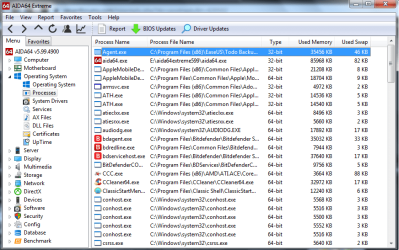
You can download a and run AIDA64 Extreme Not free but this is a 30 trial. It'll show you all you need to know.
 

Attachments

  • AIDA64.png
    AIDA64.png
    115.6 KB · Views: 2

My Computer

Computer type
PC/Desktop
Computer Manufacturer/Model Number
Custom Built By Me.
OS
Windows 10 Pro 64 bit
CPU
AMD FX 9590 8 Core Black Edition
Motherboard
MSI 990FXA GAMING (MS-7893)
Memory
Corsair Vengeance 16GB DDR3
Graphics Card(s)
AMD Radeon (TM) R9 380 Gaming Series
Sound Card
AMD High Definition
Monitor(s) Displays
Samsung 32" 60Hz 4ms Curved PLS LED
Screen Resolution
1920 X 1080
Hard Drives
C: 223 GB SSD = E: 465 GB HDD = F: 931 GB HDD = G: 149 GB HDD = H: 931 GB HDD
PSU
EVGA Supernova NEX750B 750W ATX EPS12V 80PLUS Bronze
Case
Cool Master
Cooling
Noctua NH-D15 Premium Cooler with 2x NF-A15 PWM 140mm Fan
Internet Speed
Fiber Optic: Download 332.7 Mbps / Upload 331.5 Mbps
Antivirus
Windows Defender
Browser
Slimjet (64bit)
I use filmora 8 with 8 gig and never have a problem with doing YouTube videos how long are your videos and what fps settings do you use?


Any where from 2 - 10 minutes max usually.


Where do I find the FPS settings? I'm not sure what they're even set to.
 

My Computer

Computer Manufacturer/Model Number
Built it myself
OS
Windows 7 64 & Ubuntu 64
CPU
Intel Quad Core Q6600 2.40GHz
Motherboard
Asus
Memory
8g
Graphics Card(s)
Nvidia 9600 GT & 9800 GT
Sound Card
Turtle Beach 5.1
Monitor(s) Displays
Three 19" Dell's & one 46" Samsung 750
When you goto export there are settings there like good ,best ,better and FPS which often reverts to 60fps 25fps is normal cinematic look. Are you setting it to 16 by9 not trying 4k or something. I have 6 gig PC and that works no problems
 

My Computer

Computer type
PC/Desktop
OS
win 8 32 bit
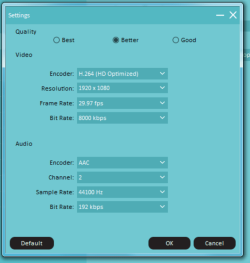
Ok so I went and checked, because I usually just used whatever the program defaulted to, which was "better" with an FPS of 29.97 (weird) and in 1080.

I've never tried to render in 4k yet, however all of the content I've been creating on my iphone XS has been recorded in 4k and I do want to start redering my videos in 4k.

Do I have to do anything else other than select the higher resolution of 3840x2160 in the Settings?

The XS records 4k in 60 FPS, however I've been using the DJI Go app and it records 4k in 30 FPS.

Thanks.
 

Attachments

  • Untitled333.png
    Untitled333.png
    70.2 KB · Views: 7

My Computer

Computer Manufacturer/Model Number
Built it myself
OS
Windows 7 64 & Ubuntu 64
CPU
Intel Quad Core Q6600 2.40GHz
Motherboard
Asus
Memory
8g
Graphics Card(s)
Nvidia 9600 GT & 9800 GT
Sound Card
Turtle Beach 5.1
Monitor(s) Displays
Three 19" Dell's & one 46" Samsung 750
I use 25 FPS as that is international standard for films I set mine to best on the export settings. One thing that can take time is if you set auto enhance on each video clip. Do you use any LUTS? If you shoot at a different resolution than your export that will give problems as it has to convert all the video. As most people can't view 4k there isn't a lot of point filming at that rate unless it gives you more dynamic range
 

My Computer

Computer type
PC/Desktop
OS
win 8 32 bit
Back
Top