Best Web Browser?

TimComputerG33K

New member
Local time
2:48 PM
Messages
7
Location
Pennsylvania
Hello everyone, I have a very common question to ask. I am aware that it is also a highly opinionated one, but I would like to get an idea.

I've experiment with just about every web browser out today. Google Chrome, Internet Explorer, Mozilla Firefox, Opera, etc.
I would like a web browser that actually deletes everything when you tell it to. When I go to delete the History on them, there is still information kept. Such as the most visited sites, or auto-fill information. Yes, I do know that you could change the settings to clear it, but it's still there! It's very annoying to me.

I would just like some opinions on what most people use. Any help or suggestions would be appreciated.
 

My Computer

OS
Windows 7 Home Premium 64-Bit
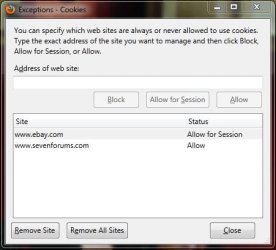
i won't weigh in on the which one is best argument, but if you've used Firefox 6 and can't get it to delete your info, you might not have it configured correctly. :)
I think it does a good job of deleting what you want it to.

Capture.JPG
 

My Computer

Computer type
PC/Desktop
Computer Manufacturer/Model Number
Custom Build
OS
Windows 7 Home Premium 64 bit
CPU
Intel Core i7-4790
Motherboard
GA-Z87X-D3H
Memory
G.SKILL 8GB (2 x 4GB) DDR3 F3-10666CL9D-8GBNT
Graphics Card(s)
AMD Radeon R7 250
Sound Card
Realtek ALC892
Monitor(s) Displays
Samsung UN32EH5000, Dell 1703FPT
Screen Resolution
1920 x 1080, 1280 x 1024
Hard Drives
WD5003AZEX
WD10EZEX
Samsung HD103SJ
Samsung 128 GB 840 PRO
PSU
SeaSonic M12II SS-500GM
Case
Fractal Design Define R4
Cooling
Zalman CNPS9900ALED
Keyboard
Logitech K800
Mouse
Logitech M705
Internet Speed
16 Mbps
Antivirus
Avast
Browser
Firefox
Other Info
Bose Companion 2 Multimedia Speakers
Best Web browser ? maybe not the best thread title for a question to do with deleting History & data
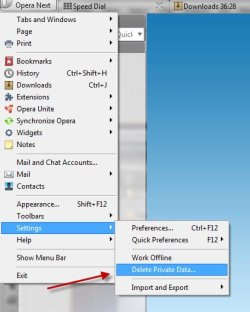
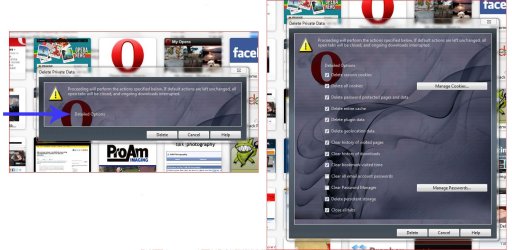
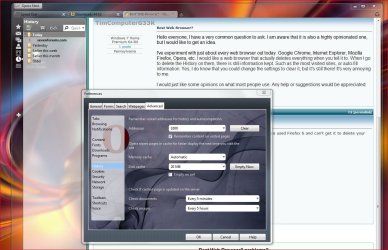
Opera deletes everything apart from Form data which isn't auto fill, when filling a form you get a drop down which can be selected if wanted.
Some Opera skins the detailed options button is less obviously a button than on other skins.
 

Attachments

  • delete data.jpg
    delete data.jpg
    28.7 KB · Views: 14
  • delete history.jpg
    delete history.jpg
    164.8 KB · Views: 8
  • OpHisPrefs.JPG
    OpHisPrefs.JPG
    154.2 KB · Views: 17

My Computer

Computer type
PC/Desktop
Computer Manufacturer/Model Number
self build
OS
Windows 7 Ultimate 64 bit
CPU
Intel Core i7 4770K overclocked to 4.7GHz Quad Core Haswell
Motherboard
Asus Z87 Pro (Socket 1150) ATX Motherboard
Memory
16GB Team Group Vulcan Gold 2133MHz
Graphics Card(s)
ATI Radeon HD 7880 Series Display adapter
Monitor(s) Displays
NEC LCD2690WUXi2
Screen Resolution
26" 1920 x 1200
Hard Drives
Samsung 500GB SSD 840 EVO SATA 6Gb/s
Samsung 250GB SSD 840 EVO SATA 6Gb/s
PSU
Corsair AX760 Platinum
Case
Cooler Master HAF X Gaming Tower
Cooling
XSPC RayStorm 750 RS360 Water cooling
Mouse
Razer Death Adder left handed
Internet Speed
126Mb download 11.5Mb up
Antivirus
Avast free
Browser
Opera
Other Info
Main Browser is Opera
Favorite software Adobe Lightroom & Photoshop
best plugins Nik software
Firewall : Private firewall 7
IE History completely clears according to the full article on the link below. I copied just an excerpt of it

The address bar in Internet Explorer is integrated with Windows Desktop search by default so even if you clear the IE history, the web entries that are stored in Windows search index will still show-up in the address bar. These entries appear in the same “History” group and hence users (myself included) confuse it with IE’s history.
To prevent web history items Windows Search from completely showing up in the IE address bar, go to Tools –> Internet Options –> Content –> AutoComplete and delete the option that says “Use Windows Search for better results.”

How to Clear your Internet Explorer's Web History
 

My Computer

Computer Manufacturer/Model Number
MUTT 101
OS
Windows 7 Pro 64bit w/ Virtual XP Mode
CPU
Core2Duo E6550
Motherboard
intel DG33FB
Memory
4GB Dual Channel PC6400
Graphics Card(s)
integrated
Sound Card
integrated
Monitor(s) Displays
Envision 22"
Hard Drives
WD 160GB 5400rpm
PSU
480watt
Case
black & silver
Cooling
cpu fan + 2 120 cm fans

My Computer

Computer Manufacturer/Model Number
MUTT 101
OS
Windows 7 Pro 64bit w/ Virtual XP Mode
CPU
Core2Duo E6550
Motherboard
intel DG33FB
Memory
4GB Dual Channel PC6400
Graphics Card(s)
integrated
Sound Card
integrated
Monitor(s) Displays
Envision 22"
Hard Drives
WD 160GB 5400rpm
PSU
480watt
Case
black & silver
Cooling
cpu fan + 2 120 cm fans
That strikes me a little bit biased considering it's MS site

I have yet to see IE9 squeek out the 2 competitors in quality web browsing, but maybe I'm not going to the right sites?
 

My Computer

OS
Windows 7
i won't weigh in on the which one is best argument, but if you've used Firefox 6 and can't get it to delete your info, you might not have it configured correctly. :)
I think it does a good job of deleting what you want it to.

View attachment 172456


Thanks for your suggestion. I changed my settings very similar to yours. The only thing that I did not change was the delete History when Firefox exits. There may be some websites that I'd prefer to keep if I'm going on and off throughout the day.

Just by exploring the picture you've provided me with I found a way to delete the cookies themselves. The only thing is is that they log you out of any Social Networking website if you delete all of them. However, there's a bunch of them that I should not be in there. So, it's good to delete everything when you're done.

Thanks for your help!
 

My Computer

OS
Windows 7 Home Premium 64-Bit
Best Web browser ? maybe not the best thread title for a question to do with deleting History & data
Opera deletes everything apart from Form data which isn't auto fill, when filling a form you get a drop down which can be selected if wanted.
Some Opera skins the detailed options button is less obviously a button than on other skins.


After reviewing the content that I posted under the thread, I do agree that the title isn't a great choice. Originally I was going to post something else but decided to change my details. I'm sorry about that, but yesterday was my first day on my Website and I'm still learning how to navigate and get the most from it.

So anyway, I have used Opera in the past. I haven't had it on this computer yet. It's an OK web browser in my opinion. I wish that Google Chrome didn't get slow or this wouldn't be a problem. No, there's nothing wrong with my connection and there's nothing running around on my computer. It's just that it became slow for some reason. I researched online and countless people were experiencing the same problem.

That's part of why I started this thread. The other is obviously the History part. Sometimes I like to start over with things and make them as good as new. It's just the way I like to do things.

Thanks for your advice!
 

My Computer

OS
Windows 7 Home Premium 64-Bit
I was very anti-IE. I've used firefox, slimbrowser, mozilla, opera, marathon ... M$ has improved it with security and features. I know it's not perfect but nither are the others. Here's a link comparing Firefox4, Opera & IE9 Compare browsers to Internet Explorer 9 - Microsoft Windows

Its a Microsoft site & you believe what it says , well its probably not lying everything carefully chosen to make IE look good its what they don't say thats just as important it would be very easy for Firefox or Chrome to cherry pick items for a list & make IE 9 look bad.
Another thing when you provide a link to a report comparing 3 browsers try to get the names of the browsers right the report compares Firefox 4, Chrome 10 & Internet 9
no mention of Opera.

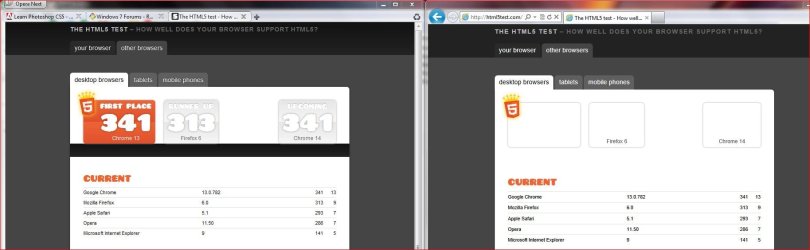
Heres a test I cherry picked that shows how poorly IE 9 is at implementing HTML 5 standards it performs poorly & cannot even display the test page properly.
The HTML5 test - How well does your browser support HTML5?
 

Attachments

  • IE 9 Faulty display of page.JPG
    IE 9 Faulty display of page.JPG
    87.1 KB · Views: 13

My Computer

Computer type
PC/Desktop
Computer Manufacturer/Model Number
self build
OS
Windows 7 Ultimate 64 bit
CPU
Intel Core i7 4770K overclocked to 4.7GHz Quad Core Haswell
Motherboard
Asus Z87 Pro (Socket 1150) ATX Motherboard
Memory
16GB Team Group Vulcan Gold 2133MHz
Graphics Card(s)
ATI Radeon HD 7880 Series Display adapter
Monitor(s) Displays
NEC LCD2690WUXi2
Screen Resolution
26" 1920 x 1200
Hard Drives
Samsung 500GB SSD 840 EVO SATA 6Gb/s
Samsung 250GB SSD 840 EVO SATA 6Gb/s
PSU
Corsair AX760 Platinum
Case
Cooler Master HAF X Gaming Tower
Cooling
XSPC RayStorm 750 RS360 Water cooling
Mouse
Razer Death Adder left handed
Internet Speed
126Mb download 11.5Mb up
Antivirus
Avast free
Browser
Opera
Other Info
Main Browser is Opera
Favorite software Adobe Lightroom & Photoshop
best plugins Nik software
Firewall : Private firewall 7
i won't weigh in on the which one is best argument, but if you've used Firefox 6 and can't get it to delete your info, you might not have it configured correctly. :)
I think it does a good job of deleting what you want it to.

View attachment 172456


Thanks for your suggestion. I changed my settings very similar to yours. The only thing that I did not change was the delete History when Firefox exits. There may be some websites that I'd prefer to keep if I'm going on and off throughout the day.

Just by exploring the picture you've provided me with I found a way to delete the cookies themselves. The only thing is is that they log you out of any Social Networking website if you delete all of them. However, there's a bunch of them that I should not be in there. So, it's good to delete everything when you're done.

Thanks for your help!

Regarding cookies, Firefox has "Accept cookies from sites" and right next to it "Exceptions". Open Exceptions and you can set up Block, Allow for session and Allow. So you have some good cookie management options in Firefox 6.

I generally delete all the cookies except for the ones that I make exceptions to.

Capture.JPG
 

My Computer

Computer type
PC/Desktop
Computer Manufacturer/Model Number
Custom Build
OS
Windows 7 Home Premium 64 bit
CPU
Intel Core i7-4790
Motherboard
GA-Z87X-D3H
Memory
G.SKILL 8GB (2 x 4GB) DDR3 F3-10666CL9D-8GBNT
Graphics Card(s)
AMD Radeon R7 250
Sound Card
Realtek ALC892
Monitor(s) Displays
Samsung UN32EH5000, Dell 1703FPT
Screen Resolution
1920 x 1080, 1280 x 1024
Hard Drives
WD5003AZEX
WD10EZEX
Samsung HD103SJ
Samsung 128 GB 840 PRO
PSU
SeaSonic M12II SS-500GM
Case
Fractal Design Define R4
Cooling
Zalman CNPS9900ALED
Keyboard
Logitech K800
Mouse
Logitech M705
Internet Speed
16 Mbps
Antivirus
Avast
Browser
Firefox
Other Info
Bose Companion 2 Multimedia Speakers
Back
Top