Beware of student downloads looking too good to be true

Nosmo

New member
Power User
Local time
3:54 PM
Messages
98
There are all sorts of posts from students that believe they have upgrade licenses and are installing successfully, booting to blank drives etc.

It seems these guys got full installs not upgrades.

The student windows 7 version available thru www.win741.com is the FULL VERSION.

The OFFICIAL answer:

Dear Customer,

Thank you for choosing Windows 7 Online store.

We understand that you are interested to purchase Windows 7 Upgrade through our online store.

We apologize for the confusion.

The Windows 7 offered in this promotion is a full version. You can

install this product even though you do not have a previous Operating System installed in your computer

or if you want to make a multi boot using Windows 7. The "Upgrade" included in the product name is just

because Windows 7 is the latest Operating System Windows developed.


Sincerely,

Joanna A.

Windows 7 Offer online store

Customer Service
 

My Computer My Computer

At a glance

Win 7 32 bit , Win xp Sp3
OS
Win 7 32 bit , Win xp Sp3
I fail to understand your point. If you pay for an upgrade installation media and instead get the full version, you get more than you paid for. With full you can always upgrade if you want to.

It's like paying for a pound and getting half a pound free.

Kari
 

My Computer My Computer

At a glance

Windows 10 Pro x64 EN-GB1.6 GHz Intel Core i7-720QM Processor6 GBATI Mobility Radeon HD 5850 Graphics
Computer type
Laptop
Computer Manufacturer/Model Number
HP ENVY 17-1150eg
OS
Windows 10 Pro x64 EN-GB
CPU
1.6 GHz Intel Core i7-720QM Processor
Memory
6 GB
Graphics Card(s)
ATI Mobility Radeon HD 5850 Graphics
Sound Card
Beats sound system with integrated subwoofer
Monitor(s) Displays
17" laptop display, 22" LED and 32" Full HD TV through HDMI
Screen Resolution
1600*900 (1), 1920*1080 (2&3)
Hard Drives
Internal: 2 x 500 GB SATA Hard Disk Drive 7200 rpm
External: 2TB for backups, 3TB USB3 network drive for media
Cooling
As Envy runs a bit warm, I have it on a Cooler Master pad
Keyboard
Logitech diNovo Media Desktop Laser (bluetooth)
Mouse
Logitech Performance Mouse MX
Internet Speed
50/10 Mbps VDSL
Antivirus
Windows Defender 4.3.9431.0
Browser
Maxthon 3.5.2., IE11
Kari,

Actually you are wrong in your assumption. The upgrade cd's are more powerful as they allow both an upgrade and a clean install.

The full media only allows a clean install.
 

My Computer My Computer

At a glance

Windows 7 Ultimate x64Intel Q9550 2.83Ghz OC'd to 3.40Ghz8GB G.Skill PI DDR2-800, 4-4-4-12 timingsEVGA 1280MB Nvidia GeForce GTX570
Computer Manufacturer/Model Number
Self-Built in July 2009
OS
Windows 7 Ultimate x64
CPU
Intel Q9550 2.83Ghz OC'd to 3.40Ghz
Motherboard
Gigabyte GA-EP45-UD3R rev. 1.1, F12 BIOS
Memory
8GB G.Skill PI DDR2-800, 4-4-4-12 timings
Graphics Card(s)
EVGA 1280MB Nvidia GeForce GTX570
Sound Card
Realtek ALC899A 8 channel onboard audio
Monitor(s) Displays
23" Acer x233H
Screen Resolution
1920x1080
Hard Drives
Intel X25-M 80GB Gen 2 SSD
Western Digital 1TB Caviar Black, 32MB cache. WD1001FALS
PSU
Corsair 620HX modular
Case
Antec P182
Cooling
stock
Keyboard
ABS M1 Mechanical
Mouse
Logitech G9 Laser Mouse
Internet Speed
15/2 cable modem
Other Info
Windows and Linux enthusiast. Logitech G35 Headset.
Woohoo! That's where I got mine. And I thought I'd have to fiddle around with reinstalling OEM Vista if I ever needed to reinstall.
So you're sure the Win741 download is the Full version and I can install it on a clean hard drive?
 

My Computer My Computer

At a glance

Vista, soon to be 7
Computer Manufacturer/Model Number
Gateway C-140
OS
Vista, soon to be 7
Your title and your opening post do not match.

Your logic is as follows:
beware: you pay 1/8th of the price and get a better product than you actually expect

I sincerely do not mean to be rude, but your entire post seems completely pointless.
 

My Computer My Computer

At a glance

Win 7 Pro
OS
Win 7 Pro
Kari,

Actually you are wrong in your assumption. The upgrade cd's are more powerful as they allow both an upgrade and a clean install.

The full media only allows a clean install.
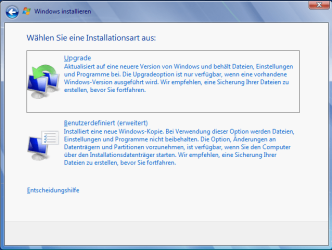
I had to check this. The screenshot below is from Seven Ultimate Full boxed version, bought this morning. It's in German but everybody knows this screen, it's the one in the beginning of installation where you choose the installation method, custom or upgrade.

My brand new boxed full version of Seven Ultimate asks if I want to upgrade or do a custom install.

Kari

clean_vs_upgrade.PNG
 

My Computer My Computer

At a glance

Windows 10 Pro x64 EN-GB1.6 GHz Intel Core i7-720QM Processor6 GBATI Mobility Radeon HD 5850 Graphics
Computer type
Laptop
Computer Manufacturer/Model Number
HP ENVY 17-1150eg
OS
Windows 10 Pro x64 EN-GB
CPU
1.6 GHz Intel Core i7-720QM Processor
Memory
6 GB
Graphics Card(s)
ATI Mobility Radeon HD 5850 Graphics
Sound Card
Beats sound system with integrated subwoofer
Monitor(s) Displays
17" laptop display, 22" LED and 32" Full HD TV through HDMI
Screen Resolution
1600*900 (1), 1920*1080 (2&3)
Hard Drives
Internal: 2 x 500 GB SATA Hard Disk Drive 7200 rpm
External: 2TB for backups, 3TB USB3 network drive for media
Cooling
As Envy runs a bit warm, I have it on a Cooler Master pad
Keyboard
Logitech diNovo Media Desktop Laser (bluetooth)
Mouse
Logitech Performance Mouse MX
Internet Speed
50/10 Mbps VDSL
Antivirus
Windows Defender 4.3.9431.0
Browser
Maxthon 3.5.2., IE11
I had to check this. The screenshot below is from Seven Ultimate Full boxed version, bought this morning. It's in German but everybody knows this screen, it's the one in the beginning of installation where you choose the installation method, custom or upgrade.

My brand new boxed full version of Seven Ultimate asks if I want to upgrade or do a custom install.

Kari

View attachment 32554

Well, now I really am all screwed up. I am looking at the Paul Thurrott "Windows 7 Secrets" book and on page 38 he clearly says

Full Version: A full version of Wiodws 7 can be used to perform a clean install of Windows 7 only. That is, it cannot be used to upgrade an existing version of Windows to Windows 7.
When I first read it, I didn't believe it, but I thought I was able to confirm on the MS Website what Paul wrote...but now I cannot find it.

And since an upgrade doesn't require prior ownership, a full version is likely going to upgrade as well. I think MS made this secretly complex so that people would just buy the software.
 

My Computer My Computer

At a glance

Windows 7 Ultimate x64Intel Q9550 2.83Ghz OC'd to 3.40Ghz8GB G.Skill PI DDR2-800, 4-4-4-12 timingsEVGA 1280MB Nvidia GeForce GTX570
Computer Manufacturer/Model Number
Self-Built in July 2009
OS
Windows 7 Ultimate x64
CPU
Intel Q9550 2.83Ghz OC'd to 3.40Ghz
Motherboard
Gigabyte GA-EP45-UD3R rev. 1.1, F12 BIOS
Memory
8GB G.Skill PI DDR2-800, 4-4-4-12 timings
Graphics Card(s)
EVGA 1280MB Nvidia GeForce GTX570
Sound Card
Realtek ALC899A 8 channel onboard audio
Monitor(s) Displays
23" Acer x233H
Screen Resolution
1920x1080
Hard Drives
Intel X25-M 80GB Gen 2 SSD
Western Digital 1TB Caviar Black, 32MB cache. WD1001FALS
PSU
Corsair 620HX modular
Case
Antec P182
Cooling
stock
Keyboard
ABS M1 Mechanical
Mouse
Logitech G9 Laser Mouse
Internet Speed
15/2 cable modem
Other Info
Windows and Linux enthusiast. Logitech G35 Headset.
Kari,

Actually you are wrong in your assumption. The upgrade cd's are more powerful as they allow both an upgrade and a clean install.

The full media only allows a clean install.

I've done in-place upgrades from Vista OEM to Windows 7 Ultimate as well as DVD-boot upgrade installs from Vista OEM to Windows 7 Ultimate. In all cases, they activated successfully with my full retail TechNet keys.
 

My Computer My Computer

At a glance

W8 Pro, W7 Ultimate, XP Pro x64, Vista x64, U...Q6600, Q6700, T7500, T7500, N270, N2708GB, 8GB, 4GB, 4GB, 2GB, 2GBATI, nVidia, nVidia, nVidia, Intel, Intel
Computer type
PC/Desktop
Computer Manufacturer/Model Number
Dell: XPS 420 (2), XPS M1330 (several), XPS 14z, Mini 9, Mini 10v
OS
W8 Pro, W7 Ultimate, XP Pro x64, Vista x64, Ubuntu
CPU
Q6600, Q6700, T7500, T7500, N270, N270
Motherboard
Dell
Memory
8GB, 8GB, 4GB, 4GB, 2GB, 2GB
Graphics Card(s)
ATI, nVidia, nVidia, nVidia, Intel, Intel
Monitor(s) Displays
Dell 2408WFP
Hard Drives
A drawer full. OCZ Vertex's in RAID 0. Vertex 3's, Vertex 4, Samsung 830's, Samsung 840's, Intel 330. Don't use dino drives any more except for servers.
Keyboard
Logitech Wave
Internet Speed
29 Mbps DL / .95 Mbps UL
Other Info
New project(2013)...Another low power server. Zotac H67ITX, i3-2100T, Windows Server 2012 Essentials on Samsung SSD.
Previous project...Low power (38-40 watts using Kill-a-Watt) Windows Home Server. Zotac ION (Atom 330, GeForce9400), 4GB RAM, 2x2TB WD Green, IN WIM miniITX Case. Fits on a shelf in laundry closet, practically silent.
I fail to understand your point. If you pay for an upgrade installation media and instead get the full version, you get more than you paid for. With full you can always upgrade if you want to.

It's like paying for a pound and getting half a pound free.

Kari

These guys are posting about all the marvelous things the so called 'Upgrade Media' will do. Install from boot for example. Someone with a real upgrade will get a surprise when they attempt to activate if the install is done incorrectly.
 

My Computer My Computer

At a glance

Win 7 32 bit , Win xp Sp3
OS
Win 7 32 bit , Win xp Sp3
Wow, I can't believe the version I downloaded from win741 is the actual full retail version, especially since I went out and bought the 199.99 version from Best Buy. Had I known that their UPGRADE tag, just meant it was the latest version of Windows, I would have used another email address to get another copy of Windows 7 home premium, instead of thinking that the copy online I was buying was an upgrade, and I would have to go through the hassel of reinstalling vista should a hd crash or system failure ever occur.

I guess it pays to look into things. 200 smackaroos down the tube.
 

My Computer My Computer

At a glance

Windows 7 Home Premium 64 bitIntel(R) Core(TM)2 Quad CPU Q8300 @ 2.50GHz 2...8.00 GB DDR3 (4 GB PC3-8500F 500 MHz, 4GB PC3...NVIDIA GeForce 9800 GTX/GTX+ 512MB
Computer Manufacturer/Model Number
Dell XPS/Dimension 430
OS
Windows 7 Home Premium 64 bit
CPU
Intel(R) Core(TM)2 Quad CPU Q8300 @ 2.50GHz 2.49GHz
Motherboard
Intel X48
Memory
8.00 GB DDR3 (4 GB PC3-8500F 500 MHz, 4GB PC3-10700h 667 MHz
Graphics Card(s)
NVIDIA GeForce 9800 GTX/GTX+ 512MB
Monitor(s) Displays
Dell S2009W
Screen Resolution
1600 x 900
Hard Drives
Western Digital 1TB Caviar Black
Case
Stock
Cooling
Stock
Keyboard
Dell XPS/Dimension 430 Stock
Mouse
Microsoft Bluetooth Notebook Mouse 5000
Internet Speed
6 meg service
I fail to understand your point. If you pay for an upgrade installation media and instead get the full version, you get more than you paid for. With full you can always upgrade if you want to.

It's like paying for a pound and getting half a pound free.

Kari

These guys are posting about all the marvelous things the so called 'Upgrade Media' will do. Install from boot for example. Someone with a real upgrade will get a surprise when they attempt to activate if the install is done incorrectly.

So how would I determine if what I purchased through the 741 offer was a Full version or an Upgrade Version?
 

My Computer My Computer

At a glance

VistanVidia 8800GT
Computer Manufacturer/Model Number
Dell Vostro 400
OS
Vista
Graphics Card(s)
nVidia 8800GT
Internet Speed
DSL
I don't quite understand this thread. When you go to win741.com , and click "Buy", it takes you to the digital river sitehttp://windows7.digitalriver.com -- the versions that you download there are not ISO's, but rather an msi that you have to run from a currently running windows os that you plan to upgrade. Yes, there is an unofficial method to convert the extracted files from the download into a bootable ISO, but from all the problems people are having with the digitalriver downloads (I should know, I purchased through win741), I am almost certain these are upgrade editions. See the thread here .
 

My Computer My Computer

At a glance

Windows 7 Pro
OS
Windows 7 Pro
I don't quite understand this thread. When you go to win741.com , and click "Buy", it takes you to the digital river site -- the versions that you download there are not ISO's, but rather an msi that you have to run from a currently running windows os that you plan to upgrade. Yes, there is an unofficial method to convert the extracted files from the download into a bootable ISO, but from all the problems people are having with the digitalriver downloads (I should know, I purchased through win741), I am almost certain these are upgrade editions. See the thread here .


Sorry I started this thread. The downloads from digital river site and win741 give the impression they are upgrade versions but they are actually full installs. Thinking these full retail install versions are upgrades, we have been getting miss information about what a supposed upgrade will do and how it will install.
 

My Computer My Computer

At a glance

Win 7 32 bit , Win xp Sp3
OS
Win 7 32 bit , Win xp Sp3
Back
Top