Solved Big problem with "unidentified network"...

Mulrik

New member
Local time
4:59 AM
Messages
7
Hi there this is my first post since I'm new here.

Built a new comupter this weekend and installed windows 7 on it.
Full with anticipation I fired it up and wanted to access internet to start download the stuff you need on a new computer.

Found that my computer can't connect to the network, only get connected to unidentified network.. Tried my second network adapter with same result = no network or interner connection.

Installed a USB wifi adapter which connected to the netowrk and internet.

Updated the drivers for both Lan adapters, still same problem.
Tried to disable and enable the network adaptors, still same problem.
Tried to disable bonjour service with no luck.
Tried to set standard gateway, no luck there either...

Searched a lot about this problem but can't find any solution to the problem, so now I'm turning to you guys to ask for a helping hand!

Tanks on beforehand, Marcus
 

My Computer

OS
windows 7 ultimate 64bit
CPU
Intel i7 870
Motherboard
Asus P7P55D-E PRO
Graphics Card(s)
Asus Geforce 460
You will want to remove the bonjour service to fix this problem.

To fix ...
Run MsConfig

Under the Services tab uncheck the service called "##Id_String1.6844[... and then a bunch of numbers]" by Apple, you need to disable the service.

After that you will want to remove bonjour from your machine.

1. Navigate to C:\Program Files\Bonjour
2. Rename the mdnsNSP.dll file in that folder to mdnsNSP.old
3. Restart your computer
4. Delete the Program Files\Bonjour folder

Reboot machine.

If you are still having problems after that please post a screen shot of your ipconfig /all here.
 

My Computer

Computer type
PC/Desktop
Computer Manufacturer/Model Number
Home built
OS
Windows 7 Ult, Windows 8.1 Pro,
CPU
Q9650-4.275GHz, E8600 4.5GHz, E6750-3.8GHz
Motherboard
Evga 780i FTW
Memory
G.Skill PC2 9600 1200Mhz 5 5 5 15 2T
Graphics Card(s)
GTX480
Sound Card
Asus Xonar D2
Monitor(s) Displays
HannsG
Screen Resolution
1680X1050
Hard Drives
GSkill Phoenix Pro 120GB SSD
PSU
ThermalTake Toughpower 1000Watt modular
Case
ThermalTake XaserV
Cooling
Xigmatek S1283
Keyboard
Logitech G15
Mouse
Logitech G9
Internet Speed
T1
Thanks for reply!

Never had that ID string under the services tab...

But removed bonjour as you said, still no connection.

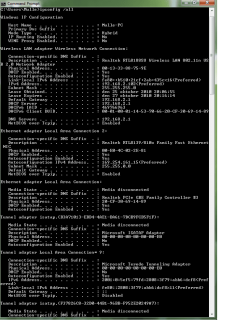
Attached screen shot from ipconfig /all.
 

Attachments

  • ipconfig.png
    ipconfig.png
    26.2 KB · Views: 56

My Computer

OS
windows 7 ultimate 64bit
CPU
Intel i7 870
Motherboard
Asus P7P55D-E PRO
Graphics Card(s)
Asus Geforce 460
Your wireless connection shows that it's connected and should be working but your wired connection isn't getting anything from the router. You can't use both at once. Unplug the eithernet cable and see if the wireless connection is working or not.

Have you tried to reset your router or update the routers firmware?

I'm a bit curious as to how bonjour got onto your system if you havn't been able to get online yet?
 

My Computer

Computer type
PC/Desktop
Computer Manufacturer/Model Number
Home built
OS
Windows 7 Ult, Windows 8.1 Pro,
CPU
Q9650-4.275GHz, E8600 4.5GHz, E6750-3.8GHz
Motherboard
Evga 780i FTW
Memory
G.Skill PC2 9600 1200Mhz 5 5 5 15 2T
Graphics Card(s)
GTX480
Sound Card
Asus Xonar D2
Monitor(s) Displays
HannsG
Screen Resolution
1680X1050
Hard Drives
GSkill Phoenix Pro 120GB SSD
PSU
ThermalTake Toughpower 1000Watt modular
Case
ThermalTake XaserV
Cooling
Xigmatek S1283
Keyboard
Logitech G15
Mouse
Logitech G9
Internet Speed
T1
Remove network adapter from device manager, reboot and let windows redetect it, that usually clears the issue.
 

My Computer

Computer type
PC/Desktop
OS
Microsoft Windows 10 Professional / Windows 7 Professional
CPU
Intel i5-3570
Motherboard
Lenovo Mahobay
Memory
16GB DDR3
Graphics Card(s)
AMD Radeon HD 7850 2GB
Sound Card
(1) Realtek HD Audio (2) AMD HD Audio
Monitor(s) Displays
LG LS192WS
Screen Resolution
1440 x 900 @ 32bit color
Hard Drives
(1) SUV300S37A/120G (2) ST3500413AS SATA Disk Device AHCI mode enabled.
PSU
Corsair HX620
Case
Thermaltake V4 Black Edition
Cooling
Cooler Master Hyper 212 + Artic Silver 5 on CPU/GPU
Keyboard
Dell SK-8115
Mouse
Razer Copperhead with MAPED mat (awesome!)
Internet Speed
100 Mbps up/down
Browser
Chrome
Your wireless connection shows that it's connected and should be working but your wired connection isn't getting anything from the router. You can't use both at once. Unplug the eithernet cable and see if the wireless connection is working or not.

Have you tried to reset your router or update the routers firmware?

I'm a bit curious as to how bonjour got onto your system if you havn't been able to get online yet?

My Wireless connection is working and has been working all the time, but what I want is my ethernet to work properly.

Wireless is working when ethernet is not plugged in.

Ethernet is never working.

Router is reseted several times and firmware is up to date.

Have been online trough my wireless connection and I've installed Itunes. (using it as I write this)

Thanks for your help this far!
 

My Computer

OS
windows 7 ultimate 64bit
CPU
Intel i7 870
Motherboard
Asus P7P55D-E PRO
Graphics Card(s)
Asus Geforce 460
Remove network adapter from device manager, reboot and let windows redetect it, that usually clears the issue.

Tried that without any success :(
 

My Computer

OS
windows 7 ultimate 64bit
CPU
Intel i7 870
Motherboard
Asus P7P55D-E PRO
Graphics Card(s)
Asus Geforce 460
Your wireless connection shows that it's connected and should be working but your wired connection isn't getting anything from the router. You can't use both at once. Unplug the eithernet cable and see if the wireless connection is working or not.

Have you tried to reset your router or update the routers firmware?

I'm a bit curious as to how bonjour got onto your system if you havn't been able to get online yet?

My Wireless connection is working and has been working all the time, but what I want is my ethernet to work properly.

Wireless is working when ethernet is not plugged in.


Ethernet is never working.

Router is reseted several times and firmware is up to date.

Have been online trough my wireless connection and I've installed Itunes. (using it as I write this)

Thanks for your help this far!

Your description of the problem was very confusing. You never even mentioned that your wireless was working, I had to figure that out myself by looking at your ipconfig.

Have you tried to disable your wireless connection and then see if the wired connection works or not, might be worth a try. Bonjour is famous for causing this exact problem.

Try running this batch file which should fix the mess that bonjour created. Disable the wireless adaptor first and reboot after running the batch file, post your ipconfig /all after that. :)
Download Renew IP + Reset Winsock Batch File
 

My Computer

Computer type
PC/Desktop
Computer Manufacturer/Model Number
Home built
OS
Windows 7 Ult, Windows 8.1 Pro,
CPU
Q9650-4.275GHz, E8600 4.5GHz, E6750-3.8GHz
Motherboard
Evga 780i FTW
Memory
G.Skill PC2 9600 1200Mhz 5 5 5 15 2T
Graphics Card(s)
GTX480
Sound Card
Asus Xonar D2
Monitor(s) Displays
HannsG
Screen Resolution
1680X1050
Hard Drives
GSkill Phoenix Pro 120GB SSD
PSU
ThermalTake Toughpower 1000Watt modular
Case
ThermalTake XaserV
Cooling
Xigmatek S1283
Keyboard
Logitech G15
Mouse
Logitech G9
Internet Speed
T1
Sorry for confusing you!

Tried with wireless disabled, did not work :(

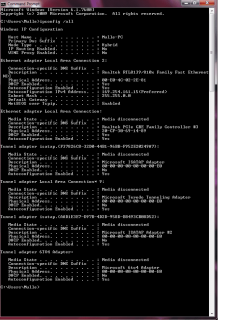
Ran the file with wireless disabled, then rebooted and got this on the ipconfig:
 

Attachments

  • ipconfig1.png
    ipconfig1.png
    25.7 KB · Views: 10

My Computer

OS
windows 7 ultimate 64bit
CPU
Intel i7 870
Motherboard
Asus P7P55D-E PRO
Graphics Card(s)
Asus Geforce 460
Want to set one thing straight!

This problem was there from the start when there was only win 7 installed on the computer.

So even before bonjour was installed i reckon, I'm guessing that bonjour was installed with itunes?
 

My Computer

OS
windows 7 ultimate 64bit
CPU
Intel i7 870
Motherboard
Asus P7P55D-E PRO
Graphics Card(s)
Asus Geforce 460
Yes the bonjour installs with iTunes and causes this Unidentified network problem on a daily basis.

From what I'm seeing either your routers wired connection isn't working or your eithernet driver isn't installed or isn't working at all.

You might want to uninstall the wired realtek driver from device manager then reboot and let windows install it's own driver for you.

Also go into your routers settings by typing 192.168.2.1 into your browsers URL and make sure that it's set up correctly for wired connections because as it stands your router isn't giving you an IP,subnet,DNS,gateway or anything else for that matter.
 

My Computer

Computer type
PC/Desktop
Computer Manufacturer/Model Number
Home built
OS
Windows 7 Ult, Windows 8.1 Pro,
CPU
Q9650-4.275GHz, E8600 4.5GHz, E6750-3.8GHz
Motherboard
Evga 780i FTW
Memory
G.Skill PC2 9600 1200Mhz 5 5 5 15 2T
Graphics Card(s)
GTX480
Sound Card
Asus Xonar D2
Monitor(s) Displays
HannsG
Screen Resolution
1680X1050
Hard Drives
GSkill Phoenix Pro 120GB SSD
PSU
ThermalTake Toughpower 1000Watt modular
Case
ThermalTake XaserV
Cooling
Xigmatek S1283
Keyboard
Logitech G15
Mouse
Logitech G9
Internet Speed
T1
Problem solved!

Installed xp an another harddrive to check if the network worked with that, it didn't.

So i figuerd since wireless is working but wired not maybe it's something with the ethernet cable. tried another one, and that solved the problem.

Really bad timing on the cable failure to happen just when i buildt my new computer ^^

Chev65 Big thank you for your help and effort, really appriciate it!

Have a nice one! Ciao!
 

My Computer

OS
windows 7 ultimate 64bit
CPU
Intel i7 870
Motherboard
Asus P7P55D-E PRO
Graphics Card(s)
Asus Geforce 460
Well no wonder we weren't getting a thing from the router. A bad cable will do that sorta thing but it's difficult to diagnose that from here. Glad you got it working again Mulrik. ;)
 

My Computer

Computer type
PC/Desktop
Computer Manufacturer/Model Number
Home built
OS
Windows 7 Ult, Windows 8.1 Pro,
CPU
Q9650-4.275GHz, E8600 4.5GHz, E6750-3.8GHz
Motherboard
Evga 780i FTW
Memory
G.Skill PC2 9600 1200Mhz 5 5 5 15 2T
Graphics Card(s)
GTX480
Sound Card
Asus Xonar D2
Monitor(s) Displays
HannsG
Screen Resolution
1680X1050
Hard Drives
GSkill Phoenix Pro 120GB SSD
PSU
ThermalTake Toughpower 1000Watt modular
Case
ThermalTake XaserV
Cooling
Xigmatek S1283
Keyboard
Logitech G15
Mouse
Logitech G9
Internet Speed
T1
Back
Top