
Bios Keeps changing boot order...

Deltawar

New member
Local time
11:16 AM
Messages
38
Hi i have a problem, i recently upgraded my sony vaio pc with a SSD.

originally it had 2x500gb RAID0 as the C disk but i clean installed on my new vertex 2 SSD and set everything up, BUT my bios keeps changing the boot order and i keep getting 'boot manager missing' press ctrl+alt+del to restart.

the RAID 0 is under Volume0 in the bios (limit bios as its from sony)

but it keeps putting [SONY] as the 1st boot and the best i can gues this is the in-built card readers.

I ve tried everthing and i cant get it to stay as i set it.

Also i cant update my bios as the .exe update tool gets a 'Cannot read system information' error message.


please and help would be amazing, ive been pulling my hair out for hours.
 

My Computer

Computer Manufacturer/Model Number
Sony Vaio VGC-RM2U
OS
Windows 7 Ultimate X64
CPU
Q6600 Quad Core
When you reinstalled with the single HD, did you change the SATA controller to AHCI or IDE mode? Or is it still set ot RAID? Check all BIOS settings related to SATA, IDE or RAID drives controller.

How many HD's are connected? Try booting with only the Win7 HD plugged in.

You say that "SONY" is listed as the First boot device. Sony what? Can you be more specific as to what device this is? Try setting the HD upon which Win7 is installed as first to boot if it's not.

Next try resetting the CMOS: Clear CMOS - 3 Ways to Clear the CMOS - Reset BIOS

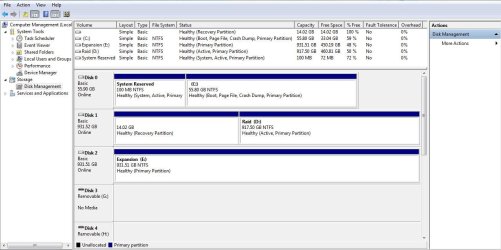
See if you can update the BIOS now, or if the problem clears. Post back a screenshot of the full Disk Mgmt drive map with listings, using Snipping Tool in Start Menu.
 
There are 4 drives.

C: SSD
D: 2X500GB RAID0
E:1TB

i have not idea what sony is, and i have tried setting the OCZ(SSD) DRIVE AS 1ST and it works to boot into windows, but then next boot it changes it again.

I cant actually edit the SATA configuration nor do i know how to.

tbh i wanted to get rid of it as its more trouble than its worth and i dont need the added read speed on a storage HD.
 

My Computer

Computer Manufacturer/Model Number
Sony Vaio VGC-RM2U
OS
Windows 7 Ultimate X64
CPU
Q6600 Quad Core
Good idea to copy out your data from the RAID 0, then wipe each HD. This will not unRAID them however as it likely needs to be done in the BIOS or by looking for the RAID utility prompt to enter settings at bootup.
http://www.sevenforums.com/tutorials/52129-disk-clean-clean-all-diskpart-command.html
http://www.sevenforums.com/tutorials/119713-diskpart-pc-startup.html?ltr=D

If this doesn't help, back up your data then try unplugging all other HD's and boot into Win7 a few times as it may abandon the RAID without having to track down the settings, which otherwise will need to be done.
 
Last edited:
ive tried startup recovery, and fixboot from command prompt, and they both havnt fixed the bootmngr problem.


It doesnt happen when i restart the PC, only power down then on again.

also when it happens i press ctrl+alt+del, and it will login normal on the next boot.

Does this help in diagnose why im getting the error?
 

My Computer

Computer Manufacturer/Model Number
Sony Vaio VGC-RM2U
OS
Windows 7 Ultimate X64
CPU
Q6600 Quad Core
Switch everything off. Take the plug out of the wall socket. Open the case, and switch the sata cables over.

Close everything.

Boot again. Windows should now find everything OK. If Not set the boot order again.

This time windows should retain the settings.

Regards....Mike Connor
 

My Computer

OS
Several, including Windows 7 x64 Ultimate
Hi mike, already tried that :(.

It has 4 pull out bays on the front, originally it was:

Bay 1: 500gb raid0 with bay 2
Bay 2: 500gb raid0 with bay 1
Bay 3: 1TB
Bay 4: SSD

then I switched it to

Bay 1: SSD
Bay 2: 500gb raid0 with bay 3
Bay 3: 500gb raid0 with bay 2
Bay 4: 1TB

But the problem persists.

After shutting down for the night, i booted up this morning and checked the bios boot order, and the SSD was not even there, but the PC booted fine anyway, and in My Computer' All looks good.

Its a very weird case that seems to keep change depending on the PC's mood.
 

My Computer

Computer Manufacturer/Model Number
Sony Vaio VGC-RM2U
OS
Windows 7 Ultimate X64
CPU
Q6600 Quad Core
It's the most common cause of the problem you describe, especially after changing drive setups. Windows can't find the boot disk, then goes to default and finds it on a reboot, etc.

The cables to the discs should be consistent with the board drive headers. It is not enough to just switch them around. Device 0 on the board must also go to device 0 in the boot order.

Only other things that usually cause that are defective plugs and cables.

Of course it COULD be software related, but I have no idea what to suggest there.

Sometimes one has to just keep plugging away ( if you'll pardon the pun! :) ) until one finds a solution, or the machine with the problem is outdated and can be replaced without a guilty conscience, and with a good excuse for the wife, "But it wasn't working dear, and I need it for all sorts of things" ( pick several convincing sounding reasons here ).
Seriously, if that hasn't fixed it I have no further clues. I would at least try setting up the boot order again, and booting at least twice. If you use a shadow BIOS, or an automatic BIOS copy to HDD make sure you copy your new settings to it, or you will end up with it defaulting back to the wrong boot order when you shut down and start again.

Regards....Mike Connor
 

My Computer

OS
Several, including Windows 7 x64 Ultimate
Just spoke to a friend of mine who services laptops.

He advised this;

Go to BIOS and change the boot sequence to CD then HDD.Sony: (F3) while you are starting the PC, then (F2) or (F1) .

On the Vaio, the BIOS access key is either <f2>or <f3>, if the POST is too fast, hit the "PAUSE" key to read the text, if you get the Sony Logo, hit <ESC> to see the text.

Once in the BIOS you can change the boot order (and possibly the drive order in the newer BIOS versions).

You could set it for cd1, cd2, floppy, hard drive.

Don't know whether it will help, but it can't hurt!

I still think there is something wrong with your boot order, or the cables are attached to the wrong headers, and he says that is the most common problem when customers do upgrades.

Hope you get it sorted.......

Regards....Mike Connor
 

My Computer

OS
Several, including Windows 7 x64 Ultimate
It's the most common cause of the problem you describe, especially after changing drive setups. Windows can't find the boot disk, then goes to default and finds it on a reboot, etc.

The cables to the discs should be consistent with the board drive headers. It is not enough to just switch them around. Device 0 on the board must also go to device 0 in the boot order.

Only other things that usually cause that are defective plugs and cables.

Of course it COULD be software related, but I have no idea what to suggest there.

Sometimes one has to just keep plugging away ( if you'll pardon the pun! :) ) until one finds a solution, or the machine with the problem is outdated and can be replaced without a guilty conscience, and with a good excuse for the wife, "But it wasn't working dear, and I need it for all sorts of things" ( pick several convincing sounding reasons here ).

Seriously, if that hasn't fixed it I have no further clues. I would at least try setting up the boot order again, and booting at least twice. If you use a shadow BIOS, or an automatic BIOS copy to HDD make sure you copy your new settings to it, or you will end up with it defaulting back to the wrong boot order when you shut down and start again.

Regards....Mike Connor

Also you may a defective CMOS/ BIOS battery.
 

My Computer

OS
ME/XP/Vista/Win7
Also you may a defective CMOS/ BIOS battery.

Yep, that's possible too. It would be consistent with the behaviour described. Good point.

Regards....Mike Connor
 

My Computer

OS
Several, including Windows 7 x64 Ultimate
I thought id give it a day or 2, to see what happens, and it always happens after a power down, but not restart.

I may have to switch the battery as a last resort, but whats the chances of the battery failing as soon as i upgrade the HDD's?
 

My Computer

Computer Manufacturer/Model Number
Sony Vaio VGC-RM2U
OS
Windows 7 Ultimate X64
CPU
Q6600 Quad Core
I thought id give it a day or 2, to see what happens, and it always happens after a power down, but not restart.

I may have to switch the battery as a last resort, but whats the chances of the battery failing as soon as i upgrade the HDD's?

Try reseating the battery.
 

My Computer

OS
ME/XP/Vista/Win7
Did you try removing the RAID to see if Win7 will boot correctly?

You may still need to remove the RAID using the RAID controller which comes up on first boot screen, or by changing the SATA controller setting to AHCI or IDE mode.

But first try removing all other HD's to see how it performs, then add back the HD's one at a time without RAID.
 
I thought id give it a day or 2, to see what happens, and it always happens after a power down, but not restart.

I may have to switch the battery as a last resort, but whats the chances of the battery failing as soon as i upgrade the HDD's?

The motherboard batteries rarely "fail" as such, ( one reason one tends to simply forget about them when troubleshooting! :) ) They simply run down over time and can no longer supply the power to keep the CMOS BIOS settings. They usually last at least three years, sometimes a lot longer. On many thousands of boards over the years I have only ever had three where the battery "Failed" in the sense that it became defective. But years ago the batteries were not quite as reliable as they are now in terms of quality and life expectancy.

Some boards allow a secondary BIOS on the Boot HDD which allows an immediate restore when the system boots. Of course it has to find the boot disk to do that! :)

The more I think about it, the more convinced I am that the battery is your problem. The symptoms are typical. I should have noticed that immediately. It used to happen quite a lot but only happens rarely now.

Regards....Mike Connor
 

My Computer

OS
Several, including Windows 7 x64 Ultimate
im not 100% convinced its the battery, as it does save settings like the time, and sometimes the boot order (as long as teh SSD IS NOT in the list.)

What its doing is..

on First boot cant find teh SSD and sees the RAID as bootable and attempts to boot from that, and in doing so gets bootmgr is missing..

so i press ctrl+alt+del

then it finds the SSD on reboot and boots the OS.

When trying to use startup repair, it labelled my C LOCAL Disk as F Local

Then i tried it again unplugging all other HDD's and it labelled it D Local, yet still not C.


Is the only way to make the RAID not bootable to delete it?

I originally wanted to remove it before setting up the new system, but ive since copied about 700GB of data to it, which would mean copying it back over to another drive, as am i correct that by destroying the RAID WILL destroy the data?


sorry for all teh questions and thanks again.


EDIT:----

Ive replaced the cmos battery, and problem persists :(.
 
Last edited:

My Computer

Computer Manufacturer/Model Number
Sony Vaio VGC-RM2U
OS
Windows 7 Ultimate X64
CPU
Q6600 Quad Core
Is the SSD set as first to boot in BIOS setup?

If you'll post back a screenshot of your full Disk Mgmt drive map with all drives plugged, we can try to help you make the RAID unbootable since you seem to want to keep it. Use Snipping Tool in Start Menu, attach file with paper clip in reply box.
 
It has a 14GB recovery partition that i cant delete also.

It doesnt detect it when i first boot up, only after i ctrl alt del from bootmgr is missing, then if i enter bios it deects the SSD.
 

Attachments

  • disk.JPG
    disk.JPG
    97.1 KB · Views: 81

My Computer

Computer Manufacturer/Model Number
Sony Vaio VGC-RM2U
OS
Windows 7 Ultimate X64
CPU
Q6600 Quad Core
It's almost certainly due to having the mix of RAID with SATA drives settings.

What was the reason you wanted RAID for all of that data in the first place?

I would not have set up RAID as it is dated technology that offers no performance advantage and loses all of your data if one HD dies. This defeats the whole purpose of redundancy. Win7 has built-in drive imaging to save backup to another HD, and you can automate the Backup to include files.

How is the RAID set up here? Do you have a card or is it an onboard setting which can be set separately for each port? I would copy off my data then set the other HD's to run in AHCI mode so they can benefit from hot-plugging.

You can also run Startup Repair from the DVD Repair console or Repair CD to see if it will repair the SSD startup. Ignore the drive letters. I see no other System active, although you could mark D Inactive first to be sure: http://www.sevenforums.com/tutorials/71432-partition-mark-active.html
 
I Didnt set it up myself, The pc came from sony like that, and im guessing its onboard.

The BIOS, has no RAID/AHCI/IDE settings, the only setting i can set in the bios is: VIEW RAID INFO [SHOW] [HIDE]
 

My Computer

Computer Manufacturer/Model Number
Sony Vaio VGC-RM2U
OS
Windows 7 Ultimate X64
CPU
Q6600 Quad Core
Back
Top