
Changing boot order in windows 7 home premium

Thank you very much Gregrocker.
I will go back and give your suggestions a shot.
 

My Computer My Computer

At a glance

windows 7 Pro 64 bitmini tower4gnvidia geforce gt730 graphics card
Computer type
PC/Desktop
Computer Manufacturer/Model Number
had the system built by PCsandParts
OS
windows 7 Pro 64 bit
CPU
mini tower
Motherboard
h110m-k (lga1151)
Memory
4g
Graphics Card(s)
nvidia geforce gt730 graphics card
Sound Card
high definition audio device
Monitor(s) Displays
19" dell ultra sharp
Screen Resolution
1280 x 800
Hard Drives
Kingston SSD
PSU
?
Case
?
Cooling
?
Keyboard
standard ps/2 keyboard
Mouse
ps/2 compatible optical
Internet Speed
fiber optics
Antivirus
ESET Smart Security
Browser
IE11
Other Info
no Wifi. Bose speakers, optical drive tsstcorp dvd+-RW
I have run across numerous machines with CD/DVD drives that will not read a bootable disc, even though the disc will work in another drive/machine. I would suggest checking the disc in another computer that you know will boot from the optical (CD/DVD) drive. If it works there and the computer you want to clone won't boot from the F12 menu, the optical drive has problems. Sometimes it just needs to be cleaned, sometimes it needs to be replaced.

Booting from optical drives has become sufficiently troublesome for me that I have migrated nearly all my bootable utilities and installers to flash drives.
 

My Computer My Computer

At a glance

Windows 7 Ultimate x86 and x64
Computer type
PC/Desktop
Computer Manufacturer/Model Number
Dell, HP, Toshiba, Compaq
OS
Windows 7 Ultimate x86 and x64
Still can't change the boot order of my friends computer. He is running a Dell Inspiron 560s 64-bit.
Today I upgraded the OS from home premium to windows 7 pro 64-bit.
I also upgraded the BIOS from ao4 to ao6. None of this had any effect on changing the boot
order of the BIOS. This has nothing to do with whether the DVD drive works or not.

I wonder if the Celeron processor has anything to do with the bIOS being quirky.
My wife's Dell t3400 running windows 7 pro 32-bit and a BIOS of a11 and an intel
chip looks completely different than the one on the Dell Inspiron.

Since everyone feels that the BIOS software is not at fault, please help me find out what
I am doing that is wrong. Thanks for any help.
 
Last edited:

My Computer My Computer

At a glance

windows 7 Pro 64 bitmini tower4gnvidia geforce gt730 graphics card
Computer type
PC/Desktop
Computer Manufacturer/Model Number
had the system built by PCsandParts
OS
windows 7 Pro 64 bit
CPU
mini tower
Motherboard
h110m-k (lga1151)
Memory
4g
Graphics Card(s)
nvidia geforce gt730 graphics card
Sound Card
high definition audio device
Monitor(s) Displays
19" dell ultra sharp
Screen Resolution
1280 x 800
Hard Drives
Kingston SSD
PSU
?
Case
?
Cooling
?
Keyboard
standard ps/2 keyboard
Mouse
ps/2 compatible optical
Internet Speed
fiber optics
Antivirus
ESET Smart Security
Browser
IE11
Other Info
no Wifi. Bose speakers, optical drive tsstcorp dvd+-RW
This is why its best to use the F12 one-time BIOS boot menu key. What happens when you choose CD drive on F12 menu?

If media won't boot but boots in other PC's then reset the Dell BIOS to defaults, after taking note of the SATA controller setting (IDE, AHCI, or SATA?). Save and exit. Try f12 again.

If that fails run the Dell Diagnostics from F12. There may be two ways to do this, one listed as Diagnostics and the another fuller suite listed as Utility Partition. You want everything so it tests the condition of the OD.

Clonezilla should have a flash stick alternative to try. If not try another imaging option like Win7 for which you can use the Win7 installation DVD or its flash stick alternative, which can be created from the links in Windows 7 USB-DVD Download Tool.
You can also create the image or backup from Windows:
Backup Complete Computer - Create an Image Backup
Backup User and System Files

Where is the response to these steps I wrote out for you? We need detailed results of each step so we know what you've done so we can suggest others.

This may be a mystery to you but we've dealt with the same exact problem thousands of times before here and almost always solve it providing the steps we provide are followed closely and nothing is skipped. Time and again a step which was ignored is the solution.

This is by far the top tech forums in web history because we do not give up, but we need cooperation to assure it gets solved.
 
Ok, I will try to comply. It will be days before I can go back to my friends home and accumulate
to data you need. I am not able to do this from memory. In the meantime I will try to create
a stick with Clonezilla-live on it and see if I can boot my computer from it.
Thanks for being patient with me.
 

My Computer My Computer

At a glance

windows 7 Pro 64 bitmini tower4gnvidia geforce gt730 graphics card
Computer type
PC/Desktop
Computer Manufacturer/Model Number
had the system built by PCsandParts
OS
windows 7 Pro 64 bit
CPU
mini tower
Motherboard
h110m-k (lga1151)
Memory
4g
Graphics Card(s)
nvidia geforce gt730 graphics card
Sound Card
high definition audio device
Monitor(s) Displays
19" dell ultra sharp
Screen Resolution
1280 x 800
Hard Drives
Kingston SSD
PSU
?
Case
?
Cooling
?
Keyboard
standard ps/2 keyboard
Mouse
ps/2 compatible optical
Internet Speed
fiber optics
Antivirus
ESET Smart Security
Browser
IE11
Other Info
no Wifi. Bose speakers, optical drive tsstcorp dvd+-RW
I would have called Dell by now. :)
 

My Computer My Computer

At a glance

Windows 10 Pro x64Intel Core i7 6700KGSkill TridentZ RGB 16GB 3600 16-16-16-36EVGA GTX 980 Ti SC x2
Computer type
PC/Desktop
Computer Manufacturer/Model Number
Skylake Special #666
OS
Windows 10 Pro x64
CPU
Intel Core i7 6700K
Motherboard
Asus Sabertooth Z170 Mark 1
Memory
GSkill TridentZ RGB 16GB 3600 16-16-16-36
Graphics Card(s)
EVGA GTX 980 Ti SC x2
Sound Card
Realtek High Definition
Monitor(s) Displays
AOC G2460PG
Screen Resolution
1920 x 1080 144Hz
Hard Drives
Samsung 860 Pro 256GB, Seagate Barracuda 4TB x2
PSU
EVGA 1000 P2, EVGA White Custom Braided Cables
Case
Corsair Vengeance C70 Gunmetal Black
Cooling
Corsair H100i v2, Corsair ML120 x2, Thermal Grizzly Kryonaut
Keyboard
Logitech G910 Orion Spectrum
Mouse
Logitech G700s
Internet Speed
Verizon Fios Quantum Gateway 75/75
Antivirus
Windows Defender, Malwarebytes Free 3.8.3
Browser
Chrome
Other Info
Corsair SP120 x4, LG Blu-ray Drive, Durabrand HT-395 100 Watt Dolby Digital Amp, Corsair H2100 Wireless 7.1 Headset
Dell Inspiron 560s 64-bit - Celeron chip - windows 7 pro 64-bit - bios a04
Hope this is the info you need Gregrocker. If not I will try to give what's needed.
#1 - I have attached a view of the BIOS. I get this when I hit f12.
#2 - Can't find this one
#3 - Ran the Diagnostics. Took about 2 hrs. Everything passes.
#4 - Loaded a flash stick with Clonezilla-live .
I tested it in my HP Pavilion 64-bit and it ran fine.
Tested on my Dell t3400 32-bit and it did not run.
Tested it on my friends Dell Inspiron 64-bit and it did not run.
 

Attachments

  • 002.jpg
    002.jpg
    632.4 KB · Views: 1

My Computer My Computer

At a glance

windows 7 Pro 64 bitmini tower4gnvidia geforce gt730 graphics card
Computer type
PC/Desktop
Computer Manufacturer/Model Number
had the system built by PCsandParts
OS
windows 7 Pro 64 bit
CPU
mini tower
Motherboard
h110m-k (lga1151)
Memory
4g
Graphics Card(s)
nvidia geforce gt730 graphics card
Sound Card
high definition audio device
Monitor(s) Displays
19" dell ultra sharp
Screen Resolution
1280 x 800
Hard Drives
Kingston SSD
PSU
?
Case
?
Cooling
?
Keyboard
standard ps/2 keyboard
Mouse
ps/2 compatible optical
Internet Speed
fiber optics
Antivirus
ESET Smart Security
Browser
IE11
Other Info
no Wifi. Bose speakers, optical drive tsstcorp dvd+-RW
Judging from those results, it looks to me like a problem with Dell's USB flash boot support. It's happened to me before. When it also would not boot from the onboard optical drive, I've had to resort to a USB optical drive. Failing that, I've removed the HD and connected it to another computer using a USB-SATA adapter. Changing the boot order in the BIOS won't help if it can't boot from the selected device.

Edit: I realized that you have been confusing the one-time boot device selection menu (f12) with the BIOS configuration (f2). The screen shot you posted allows you to select a boot device but does not change the boot device settings in the BIOS.
 
Last edited:

My Computer My Computer

At a glance

Windows 7 Ultimate x86 and x64
Computer type
PC/Desktop
Computer Manufacturer/Model Number
Dell, HP, Toshiba, Compaq
OS
Windows 7 Ultimate x86 and x64
Did you arrow down to the Lexar flash stick? It is detected and determined by the BIOS to be bootable or it would not appear. What exactly happens when you choose it?

Then the question becomes if the stick is written correctly. I would test this with the Win7 ISO for your version from Windows 7 USB-DVD Download Tool. If that fails then I'd write the confirmed (by size and/or HASH) ISO to stick using UltraISO Software To Create Bootable USB Flash Drive which never fails. If these fail try DVD and if that fails try stick with DVD drive unplugged (it can interfere to block flash media boot).

Did you reset the BIOS to defaults? Are all USB settings in BIOS enabled? Let us see pics of any in question.

Is the issue only that you can't boot Clonezilla in case you want to reimage? Did you try Win7 backup imaging or Macrium as first suggested? Do you have issues with Win7 or have less than the perfect install compiled in Clean Reinstall - Factory OEM Windows 7 so that you might want to go ahead and reinstall? If so wipe the HD of boot code first with Diskpart Clean Command
 
Thanks guys.
I will have to go back to my friends home to try some of these suggestions.

I have not tried the Lexar flash usb. Will do so.

The stick loaded Clonezilla-live on my HP Computer, so I feel the stick is working
properly.

Will set the BIOS to defaults. Not sure if all USB settings in the bios are enabled.
Also not sure how to check that, but will investigate.

I would like to stay with Clonezilla-live because I have had success with it and am
somewhat familiar with it. It backs up to an external HD and not one in use in the
computer.

Working
 

My Computer My Computer

At a glance

windows 7 Pro 64 bitmini tower4gnvidia geforce gt730 graphics card
Computer type
PC/Desktop
Computer Manufacturer/Model Number
had the system built by PCsandParts
OS
windows 7 Pro 64 bit
CPU
mini tower
Motherboard
h110m-k (lga1151)
Memory
4g
Graphics Card(s)
nvidia geforce gt730 graphics card
Sound Card
high definition audio device
Monitor(s) Displays
19" dell ultra sharp
Screen Resolution
1280 x 800
Hard Drives
Kingston SSD
PSU
?
Case
?
Cooling
?
Keyboard
standard ps/2 keyboard
Mouse
ps/2 compatible optical
Internet Speed
fiber optics
Antivirus
ESET Smart Security
Browser
IE11
Other Info
no Wifi. Bose speakers, optical drive tsstcorp dvd+-RW
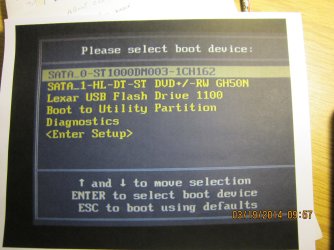
Do you have a Lexar flash stick? It would normally not list it if it isn't inserted and bootable. Try booting it now.
 
Right there in your pic it says to use the arrow keys to move items up or down the list. Are you saying you`ve tried to do that to change the boot order in the bios and it still won`t work ?

Take a pic while your on the boot tab in the bios for us, make sure you get the entire screen.
 

My Computer My Computer

At a glance

Windows 10 Pro x64Intel Core i7 6700KGSkill TridentZ RGB 16GB 3600 16-16-16-36EVGA GTX 980 Ti SC x2
Computer type
PC/Desktop
Computer Manufacturer/Model Number
Skylake Special #666
OS
Windows 10 Pro x64
CPU
Intel Core i7 6700K
Motherboard
Asus Sabertooth Z170 Mark 1
Memory
GSkill TridentZ RGB 16GB 3600 16-16-16-36
Graphics Card(s)
EVGA GTX 980 Ti SC x2
Sound Card
Realtek High Definition
Monitor(s) Displays
AOC G2460PG
Screen Resolution
1920 x 1080 144Hz
Hard Drives
Samsung 860 Pro 256GB, Seagate Barracuda 4TB x2
PSU
EVGA 1000 P2, EVGA White Custom Braided Cables
Case
Corsair Vengeance C70 Gunmetal Black
Cooling
Corsair H100i v2, Corsair ML120 x2, Thermal Grizzly Kryonaut
Keyboard
Logitech G910 Orion Spectrum
Mouse
Logitech G700s
Internet Speed
Verizon Fios Quantum Gateway 75/75
Antivirus
Windows Defender, Malwarebytes Free 3.8.3
Browser
Chrome
Other Info
Corsair SP120 x4, LG Blu-ray Drive, Durabrand HT-395 100 Watt Dolby Digital Amp, Corsair H2100 Wireless 7.1 Headset
I'm not sure if my friend has a Lexar flash stick but he must. So will investigate.

Yes I have tried to move the items up and down. What it does is put me in another window with
the Usb 1st and then when I power down and back up it goes back to the way it was before.

Going to my friends house tomorrow 3-21 and try some of these things.
Thanks again.....
 

My Computer My Computer

At a glance

windows 7 Pro 64 bitmini tower4gnvidia geforce gt730 graphics card
Computer type
PC/Desktop
Computer Manufacturer/Model Number
had the system built by PCsandParts
OS
windows 7 Pro 64 bit
CPU
mini tower
Motherboard
h110m-k (lga1151)
Memory
4g
Graphics Card(s)
nvidia geforce gt730 graphics card
Sound Card
high definition audio device
Monitor(s) Displays
19" dell ultra sharp
Screen Resolution
1280 x 800
Hard Drives
Kingston SSD
PSU
?
Case
?
Cooling
?
Keyboard
standard ps/2 keyboard
Mouse
ps/2 compatible optical
Internet Speed
fiber optics
Antivirus
ESET Smart Security
Browser
IE11
Other Info
no Wifi. Bose speakers, optical drive tsstcorp dvd+-RW
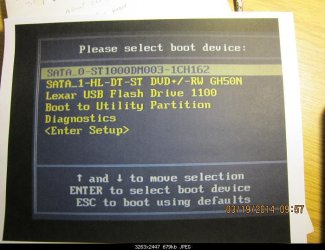
Again, let me point out that the screen being shown is the one-time boot device (f12) screen, not the BIOS configuration (f2) screen. Selection here will not be saved to the BIOS. The last choice <Enter Setup> on the list will take you to the BIOS configuration.
Boot Device.jpg
 

My Computer My Computer

At a glance

Windows 7 Ultimate x86 and x64
Computer type
PC/Desktop
Computer Manufacturer/Model Number
Dell, HP, Toshiba, Compaq
OS
Windows 7 Ultimate x86 and x64
If my memory serves me correctly, the last choice booted me back into the windows desktop.
I have in the past tried the "f2" route and that did not change the BIOS either.
But I will give it another shot.
IMHO it has to be this "Celeron" chip that is causing the problem. On my 2 computers
with the Pentium and higher chip the boot order is changed easily.
 

My Computer My Computer

At a glance

windows 7 Pro 64 bitmini tower4gnvidia geforce gt730 graphics card
Computer type
PC/Desktop
Computer Manufacturer/Model Number
had the system built by PCsandParts
OS
windows 7 Pro 64 bit
CPU
mini tower
Motherboard
h110m-k (lga1151)
Memory
4g
Graphics Card(s)
nvidia geforce gt730 graphics card
Sound Card
high definition audio device
Monitor(s) Displays
19" dell ultra sharp
Screen Resolution
1280 x 800
Hard Drives
Kingston SSD
PSU
?
Case
?
Cooling
?
Keyboard
standard ps/2 keyboard
Mouse
ps/2 compatible optical
Internet Speed
fiber optics
Antivirus
ESET Smart Security
Browser
IE11
Other Info
no Wifi. Bose speakers, optical drive tsstcorp dvd+-RW
Sorry to jump in, I do not want to step on someone's toes but as a reader of this thread I am missing a clear answer from the OP:

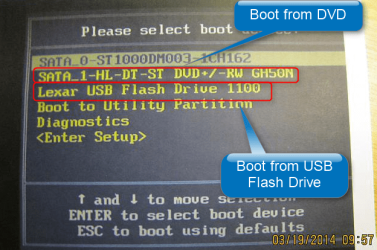
The last screenshot, as mentioned before, clearly shows a boot device selection menu and indicates booting from both DVD and USB Flash is possible. Have you or have you not moved the selection with arrow keys to second (DVD) or third (USB Flash) selection confirming the selection with Enter?

2014-03-21_11h53_36.png

Kari
 

My Computer My Computer

At a glance

Windows 10 Pro x64 EN-GB1.6 GHz Intel Core i7-720QM Processor6 GBATI Mobility Radeon HD 5850 Graphics
Computer type
Laptop
Computer Manufacturer/Model Number
HP ENVY 17-1150eg
OS
Windows 10 Pro x64 EN-GB
CPU
1.6 GHz Intel Core i7-720QM Processor
Memory
6 GB
Graphics Card(s)
ATI Mobility Radeon HD 5850 Graphics
Sound Card
Beats sound system with integrated subwoofer
Monitor(s) Displays
17" laptop display, 22" LED and 32" Full HD TV through HDMI
Screen Resolution
1600*900 (1), 1920*1080 (2&3)
Hard Drives
Internal: 2 x 500 GB SATA Hard Disk Drive 7200 rpm
External: 2TB for backups, 3TB USB3 network drive for media
Cooling
As Envy runs a bit warm, I have it on a Cooler Master pad
Keyboard
Logitech diNovo Media Desktop Laser (bluetooth)
Mouse
Logitech Performance Mouse MX
Internet Speed
50/10 Mbps VDSL
Antivirus
Windows Defender 4.3.9431.0
Browser
Maxthon 3.5.2., IE11
Thank you for responding Kari.
No I have not moved the selection, as it will NOT move on this Dell Inspiron 560s 64-bit.
That is the whole problem.
I have tried to move them by hitting the f12 key and that does not work.
I have tried to move them by hitting the f2 key and that does not work.

I have 3 computers of varying ages all of which I can rearrange the BIOS at will.
Dell gx280, Dell T3400 and an HP Pavilion.

As of this moment I have given up on this. I will monitor this thread for awhile but
see no hope. This 5 minute job has taken days with no results.
The Dell web site is worthless.

I thank everyone that responded for their efforts.
 

My Computer My Computer

At a glance

windows 7 Pro 64 bitmini tower4gnvidia geforce gt730 graphics card
Computer type
PC/Desktop
Computer Manufacturer/Model Number
had the system built by PCsandParts
OS
windows 7 Pro 64 bit
CPU
mini tower
Motherboard
h110m-k (lga1151)
Memory
4g
Graphics Card(s)
nvidia geforce gt730 graphics card
Sound Card
high definition audio device
Monitor(s) Displays
19" dell ultra sharp
Screen Resolution
1280 x 800
Hard Drives
Kingston SSD
PSU
?
Case
?
Cooling
?
Keyboard
standard ps/2 keyboard
Mouse
ps/2 compatible optical
Internet Speed
fiber optics
Antivirus
ESET Smart Security
Browser
IE11
Other Info
no Wifi. Bose speakers, optical drive tsstcorp dvd+-RW
No I have not moved the selection, as it will NOT move on this Dell Inspiron 560s 64-bit.
That is the whole problem.
I have tried to move them by hitting the f12 key and that does not work.
I have tried to move them by hitting the f2 key and that does not work.

When the screen in your last screenshot shows, the first selection (HDD) is selected. You move down to next selection (DVD) with the down arrow key, not with a function key. If the down arrow key does not work and you are unable to change the selection, then it might be a faulty keyboard.

I repeat: you move in the boot device menu (as shown in your photo) with DOWN and UP arrow keys selecting the boot device, then confirm the selection with Enter:

2014-03-21_21h07_34.png

Press DOWN Arrow once followed by ENTER to select DVD as boot device. Press DOWN Arrow once again to select USB Flash. Twice more to enter BIOS. F2 and F12 keys have no function when you have entered the boot device selection screen, you can press them as much as you want to, nothing will happen.
 

My Computer My Computer

At a glance

Windows 10 Pro x64 EN-GB1.6 GHz Intel Core i7-720QM Processor6 GBATI Mobility Radeon HD 5850 Graphics
Computer type
Laptop
Computer Manufacturer/Model Number
HP ENVY 17-1150eg
OS
Windows 10 Pro x64 EN-GB
CPU
1.6 GHz Intel Core i7-720QM Processor
Memory
6 GB
Graphics Card(s)
ATI Mobility Radeon HD 5850 Graphics
Sound Card
Beats sound system with integrated subwoofer
Monitor(s) Displays
17" laptop display, 22" LED and 32" Full HD TV through HDMI
Screen Resolution
1600*900 (1), 1920*1080 (2&3)
Hard Drives
Internal: 2 x 500 GB SATA Hard Disk Drive 7200 rpm
External: 2TB for backups, 3TB USB3 network drive for media
Cooling
As Envy runs a bit warm, I have it on a Cooler Master pad
Keyboard
Logitech diNovo Media Desktop Laser (bluetooth)
Mouse
Logitech Performance Mouse MX
Internet Speed
50/10 Mbps VDSL
Antivirus
Windows Defender 4.3.9431.0
Browser
Maxthon 3.5.2., IE11
Thank you Kari for responding.
I have done all that several times with no results.
My friend has a bottom of the line computer and it passed all the bios diagnostics.
But to my knowledge the computer seems to be functioning decently.
However I would never buy a computer with a Celeron chip in it.
 

My Computer My Computer

At a glance

windows 7 Pro 64 bitmini tower4gnvidia geforce gt730 graphics card
Computer type
PC/Desktop
Computer Manufacturer/Model Number
had the system built by PCsandParts
OS
windows 7 Pro 64 bit
CPU
mini tower
Motherboard
h110m-k (lga1151)
Memory
4g
Graphics Card(s)
nvidia geforce gt730 graphics card
Sound Card
high definition audio device
Monitor(s) Displays
19" dell ultra sharp
Screen Resolution
1280 x 800
Hard Drives
Kingston SSD
PSU
?
Case
?
Cooling
?
Keyboard
standard ps/2 keyboard
Mouse
ps/2 compatible optical
Internet Speed
fiber optics
Antivirus
ESET Smart Security
Browser
IE11
Other Info
no Wifi. Bose speakers, optical drive tsstcorp dvd+-RW
If the selection does not change when pressing DOWN Arrow, it's a strong indicator that the keyboard is faulty. What chip the PC has, or what OS is installed, those things are totally irrelevant and have nothing to do with this issue.

Your pic shows you can enter boot device selection screen. When there, you select the correct device or BIOS with arrow keys confirming your selection with Enter.

It really is that simple.
 

My Computer My Computer

At a glance

Windows 10 Pro x64 EN-GB1.6 GHz Intel Core i7-720QM Processor6 GBATI Mobility Radeon HD 5850 Graphics
Computer type
Laptop
Computer Manufacturer/Model Number
HP ENVY 17-1150eg
OS
Windows 10 Pro x64 EN-GB
CPU
1.6 GHz Intel Core i7-720QM Processor
Memory
6 GB
Graphics Card(s)
ATI Mobility Radeon HD 5850 Graphics
Sound Card
Beats sound system with integrated subwoofer
Monitor(s) Displays
17" laptop display, 22" LED and 32" Full HD TV through HDMI
Screen Resolution
1600*900 (1), 1920*1080 (2&3)
Hard Drives
Internal: 2 x 500 GB SATA Hard Disk Drive 7200 rpm
External: 2TB for backups, 3TB USB3 network drive for media
Cooling
As Envy runs a bit warm, I have it on a Cooler Master pad
Keyboard
Logitech diNovo Media Desktop Laser (bluetooth)
Mouse
Logitech Performance Mouse MX
Internet Speed
50/10 Mbps VDSL
Antivirus
Windows Defender 4.3.9431.0
Browser
Maxthon 3.5.2., IE11
Back
Top