Solved BitDefender Threat scanner error

just restarted and it did pop-up again about the bitdefender threat scanner error

now what i am completely puzzled now
 

My Computer

Computer type
Laptop
Computer Manufacturer/Model Number
Acer
OS
Windows 7 Home Premium 64bit
CPU
Intel Pentium T4400
Motherboard
Acer Aspire 5732Z
Memory
3 GBytes
Graphics Card(s)
ATI Mobility Radeon HD 4500/5100 Series
Sound Card
Realtek High Definition Audio
Monitor(s) Displays
Generic PnP Monitor
Screen Resolution
1366 X 768
Keyboard
Launch Manager
Mouse
USB Optical Mouse
Internet Speed
130.0 MBps
Antivirus
BT Virus Protect, Spybot Search and Destroy
Browser
Firefox
Bitdefender is not even installed on my laptop so what do I do now

What if I delete the file will that fix it I just deleted it

Or should I reinstall it again or what torchwood

Hi alexhob123,

I have a feeling that BitDefender is either hiding or the program was uninstalled and a driver left behind that is running at startup. To find out for sure I would appreciate if you followed the instructions below:

Down Farbar Recovery Scan Tool to your desktop from one of the links below. You can follow the instructions in this link to change the download location for IE, Chrome, Firefox and Opera, depending on which ever browser you use. If you need more detailed instructions on how to change the default download location, just let me know which browser you prefer to use.

For x64 bit systems download Farbar Recovery Scan Tool x64.


  • Right click on the FRST.exe and choose Run as administrator.
  • When the tool opens click Yes to disclaimer.
  • Under Optional Scan make sure there is a checkmark in the box for Addition.txt to ensure it creates that 2nd log.
  • Press Scan button.
  • Please attach both logs in your next reply.


Please attach the following 2 logs:

FRST.txt
Addition.txt


Thank you,
Donna :)
 

My Computer

Computer type
Laptop
OS
Win7 64-bit, Vista 32-bit, XP 32-bit, W2K 32-bit (VM)
Antivirus
Avast, MSE
Browser
Firefox
Other Info
Multiple systems. Too many specs to name.
Okay I will give it a try the message didn't pop up when I shut down my laptop but should I do this just in case
 

My Computer

Computer type
Laptop
Computer Manufacturer/Model Number
Acer
OS
Windows 7 Home Premium 64bit
CPU
Intel Pentium T4400
Motherboard
Acer Aspire 5732Z
Memory
3 GBytes
Graphics Card(s)
ATI Mobility Radeon HD 4500/5100 Series
Sound Card
Realtek High Definition Audio
Monitor(s) Displays
Generic PnP Monitor
Screen Resolution
1366 X 768
Keyboard
Launch Manager
Mouse
USB Optical Mouse
Internet Speed
130.0 MBps
Antivirus
BT Virus Protect, Spybot Search and Destroy
Browser
Firefox
Hi alexhob123,

Yes. Please do. I would rather be safe than sorry.

:)
 

My Computer

Computer type
Laptop
OS
Win7 64-bit, Vista 32-bit, XP 32-bit, W2K 32-bit (VM)
Antivirus
Avast, MSE
Browser
Firefox
Other Info
Multiple systems. Too many specs to name.
okay here are results DonnaB
 

Attachments

My Computer

Computer type
Laptop
Computer Manufacturer/Model Number
Acer
OS
Windows 7 Home Premium 64bit
CPU
Intel Pentium T4400
Motherboard
Acer Aspire 5732Z
Memory
3 GBytes
Graphics Card(s)
ATI Mobility Radeon HD 4500/5100 Series
Sound Card
Realtek High Definition Audio
Monitor(s) Displays
Generic PnP Monitor
Screen Resolution
1366 X 768
Keyboard
Launch Manager
Mouse
USB Optical Mouse
Internet Speed
130.0 MBps
Antivirus
BT Virus Protect, Spybot Search and Destroy
Browser
Firefox
I will be back on tomorrow dude hope to hear from you then
 

My Computer

Computer type
Laptop
Computer Manufacturer/Model Number
Acer
OS
Windows 7 Home Premium 64bit
CPU
Intel Pentium T4400
Motherboard
Acer Aspire 5732Z
Memory
3 GBytes
Graphics Card(s)
ATI Mobility Radeon HD 4500/5100 Series
Sound Card
Realtek High Definition Audio
Monitor(s) Displays
Generic PnP Monitor
Screen Resolution
1366 X 768
Keyboard
Launch Manager
Mouse
USB Optical Mouse
Internet Speed
130.0 MBps
Antivirus
BT Virus Protect, Spybot Search and Destroy
Browser
Firefox
Hi,
I don't know any "dudes" named Donna :)
 

My Computer

Computer type
PC/Desktop
Computer Manufacturer/Model Number
Custom assembled by me :}
OS
Win-7-Pro64bit 7-H-Prem-64bit
CPU
i7-5930K 2nd i9-9940x both water blocked VRM's too
Motherboard
ASUS SABERTOOTH X99 2nd ASUS x299 Apex
Memory
Trident-z 3200C14 2nd Trident-z 3600C16
Graphics Card(s)
EVGA 1080ti ftw3 2nd Titan Xp both water blocked
Sound Card
Built-in Realtek
Monitor(s) Displays
1-AOC G2460PG 24"G-Sync 144Hz/ 2nd 1-ASUS VG248QE 24" 144Hz
Screen Resolution
1920 x 1080 144Hz
Hard Drives
2-Samsung M.2 Evo & Evo Plus
2-Samsung 850 EVO 500GB SSD's/ 3-2.5 W.D. Black 1tb-&3-1tb/3-3.5 WD Black 1tb hdd's
PSU
EVGA SuperNOVA 1000-P2 2nd 1200-P2
Case
2-Corsair Obsidian Series 450D Black ATX Mid Tower
Cooling
Custom water loops
Keyboard
Logitech G710+/ 2nd Logitech G910
Mouse
2-RedDragon M901 Perdition 16400 dpi Gaming mouse = wired
Internet Speed
Comcast Ping 19ms 89.31mbps download speed 6.12mbps upload
Antivirus
Malwarebytes Pro/ Superantispyware Pro
Browser
FireFox & Pale moon
Other Info
2nd ASUS X299 Apex/Intel i9-9940x with Custom water loop/7H-Prem-x64/Corsair 450D case/Ram Trident-z 3600C16 4x8gb / Samsung970Evo plus 500gb SSD/Dual ssd EZ swap evo/PSU EVGA SuperNova 1200w-P2 80+Platinum/GPU Titan Xp /8-ML-140 on push-pull on 2-280GTX rads
I will be back on tomorrow dude hope to hear from you then
Hi,
I don't know any "dudes" named Donna :)
:roflmao: I prefer dudette, myself. ;)

You have a bunch of plugins in Chrome that show No File. They can be removed by refreshing Google Chrome plugins cache as follows...


  • Type chrome://plugins into the address bar
  • Switch the status of the offending plugin to Disable, then back to Enable


I saw nothing that is associated with BitDefender, though there is a need for some clean up here of orphaned files, tasks, etc. Please do as follows and let me know if you still get the error popup about on reboot. I am hoping a good cleaning of the temp folders will remove the file that is causing the error popup. The fix script is quite long so please make sure to copy everything in the script list. :)

NOTICE: This script was written specifically for this user, for use on this particular machine. Running this on any other machine may cause damage to your operating system


  • Open notepad (Start orb > type notepad into Start Search > chose notepad from list.
  • Please copy the entire contents of the code box below.
    (To do this highlight the contents of the box, right click on it and select copy. Right-click in the open notepad and select Paste).
  • Save it to the same directory as frst.exe (or frst64.exe) as fixlist.txt.

    Code:
    CreateRestorePoint:
    CloseProcesses:
    HKLM-x32\...\RunOnce: [AvgUninstallURL] => cmd.exe /c start hxxp://www.avg.com/ww.special-uninstallation-feedback-app?lic=SUFOUEctN1NBSVItTlVRVTItQTRFRkItSFBZU04tVg"&"inst=NzYtOTQ3MDM0NTcyLUZMMTArMS1TVVArMS1ERFQrMC1ERDEwRisxLVNUMTBGQVBQKzEtRjE (the data entry has 199 more characters).
    Winlogon\Notify\SDWinLogon-x32: SDWinLogon.dll [X]
    HKU\S-1-5-19\Control Panel\Desktop\\SCRNSAVE.EXE -> 
    HKU\S-1-5-20\Control Panel\Desktop\\SCRNSAVE.EXE -> 
    HKU\S-1-5-21-9838473-2416347081-955692511-1000\...\Policies\Explorer: [HideSCAVolume] 0
    HKU\S-1-5-21-9838473-2416347081-955692511-1000\...\Policies\Explorer: [HideSCAPower] 0
    HKU\S-1-5-21-9838473-2416347081-955692511-1000\...\Policies\Explorer: [HideSCANetwork] 0
    HKU\S-1-5-21-9838473-2416347081-955692511-1000\...\Policies\Explorer: [HideSCAHealth] 0
    HKU\S-1-5-21-9838473-2416347081-955692511-1000\...\Policies\Explorer: [NoSaveSettings] 0
    HKU\S-1-5-21-9838473-2416347081-955692511-1000\...\Policies\Explorer: [NoLowDiskSpaceChecks] 1
    HKU\S-1-5-21-9838473-2416347081-955692511-1000\Control Panel\Desktop\\SCRNSAVE.EXE ->
    HKU\S-1-5-18\Control Panel\Desktop\\SCRNSAVE.EXE -> 
    HKU\S-1-5-21-9838473-2416347081-955692511-1000\...\MountPoints2: E - E:\Setup.now.exe
    HKU\S-1-5-21-9838473-2416347081-955692511-1000\...\MountPoints2: F - F:\Autorun.exe
    HKU\S-1-5-21-9838473-2416347081-955692511-1000\...\MountPoints2: G - G:\Launcher\LAUNCHER.EXE
    HKU\S-1-5-21-9838473-2416347081-955692511-1000\...\MountPoints2: {02567a19-5ed3-11e5-9df0-705ab6d00da5} - H:\Launcher.exe
    HKU\S-1-5-21-9838473-2416347081-955692511-1000\...\MountPoints2: {0e5eb27a-52e6-11e4-9904-705ab6d00da5} - E:\Setup.now.exe
    HKU\S-1-5-21-9838473-2416347081-955692511-1000\...\MountPoints2: {122b71fd-3747-11e4-bc9d-705ab6d00da5} - E:\Setup.now.exe
    HKU\S-1-5-21-9838473-2416347081-955692511-1000\...\MountPoints2: {122b7203-3747-11e4-bc9d-705ab6d00da5} - G:\Launcher\LAUNCHER.EXE
    HKU\S-1-5-21-9838473-2416347081-955692511-1000\...\MountPoints2: {6a42d840-dba4-11e0-8875-806e6f6e6963} - G:\SETUP.EXE
    ShellIconOverlayIdentifiers: [egisPSDP] -> {30A0A3F6-38AC-4C53-BB8B-0D95238E25BA} => C:\Program Files (x86)\EgisTec\MyWinLocker 3\x64\psdprotect.dll No File
    ShellIconOverlayIdentifiers-x32: [egisPSDP] -> {30A0A3F6-38AC-4C53-BB8B-0D95238E25BA} => C:\Program Files (x86)\EgisTec\MyWinLocker 3\x86\psdprotect.dll No File
    GroupPolicyScripts-x32\User: Restriction <======= ATTENTION
    HKLM\SOFTWARE\Policies\Microsoft\Internet Explorer: Restriction <======= ATTENTION
    HKU\.DEFAULT\SOFTWARE\Policies\Microsoft\Internet Explorer: Restriction <======= ATTENTION
    HKU\S-1-5-21-9838473-2416347081-955692511-1000\SOFTWARE\Policies\Microsoft\Internet Explorer: Restriction <======= ATTENTION
    HKLM\Software\Microsoft\Internet Explorer\Main,Search Page = 
    HKLM\Software\Wow6432Node\Microsoft\Internet Explorer\Main,Search Page = 
    HKLM\Software\Microsoft\Internet Explorer\Main,Default_Page_URL = 
    HKLM\Software\Wow6432Node\Microsoft\Internet Explorer\Main,Default_Page_URL = 
    HKLM\Software\Microsoft\Internet Explorer\Main,Default_Search_URL = 
    HKLM\Software\Wow6432Node\Microsoft\Internet Explorer\Main,Default_Search_URL = 
    HKLM\Software\Microsoft\Internet Explorer\Main,Local Page = 
    HKLM\Software\Wow6432Node\Microsoft\Internet Explorer\Main,Local Page = 
    SearchScopes: HKU\.DEFAULT -> {2F0149B9-28EA-40B4-9523-541F101B026C} URL = hxxp://www.scanquery.com/?prt=SCANQUERY145&keywords={searchTerms}
    SearchScopes: HKU\.DEFAULT -> {483830EE-A4CD-4b71-B0A3-3D82E62A6909} URL = 
    CHR HKLM\...\Chrome\Extension: [fheoggkfdfchfphceeifdbepaooicaho] - C:\Program Files (x86)\McAfee\SiteAdvisor\McChPlg.crx <not found>
    CHR HKLM\...\Chrome\Extension: [Yontoo Layers] - C:\Users\Alex\AppData\Local\Temp\Yontoo Layers <not found>
    CHR HKU\S-1-5-21-9838473-2416347081-955692511-1000\SOFTWARE\Google\Chrome\Extensions\...\Chrome\Extension: [Yontoo Layers] - C:\Users\Alex\AppData\Local\Temp\YontooLayers.crx <not found>
    CHR HKLM-x32\...\Chrome\Extension: [dnnajmlhehgnkclpdlggknanmcplloej] - C:\Program Files (x86)\PutLockerDownloader\PutLockerDownloader10.crx <not found>
    CHR HKLM-x32\...\Chrome\Extension: [fheoggkfdfchfphceeifdbepaooicaho] - C:\Program Files (x86)\McAfee\SiteAdvisor\McChPlg.crx <not found>
    CHR HKLM-x32\...\Chrome\Extension: [jfmjfhklogoienhpfnppmbcbjfjnkonk] - <no Path/update_url>
    S2 IAANTMON; C:\Program Files (x86)\Intel\Intel Matrix Storage Manager\IAANTMon.exe [X]
    S2 McShield; "C:\Program Files\Common Files\McAfee\SystemCore\\mcshield.exe" [X]
    S3 MWLService; C:\Program Files (x86)\EgisTec\MyWinLocker 3\x86\\MWLService.exe [X]
    S3 OWSTimer; "C:\Program Files (x86)\Microsoft Office\Office\OWSTIMER.EXE" [X]
    S3 cpuz135; \??\C:\Program Files (x86)\CPUID\PC Wizard 2012\pcwiz_x64.sys [X]
    S3 cpuz137; \??\C:\Program Files (x86)\CPUID\PC Wizard 2013\pcwiz_x64.sys [X]
    S3 MFE_RR; \??\C:\Users\Alex\AppData\Local\Temp\mfe_rr.sys [X]
    S3 VBoxNetFlt; system32\DRIVERS\VBoxNetFlt.sys [X]
    S3 vmci; \SystemRoot\system32\DRIVERS\vmci.sys [X]
    S3 VMnetAdapter; system32\DRIVERS\vmnetadapter.sys [X]
    S3 WinRing0_1_2_0; \??\C:\Program Files (x86)\Razer\Razer Game Booster\Driver\WinRing0x64.sys [X]
    C:\Users\Alex\AppData\Local\Temp\LEGOLOTR.exe
    C:\Users\Alex\AppData\Local\Temp\libeay32.dll
    C:\Users\Alex\AppData\Local\Temp\msvcr120.dll
    C:\Users\Alex\AppData\Local\Temp\sqlite3.dll
    CustomCLSID: HKU\S-1-5-21-9838473-2416347081-955692511-1000_Classes\CLSID\{590C4387-5EBD-4D46-8A84-CD0BA2EF2856}\InprocServer32 -> C:\Users\Alex\AppData\Local\Google\Update\1.3.30.3\psuser_64.dll => No File
    CustomCLSID: HKU\S-1-5-21-9838473-2416347081-955692511-1000_Classes\CLSID\{793EE463-1304-471C-ADF1-68C2FFB01247}\InprocServer32 -> C:\Users\Alex\AppData\Local\Google\Update\1.3.29.5\psuser_64.dll => No File
    Task: {35BA54F1-9222-4473-BFA2-7D0AF2018164} - System32\Tasks\{8CEBFBC1-3B87-466C-9D53-1A7C3325425A} => pcalua.exe -a C:\Users\Alex\AppData\Local\Temp\{30D756A7-0D8B-44E5-ADED-5EEDF8A2EBE5}\setup.exe -d "C:\Program Files (x86)\Mozilla Firefox" <==== ATTENTION
    Task: {4A9810FA-9640-4BE8-A079-C24B1505CE58} - System32\Tasks\Origin => C:\Windows\system32\config\systemprofile\AppData\Roaming\Origin\update.vbe <==== ATTENTION
    Task: {AB4807A8-F8BF-4845-ADEC-199388A757F2} - System32\Tasks\RegAce Scheduled Scan - Alex => C:\Program Files (x86)\RegAce System Suite\RegAce.exe
    Task: {B51EFE95-6CDE-4AF5-8405-33FE6845C581} - System32\Tasks\{7BC60DBC-67CD-4CC9-A45E-C6583CFF292E} => pcalua.exe -a C:\Users\Alex\AppData\Local\Temp\{5210E0CE-3F01-4A19-8AB1-9F1EF0594C0A}\setup.exe -d "C:\Program Files (x86)\Mozilla Firefox" <==== ATTENTION
    Task: {ECC8D5E2-353A-4BAF-9CE0-A2729214AC47} - System32\Tasks\4575 => Wscript.exe C:\Users\Alex\AppData\Local\Temp\launchie.vbs //B <==== ATTENTION
    Task: C:\Windows\Tasks\RegAce Scheduled Scan - Alex.job => C:\Program Files (x86)\RegAce System Suite\RegAce.exe
    AlternateDataStreams: C:\ProgramData\Temp:0B4227B4 [124]
    AlternateDataStreams: C:\ProgramData\Temp:4D066AD2 [278]
    AlternateDataStreams: C:\ProgramData\Temp:E1F04E8D [124]
    AlternateDataStreams: C:\Users\Public\DRM:احتضان [48]
    MSCONFIG\startupreg: AVG_TRAY => C:\Program Files (x86)\AVG\AVG10\avgtray.exe
    EmptyTemp:
  • Run frst.exe (on 64bit, run frst64.exe) and press the Fix button just once and wait.
  • The tool will make a log (Fixlog.txt) which you will find where you saved FRST. Please attach to your next reply.

Next:

  • Right click on the FRST.exe and choose Run as administrator (XP users click run after receipt of Windows Security Warning - Open File). When the tool opens click Yes to disclaimer.
  • Under Optional Scan place a checkmark in the box for Addition.txt to ensure it creates that 2nd log.
  • Press Scan button.
  • Please attach both logs in your next reply along with the Fixlog.txt.
 

My Computer

Computer type
Laptop
OS
Win7 64-bit, Vista 32-bit, XP 32-bit, W2K 32-bit (VM)
Antivirus
Avast, MSE
Browser
Firefox
Other Info
Multiple systems. Too many specs to name.
here is the results

Hope this is correct when you are on next time

I just restarted via system restore and the message still keeps popping up so that didn't work either why however I will be removing BT Virus Protect soon because we are going on to virgin media and we won't be able to use it anymore so should i use BitDefender when we change to Virgin Media
 

Attachments

Last edited:

My Computer

Computer type
Laptop
Computer Manufacturer/Model Number
Acer
OS
Windows 7 Home Premium 64bit
CPU
Intel Pentium T4400
Motherboard
Acer Aspire 5732Z
Memory
3 GBytes
Graphics Card(s)
ATI Mobility Radeon HD 4500/5100 Series
Sound Card
Realtek High Definition Audio
Monitor(s) Displays
Generic PnP Monitor
Screen Resolution
1366 X 768
Keyboard
Launch Manager
Mouse
USB Optical Mouse
Internet Speed
130.0 MBps
Antivirus
BT Virus Protect, Spybot Search and Destroy
Browser
Firefox
Ok. Dudette is back online. ;)

And yep! That is correct. What do you mean by you "just restarted via system restore"?

This very strange. Have you ever had BitDefender installed on this computer? Let's run the uninstall tool for BitDefender and see if that helps.

You can find it >> here <<

I see that BT Virus Protect had teamed up with McAfee. From my understanding, when you install BT Virus Protect it actually installs McAfee(see steps 3 and 4 in BT link).

Not sure I like what I found here about BT/McAfee.

To make the BT Virus Protect installation process as easy as possible, it will automatically detect and remove many existing software security packages (after asking for your permission).
The appropriate way to change AV software is to use the previous AV's uninstaller to make sure all residual files have been removed. I usually then instruct the user to run the uninstall tool that was designed for that purpose to ensure ALL residual files have been remove that could cause conflict. I don't see how BT/McAfee could completely detect all the files from a previously installed program so they can be removed.

I am not sure which AV suite Virgin offers, though whatever they offer you do not have to use it. Maybe one of the members here who has Virign can provide some insight on that. Personally, I have never been a big fan of AV's that were offered by any internet provider, at least not since my aging mother was scammed into believing it was "included" in the package she got and they never told her that she was actually paying $5.99 a month for.

You can use BitDefender if you like. I am a big Avast fan myself. If you do choose to go with BitDefender, still use the uninstall tool I linked you to above. I want to see if that will remove whatever is making that popup appear. Otherwise, I am going to have you perform a search for that file and see if we can annihilate the bugger.

You can delete the FRST/Addition.txt logs off your desktop if you like. There should be copies saved in the path below which will be removed when I have you uninstall the tool with a special removal tool I use once we get this error popup sorted out.

C:\FRST\Logs

 

My Computer

Computer type
Laptop
OS
Win7 64-bit, Vista 32-bit, XP 32-bit, W2K 32-bit (VM)
Antivirus
Avast, MSE
Browser
Firefox
Other Info
Multiple systems. Too many specs to name.
should i do the uninstaller first then restart then computer to see if it has worked
 

My Computer

Computer type
Laptop
Computer Manufacturer/Model Number
Acer
OS
Windows 7 Home Premium 64bit
CPU
Intel Pentium T4400
Motherboard
Acer Aspire 5732Z
Memory
3 GBytes
Graphics Card(s)
ATI Mobility Radeon HD 4500/5100 Series
Sound Card
Realtek High Definition Audio
Monitor(s) Displays
Generic PnP Monitor
Screen Resolution
1366 X 768
Keyboard
Launch Manager
Mouse
USB Optical Mouse
Internet Speed
130.0 MBps
Antivirus
BT Virus Protect, Spybot Search and Destroy
Browser
Firefox
there are different types of bitdefender I don't know which one to choose
 

My Computer

Computer type
Laptop
Computer Manufacturer/Model Number
Acer
OS
Windows 7 Home Premium 64bit
CPU
Intel Pentium T4400
Motherboard
Acer Aspire 5732Z
Memory
3 GBytes
Graphics Card(s)
ATI Mobility Radeon HD 4500/5100 Series
Sound Card
Realtek High Definition Audio
Monitor(s) Displays
Generic PnP Monitor
Screen Resolution
1366 X 768
Keyboard
Launch Manager
Mouse
USB Optical Mouse
Internet Speed
130.0 MBps
Antivirus
BT Virus Protect, Spybot Search and Destroy
Browser
Firefox
i uninstalled it restarted it and it didn't appear but then i shutdown and it popped up again why oh why is this happening :mad::mad:
 

My Computer

Computer type
Laptop
Computer Manufacturer/Model Number
Acer
OS
Windows 7 Home Premium 64bit
CPU
Intel Pentium T4400
Motherboard
Acer Aspire 5732Z
Memory
3 GBytes
Graphics Card(s)
ATI Mobility Radeon HD 4500/5100 Series
Sound Card
Realtek High Definition Audio
Monitor(s) Displays
Generic PnP Monitor
Screen Resolution
1366 X 768
Keyboard
Launch Manager
Mouse
USB Optical Mouse
Internet Speed
130.0 MBps
Antivirus
BT Virus Protect, Spybot Search and Destroy
Browser
Firefox
If i open up the file BitDefender Threat Scanner.dmp with notepad or word there is nothing even on it strange
 

My Computer

Computer type
Laptop
Computer Manufacturer/Model Number
Acer
OS
Windows 7 Home Premium 64bit
CPU
Intel Pentium T4400
Motherboard
Acer Aspire 5732Z
Memory
3 GBytes
Graphics Card(s)
ATI Mobility Radeon HD 4500/5100 Series
Sound Card
Realtek High Definition Audio
Monitor(s) Displays
Generic PnP Monitor
Screen Resolution
1366 X 768
Keyboard
Launch Manager
Mouse
USB Optical Mouse
Internet Speed
130.0 MBps
Antivirus
BT Virus Protect, Spybot Search and Destroy
Browser
Firefox
Well you can run a scan and create a log with UVK then upload the results. Let's see if anything "BitDrfender" related shows up.

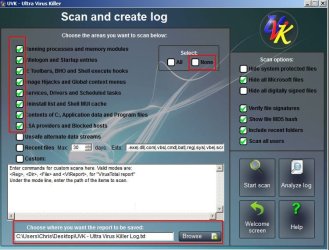
UVK - Ultra Virus Killer

Need to go to the "Scan & Create Log" section then tick "None" along with the following items then run a scan. Upload the results.

UVK - Ultra Virus Killer.jpg

RE: MyWinLocker removal. You've got leftovers. You can run this fix in FARBAR if you like:


FixList contents:

Code:
start

HKLM\...\Run: [mwlDaemon] => C:\Program Files (x86)\EgisTec\MyWinLocker 3\x86\mwlDaemon.exe

ShellIconOverlayIdentifiers: [egisPSDP] -> {30A0A3F6-38AC-4C53-BB8B-0D95238E25BA} => C:\Program Files (x86)\EgisTec\MyWinLocker 3\x64\psdprotect.dll No File

ShellIconOverlayIdentifiers-x32: [egisPSDP] -> {30A0A3F6-38AC-4C53-BB8B-0D95238E25BA} => C:\Program Files (x86)\EgisTec\MyWinLocker 

S3 MWLService; C:\Program Files (x86)\EgisTec\MyWinLocker 3\x86\\MWLService.exe

end
 

My Computer

Computer type
Laptop
Computer Manufacturer/Model Number
ASUS
OS
Microsoft Windows 7 Home Premium 64-bit 7601 Multiprocessor Free Service Pack 1
CPU
AMD C-60 APU with Radeon(tm) HD Graphics
Motherboard
ASUSTeK COMPUTER INC. X501U
Memory
4.00 GB
Graphics Card(s)
AMD Radeon HD 6290 Graphics
Sound Card
(1) AMD High Definition Audio Device (2) Realtek High Defi
Screen Resolution
1366 x 768 x 32 bits (4294967296 colors) @ 60 Hz
Hard Drives
Hitachi HTS545050A7E380 SATA Disk Device
Antivirus
Comodo CIS & FW, SecureAplus App Whitelisting, Threatfire
Browser
Cyberfox 64bit, Opera 64bit, Airfox
Other Info
Spy-The-Spy, HitmanPro.Alert, Norton Connect Safe, MJRegWatcher, BitDefender TrafficLight, Voodoo Shield, Zemana AntiMalware
okay mate will do
 

My Computer

Computer type
Laptop
Computer Manufacturer/Model Number
Acer
OS
Windows 7 Home Premium 64bit
CPU
Intel Pentium T4400
Motherboard
Acer Aspire 5732Z
Memory
3 GBytes
Graphics Card(s)
ATI Mobility Radeon HD 4500/5100 Series
Sound Card
Realtek High Definition Audio
Monitor(s) Displays
Generic PnP Monitor
Screen Resolution
1366 X 768
Keyboard
Launch Manager
Mouse
USB Optical Mouse
Internet Speed
130.0 MBps
Antivirus
BT Virus Protect, Spybot Search and Destroy
Browser
Firefox
Here are scan results callender
 

Attachments

My Computer

Computer type
Laptop
Computer Manufacturer/Model Number
Acer
OS
Windows 7 Home Premium 64bit
CPU
Intel Pentium T4400
Motherboard
Acer Aspire 5732Z
Memory
3 GBytes
Graphics Card(s)
ATI Mobility Radeon HD 4500/5100 Series
Sound Card
Realtek High Definition Audio
Monitor(s) Displays
Generic PnP Monitor
Screen Resolution
1366 X 768
Keyboard
Launch Manager
Mouse
USB Optical Mouse
Internet Speed
130.0 MBps
Antivirus
BT Virus Protect, Spybot Search and Destroy
Browser
Firefox
I just shutdown my laptop and it didn't pop up but I have a strange feeling that it might pop up again when I shut it down or restart it again when I am on my laptop again If it happens again when I shut down my laptop the next time I am on my laptop when I am done I will get back to you okay I should be on my laptop on Saturday hopefully
 

My Computer

Computer type
Laptop
Computer Manufacturer/Model Number
Acer
OS
Windows 7 Home Premium 64bit
CPU
Intel Pentium T4400
Motherboard
Acer Aspire 5732Z
Memory
3 GBytes
Graphics Card(s)
ATI Mobility Radeon HD 4500/5100 Series
Sound Card
Realtek High Definition Audio
Monitor(s) Displays
Generic PnP Monitor
Screen Resolution
1366 X 768
Keyboard
Launch Manager
Mouse
USB Optical Mouse
Internet Speed
130.0 MBps
Antivirus
BT Virus Protect, Spybot Search and Destroy
Browser
Firefox
Okay I had a quick look. It's not a Bitdefender AV problem - it's a Spybot Search & Destroy problem.

Example from your log shows Spybot files signed by BitDefender:

C:\Program Files (x86)\Spybot - Search & Destroy 2\av\scan.dll | BitDefender ThreatScanner | 9B375BB63F99B113C065A5DB4E632E23 | Signed : BitDefender

Also read here:

Spybot Anti-Spyware Partners with Bitdefender to Create Spybot +AV

To uninstall it try exiting any open Spybot windows and if there's a Spybot icon in the system tray right click it and find an option to exit the program. Then check task manager for running Spybot processes and end them if found.

Then Start> Run

type services.msc

Press Enter.

Check for and stop any Spybot S&D service if found.

Then Start > Run

then type:

C:\Program Files (x86)\Spybot – Search & Destroy 2\unins000(.exe)

That should uninstall it. Reboot then check that it was removed. If you like you could upload another UVK scan.

Anyway if you still want to use Spybot S&D you'd need to reinstall it.

Also I found a couple of things in your log. I'll post a fix for those soon.
 

My Computer

Computer type
Laptop
Computer Manufacturer/Model Number
ASUS
OS
Microsoft Windows 7 Home Premium 64-bit 7601 Multiprocessor Free Service Pack 1
CPU
AMD C-60 APU with Radeon(tm) HD Graphics
Motherboard
ASUSTeK COMPUTER INC. X501U
Memory
4.00 GB
Graphics Card(s)
AMD Radeon HD 6290 Graphics
Sound Card
(1) AMD High Definition Audio Device (2) Realtek High Defi
Screen Resolution
1366 x 768 x 32 bits (4294967296 colors) @ 60 Hz
Hard Drives
Hitachi HTS545050A7E380 SATA Disk Device
Antivirus
Comodo CIS & FW, SecureAplus App Whitelisting, Threatfire
Browser
Cyberfox 64bit, Opera 64bit, Airfox
Other Info
Spy-The-Spy, HitmanPro.Alert, Norton Connect Safe, MJRegWatcher, BitDefender TrafficLight, Voodoo Shield, Zemana AntiMalware
RE: MyWinlocker removal (you posted in another thread when explorer was crashing)

This script should remove all the leftovers.

Code:
<UVKCommandsScript>

<SDelete>

<FileContextMenu> | EDSshellExt | C:\Program Files (x86)\EgisTec\MyWinLocker 3\x64\mwlshellext.dll | No description | Hash error: File not found | Unsigned :  No publisher

<FolderContextMenu> | EDSshellExt | C:\Program Files (x86)\EgisTec\MyWinLocker 3\x64\mwlshellext.dll | No description | Hash error: File not found | Unsigned :  No publisher

<Services> | MWLService | File not found: C:\Program Files (x86)\EgisTec\MyWinLocker 3\x86\\MWLService.exe | No description | Stopped - Manual | Hash error: File not found | Unsigned :  No publisher

<HKLMW6432...Run> | EgisTecLiveUpdate | File not found: "C:\Program Files (x86)\EgisTec Egis Software Update\EgisUpdate.exe" | No description | Hash error: File not found | Unsigned :  No publisher

<ContentsCommonAppData> | EgisTec | 0 bytes | Directory

<@Alex\LocalAppdata> | EgisTec | 179 bytes | Directory

<@Alex\LocalAppdata> | MyWinLockerInstaller.txt-20120205.log | 2.62 KB | No description | CE20BAFB38A080A7F303440B023EB5B1 | Unsigned :  No publisher

<@Alex\LocalAppdata> | MyWinLockerInstaller.txt-20160923.log | 25.5 KB | No description | 48B83896D92DDEEAF8A209558AA26C0E | Unsigned :  No publisher

<HKLM...Run> | mwlDaemon | File not found: C:\Program Files (x86)\EgisTec\MyWinLocker 3\x86\mwlDaemon.exe | No description | Hash error: File not found | Unsigned :  No publisher

<Drivers> | mwlPSDNServ | C:\Windows\system32\DRIVERS\mwlPSDNServ.sys | MyWinLocker PSD Named Pipe Driver | Running - System | 0BEFE32CA56D6EE89D58175725596A85 | Signed :  Egis Technology Inc.

<Drivers> | mwlPSDVDisk | C:\Windows\system32\DRIVERS\mwlPSDVDisk.sys | MyWinLocker PSD Virtual Disk Driver | Running - System | D43BC633B8660463E446E28E14A51262 | Signed :  Egis Technology Inc.

<CleanAllUsersTemp>

<Reboot>

Copy that lot into a notepad document and save the file with the .uvk extension. Close notepad then double click the file you saved.

Or just use this instead:


Extract the MyWinLFixocker.uvk file from the zip and save to desktop.

Double click it to run it in UVK.

On the screen that opens up click "Run / Fix Listed"

When finished your computer should reboot so don't leave any open work unsaved.

A reboot will be needed to delete some running files.
 

My Computer

Computer type
Laptop
Computer Manufacturer/Model Number
ASUS
OS
Microsoft Windows 7 Home Premium 64-bit 7601 Multiprocessor Free Service Pack 1
CPU
AMD C-60 APU with Radeon(tm) HD Graphics
Motherboard
ASUSTeK COMPUTER INC. X501U
Memory
4.00 GB
Graphics Card(s)
AMD Radeon HD 6290 Graphics
Sound Card
(1) AMD High Definition Audio Device (2) Realtek High Defi
Screen Resolution
1366 x 768 x 32 bits (4294967296 colors) @ 60 Hz
Hard Drives
Hitachi HTS545050A7E380 SATA Disk Device
Antivirus
Comodo CIS & FW, SecureAplus App Whitelisting, Threatfire
Browser
Cyberfox 64bit, Opera 64bit, Airfox
Other Info
Spy-The-Spy, HitmanPro.Alert, Norton Connect Safe, MJRegWatcher, BitDefender TrafficLight, Voodoo Shield, Zemana AntiMalware
Back
Top