Bitlocker Encryption drives

vawii

New member
Local time
4:42 AM
Messages
20
I m having problems with bitlocker :cry: .... my hard drives are not showing in control panel-->system&security-->Bitlocker Encryption drive .... any help related to this please ?????????????????????????????????????????????????????????
 

My Computer

OS
windows 7 ultimate 64 bit

My Computer

Computer type
PC/Desktop
Computer Manufacturer/Model Number
Gateway / Slight Modifications
OS
Windows 8 64 bit PRO
CPU
AMD Phenom X4 9100e
Motherboard
Gateway RS780
Memory
2GB X2 DDR2
Graphics Card(s)
Sapphire HD 6850
Sound Card
Integrated
Monitor(s) Displays
Gateway 19" + Dell 19"
Screen Resolution
1440X900 sometimes 2880 by 900
Hard Drives
WD 80GB
WD 640GB
WD 1,000GB
PSU
Antec BP 550watts
Case
Antec 300
Cooling
Stock Cooling
Keyboard
Saitek Eclipse II
Mouse
Gigabyte GM-M6800
Internet Speed
D: 30Mbps U:4Mbps
Antivirus
Avast version 8
Browser
Internet Explorer ver 10 64 bit
Other Info
This is my work computer.
I have another laptop running Windows 7 64 bit.
Another PC running Windows 8 64 bit pro.
Total of 3
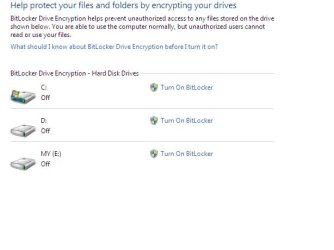
Thanks mate ... yep i have checked the h/w specs its fine .... please see the attachment only c:\ drive is showing i want to turn bitlocker On any drive other than c:\ .... any suggestion
 

Attachments

  • Bitlocker.jpg
    Bitlocker.jpg
    21.3 KB · Views: 21

My Computer

OS
windows 7 ultimate 64 bit
Hmmm, i dont quite understand your question. I am looking at your attachment all are showing, you can turn on bitlocker on any of them... Do you get an error when you attemp to?
 

My Computer

Computer type
PC/Desktop
Computer Manufacturer/Model Number
Gateway / Slight Modifications
OS
Windows 8 64 bit PRO
CPU
AMD Phenom X4 9100e
Motherboard
Gateway RS780
Memory
2GB X2 DDR2
Graphics Card(s)
Sapphire HD 6850
Sound Card
Integrated
Monitor(s) Displays
Gateway 19" + Dell 19"
Screen Resolution
1440X900 sometimes 2880 by 900
Hard Drives
WD 80GB
WD 640GB
WD 1,000GB
PSU
Antec BP 550watts
Case
Antec 300
Cooling
Stock Cooling
Keyboard
Saitek Eclipse II
Mouse
Gigabyte GM-M6800
Internet Speed
D: 30Mbps U:4Mbps
Antivirus
Avast version 8
Browser
Internet Explorer ver 10 64 bit
Other Info
This is my work computer.
I have another laptop running Windows 7 64 bit.
Another PC running Windows 8 64 bit pro.
Total of 3
Dear but these drives are not showing in my system only c:\ drive is showing ...........
 

My Computer

OS
windows 7 ultimate 64 bit
I understand what the OP is trying to say. What you can do is open up windows explorer and right click on the drive that you wish to activate bitlocker on. A context menu will appear and you can select "Turn on Bitlocker" from there. Remember to have a thumb drive handy to save your Bitlocker key on in case you forget your password. Bitlocker takes a long time to encrypt a drive, depending on the size of your drive that you want encrypted.

Good Luck!

Snarks:cool:
 

My Computer

Computer Manufacturer/Model Number
Dell Precision M4400
OS
Windows 7 Ultimate x64 SP1
CPU
Intel Core 2 Duo @ 2.4 ghz
Motherboard
Intel
Memory
4 GB
Graphics Card(s)
Nvidia Quadro 7700x
Sound Card
Onboard
Monitor(s) Displays
Dell LCD
Screen Resolution
1440x900
PSU
Absolutely! How else would this hunk o' junk run?
Vawii, Welcome to the windows 7 forums.

FWIW: Before you encrypt any drive, PLEASE backup any critical data and you should create a system image of the drives that you are going to encrypt. store them someplace safe and then, when the crap hits the fan and you can't access your data anymore on your encrypted drives. You will have a warm fuzzy and will feel really good that you heeded the advice of others to make a good image before you bitlockered anything.
There are several free imaging programs available in order to sya.
Just my opinion.

Rich
 

My Computer

Computer type
Laptop
Computer Manufacturer/Model Number
Toshiba Laptop Qosimo X870
OS
Windows 7 Pro x64 SP1
CPU
Intel Core I7
Motherboard
Toshiba Qosmio
Memory
16 Gigs
Graphics Card(s)
NVIDIA GeForce GTX 670M
Monitor(s) Displays
17.7" laptop
Screen Resolution
1600 x 900
Hard Drives
256 Gig SanDisk SSD for C
256 Gig Intel SSD for D
Internet Speed
50/25 FIOS
Antivirus
Vipre (all you can eat for 10 machines)
Browser
IE and FF
Other Info
I have dos 6.22, wfwg 3.11, win98, 2000 and xp VHD's available for testing. MS's Virtual PC works great.
Thanks rich ...... But now what i m facing .. I cannot even turn bitlocker on from windows explorer as well when ever i right click the drive to turn Bitlocker ON it's not showing the bit locker option ...... so now what can i do ????:cry:
 

My Computer

OS
windows 7 ultimate 64 bit
Back
Top