Solved Black Background-GoogleChrome,ControlPanel, Mozilla Thunderbird

FredricJLowe

New member
Local time
5:11 PM
Messages
13
HP Pavilion laptop running Windows 7 64 bit.
Recently when opening Google Chrome it appears with black background. I googled the issue and turned off hardware acceleration. No help. Also when opening Mozilla Thunderbird email the background is also black.
When I went into Control Panel this morning, the background is also black.

What is causing this issue and how can this be fixed?
 

My Computer

Computer type
PC/Desktop
Computer Manufacturer/Model Number
HP
OS
W7 Home Premium 64 bit
CPU
I7
Memory
8gb
Hard Drives
750GB
Antivirus
Norton
Browser
Google
Hi FredricJLowe,

HP Pavilion laptop running Windows 7 64 bit.
Recently when opening Google Chrome it appears with black background. I googled the issue and turned off hardware acceleration. No help. Also when opening Mozilla Thunderbird email the background is also black.
When I went into Control Panel this morning, the background is also black.

What is causing this issue and how can this be fixed?

Some questions and suggestions first!

[1] Have you installed any new hardware, software or updates prior to this problem?
[2] Have you got a restore point prior to this problem?
[3] Run Malwarebytes [FREE] => Malwarebytes [FREE].
[4] Run a FULL system Anti-Virus scan.
[5] Are there any new items that have appeared in the Startup tab of msconfig?

I hope this helps!
 

My Computer

Computer type
Laptop
Computer Manufacturer/Model Number
Fujitsu LIFEBOOK
OS
Win 7 HP SP1 64-bit Vista HB SP2 32-bit Linux Mint 18.3
CPU
Intel(R) Pentium(R) CPU P6200 @ 2.13GHz
Motherboard
FUJITSU FJNBB06
Memory
4.00 GB
Graphics Card(s)
Intel(R) Graphics Media Accelerator HD
Sound Card
[1] Realtek High Definition Audio [2] Intel(R) Display Audio
Screen Resolution
1366 x 768 x 32 bits (4294967296 colors) @ 59 Hz
Hard Drives
TOSHIBA MK5076GSX
Antivirus
AVG FREE
I ran Malwarebytes and Norton Anti Virus Full Scan but the issue persists.

When I tried to run System Restore, it just hung that it was initializing so I rebooted the computer and it said it had not finished running do I wish to continue or not. I closed out.

I checked and the black background persists on everything.
 

My Computer

Computer type
PC/Desktop
Computer Manufacturer/Model Number
HP
OS
W7 Home Premium 64 bit
CPU
I7
Memory
8gb
Hard Drives
750GB
Antivirus
Norton
Browser
Google
Hi FredricJLowe,

When I tried to run System Restore, it just hung that it was initializing so I rebooted the computer and it said it had not finished running do I wish to continue or not. I closed out.

How long did it run before you interupted the System Restore procedure [System Restore shouldn't take longer than an hour!]?
Did you try a restore point prior to the one mentioned above that hung?

SUGGESTION: Try running the System Restore with Norton disabled as Norton interferes with the process. Obviously disconnect from the Internet first!

I hope this helps!
 

My Computer

Computer type
Laptop
Computer Manufacturer/Model Number
Fujitsu LIFEBOOK
OS
Win 7 HP SP1 64-bit Vista HB SP2 32-bit Linux Mint 18.3
CPU
Intel(R) Pentium(R) CPU P6200 @ 2.13GHz
Motherboard
FUJITSU FJNBB06
Memory
4.00 GB
Graphics Card(s)
Intel(R) Graphics Media Accelerator HD
Sound Card
[1] Realtek High Definition Audio [2] Intel(R) Display Audio
Screen Resolution
1366 x 768 x 32 bits (4294967296 colors) @ 59 Hz
Hard Drives
TOSHIBA MK5076GSX
Antivirus
AVG FREE
Thanks Paul,

I think it was running about an hour. I just disabled Norton for 5 hours and disconnected from the internet.

Running the system restore again to a critical Windows update point 11/21/18.

I'll keep you updated when I return later this afternoon.

Thank you.
 

My Computer

Computer type
PC/Desktop
Computer Manufacturer/Model Number
HP
OS
W7 Home Premium 64 bit
CPU
I7
Memory
8gb
Hard Drives
750GB
Antivirus
Norton
Browser
Google
Hi FredricJLowe,

Running the system restore again to a critical Windows update point 11/21/18.

I'll keep you updated when I return later this afternoon.

OK, fingers crossed!

If the System Restore works, you will just have to re-install any software that you installed between the date of the System Restore point and now!

[1] Have you installed any new hardware, software or updates prior to this problem?
[5] Are there any new items that have appeared in the Startup tab of msconfig?

You didn't answer my two questions above!

I hope this helps!
 

My Computer

Computer type
Laptop
Computer Manufacturer/Model Number
Fujitsu LIFEBOOK
OS
Win 7 HP SP1 64-bit Vista HB SP2 32-bit Linux Mint 18.3
CPU
Intel(R) Pentium(R) CPU P6200 @ 2.13GHz
Motherboard
FUJITSU FJNBB06
Memory
4.00 GB
Graphics Card(s)
Intel(R) Graphics Media Accelerator HD
Sound Card
[1] Realtek High Definition Audio [2] Intel(R) Display Audio
Screen Resolution
1366 x 768 x 32 bits (4294967296 colors) @ 59 Hz
Hard Drives
TOSHIBA MK5076GSX
Antivirus
AVG FREE
Oh, it's my brother's computer. I didn't have a chance to ask him if he knowingly downloaded any programs or not.

I forgot to look in msconfig but since I just got here, I haven't a clue if there are any new items appearing in startup.

When System Restore finishes, I'll look in startup to see if I see anything.
 

My Computer

Computer type
PC/Desktop
Computer Manufacturer/Model Number
HP
OS
W7 Home Premium 64 bit
CPU
I7
Memory
8gb
Hard Drives
750GB
Antivirus
Norton
Browser
Google

My Computer

Computer type
Laptop
Computer Manufacturer/Model Number
Fujitsu LIFEBOOK
OS
Win 7 HP SP1 64-bit Vista HB SP2 32-bit Linux Mint 18.3
CPU
Intel(R) Pentium(R) CPU P6200 @ 2.13GHz
Motherboard
FUJITSU FJNBB06
Memory
4.00 GB
Graphics Card(s)
Intel(R) Graphics Media Accelerator HD
Sound Card
[1] Realtek High Definition Audio [2] Intel(R) Display Audio
Screen Resolution
1366 x 768 x 32 bits (4294967296 colors) @ 59 Hz
Hard Drives
TOSHIBA MK5076GSX
Antivirus
AVG FREE

My Computer

Computer type
PC/Desktop
Computer Manufacturer/Model Number
medionl/Aspire 6930G/acer x55a
OS
W7 home premium 32bit/W7HP 64bit/w10 tp insider ring
CPU
E5300 dual core
Motherboard
medion MS7366
Memory
3gb
Graphics Card(s)
Nvidia Geforce 7100 Nforce 630i
Monitor(s) Displays
avixc
Internet Speed
n (isp resticted to 72)
Antivirus
mse/pands
Browser
palemoon
Other Info
Belkin Fd7050 n USB using Railink RT2870 drivers, more upto date

My Computer

Computer type
Laptop
Computer Manufacturer/Model Number
Sager NP9170
OS
Win 7 Pro x64 / Win 10 Pro
CPU
Intel(R) Core(TM) i7-3630QM CPU @ 2.40GHz
Motherboard
CLEVO P170EM
Memory
12 GB
Graphics Card(s)
(1) Intel(R) HD Graphics 4000 (2) NVIDIA GeForce GTX 675M
Sound Card
(1) Realtek High Definition Audio (2) Intel(R) Display Aud
Monitor(s) Displays
17.3
Screen Resolution
1920x1080
Hard Drives
(1) Samsung 860 EVO 500GB(OS) (1) Samsung 860 EVO 500GB(Data)
Keyboard
Backlite
Antivirus
MSE, Malwarebytes Pro
Browser
Firefox
Other Info
DESKTOP: Custom-built.
OS: Win 10 Pro x64.
CASE: Rosewill R5.
CPU: Intel I5 4670K CPU @ 3.40GHz.
CPU COOLER: Cool Master Hyper 212 EVO.
MOTHERBOARD: Asus Z87-A.
MEMORY: Kingston HyperX 2x4 GB.
GPU: Nvidia Geforce 650 TI.
PSU: Corsair TX750.
DRIVES: (1) Samsung 840 120 GB SSD (2) Western Digital blue 500 GB 7200 RPM.
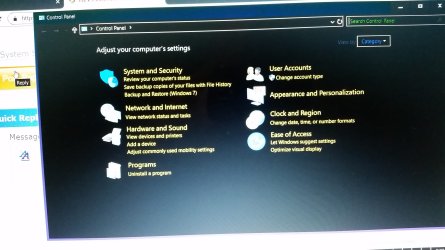
It wouldn't let me copy it. I took a jpg instead. You can see it is a black background too.

System Restore did not finish. It said something about a file.
 

Attachments

  • 20181211_172535.jpg
    20181211_172535.jpg
    1.7 MB · Views: 0

My Computer

Computer type
PC/Desktop
Computer Manufacturer/Model Number
HP
OS
W7 Home Premium 64 bit
CPU
I7
Memory
8gb
Hard Drives
750GB
Antivirus
Norton
Browser
Google
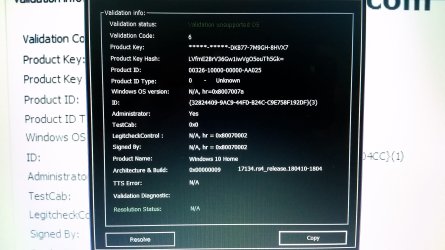
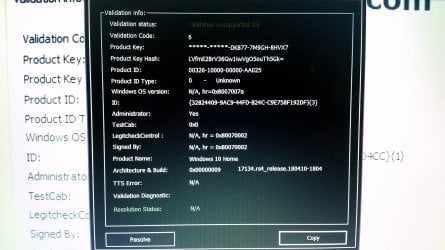
Attached jpg of the Windows Genuine and Activation Issue as well as Control Panel.

I wouldn't let me copy it.

System Restore did not complete successfully it said. Something about a file.
 

Attachments

  • 20181211_173206.jpg
    20181211_173206.jpg
    1.3 MB · Views: 0
  • 20181211_172535.jpg
    20181211_172535.jpg
    1.7 MB · Views: 0

My Computer

Computer type
PC/Desktop
Computer Manufacturer/Model Number
HP
OS
W7 Home Premium 64 bit
CPU
I7
Memory
8gb
Hard Drives
750GB
Antivirus
Norton
Browser
Google
I went into Themes and it says Color Black. I noticed the background color for the desktop was also Black. I changed that to a custom blue. But the issue still persists when I open anything.
 

My Computer

Computer type
PC/Desktop
Computer Manufacturer/Model Number
HP
OS
W7 Home Premium 64 bit
CPU
I7
Memory
8gb
Hard Drives
750GB
Antivirus
Norton
Browser
Google
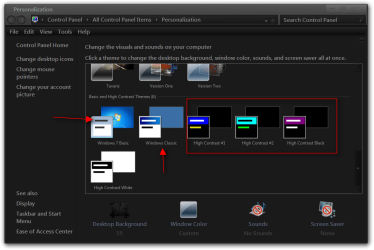
Change to a different theme, you are using a high contrast theme, change to aero or the 2 the red arrow is pointing to.


Jerry


Personalization2.png

Personalization.png
 

My Computer

Computer type
Laptop
Computer Manufacturer/Model Number
Sager NP9170
OS
Win 7 Pro x64 / Win 10 Pro
CPU
Intel(R) Core(TM) i7-3630QM CPU @ 2.40GHz
Motherboard
CLEVO P170EM
Memory
12 GB
Graphics Card(s)
(1) Intel(R) HD Graphics 4000 (2) NVIDIA GeForce GTX 675M
Sound Card
(1) Realtek High Definition Audio (2) Intel(R) Display Aud
Monitor(s) Displays
17.3
Screen Resolution
1920x1080
Hard Drives
(1) Samsung 860 EVO 500GB(OS) (1) Samsung 860 EVO 500GB(Data)
Keyboard
Backlite
Antivirus
MSE, Malwarebytes Pro
Browser
Firefox
Other Info
DESKTOP: Custom-built.
OS: Win 10 Pro x64.
CASE: Rosewill R5.
CPU: Intel I5 4670K CPU @ 3.40GHz.
CPU COOLER: Cool Master Hyper 212 EVO.
MOTHERBOARD: Asus Z87-A.
MEMORY: Kingston HyperX 2x4 GB.
GPU: Nvidia Geforce 650 TI.
PSU: Corsair TX750.
DRIVES: (1) Samsung 840 120 GB SSD (2) Western Digital blue 500 GB 7200 RPM.
I don't see those options at all for themes. I cliked on High Contrast settings and it was already selected as OFF, but I did turn it on first and adjust it High Contrast White and then cliked Off. Mozilla Thunderbird background is now WHITE. Same with background on Control Panel. Google Chrome background is still Black.
 

My Computer

Computer type
PC/Desktop
Computer Manufacturer/Model Number
HP
OS
W7 Home Premium 64 bit
CPU
I7
Memory
8gb
Hard Drives
750GB
Antivirus
Norton
Browser
Google
I went into Google Chrome settings, Themes, and changed to a different one. Issue appears to be solved!!!

Thank you to all of you!!!
 

My Computer

Computer type
PC/Desktop
Computer Manufacturer/Model Number
HP
OS
W7 Home Premium 64 bit
CPU
I7
Memory
8gb
Hard Drives
750GB
Antivirus
Norton
Browser
Google
Suggest you use our sister W10 site as thats what your running according to the tool


Roy
 

My Computer

Computer type
PC/Desktop
Computer Manufacturer/Model Number
medionl/Aspire 6930G/acer x55a
OS
W7 home premium 32bit/W7HP 64bit/w10 tp insider ring
CPU
E5300 dual core
Motherboard
medion MS7366
Memory
3gb
Graphics Card(s)
Nvidia Geforce 7100 Nforce 630i
Monitor(s) Displays
avixc
Internet Speed
n (isp resticted to 72)
Antivirus
mse/pands
Browser
palemoon
Other Info
Belkin Fd7050 n USB using Railink RT2870 drivers, more upto date
That's interesting in that you say its Windows 10. I know he tried upgrading to Windows 10 but when I went into System and Security in the Control Panel, it says Windows 7 under Backup and Restore, but in System it says Windows 10. He upgraded from Windows 7 to Windows 10.

Thank you for bringing that to my attention for further assistance Roy.
 

My Computer

Computer type
PC/Desktop
Computer Manufacturer/Model Number
HP
OS
W7 Home Premium 64 bit
CPU
I7
Memory
8gb
Hard Drives
750GB
Antivirus
Norton
Browser
Google
You're Welcome
 

My Computer

Computer type
Laptop
Computer Manufacturer/Model Number
Sager NP9170
OS
Win 7 Pro x64 / Win 10 Pro
CPU
Intel(R) Core(TM) i7-3630QM CPU @ 2.40GHz
Motherboard
CLEVO P170EM
Memory
12 GB
Graphics Card(s)
(1) Intel(R) HD Graphics 4000 (2) NVIDIA GeForce GTX 675M
Sound Card
(1) Realtek High Definition Audio (2) Intel(R) Display Aud
Monitor(s) Displays
17.3
Screen Resolution
1920x1080
Hard Drives
(1) Samsung 860 EVO 500GB(OS) (1) Samsung 860 EVO 500GB(Data)
Keyboard
Backlite
Antivirus
MSE, Malwarebytes Pro
Browser
Firefox
Other Info
DESKTOP: Custom-built.
OS: Win 10 Pro x64.
CASE: Rosewill R5.
CPU: Intel I5 4670K CPU @ 3.40GHz.
CPU COOLER: Cool Master Hyper 212 EVO.
MOTHERBOARD: Asus Z87-A.
MEMORY: Kingston HyperX 2x4 GB.
GPU: Nvidia Geforce 650 TI.
PSU: Corsair TX750.
DRIVES: (1) Samsung 840 120 GB SSD (2) Western Digital blue 500 GB 7200 RPM.
Back
Top