
The HP 4500 Envy all-in-one printer is new, replacing a defunct Canon Pixma. I received an electronic 1099 form, and printed it from my Foxit Reader program. To my dismay, the printed form was obscured by black bars in 4 places. 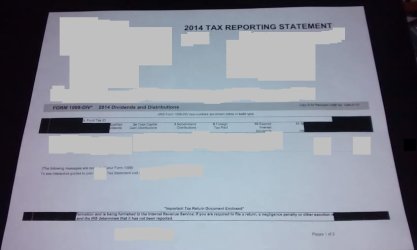 These do not show in the print preview, and after experimenting for some time, I can find no setting that accounts for the problem. I went online and tried reprinting the 1009 form from last year. The same problem occurred, but my hard copy in last year's records — printed from Foxit but using the old Canon — did not have the offending black bars. So far this is the only pdf with which I have a printing problem, but the fact that it occurs with the same form for two different years is puzzling and annoying. Any thoughts or help would be appreciated!
These do not show in the print preview, and after experimenting for some time, I can find no setting that accounts for the problem. I went online and tried reprinting the 1009 form from last year. The same problem occurred, but my hard copy in last year's records — printed from Foxit but using the old Canon — did not have the offending black bars. So far this is the only pdf with which I have a printing problem, but the fact that it occurs with the same form for two different years is puzzling and annoying. Any thoughts or help would be appreciated!My Computer
At a glance
Windows 7 Home Premium SP1i36 GBATI Radeon
- Computer Manufacturer/Model Number
- Dell Inspiron 580s
- OS
- Windows 7 Home Premium SP1
- CPU
- i3
- Memory
- 6 GB
- Graphics Card(s)
- ATI Radeon
