
Solved Black rectangular box appeared on deskop after update

loukask6

New member
Local time
5:07 PM
Messages
4
After updating Windows 7 a black rectangular box with an arrow and number 1 in the center appeared on the desktop.
Hovering over "show desktop" rectangle in corner of main monitor taskbar makes it go away (temporarily of course).

Here you can see how desktop looks like
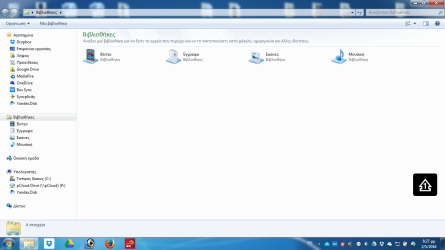
2016-05-02 (1).png

It is annoying and I would like to get rid of it.

Please advise help...
 

My Computer

Computer type
Laptop
Computer Manufacturer/Model Number
Lenovo B590
OS
Windows 7 Ultimate 32 bit
CPU
Intel Celeron CPU B830 1.80 Ghz
Memory
4 GB
That means Num Lock is on I believe.

A Google image search found it.
 

My Computer

Computer type
PC/Desktop
Computer Manufacturer/Model Number
Lenovo IdeaCenter 450
OS
Windows 10 Pro X64
CPU
Intel Quad Core i7-4770 @ 3.4Ghz
Memory
16.0GB PC3-12800 DDR3 SDRAM 1600 MHz
Graphics Card(s)
Intel Integrated HD Graphics
Sound Card
Realtek HD Audio
Monitor(s) Displays
HP 22" LCD
Screen Resolution
1680 x 1050
Hard Drives
250GB Samsung EVO SATA-3 SSD
2TB Seagate ST2000DM001 SATA-2
1.5TB Seagate ST3150041AS SATA
Keyboard
Dell USB
Mouse
Lenovo USB
Internet Speed
Cable via Road Runner 3MB Upload, 30MB Download
Antivirus
Windows Defender, MBAM Pro, MBAE
Browser
Seamonkey
Other Info
UEFI/GPT
PLDS DVD-RW DH16AERSH
Just a thought.

If you are using more than one monitor it could indicate what monitor you are on.

From post #1
Hovering over "show desktop" rectangle in corner of main monitor taskbar makes it go away (temporarily of course).
 

My Computer

Computer type
PC/Desktop
Computer Manufacturer/Model Number
Home made Desktop
OS
Windows 10 Pro. 64/ version 1709 Windows 7 Pro/64
CPU
Intel i7-6800K @ 4.3
Motherboard
ASUS X-99 Deluxe II
Memory
Corsair Platinum 16 gig @2400
Graphics Card(s)
EVGA GTX 1070 OC
Monitor(s) Displays
Asus 27" LED LCD/VE278Q
Screen Resolution
1920-1080 or 1280-720 HDMI
Hard Drives
INTEL SSD 730-240 Gb Sata 3.0/
PSU
EVGA Platium 1200W
Case
Phanteks Luxe Tempered Glass 8 fans/ one radiator
Cooling
XSPC/ Water Cooled CPU
Keyboard
Das 4 Professional
Mouse
Logitech M705/MX Anywhere 2-S
Internet Speed
100 mbits
Antivirus
Microsoft Security Essentials/ Malwarebytes Premium 3.0/ SAS
Browser
I.E. 11 default/Firefox/ ISP Time Warner Cable/Spectrum
Other Info
LG BluRay Burner/
Sound system-KLipsch-THX/
Icy Dock ssd Hot Swap bays.
@Ztruker: You are right. When I disable Num Lock a white line crosses the number 1.
But I want to get rid of it!
 

My Computer

Computer type
Laptop
Computer Manufacturer/Model Number
Lenovo B590
OS
Windows 7 Ultimate 32 bit
CPU
Intel Celeron CPU B830 1.80 Ghz
Memory
4 GB
Just a thought.

If you are using more than one monitor it could indicate what monitor you are on.

From post #1
Hovering over "show desktop" rectangle in corner of main monitor taskbar makes it go away (temporarily of course).

I have no other monitors.
Just the one that is on my Laptop...
 

My Computer

Computer type
Laptop
Computer Manufacturer/Model Number
Lenovo B590
OS
Windows 7 Ultimate 32 bit
CPU
Intel Celeron CPU B830 1.80 Ghz
Memory
4 GB
Try this,
right-click on desktop -> screen resolution
2. click on "advanced settings"
3. click on the "On Screen Display" tab
4. uncheck the box "Enabled on-screen display"


Roy
 

My Computer

Computer type
PC/Desktop
Computer Manufacturer/Model Number
medionl/Aspire 6930G/acer x55a
OS
W7 home premium 32bit/W7HP 64bit/w10 tp insider ring
CPU
E5300 dual core
Motherboard
medion MS7366
Memory
3gb
Graphics Card(s)
Nvidia Geforce 7100 Nforce 630i
Monitor(s) Displays
avixc
Internet Speed
n (isp resticted to 72)
Antivirus
mse/pands
Browser
palemoon
Other Info
Belkin Fd7050 n USB using Railink RT2870 drivers, more upto date
Try this,
right-click on desktop -> screen resolution
2. click on "advanced settings"
3. click on the "On Screen Display" tab
4. uncheck the box "Enabled on-screen display"


Roy

Now that's what I call a solution!
Thank you Roy!!
Problem is solved!!!
I am deeply obliged!!
 

My Computer

Computer type
Laptop
Computer Manufacturer/Model Number
Lenovo B590
OS
Windows 7 Ultimate 32 bit
CPU
Intel Celeron CPU B830 1.80 Ghz
Memory
4 GB
Back
Top