Black Screen on start-up in regular and safe mode

Tec34

New member
Local time
3:53 AM
Messages
12
I recently came home to my computer off and when I went to turn it back on, it started up with a black screen after the windows logo with just the cursor available. Things like ctrl-alt-delete did nothing so I tried booting up in safe mode which ended up with same black screen and cursor.

I then went to search the internet for possible fixes and have done/verified the following:

Used boot CD and ran Start-up repair, told me to remove any mp3 players or USB devices and try starting again, didn't work (nothing was connected in the first place). The start-up repair log appears to identify no problems with the system.

It's not a hardware issue, the drive itself has been checked on another computer and I've already used a new drive and installed a new copy of windows using the same computer.

Not a virus issue, scanned the drive for viruses and did a chkdsk on it, neither of which turned up anything.

Unfortunately there are no restore points saved so I can't just revert to an older profile.

Since I can access the drive on another computer, is there any program I could run to try and fix the problem? This seems to be the only thing that hasn't been covered in other topics similar to this one which I've found online.

This is my last resort so any help that you can provide will be greatly appreciated,
Thanks!
 

My Computer My Computer

At a glance

Windows 6 64-bit
Computer type
PC/Desktop
OS
Windows 6 64-bit
Did you take the cover off and make sure all cables are connected, make sure that your RAM is seated properly. Just anything that might be loose. From what you say, the HDD seems to be OK. It would seem that making sure everything is connected OK would be the next step. Let us know.
 

My Computer My Computer

At a glance

Windows 7 Home Premium 32-Bit - Build 7600 SP1Intel Core i3-2120 3.30GhzKingston 4 GB DDR3 1333 mhzAMD Radeon HD6670
Computer type
PC/Desktop
Computer Manufacturer/Model Number
Custom Build
OS
Windows 7 Home Premium 32-Bit - Build 7600 SP1
CPU
Intel Core i3-2120 3.30Ghz
Motherboard
Asus P8Z68-V LX Intel Z68 Socket H2 ATX
Memory
Kingston 4 GB DDR3 1333 mhz
Graphics Card(s)
AMD Radeon HD6670
Sound Card
Sound Blaster Audigy SE 24-Bit
Monitor(s) Displays
Asus VE228
Screen Resolution
1440 X 900
Hard Drives
OCZ Vertex 3 120 GB Sata 3 SSD ==
Kingston SH103/S3 120 G Hyper X 120 GB SSD ==
Western Digital 500 GB Caviar Green 7200 RPM ==
PSU
Corsair CX600M == 600 Watt
Case
NZXT Apollo - Silver with Clear Side Panel
Cooling
Three 120 mm Fans
Keyboard
Microsoft Natural 4000
Mouse
Microsoft Custom Optical 3000
Internet Speed
AT&T Fiber Optic Wireless Network
Antivirus
Microsoft Security Essentials
Browser
Chrome
Other Info
120 mm Blue LED Fan -- Three Blue LED Lazer Light Sticks
Yes, everything is properly connected. I've already installed a new copy of windows on another drive using the same computer so I'm quite sure that it is not an issue with the hardware configuration.
 

My Computer My Computer

At a glance

Windows 6 64-bit
Computer type
PC/Desktop
OS
Windows 6 64-bit
Hi,

This issue sounds familiar to me, but the fix which i can recall now is reinstalling windows :confused:

Basically i think it has something to do with some recent driver installation (Webcam, Scanner or other imaging device drivers are the main culprits).

Try booting onto the machine in command line and try running devmgmnt.msc and uninstall the last installed driver. See if this fixes the problem. You could enter into command line via safe mode or use a Windows 7 startup disc.

Uninstalling the last buggy driver installation should be the goal and the means could be anything; also try attempting other safe mode options such as "last known good configuration" to get inside the os.
 

My Computer My Computer

At a glance

Windows 7 Ultimate x64Intel Core i5-4200UKingston ValueRAM 8GB 1600MHz DDR3 (PC3-12800...AMD Radeon HD 8670M Switchable Graphics
Computer type
Laptop
Computer Manufacturer/Model Number
HP Pavilion 15-n003tx
OS
Windows 7 Ultimate x64
CPU
Intel Core i5-4200U
Motherboard
Hewlett-Packard 2164
Memory
Kingston ValueRAM 8GB 1600MHz DDR3 (PC3-12800) Non-ECC CL11
Graphics Card(s)
AMD Radeon HD 8670M Switchable Graphics
Sound Card
Realtek High Definition Audio
Hard Drives
Samsung SSD 840 PRO Seri SCSI Disk Device
HGST Travelstar 2.5-Inch 1TB 5400RPM SATA
Other Info
http://www.passmark.com/baselines/V8/display.php?id=16765261531
The thing is I hadn't installed anything on the computer in a while so I would be surprised if it was a driver related issue. My only guess is it could have something to do with a windows update since the computer, which I usually leave on, was off when this issue started.

Can you provide more details on the devmgmnt.msc troubleshooting?

I've tried the various F8 startup options (low-res, last known good configuration, etc)and all boot up to the same black screen unfortunately.

One other thing that I noticed, the drive currently only has .99 Gbs of free space. Could that cause a problem with startup?
 

My Computer My Computer

At a glance

Windows 6 64-bit
Computer type
PC/Desktop
OS
Windows 6 64-bit
I tried the startup repair loop fix but unfortunately that didn't fix the problem. Are there any other suggestions that I could try?
 

My Computer My Computer

At a glance

Windows 6 64-bit
Computer type
PC/Desktop
OS
Windows 6 64-bit
One other thing that I noticed, the drive currently only has .99 Gbs of free space. Could that cause a problem with startup?

Correcting that is worth a shot. It needs to be corrected regardless.
 

My Computer My Computer

At a glance

Windows 7 Home Premium 32-Bit - Build 7600 SP1Intel Core i3-2120 3.30GhzKingston 4 GB DDR3 1333 mhzAMD Radeon HD6670
Computer type
PC/Desktop
Computer Manufacturer/Model Number
Custom Build
OS
Windows 7 Home Premium 32-Bit - Build 7600 SP1
CPU
Intel Core i3-2120 3.30Ghz
Motherboard
Asus P8Z68-V LX Intel Z68 Socket H2 ATX
Memory
Kingston 4 GB DDR3 1333 mhz
Graphics Card(s)
AMD Radeon HD6670
Sound Card
Sound Blaster Audigy SE 24-Bit
Monitor(s) Displays
Asus VE228
Screen Resolution
1440 X 900
Hard Drives
OCZ Vertex 3 120 GB Sata 3 SSD ==
Kingston SH103/S3 120 G Hyper X 120 GB SSD ==
Western Digital 500 GB Caviar Green 7200 RPM ==
PSU
Corsair CX600M == 600 Watt
Case
NZXT Apollo - Silver with Clear Side Panel
Cooling
Three 120 mm Fans
Keyboard
Microsoft Natural 4000
Mouse
Microsoft Custom Optical 3000
Internet Speed
AT&T Fiber Optic Wireless Network
Antivirus
Microsoft Security Essentials
Browser
Chrome
Other Info
120 mm Blue LED Fan -- Three Blue LED Lazer Light Sticks
I noticed that the windows temp folder had several gbs of data so I deleted most of it while accessing the drive from another computer. However when I tried to boot the drive up (which didn't work) and checked it again using the other computer, it's back to .99gb free. My only guess is that the original OS is not recognizing that I deleted anything when I access from another computer? Is it possible for me to delete using the command prompt in advanced recovery options?
 

My Computer My Computer

At a glance

Windows 6 64-bit
Computer type
PC/Desktop
OS
Windows 6 64-bit
I noticed that the windows temp folder had several gbs of data so I deleted most of it while accessing the drive from another computer. However when I tried to boot the drive up (which didn't work) and checked it again using the other computer, it's back to .99gb free. My only guess is that the original OS is not recognizing that I deleted anything when I access from another computer? Is it possible for me to delete using the command prompt in advanced recovery options?

I would be very surprised if your Temp files had several GBs of data. Are you sure it wasn't MB's instead? I don't think you should go to the command prompt to delete anything. If you delete one wrong file, you PC won't boot. A better solution is to expand your C: drive using Best Free Partition Manager Freeware and free partition magic for Windows 7, Windows 8, Windows Vista and Windows XP 32 bit & 64 bit. MiniTool Free Partition Manager Software Home Edition. You will also need to download the Bootable CD from the site. Partition Wizard Bootable CD allows user to manage partition directly with partition manager bootable CD. You will have to boot your PC with the Boot Disk in order to change the C: drive.
 

My Computer My Computer

At a glance

Windows 7 Home Premium 32-Bit - Build 7600 SP1Intel Core i3-2120 3.30GhzKingston 4 GB DDR3 1333 mhzAMD Radeon HD6670
Computer type
PC/Desktop
Computer Manufacturer/Model Number
Custom Build
OS
Windows 7 Home Premium 32-Bit - Build 7600 SP1
CPU
Intel Core i3-2120 3.30Ghz
Motherboard
Asus P8Z68-V LX Intel Z68 Socket H2 ATX
Memory
Kingston 4 GB DDR3 1333 mhz
Graphics Card(s)
AMD Radeon HD6670
Sound Card
Sound Blaster Audigy SE 24-Bit
Monitor(s) Displays
Asus VE228
Screen Resolution
1440 X 900
Hard Drives
OCZ Vertex 3 120 GB Sata 3 SSD ==
Kingston SH103/S3 120 G Hyper X 120 GB SSD ==
Western Digital 500 GB Caviar Green 7200 RPM ==
PSU
Corsair CX600M == 600 Watt
Case
NZXT Apollo - Silver with Clear Side Panel
Cooling
Three 120 mm Fans
Keyboard
Microsoft Natural 4000
Mouse
Microsoft Custom Optical 3000
Internet Speed
AT&T Fiber Optic Wireless Network
Antivirus
Microsoft Security Essentials
Browser
Chrome
Other Info
120 mm Blue LED Fan -- Three Blue LED Lazer Light Sticks
This happens periodically to me, running Win7 HomePrem 64 on an Acer. I've come to accept it as periodically annoying. I do a hard shut off, wait a bit, reboot, and get black screen with choice highlighted "Start Windows Normally" which I then do, and boom, I'm fine. Sometimes the black screen wants to do a lengthy check disk, so what choice do I have but wait. I'm posting this so the orig poster knows he's not alone, but I don't think you have to jump through the hoops you've been angsting about. I attritbute it to a Windows/Microsoft problem, something which they wouldn't consider worthy of a fix,so I haven't wanted to waste my time looking for a fix. Am I wrong anyone?
 

My Computer My Computer

At a glance

Win7Home Premium, 64 bit
Computer type
PC/Desktop
OS
Win7Home Premium, 64 bit
I would be very surprised if your Temp files had several GBs of data. Are you sure it wasn't MB's instead? I don't think you should go to the command prompt to delete anything. If you delete one wrong file, you PC won't boot. A better solution is to expand your C: drive using Best Free Partition Manager Freeware and free partition magic for Windows 7, Windows 8, Windows Vista and Windows XP 32 bit & 64 bit. MiniTool Free Partition Manager Software Home Edition. You will also need to download the Bootable CD from the site. Partition Wizard Bootable CD allows user to manage partition directly with partition manager bootable CD. You will have to boot your PC with the Boot Disk in order to change the C: drive.

It was at least a gb or two, there were files from 2009 in there.
Can you clarify on the partitioning? The OS is on a hard disk that isn't partitioned (74gb drive) so I'm not clear how I could expand it?

This happens periodically to me, running Win7 HomePrem 64 on an Acer. I've come to accept it as periodically annoying. I do a hard shut off, wait a bit, reboot, and get black screen with choice highlighted "Start Windows Normally" which I then do, and boom, I'm fine. Sometimes the black screen wants to do a lengthy check disk, so what choice do I have but wait. I'm posting this so the orig poster knows he's not alone, but I don't think you have to jump through the hoops you've been angsting about. I attritbute it to a Windows/Microsoft problem, something which they wouldn't consider worthy of a fix,so I haven't wanted to waste my time looking for a fix. Am I wrong anyone?

My system isn't fixing itself which is why I'm trying to look for a solution.
 

My Computer My Computer

At a glance

Windows 6 64-bit
Computer type
PC/Desktop
OS
Windows 6 64-bit
Can you clarify on the partitioning? The OS is on a hard disk that isn't partitioned (74gb drive) so I'm not clear how I could expand it?

When you say "Not Partitioned", do you mean the OS is on a HD by itself? Could you post a screen shot of
http://www.sevenforums.com/tutorials/274797-disk-management-post-screen-capture-image.html
This will help to see the situation better. Be sure and spread the columns so that all the print can be read. Thanks,
http://www.sevenforums.com/tutorials/274797-disk-management-post-screen-capture-image.html
 

My Computer My Computer

At a glance

Windows 7 Home Premium 32-Bit - Build 7600 SP1Intel Core i3-2120 3.30GhzKingston 4 GB DDR3 1333 mhzAMD Radeon HD6670
Computer type
PC/Desktop
Computer Manufacturer/Model Number
Custom Build
OS
Windows 7 Home Premium 32-Bit - Build 7600 SP1
CPU
Intel Core i3-2120 3.30Ghz
Motherboard
Asus P8Z68-V LX Intel Z68 Socket H2 ATX
Memory
Kingston 4 GB DDR3 1333 mhz
Graphics Card(s)
AMD Radeon HD6670
Sound Card
Sound Blaster Audigy SE 24-Bit
Monitor(s) Displays
Asus VE228
Screen Resolution
1440 X 900
Hard Drives
OCZ Vertex 3 120 GB Sata 3 SSD ==
Kingston SH103/S3 120 G Hyper X 120 GB SSD ==
Western Digital 500 GB Caviar Green 7200 RPM ==
PSU
Corsair CX600M == 600 Watt
Case
NZXT Apollo - Silver with Clear Side Panel
Cooling
Three 120 mm Fans
Keyboard
Microsoft Natural 4000
Mouse
Microsoft Custom Optical 3000
Internet Speed
AT&T Fiber Optic Wireless Network
Antivirus
Microsoft Security Essentials
Browser
Chrome
Other Info
120 mm Blue LED Fan -- Three Blue LED Lazer Light Sticks
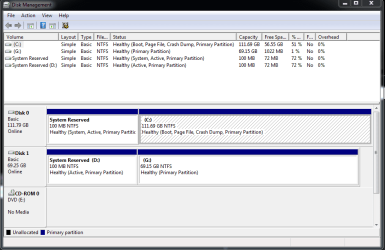
Disk 1 is the hard drive with the OS that is not booting up.
 

Attachments

  • X.PNG
    X.PNG
    18.2 KB · Views: 1

My Computer My Computer

At a glance

Windows 6 64-bit
Computer type
PC/Desktop
OS
Windows 6 64-bit
I see some problems with Disk 1. Let me ask a few questions first. == Disk 0, Do you have an OS on C: drive and if so what is it? It looks like that should boot OK. If you unplug Disk 1, your PC should boot. == Disk 1, what OS is on it? Since you have two System Reserved partitions, you must be trying to boot two different OS's. Let me know and then I can proceed as to how to get this repaired. Thanks,
 

My Computer My Computer

At a glance

Windows 7 Home Premium 32-Bit - Build 7600 SP1Intel Core i3-2120 3.30GhzKingston 4 GB DDR3 1333 mhzAMD Radeon HD6670
Computer type
PC/Desktop
Computer Manufacturer/Model Number
Custom Build
OS
Windows 7 Home Premium 32-Bit - Build 7600 SP1
CPU
Intel Core i3-2120 3.30Ghz
Motherboard
Asus P8Z68-V LX Intel Z68 Socket H2 ATX
Memory
Kingston 4 GB DDR3 1333 mhz
Graphics Card(s)
AMD Radeon HD6670
Sound Card
Sound Blaster Audigy SE 24-Bit
Monitor(s) Displays
Asus VE228
Screen Resolution
1440 X 900
Hard Drives
OCZ Vertex 3 120 GB Sata 3 SSD ==
Kingston SH103/S3 120 G Hyper X 120 GB SSD ==
Western Digital 500 GB Caviar Green 7200 RPM ==
PSU
Corsair CX600M == 600 Watt
Case
NZXT Apollo - Silver with Clear Side Panel
Cooling
Three 120 mm Fans
Keyboard
Microsoft Natural 4000
Mouse
Microsoft Custom Optical 3000
Internet Speed
AT&T Fiber Optic Wireless Network
Antivirus
Microsoft Security Essentials
Browser
Chrome
Other Info
120 mm Blue LED Fan -- Three Blue LED Lazer Light Sticks
Both disks have a copy of Windows 7 on them. When I try to boot disk 1, I completely disconnect disk 0.

Disk 1 is the drive with the copy of windows that will not boot up, I did not originally have two drives with OS's on them, it's currently like this so that I can use the computer.
 
Last edited:

My Computer My Computer

At a glance

Windows 6 64-bit
Computer type
PC/Desktop
OS
Windows 6 64-bit
If you disconnect Disk 1, does you PC work OK? It appears that Disk 0 is in good shape. If Disk 0 works OK, is there any need to have Windows on Disk 1? I don't really see any purpose. == There are several problems with the way Windows is setup on Disk 1. I need to know if you want to have two Win 7 on your PC or if Disk 0 is working, that is all you want?
 

My Computer My Computer

At a glance

Windows 7 Home Premium 32-Bit - Build 7600 SP1Intel Core i3-2120 3.30GhzKingston 4 GB DDR3 1333 mhzAMD Radeon HD6670
Computer type
PC/Desktop
Computer Manufacturer/Model Number
Custom Build
OS
Windows 7 Home Premium 32-Bit - Build 7600 SP1
CPU
Intel Core i3-2120 3.30Ghz
Motherboard
Asus P8Z68-V LX Intel Z68 Socket H2 ATX
Memory
Kingston 4 GB DDR3 1333 mhz
Graphics Card(s)
AMD Radeon HD6670
Sound Card
Sound Blaster Audigy SE 24-Bit
Monitor(s) Displays
Asus VE228
Screen Resolution
1440 X 900
Hard Drives
OCZ Vertex 3 120 GB Sata 3 SSD ==
Kingston SH103/S3 120 G Hyper X 120 GB SSD ==
Western Digital 500 GB Caviar Green 7200 RPM ==
PSU
Corsair CX600M == 600 Watt
Case
NZXT Apollo - Silver with Clear Side Panel
Cooling
Three 120 mm Fans
Keyboard
Microsoft Natural 4000
Mouse
Microsoft Custom Optical 3000
Internet Speed
AT&T Fiber Optic Wireless Network
Antivirus
Microsoft Security Essentials
Browser
Chrome
Other Info
120 mm Blue LED Fan -- Three Blue LED Lazer Light Sticks
The computer works fine because I set it to boot to disk 0. There is nothing wrong with disk 0's OS, this is an issue with Disk 1's OS. I do not need nor want two OS's on two separate disks on the same computer, the only reason disk 1 is hooked up is so that I can access it. All I want to do is fix Disk 1's OS so that it actually boots up; this has nothing to do with Disk 0
 

My Computer My Computer

At a glance

Windows 6 64-bit
Computer type
PC/Desktop
OS
Windows 6 64-bit
The computer works fine because I set it to boot to disk 0. There is nothing wrong with disk 0's OS, this is an issue with Disk 1's OS. I do not need nor want two OS's on two separate disks on the same computer, the only reason disk 1 is hooked up is so that I can access it. All I want to do is fix Disk 1's OS so that it actually boots up; this has nothing to do with Disk 0

You can't have two OS with only one license on the same PC. Above you say that you don't want two OS's on the same PC, but then in the next line you want Disk 1 fixed so it boots. I have asked questions but am not getting answers. I will retire on this problem.
 

My Computer My Computer

At a glance

Windows 7 Home Premium 32-Bit - Build 7600 SP1Intel Core i3-2120 3.30GhzKingston 4 GB DDR3 1333 mhzAMD Radeon HD6670
Computer type
PC/Desktop
Computer Manufacturer/Model Number
Custom Build
OS
Windows 7 Home Premium 32-Bit - Build 7600 SP1
CPU
Intel Core i3-2120 3.30Ghz
Motherboard
Asus P8Z68-V LX Intel Z68 Socket H2 ATX
Memory
Kingston 4 GB DDR3 1333 mhz
Graphics Card(s)
AMD Radeon HD6670
Sound Card
Sound Blaster Audigy SE 24-Bit
Monitor(s) Displays
Asus VE228
Screen Resolution
1440 X 900
Hard Drives
OCZ Vertex 3 120 GB Sata 3 SSD ==
Kingston SH103/S3 120 G Hyper X 120 GB SSD ==
Western Digital 500 GB Caviar Green 7200 RPM ==
PSU
Corsair CX600M == 600 Watt
Case
NZXT Apollo - Silver with Clear Side Panel
Cooling
Three 120 mm Fans
Keyboard
Microsoft Natural 4000
Mouse
Microsoft Custom Optical 3000
Internet Speed
AT&T Fiber Optic Wireless Network
Antivirus
Microsoft Security Essentials
Browser
Chrome
Other Info
120 mm Blue LED Fan -- Three Blue LED Lazer Light Sticks
I want to fix disk 1 so it can boot and then I can separate the drives to different computers, they are two different licences in play here regardless.
 

My Computer My Computer

At a glance

Windows 6 64-bit
Computer type
PC/Desktop
OS
Windows 6 64-bit
OK, that was what I was trying to find out. == Disconnect Disk 0 permanently. You will need a Win 7 install disk. Boot from the Win 7 disk and run Repair Install three times. If this does not make your PC bootable, you will have to do a http://www.sevenforums.com/tutorials/1649-clean-install-windows-7-a.html
If you don't have a disk, you can download a ISO here. http://www.heidoc.net/joomla/technology-science/microsoft/14-windows-7-direct-download-links Be sure and get the correct language, Version (Home Premium, Pro, Etc) and either 32-bit or 64-bit. Burn the ISO to a DVD and you have your own Win 7 disk. During the install it will ask you to put in the Product Key. Don't do that until you are happy with the install. You have 30 days to input the Product Key.
http://www.sevenforums.com/tutorials/1649-clean-install-windows-7-a.html
 

My Computer My Computer

At a glance

Windows 7 Home Premium 32-Bit - Build 7600 SP1Intel Core i3-2120 3.30GhzKingston 4 GB DDR3 1333 mhzAMD Radeon HD6670
Computer type
PC/Desktop
Computer Manufacturer/Model Number
Custom Build
OS
Windows 7 Home Premium 32-Bit - Build 7600 SP1
CPU
Intel Core i3-2120 3.30Ghz
Motherboard
Asus P8Z68-V LX Intel Z68 Socket H2 ATX
Memory
Kingston 4 GB DDR3 1333 mhz
Graphics Card(s)
AMD Radeon HD6670
Sound Card
Sound Blaster Audigy SE 24-Bit
Monitor(s) Displays
Asus VE228
Screen Resolution
1440 X 900
Hard Drives
OCZ Vertex 3 120 GB Sata 3 SSD ==
Kingston SH103/S3 120 G Hyper X 120 GB SSD ==
Western Digital 500 GB Caviar Green 7200 RPM ==
PSU
Corsair CX600M == 600 Watt
Case
NZXT Apollo - Silver with Clear Side Panel
Cooling
Three 120 mm Fans
Keyboard
Microsoft Natural 4000
Mouse
Microsoft Custom Optical 3000
Internet Speed
AT&T Fiber Optic Wireless Network
Antivirus
Microsoft Security Essentials
Browser
Chrome
Other Info
120 mm Blue LED Fan -- Three Blue LED Lazer Light Sticks
Back
Top