Lost PW and Safe Mode w/cmd disabled on tablet

SniffyDRat

New member
Local time
3:31 AM
Messages
4
I bought a Fujitsu Q550 tablet off ebay with a locked login screen. I thought that I could just use the backdoor work around but the F8 Safe mode with command prompt option has been disabled so it just reloads the Windows login screen. Bios is open and fine but I'm not sure how to get around this. Being a tablet it doesn't have a CD, just a USB port, so I really don't want to reload windows back on it unless I have to. Finding an old 32bit copy will be a pita. Its pretty old but perfect for collecting data and operating a borescope out in the field. At $30 its a nice disposable tool if things go bad, and I save my laptop.
Any ideas on a work around?
 

My Computer My Computer

At a glance

Win 7 pro
Computer type
PC/Desktop
OS
Win 7 pro
Update-
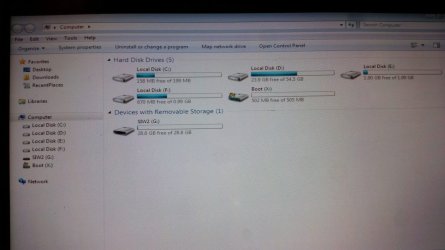
I have gotten as far as changing the bios to boot from a USB stick and I load a 32bit iso posted by SIW2 (thank you) onto the usb with Poweriso. The boot sequence took me into the hard drive where I'm a little stumped. Its been partitioned into 5 drives
C: 199 mb
D: 54 GB
E: 2 GB
F: 0.99 GB
(Boot x: and SIW2 G: I'm guessing are the USB drive files/boot disk)

The C: drive is small (200mb)with only a few files & folders


- boot
-various folder names (cs-CZ or en-US)

- bootmgr.exe.mui

BCD
BCD.log
BCD.log1
BCD.log2
BOOTSTAT.DAT
memtest.exe
-system volume information
- SPP
- OnlineMetadataCache
{ a system file w a loooong name}_OnDiskSnapshotProp
001.dat
002.dat
tracking.log
uxdcmnim.log
uxdemt.log
bootmgr
debugwst.log
mk_system_done.dat
uxdcmnFL.log


So my question is-
Where from here? What do I need to modify to have a normal Login without scrubbing the drive?


My Computer My Computer

At a glance

Win 7 pro
Computer type
PC/Desktop
OS
Win 7 pro
Welcome to the forum

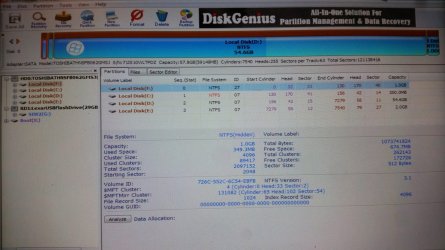
The drive seems to have a 64G SSD and one of the partitions may have a Factory recover to recover back to how it was delivered from Fujitsu.

Can you boot from SIW2 tool, open disk manager, expand the window and the columns so we can read them and post an image as an attachment?
Don't use external links. Use the paper clip (top right) on the Quick Reply window
 

My Computers My Computers

  • At a glance

    Windows 7 HP 64i5 6600K - 800MHz to 4200MHz4+4G GSkill DDR4 3000IG - Intel 530
    Computer type
    PC/Desktop
    Computer Manufacturer/Model Number
    custom build
    OS
    Windows 7 HP 64
    CPU
    i5 6600K - 800MHz to 4200MHz
    Motherboard
    GA-Z170-HD3P
    Memory
    4+4G GSkill DDR4 3000
    Graphics Card(s)
    IG - Intel 530
    Monitor(s) Displays
    Samsung 226BW
    Screen Resolution
    1680x1050
    Hard Drives
    (1) -1 SM951 – 128GB M.2 AHCI PCIe SSD drive for Windows 7 and Lubuntu
    (2) -1 WD SATA 3 - 1T for Data
    (3) -1 WD SATA 3 - 1T for backup
    PSU
    Thermaltake 450W TR2 gold
    Keyboard
    Old and good Chicony mechanical keyboard
    Mouse
    Logitech mX performance - 9 buttons (had to disable some)
    Internet Speed
    500Mb/s
    Browser
    Firefox 64
    Other Info
    TinyWall firewall
  • At a glance

    Windows 7 Proi7-4500U 800MHz to 3.0GHz(4+4)G DDR3 1600IG intel 4400 + NVIDIA GeForce GT 745M
    Computer type
    Laptop
    System Manufacturer/Model Number
    Asus Q550LF
    OS
    Windows 7 Pro
    CPU
    i7-4500U 800MHz to 3.0GHz
    Motherboard
    Asus Q550LF
    Memory
    (4+4)G DDR3 1600
    Graphics Card(s)
    IG intel 4400 + NVIDIA GeForce GT 745M
    Sound Card
    Realtek
    Monitor(s) Displays
    LG Display LP156WF4-SPH1
    Screen Resolution
    1920 x 1080
    Hard Drives
    BX500 120G SSD for Windows and programs +
    1T HDD for data
    Internet Speed
    500 Mb/s
    Browser
    Firefox
    Other Info
    TinyWall firewall
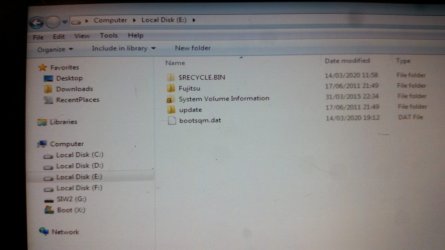
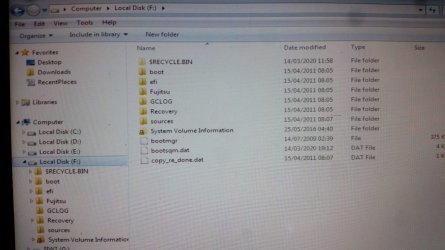
Here are a few screen shots of the drives. Note that drive F isn't always listed.
 

Attachments

  • 20200314_192510_30.jpg
    20200314_192510_30.jpg
    110 KB · Views: 0
  • 20200314_192616_30.jpg
    20200314_192616_30.jpg
    125.4 KB · Views: 0
  • 20200314_192739_30.jpg
    20200314_192739_30.jpg
    167.7 KB · Views: 0
  • 20200314_192852_50.jpg
    20200314_192852_50.jpg
    183.4 KB · Views: 0
  • 20200314_192909_50.jpg
    20200314_192909_50.jpg
    587.5 KB · Views: 1

My Computer My Computer

At a glance

Win 7 pro
Computer type
PC/Desktop
OS
Win 7 pro
I've sorted out the log in issue (i think), cleaned up all the old user info, removed unnecessary programs, and gotten rid of the Kapersky crap. I'm currently being plagues with one last issue.... There are hidden network permissions blocking my ability to use the wifi lan card. It says that the driver isn't installed and when I try to install one it won't allow me. Even auto installers are being blocked. I installed an exe driver package from Fujitsu and it was unable to run. Access denied. I'm finding that there are areas that have no info at all. Blank screen. The Network Connection page displays nothing. I'm starting to think that I'll be better off with a fresh install but I'm a bit worried that by not having the Fuji recovery disk that I'll be opening a can-o-worms formatting in reinstalling. Thoughts?
 

My Computer My Computer

At a glance

Win 7 pro
Computer type
PC/Desktop
OS
Win 7 pro
My suggestion is to forget the current installation. It has been modified to / by the previous user. And you can't trust a software on a tablet that you bought on ebay.
Does the tablet has Win 7 or Win 10?
What you have on the F:\Fujitsu and F:\sources?
What you have on the E:\Fujitsu?
 

My Computers My Computers

  • At a glance

    Windows 7 HP 64i5 6600K - 800MHz to 4200MHz4+4G GSkill DDR4 3000IG - Intel 530
    Computer type
    PC/Desktop
    Computer Manufacturer/Model Number
    custom build
    OS
    Windows 7 HP 64
    CPU
    i5 6600K - 800MHz to 4200MHz
    Motherboard
    GA-Z170-HD3P
    Memory
    4+4G GSkill DDR4 3000
    Graphics Card(s)
    IG - Intel 530
    Monitor(s) Displays
    Samsung 226BW
    Screen Resolution
    1680x1050
    Hard Drives
    (1) -1 SM951 – 128GB M.2 AHCI PCIe SSD drive for Windows 7 and Lubuntu
    (2) -1 WD SATA 3 - 1T for Data
    (3) -1 WD SATA 3 - 1T for backup
    PSU
    Thermaltake 450W TR2 gold
    Keyboard
    Old and good Chicony mechanical keyboard
    Mouse
    Logitech mX performance - 9 buttons (had to disable some)
    Internet Speed
    500Mb/s
    Browser
    Firefox 64
    Other Info
    TinyWall firewall
  • At a glance

    Windows 7 Proi7-4500U 800MHz to 3.0GHz(4+4)G DDR3 1600IG intel 4400 + NVIDIA GeForce GT 745M
    Computer type
    Laptop
    System Manufacturer/Model Number
    Asus Q550LF
    OS
    Windows 7 Pro
    CPU
    i7-4500U 800MHz to 3.0GHz
    Motherboard
    Asus Q550LF
    Memory
    (4+4)G DDR3 1600
    Graphics Card(s)
    IG intel 4400 + NVIDIA GeForce GT 745M
    Sound Card
    Realtek
    Monitor(s) Displays
    LG Display LP156WF4-SPH1
    Screen Resolution
    1920 x 1080
    Hard Drives
    BX500 120G SSD for Windows and programs +
    1T HDD for data
    Internet Speed
    500 Mb/s
    Browser
    Firefox
    Other Info
    TinyWall firewall
Sorry (off subject) but.... can you please tell me how to make the TITLE of a new thread dark and BOLD like it is on yours? or PM me with answer........ Thanks in advance....mugwampbro
 

My Computer My Computer

At a glance

windows 7 home premium x64Intel Core i3 380MDDR3 4GBIntel HD Graphics
Computer type
Laptop
Computer Manufacturer/Model Number
msi A6200 (CR620)
OS
windows 7 home premium x64
CPU
Intel Core i3 380M
Motherboard
MSI A6200 ver.001
Memory
DDR3 4GB
Graphics Card(s)
Intel HD Graphics
Sound Card
Realtek HD Audio
Hard Drives
WDC WD3200BEVT-22A23T0
Antivirus
Avast and MBAM Pro
Back
Top