
Hey guys,
I run Windows 7 64 bit, and currently am running dual monitors (1920: 1200 on the left, and 1920: 1080 on the right). The reason I have 2 is because my monitor of 4 or so years ( the left one), developed a very thick black line running down the screen about 4 cm in from the left side of the screen. This is a very very annoying position and blocks important things on almost every program. Combined with it fading slightly, I went and got a new screen to replace it, but then decided to keep the old one as a second monitor (very useful for gaming, programming etc.)
However, the black line is still there on the second monitor and, while I don't use it as much as the first monitor, it is still very noticeable and annoying. I've started only using the part of the screen right of the black line, so the black line does not interfere. However, this makes the dragging windows functions on Windows 7 (drag top to maximize, drag to side to split window) useless, as it always fills the whole screen, making the black line block out stuff again. Furthermore, it is always annoying having to resize windows to get around the line.
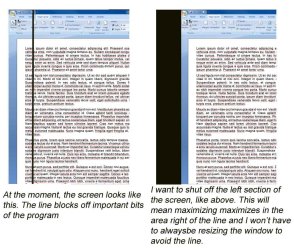
My question is whether it is possible to black out the left 4 cm of my screen, and only have the active screen right of the line. This would allow me to maximize windows and not have to be always resizing to avoid the line.
I have attached an image to better explain my problem.
Thanks
p.s. The line is definitely a hardware glitch, not software
I run Windows 7 64 bit, and currently am running dual monitors (1920: 1200 on the left, and 1920: 1080 on the right). The reason I have 2 is because my monitor of 4 or so years ( the left one), developed a very thick black line running down the screen about 4 cm in from the left side of the screen. This is a very very annoying position and blocks important things on almost every program. Combined with it fading slightly, I went and got a new screen to replace it, but then decided to keep the old one as a second monitor (very useful for gaming, programming etc.)
However, the black line is still there on the second monitor and, while I don't use it as much as the first monitor, it is still very noticeable and annoying. I've started only using the part of the screen right of the black line, so the black line does not interfere. However, this makes the dragging windows functions on Windows 7 (drag top to maximize, drag to side to split window) useless, as it always fills the whole screen, making the black line block out stuff again. Furthermore, it is always annoying having to resize windows to get around the line.
My question is whether it is possible to black out the left 4 cm of my screen, and only have the active screen right of the line. This would allow me to maximize windows and not have to be always resizing to avoid the line.
I have attached an image to better explain my problem.
Thanks
p.s. The line is definitely a hardware glitch, not software
Attachments
My Computer
- OS
- Windows 7 Home Premium 64bit


