Solved Blank Boot Tab in Msconfigsys

edchau3

New member
Local time
2:15 PM
Messages
3
I am trying to determine if Windows 7 is seeing all of the memory in my computer (16GB). The control panel > system page shows:

My System.jpg
Notice, there's no mention of the amount available. Is it safe to assume that this means all of the memory is available to Windows 7?
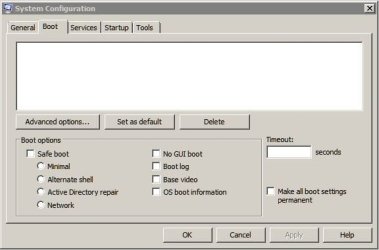
On a related matter, the boot tab of my msconfigsys page is shown below:
My ConfigSys.jpg
The page is blank, the mouse has no effect anywhere on that tab, as does the keyboard. All other tabs behave normally. What does this mean? How do I fix it?
Thank You :confused:
 
Last edited:

My Computer

Computer Manufacturer/Model Number
MSI/MS7636
OS
Microsoft Windows 7 Ultimate 64-bit 7601 Multiprocessor Free Service Pack 1
CPU
Intel(R) Core(TM) i7 CPU 860 @ 2.80GHz
Motherboard
MSI/H55M-E33(MS-7636)
Memory
6,144 MBytes Samsung 667 MHz (DDR3 1333)
Graphics Card(s)
ATI Radeon HD 5400 Series
Sound Card
Realtek High Definition Audio
Monitor(s) Displays
HP S2031 Series Wide LCD Monitor
Screen Resolution
1600 x 900 x 32 bits (4294967296 colors) @ 60 Hz
Hard Drives
INTEL SSDSA2CW120G3 ATA Device (1)
Seagate ST31000528AS 1000.2 GB (1)
Western Digital WDC WD20EARS-00MVWB0 2000.3 GB(1)
Seagate FA GoFlex Desk USB Device 1.82 TB (2)
Seagate FreeAgent Go USB Device 500 GB (1)
PSU
don't know
Case
mini-tower
Cooling
1-cpu fan, 1-case fan
Keyboard
Logitech Deluxe 250
Mouse
Logitech Optical Mouse PS/2
Internet Speed
DSL
I am trying to determine if Windows 7 is seeing all of the memory in my computer (16GB). The control panel > system page shows:
View attachment 206073
Notice, there's no mention of the amount available. Is it safe to assume that this means all of the memory if available to Windows 7?
On a related matter, the boot tab of my msconfigsys page is shown below:
View attachment 206075
The page is blank, the mouse has no effect anywhere on that tab, as does the keyboard. All other tabs behave normally. What does this mean? How do I fix it?
Thank You :confused:
That area is supposed to show which operating systems that the Windows Master Boot Record detects. Something must be corrupt in Windows. Try running the system file checker. To run this, go to start, the type cmd, then right click on it and select run as administrator. Once the command prompt comes up, type: sfc /scannow
 

My Computer

Computer type
PC/Desktop
Computer Manufacturer/Model Number
HP Pavilion P7-1010
OS
Windows 7 Professional x64 Service Pack 1
CPU
AMD Athlon X4 645
Motherboard
Foxxcon N-Alvorix RS880
Memory
6GB DDR3 1066
Graphics Card(s)
Sapphire Radeon HD 5670 512MB GDDR5
Sound Card
Realtek Integrated Audio
Monitor(s) Displays
HP 2011x
Screen Resolution
1600x900
Hard Drives
1. Crucial M4 128GB SSD
2. 1TB Seagate Barracuda 7200.12 RPM
3. 1TB Western Digital Caviar Green 5400RPM
PSU
Seasonic S12 II Bronze 380 Watt
Case
HP OEM
Cooling
Coolermaster Heatsink, AVC Case Fan
Keyboard
HP OEM- Made by Chicony
Mouse
HP OEM- Made by Logitech
Internet Speed
20MBit Down/4 Up
Antivirus
Microsoft Security Essentials
Browser
Internet Explorer 10
I am trying to determine if Windows 7 is seeing all of the memory in my computer (16GB). The control panel > system page shows:
View attachment 206073
Notice, there's no mention of the amount available. Is it safe to assume that this means all of the memory if available to Windows 7?
On a related matter, the boot tab of my msconfigsys page is shown below:
View attachment 206075
The page is blank, the mouse has no effect anywhere on that tab, as does the keyboard. All other tabs behave normally. What does this mean? How do I fix it?
Thank You :confused:
That area is supposed to show which operating systems that the Windows Master Boot Record detects. Something must be corrupt in Windows. Try running the system file checker. To run this, go to start, the type cmd, then right click on it and select run as administrator. Once the command prompt comes up, type: sfc /scannow
Thank you, windude99 for your interesy and prompt reply. I ran "sfc /scannow" from an administrator command prompt. Results as follows:

C:\Users\Edwin>sfc /scannow
Beginning system scan. This process will take some time.
Beginning verification phase of system scan.
Verification 100% complete.
Windows Resource Protection did not find any integrity violations.
C:\Users\Edwin>

What next? Perhaps checkdisk? Also, was my asuumption about the availability of all of the ram to the system correct? :)
 
Last edited:

My Computer

Computer Manufacturer/Model Number
MSI/MS7636
OS
Microsoft Windows 7 Ultimate 64-bit 7601 Multiprocessor Free Service Pack 1
CPU
Intel(R) Core(TM) i7 CPU 860 @ 2.80GHz
Motherboard
MSI/H55M-E33(MS-7636)
Memory
6,144 MBytes Samsung 667 MHz (DDR3 1333)
Graphics Card(s)
ATI Radeon HD 5400 Series
Sound Card
Realtek High Definition Audio
Monitor(s) Displays
HP S2031 Series Wide LCD Monitor
Screen Resolution
1600 x 900 x 32 bits (4294967296 colors) @ 60 Hz
Hard Drives
INTEL SSDSA2CW120G3 ATA Device (1)
Seagate ST31000528AS 1000.2 GB (1)
Western Digital WDC WD20EARS-00MVWB0 2000.3 GB(1)
Seagate FA GoFlex Desk USB Device 1.82 TB (2)
Seagate FreeAgent Go USB Device 500 GB (1)
PSU
don't know
Case
mini-tower
Cooling
1-cpu fan, 1-case fan
Keyboard
Logitech Deluxe 250
Mouse
Logitech Optical Mouse PS/2
Internet Speed
DSL
Hello Ed, and welcome to Seven Forums.

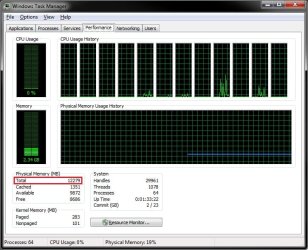
From your System page screenshot, it shows that you have 16 GB of RAM installed, so it should be using all of it. You could also look in Task Manager (CTRL+Shift+ESC) in the Performance tab to see what is says you have for "Total" "Physical Memory (MB)" and for it's usage. (16384 MB = 16 GB)

TM.jpg

As for the boot tab, you might see if restaring the computer may sort it. If not, then you could try doing a system restore using a restore point dated when you believe it may have been working ok.

Hope this helps,
Shawn
 

My Computer

Computer type
PC/Desktop
Computer Manufacturer/Model Number
Self built custom
OS
64-bit Windows 11 Pro for Workstations
CPU
Intel i7-8700K OC'd to 5 GHz
Motherboard
ASUS ROG Maximus XI Formula Z390
Memory
64 GB (4x16GB) G.SKILL TridentZ RGB DDR4 3600 MHz
Graphics Card(s)
ASUS ROG-STRIX-GTX1080TI-O11G-GAMING
Sound Card
Integrated
Monitor(s) Displays
2 x Samsung Odyssey G7 27"
Screen Resolution
2560x1440
Hard Drives
1TB Samsung 990 PRO M.2,
4TB Samsung 990 PRO PRO M.2,
TerraMaster F8 SSD Plus NAS
PSU
Seasonic Prime Titanium 850W
Case
Thermaltake Core P3
Cooling
Corsair Hydro H115i
Keyboard
Logitech wireless K800
Mouse
Logitech MX Master 4
Internet Speed
2 Gb/s Download and 100 Mb/s Upload
Antivirus
Malwarebyte Anti-Malware Premium
Browser
Google Chrome
Other Info
Logitech Z625 speaker system,
Logitech BRIO 4K Pro webcam,
HP Color LaserJet Pro MFP M477fdn,
APC SMART-UPS RT 1000 XL - SURT1000XLI,
Galaxy S23 Plus phone
Many thanks to all who offered help with this problem. It seems to have fixed itself. I have heard that many Windows problems will self-resolve after three restarts, but this is the first time I've actually experienced it. Darned shame it doesn't work for all problems! Thanks again
 

My Computer

Computer Manufacturer/Model Number
MSI/MS7636
OS
Microsoft Windows 7 Ultimate 64-bit 7601 Multiprocessor Free Service Pack 1
CPU
Intel(R) Core(TM) i7 CPU 860 @ 2.80GHz
Motherboard
MSI/H55M-E33(MS-7636)
Memory
6,144 MBytes Samsung 667 MHz (DDR3 1333)
Graphics Card(s)
ATI Radeon HD 5400 Series
Sound Card
Realtek High Definition Audio
Monitor(s) Displays
HP S2031 Series Wide LCD Monitor
Screen Resolution
1600 x 900 x 32 bits (4294967296 colors) @ 60 Hz
Hard Drives
INTEL SSDSA2CW120G3 ATA Device (1)
Seagate ST31000528AS 1000.2 GB (1)
Western Digital WDC WD20EARS-00MVWB0 2000.3 GB(1)
Seagate FA GoFlex Desk USB Device 1.82 TB (2)
Seagate FreeAgent Go USB Device 500 GB (1)
PSU
don't know
Case
mini-tower
Cooling
1-cpu fan, 1-case fan
Keyboard
Logitech Deluxe 250
Mouse
Logitech Optical Mouse PS/2
Internet Speed
DSL
That's great news Ed. Yeah, that would be nice for everything to be fixed liked that. :)
 

My Computer

Computer type
PC/Desktop
Computer Manufacturer/Model Number
Self built custom
OS
64-bit Windows 11 Pro for Workstations
CPU
Intel i7-8700K OC'd to 5 GHz
Motherboard
ASUS ROG Maximus XI Formula Z390
Memory
64 GB (4x16GB) G.SKILL TridentZ RGB DDR4 3600 MHz
Graphics Card(s)
ASUS ROG-STRIX-GTX1080TI-O11G-GAMING
Sound Card
Integrated
Monitor(s) Displays
2 x Samsung Odyssey G7 27"
Screen Resolution
2560x1440
Hard Drives
1TB Samsung 990 PRO M.2,
4TB Samsung 990 PRO PRO M.2,
TerraMaster F8 SSD Plus NAS
PSU
Seasonic Prime Titanium 850W
Case
Thermaltake Core P3
Cooling
Corsair Hydro H115i
Keyboard
Logitech wireless K800
Mouse
Logitech MX Master 4
Internet Speed
2 Gb/s Download and 100 Mb/s Upload
Antivirus
Malwarebyte Anti-Malware Premium
Browser
Google Chrome
Other Info
Logitech Z625 speaker system,
Logitech BRIO 4K Pro webcam,
HP Color LaserJet Pro MFP M477fdn,
APC SMART-UPS RT 1000 XL - SURT1000XLI,
Galaxy S23 Plus phone
Click your heels three times? Glad you got it sorted ;)

A Guy
 

My Computer

Computer type
PC/Desktop
OS
Windows 10 Home x64
CPU
INTEL Core i5-750 Quad-Core 3.37GHz
Motherboard
ASUS P7P55D
Memory
HyperX Fury Black Series 8GB (2 x 4GB) 1866Mhz
Graphics Card(s)
EVGA GeForce GTX 750 Superclocked 1GB 128-Bit GDDR5
Monitor(s) Displays
LG 32MA68HY 32" IPS
Screen Resolution
1920 x 1080
Hard Drives
Samsung 840 Evo 120GB, SEAGATE 500GB Barracuda® 7200.12, SATA 3 Gb/s, 7200 RPM, 16MB cache
PSU
ANTEC TruePower New TP-550, 80 PLUS, 550W
Case
ANTEC Three Hundred Illusion
Cooling
COOLER MASTER Hyper 212 Plus, 4 x 120mm 1 x 140mm Noctua's
Internet Speed
85 + Mbps
Antivirus
Avast
Browser
Vivaldi
Back
Top