Solved Blank icon with no name in Control Panel

Sarc

New member
Local time
1:33 AM
Messages
15
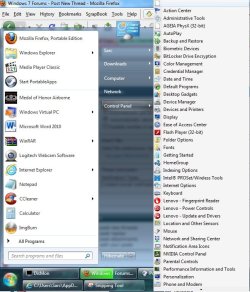
My Start Menu is set to display the Control Panel as a menu. At the top of the list is an item with no icon or name. Clicking it does nothing. I cant even create a shortcut of it. How can I remove this item? (Please see attached pic of the problem)
 

Attachments
  • Control Panel blank icon.jpg
    Control Panel blank icon.jpg
    80.9 KB · Views: 85
Last edited:

My Computer My Computer

At a glance

Windows 7 Ult SP1 x64Core i5 M540 2.53Ghz4GB
Computer Manufacturer/Model Number
Lenovo
OS
Windows 7 Ult SP1 x64
CPU
Core i5 M540 2.53Ghz
Memory
4GB
Hard Drives
500GB
Internet Speed
384kbps
Switch the control panel setting back to display as a link, check control panel. Post your results.
 

My Computer My Computer

At a glance

Windows 10 Pro x64Intel Core i7 6700KGSkill TridentZ RGB 16GB 3600 16-16-16-36EVGA GTX 980 Ti SC x2
Computer type
PC/Desktop
Computer Manufacturer/Model Number
Skylake Special #666
OS
Windows 10 Pro x64
CPU
Intel Core i7 6700K
Motherboard
Asus Sabertooth Z170 Mark 1
Memory
GSkill TridentZ RGB 16GB 3600 16-16-16-36
Graphics Card(s)
EVGA GTX 980 Ti SC x2
Sound Card
Realtek High Definition
Monitor(s) Displays
AOC G2460PG
Screen Resolution
1920 x 1080 144Hz
Hard Drives
Samsung 860 Pro 256GB, Seagate Barracuda 4TB x2
PSU
EVGA 1000 P2, EVGA White Custom Braided Cables
Case
Corsair Vengeance C70 Gunmetal Black
Cooling
Corsair H100i v2, Corsair ML120 x2, Thermal Grizzly Kryonaut
Keyboard
Logitech G910 Orion Spectrum
Mouse
Logitech G700s
Internet Speed
Verizon Fios Quantum Gateway 75/75
Antivirus
Windows Defender, Malwarebytes Free 3.8.3
Browser
Chrome
Other Info
Corsair SP120 x4, LG Blu-ray Drive, Durabrand HT-395 100 Watt Dolby Digital Amp, Corsair H2100 Wireless 7.1 Headset
Switch the control panel setting back to display as a link, check control panel. Post your results.

Tried that but when I switch back to MENU from LINK, the blank entry is still there.
 

My Computer My Computer

At a glance

Windows 7 Ult SP1 x64Core i5 M540 2.53Ghz4GB
Computer Manufacturer/Model Number
Lenovo
OS
Windows 7 Ult SP1 x64
CPU
Core i5 M540 2.53Ghz
Memory
4GB
Hard Drives
500GB
Internet Speed
384kbps

My Computer My Computer

At a glance

Windows 10 Pro x64Intel Core i7 6700KGSkill TridentZ RGB 16GB 3600 16-16-16-36EVGA GTX 980 Ti SC x2
Computer type
PC/Desktop
Computer Manufacturer/Model Number
Skylake Special #666
OS
Windows 10 Pro x64
CPU
Intel Core i7 6700K
Motherboard
Asus Sabertooth Z170 Mark 1
Memory
GSkill TridentZ RGB 16GB 3600 16-16-16-36
Graphics Card(s)
EVGA GTX 980 Ti SC x2
Sound Card
Realtek High Definition
Monitor(s) Displays
AOC G2460PG
Screen Resolution
1920 x 1080 144Hz
Hard Drives
Samsung 860 Pro 256GB, Seagate Barracuda 4TB x2
PSU
EVGA 1000 P2, EVGA White Custom Braided Cables
Case
Corsair Vengeance C70 Gunmetal Black
Cooling
Corsair H100i v2, Corsair ML120 x2, Thermal Grizzly Kryonaut
Keyboard
Logitech G910 Orion Spectrum
Mouse
Logitech G700s
Internet Speed
Verizon Fios Quantum Gateway 75/75
Antivirus
Windows Defender, Malwarebytes Free 3.8.3
Browser
Chrome
Other Info
Corsair SP120 x4, LG Blu-ray Drive, Durabrand HT-395 100 Watt Dolby Digital Amp, Corsair H2100 Wireless 7.1 Headset
Last edited:

My Computer My Computer

At a glance

Windows 7 Ult SP1 x64Core i5 M540 2.53Ghz4GB
Computer Manufacturer/Model Number
Lenovo
OS
Windows 7 Ult SP1 x64
CPU
Core i5 M540 2.53Ghz
Memory
4GB
Hard Drives
500GB
Internet Speed
384kbps
He may or may not see it that way. You have to click on his icon to send him a message.
 

My Computer My Computer

At a glance

Windows 10 Pro x64Intel Core i7 6700KGSkill TridentZ RGB 16GB 3600 16-16-16-36EVGA GTX 980 Ti SC x2
Computer type
PC/Desktop
Computer Manufacturer/Model Number
Skylake Special #666
OS
Windows 10 Pro x64
CPU
Intel Core i7 6700K
Motherboard
Asus Sabertooth Z170 Mark 1
Memory
GSkill TridentZ RGB 16GB 3600 16-16-16-36
Graphics Card(s)
EVGA GTX 980 Ti SC x2
Sound Card
Realtek High Definition
Monitor(s) Displays
AOC G2460PG
Screen Resolution
1920 x 1080 144Hz
Hard Drives
Samsung 860 Pro 256GB, Seagate Barracuda 4TB x2
PSU
EVGA 1000 P2, EVGA White Custom Braided Cables
Case
Corsair Vengeance C70 Gunmetal Black
Cooling
Corsair H100i v2, Corsair ML120 x2, Thermal Grizzly Kryonaut
Keyboard
Logitech G910 Orion Spectrum
Mouse
Logitech G700s
Internet Speed
Verizon Fios Quantum Gateway 75/75
Antivirus
Windows Defender, Malwarebytes Free 3.8.3
Browser
Chrome
Other Info
Corsair SP120 x4, LG Blu-ray Drive, Durabrand HT-395 100 Watt Dolby Digital Amp, Corsair H2100 Wireless 7.1 Headset
Just a couple of follow up questions, Sarc. Have you recently uninstalled anything from your computer that might have left behind this blank icon? If you hover your cursor over the icon does it give any information in a popup? When you say you clicked on the icon was that a right click? Have you rebooted your computer since this icon first appeared? Have you run a full system scan with your antivirus and antispyware of choice? Have you run any other free on-demand scanners like Malwarebytes, Superantispyware, HitmanPro, Comodo Cleaning Essentials, etc?

You could try rebuilding your icon cache:

http://www.sevenforums.com/tutorials/49819-icon-cache-rebuild.html

You could also run a System File Checker scan to see if there are any damaged or corrupt system files. If problems are noted run the scan 3 times rebooting in between each scan.

http://www.sevenforums.com/tutorials/1538-sfc-scannow-command-system-file-checker.html

If none of the above helps you could try a system restore and return your computer to a date/time prior to when the icon first appeared.

   Warning
System restore will uninstall any programs or drivers that were installed after the date of the selected restore point.


http://www.sevenforums.com/tutorials/700-system-restore.html
 

My Computer My Computer

At a glance

Win 7 Pro 64-bitIntel i5 2.4 Ghz8GB DDR3Intel HD 3000
Computer type
Laptop
Computer Manufacturer/Model Number
Sony Vaio VPCEB47GM Laptop
OS
Win 7 Pro 64-bit
CPU
Intel i5 2.4 Ghz
Memory
8GB DDR3
Graphics Card(s)
Intel HD 3000
Sound Card
IDT High Definition
Monitor(s) Displays
15.6 WGXA Anti-Glare LED
Screen Resolution
1280x800
Hard Drives
640Gb 7200rpm
Antivirus
MSE
Browser
Opera (primary) with IE9 backup
I have recently installed many Windows updates as well as uninstalled some software, but cant pinpoint which one exactly left this control panel entry behind. Left clicking the icon does nothing. Right clicking gives the option of creating a shortcut which does not work.I have rebooted the system twice since the appearance of this entry. MS Security Essentials is continuously up and running with the latest definitions. SFC did not find any problems. I dont want to do a system restore as that may introduce more problems (I think).

Update: Rebuilding icons does not work
 
Last edited:

My Computer My Computer

At a glance

Windows 7 Ult SP1 x64Core i5 M540 2.53Ghz4GB
Computer Manufacturer/Model Number
Lenovo
OS
Windows 7 Ult SP1 x64
CPU
Core i5 M540 2.53Ghz
Memory
4GB
Hard Drives
500GB
Internet Speed
384kbps
Hello Sarc, and welcome to Seven Forums.

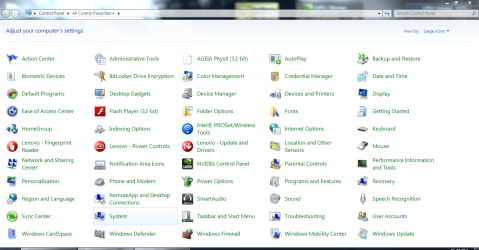
Just as a test, could you post a screenshot of your Control Panel in large icons view showing all items in it to see if you have the blank entry there as well?
 

My Computer My Computer

At a glance

64-bit Windows 11 Pro for WorkstationsIntel i7-8700K OC'd to 5 GHz64 GB (4x16GB) G.SKILL TridentZ RGB DDR4 3600...ASUS ROG-STRIX-GTX1080TI-O11G-GAMING
Computer type
PC/Desktop
Computer Manufacturer/Model Number
Self built custom
OS
64-bit Windows 11 Pro for Workstations
CPU
Intel i7-8700K OC'd to 5 GHz
Motherboard
ASUS ROG Maximus XI Formula Z390
Memory
64 GB (4x16GB) G.SKILL TridentZ RGB DDR4 3600 MHz
Graphics Card(s)
ASUS ROG-STRIX-GTX1080TI-O11G-GAMING
Sound Card
Integrated
Monitor(s) Displays
2 x Samsung Odyssey G7 27"
Screen Resolution
2560x1440
Hard Drives
1TB Samsung 990 PRO M.2,
4TB Samsung 990 PRO PRO M.2,
TerraMaster F8 SSD Plus NAS
PSU
Seasonic Prime Titanium 850W
Case
Thermaltake Core P3
Cooling
Corsair Hydro H115i
Keyboard
Logitech wireless K800
Mouse
Logitech MX Master 4
Internet Speed
2 Gb/s Download and 100 Mb/s Upload
Antivirus
Malwarebyte Anti-Malware Premium
Browser
Google Chrome
Other Info
Logitech Z625 speaker system,
Logitech BRIO 4K Pro webcam,
HP Color LaserJet Pro MFP M477fdn,
APC SMART-UPS RT 1000 XL - SURT1000XLI,
Galaxy S23 Plus phone
Hello Sarc, and welcome to Seven Forums.

Just as a test, could you post a screenshot of your Control Panel in large icons view showing all items in it to see if you have the blank entry there as well?

This blank icon does not appear in a Control Panel explorer window.
 

Attachments

  • Control Panel Large.PNG
    Control Panel Large.PNG
    84.1 KB · Views: 43

My Computer My Computer

At a glance

Windows 7 Ult SP1 x64Core i5 M540 2.53Ghz4GB
Computer Manufacturer/Model Number
Lenovo
OS
Windows 7 Ult SP1 x64
CPU
Core i5 M540 2.53Ghz
Memory
4GB
Hard Drives
500GB
Internet Speed
384kbps
Appears to be part of NVIDIA software. Have you tried uninstalling all NVIDIA software through Control Panel -> Uninstall a program and then installing the latest package of NVIDIA software/drivers for your graphics card?

  1. Download the latest drivers for your display card(s) from Drivers - Download NVIDIA Drivers
  2. Click Start Menu
  3. Click Control Panel
  4. Click Uninstall a program
  5. For NVIDIA:
    • Uninstall the NVIDIA Graphics Driver (this should uninstall all NVIDIA software and drivers)
    • Restart your computer
    • Make sure NVIDIA 3D Vision Driver, NVIDIA 3D Vision Video Player, NVIDIA HD Audio Driver, and NVIDIA PhysX System Software are not still listed under Uninstall a program through Control Panel
    • If any remain of the above, uninstall one at a time
    • If asked to restart after uninstalling any of the above, do so, and continue uninstalling any remaining NVIDIA items until all are removed
  6. Restart your computer after uninstalling drivers for all display cards
  7. Install the latest driver for the display cards once Windows starts
 

My Computer My Computer

At a glance

Windows 7 Home Premium 64 BitIntel(R) Core(TM)2 Quad CPU Q9550 @ 2.83GHz6.00 GB Hundai HMT125U6BFR8C-H9ATI Radeon HD 4850
Computer Manufacturer/Model Number
HP Pavilion e9110t
OS
Windows 7 Home Premium 64 Bit
CPU
Intel(R) Core(TM)2 Quad CPU Q9550 @ 2.83GHz
Motherboard
Pegatron IPIEL-LA3
Memory
6.00 GB Hundai HMT125U6BFR8C-H9
Graphics Card(s)
ATI Radeon HD 4850
Sound Card
Realtek High Definition Audio/ATI High Definition Audio
Monitor(s) Displays
Acer AL2216W
Screen Resolution
1680x1050
Hard Drives
Hitachi HDP725050GLA360 ATA Device 500 GB
PSU
Unknown/installed by HP
Case
HP generic case
Cooling
Intel Stock Cooling
Keyboard
HP Keyboard
Mouse
HP Mouse
Internet Speed
Download: 19.15 Mbps Upload: 1.67 Mbps
Other Info
Network Adapter Realtek RTL8168D/8111D Family PCI-E Gigabit Ethernet NIC (NDIS 6.20)
Network Adapter 802.11n Wireless PCI Express Card LAN Adapter

My Computer My Computer

At a glance

Windows 7 Ult SP1 x64Core i5 M540 2.53Ghz4GB
Computer Manufacturer/Model Number
Lenovo
OS
Windows 7 Ult SP1 x64
CPU
Core i5 M540 2.53Ghz
Memory
4GB
Hard Drives
500GB
Internet Speed
384kbps
Appears to be part of NVIDIA software. Have you tried uninstalling all NVIDIA software through Control Panel -> Uninstall a program and then installing the latest package of NVIDIA software/drivers for your graphics card?

  1. Download the latest drivers for your display card(s) from Drivers - Download NVIDIA Drivers
  2. Click Start Menu
  3. Click Control Panel
  4. Click Uninstall a program
  5. For NVIDIA:
    • Uninstall the NVIDIA Graphics Driver (this should uninstall all NVIDIA software and drivers)
    • Restart your computer
    • Make sure NVIDIA 3D Vision Driver, NVIDIA 3D Vision Video Player, NVIDIA HD Audio Driver, and NVIDIA PhysX System Software are not still listed under Uninstall a program through Control Panel
    • If any remain of the above, uninstall one at a time
    • If asked to restart after uninstalling any of the above, do so, and continue uninstalling any remaining NVIDIA items until all are removed
  6. Restart your computer after uninstalling drivers for all display cards
  7. Install the latest driver for the display cards once Windows starts

The above, and I did a Google search for the name of the icon.

Edit: Sorry, I was looking at the other Control Panel item missing an icon. I am wondering if these are related, though. Could still be NVIDIA software that is missing the icon and name.
 

My Computer My Computer

At a glance

Windows 7 Home Premium 64 BitIntel(R) Core(TM)2 Quad CPU Q9550 @ 2.83GHz6.00 GB Hundai HMT125U6BFR8C-H9ATI Radeon HD 4850
Computer Manufacturer/Model Number
HP Pavilion e9110t
OS
Windows 7 Home Premium 64 Bit
CPU
Intel(R) Core(TM)2 Quad CPU Q9550 @ 2.83GHz
Motherboard
Pegatron IPIEL-LA3
Memory
6.00 GB Hundai HMT125U6BFR8C-H9
Graphics Card(s)
ATI Radeon HD 4850
Sound Card
Realtek High Definition Audio/ATI High Definition Audio
Monitor(s) Displays
Acer AL2216W
Screen Resolution
1680x1050
Hard Drives
Hitachi HDP725050GLA360 ATA Device 500 GB
PSU
Unknown/installed by HP
Case
HP generic case
Cooling
Intel Stock Cooling
Keyboard
HP Keyboard
Mouse
HP Mouse
Internet Speed
Download: 19.15 Mbps Upload: 1.67 Mbps
Other Info
Network Adapter Realtek RTL8168D/8111D Family PCI-E Gigabit Ethernet NIC (NDIS 6.20)
Network Adapter 802.11n Wireless PCI Express Card LAN Adapter
Appears to be part of NVIDIA software.

What makes you think its part of Nvidia? The entry has no name nor icon.

In addition:

The only blank icon in your Control Panel is for AGEIA PhysX (32-bit), and that is part of the NIVIDIA drivers. Uninstalling/reinstalling all NVIDIA software as Mike posted above may sort it for you.
 

My Computer My Computer

At a glance

64-bit Windows 11 Pro for WorkstationsIntel i7-8700K OC'd to 5 GHz64 GB (4x16GB) G.SKILL TridentZ RGB DDR4 3600...ASUS ROG-STRIX-GTX1080TI-O11G-GAMING
Computer type
PC/Desktop
Computer Manufacturer/Model Number
Self built custom
OS
64-bit Windows 11 Pro for Workstations
CPU
Intel i7-8700K OC'd to 5 GHz
Motherboard
ASUS ROG Maximus XI Formula Z390
Memory
64 GB (4x16GB) G.SKILL TridentZ RGB DDR4 3600 MHz
Graphics Card(s)
ASUS ROG-STRIX-GTX1080TI-O11G-GAMING
Sound Card
Integrated
Monitor(s) Displays
2 x Samsung Odyssey G7 27"
Screen Resolution
2560x1440
Hard Drives
1TB Samsung 990 PRO M.2,
4TB Samsung 990 PRO PRO M.2,
TerraMaster F8 SSD Plus NAS
PSU
Seasonic Prime Titanium 850W
Case
Thermaltake Core P3
Cooling
Corsair Hydro H115i
Keyboard
Logitech wireless K800
Mouse
Logitech MX Master 4
Internet Speed
2 Gb/s Download and 100 Mb/s Upload
Antivirus
Malwarebyte Anti-Malware Premium
Browser
Google Chrome
Other Info
Logitech Z625 speaker system,
Logitech BRIO 4K Pro webcam,
HP Color LaserJet Pro MFP M477fdn,
APC SMART-UPS RT 1000 XL - SURT1000XLI,
Galaxy S23 Plus phone
Appears to be part of NVIDIA software.

What makes you think its part of Nvidia? The entry has no name nor icon.

In addition:

The only blank icon in your Control Panel is for AGEIA PhysX (32-bit), and that is part of the NIVIDIA drivers. Uninstalling/reinstalling all NVIDIA software as Mike posted above may sort it for you.

There are actually two blank icons. One without a name, one with the AGEIA PhysX name. I missed the first one myself. See my previous post for my edit. I do think they may both be related, or at least it is worth seeing if they are.
 

My Computer My Computer

At a glance

Windows 7 Home Premium 64 BitIntel(R) Core(TM)2 Quad CPU Q9550 @ 2.83GHz6.00 GB Hundai HMT125U6BFR8C-H9ATI Radeon HD 4850
Computer Manufacturer/Model Number
HP Pavilion e9110t
OS
Windows 7 Home Premium 64 Bit
CPU
Intel(R) Core(TM)2 Quad CPU Q9550 @ 2.83GHz
Motherboard
Pegatron IPIEL-LA3
Memory
6.00 GB Hundai HMT125U6BFR8C-H9
Graphics Card(s)
ATI Radeon HD 4850
Sound Card
Realtek High Definition Audio/ATI High Definition Audio
Monitor(s) Displays
Acer AL2216W
Screen Resolution
1680x1050
Hard Drives
Hitachi HDP725050GLA360 ATA Device 500 GB
PSU
Unknown/installed by HP
Case
HP generic case
Cooling
Intel Stock Cooling
Keyboard
HP Keyboard
Mouse
HP Mouse
Internet Speed
Download: 19.15 Mbps Upload: 1.67 Mbps
Other Info
Network Adapter Realtek RTL8168D/8111D Family PCI-E Gigabit Ethernet NIC (NDIS 6.20)
Network Adapter 802.11n Wireless PCI Express Card LAN Adapter
Yeah, I'm also thinking the second one showing in the Start Menu may actually be the same (or related to) AGEIA PhysX (32-bit) that is showing only once in the Control Panel. Could be a glitch in the Start Menu that uninstall/reinstalling the drivers may help get rid of. We shall see though.
 

My Computer My Computer

At a glance

64-bit Windows 11 Pro for WorkstationsIntel i7-8700K OC'd to 5 GHz64 GB (4x16GB) G.SKILL TridentZ RGB DDR4 3600...ASUS ROG-STRIX-GTX1080TI-O11G-GAMING
Computer type
PC/Desktop
Computer Manufacturer/Model Number
Self built custom
OS
64-bit Windows 11 Pro for Workstations
CPU
Intel i7-8700K OC'd to 5 GHz
Motherboard
ASUS ROG Maximus XI Formula Z390
Memory
64 GB (4x16GB) G.SKILL TridentZ RGB DDR4 3600 MHz
Graphics Card(s)
ASUS ROG-STRIX-GTX1080TI-O11G-GAMING
Sound Card
Integrated
Monitor(s) Displays
2 x Samsung Odyssey G7 27"
Screen Resolution
2560x1440
Hard Drives
1TB Samsung 990 PRO M.2,
4TB Samsung 990 PRO PRO M.2,
TerraMaster F8 SSD Plus NAS
PSU
Seasonic Prime Titanium 850W
Case
Thermaltake Core P3
Cooling
Corsair Hydro H115i
Keyboard
Logitech wireless K800
Mouse
Logitech MX Master 4
Internet Speed
2 Gb/s Download and 100 Mb/s Upload
Antivirus
Malwarebyte Anti-Malware Premium
Browser
Google Chrome
Other Info
Logitech Z625 speaker system,
Logitech BRIO 4K Pro webcam,
HP Color LaserJet Pro MFP M477fdn,
APC SMART-UPS RT 1000 XL - SURT1000XLI,
Galaxy S23 Plus phone
I will reinstall Nvidia drivers and post an update....
 

My Computer My Computer

At a glance

Windows 7 Ult SP1 x64Core i5 M540 2.53Ghz4GB
Computer Manufacturer/Model Number
Lenovo
OS
Windows 7 Ult SP1 x64
CPU
Core i5 M540 2.53Ghz
Memory
4GB
Hard Drives
500GB
Internet Speed
384kbps
writhziden looked up the blank icon with the name AGEIA PhysX (32-bit)
AGEIA PhysX (also known as Nvidia Physx) software
 

My Computer My Computer

At a glance

Windows 7 Ultimate 32bit SP1Intel(R) Core(TM)2 Quad CPU @ 2.40GHz, 2400 MHz4 GBATI Radeon HD 2600 Pro
Computer type
PC/Desktop
Computer Manufacturer/Model Number
Bruce ... somewhere in his 40's
OS
Windows 7 Ultimate 32bit SP1
CPU
Intel(R) Core(TM)2 Quad CPU @ 2.40GHz, 2400 MHz
Motherboard
INTEL/D975XBX2
Memory
4 GB
Graphics Card(s)
ATI Radeon HD 2600 Pro
Monitor(s) Displays
Samsung SyncMaster 914v
Screen Resolution
1280 x 1024
Hard Drives
2/500GB each ... ST3500630AS ATA Device.
One is not connected
PSU
Rocketfish 700 W
Case
G.Skill Gigabyte Chassis
Keyboard
Standard PS/2 Keyboard
Mouse
Microsoft PS/2 Mouse
Internet Speed
DSL
Antivirus
Avira Internet Security
Browser
IE 11
Other Info
ATI HDMI Audio

My Computer My Computer

At a glance

64-bit Windows 11 Pro for WorkstationsIntel i7-8700K OC'd to 5 GHz64 GB (4x16GB) G.SKILL TridentZ RGB DDR4 3600...ASUS ROG-STRIX-GTX1080TI-O11G-GAMING
Computer type
PC/Desktop
Computer Manufacturer/Model Number
Self built custom
OS
64-bit Windows 11 Pro for Workstations
CPU
Intel i7-8700K OC'd to 5 GHz
Motherboard
ASUS ROG Maximus XI Formula Z390
Memory
64 GB (4x16GB) G.SKILL TridentZ RGB DDR4 3600 MHz
Graphics Card(s)
ASUS ROG-STRIX-GTX1080TI-O11G-GAMING
Sound Card
Integrated
Monitor(s) Displays
2 x Samsung Odyssey G7 27"
Screen Resolution
2560x1440
Hard Drives
1TB Samsung 990 PRO M.2,
4TB Samsung 990 PRO PRO M.2,
TerraMaster F8 SSD Plus NAS
PSU
Seasonic Prime Titanium 850W
Case
Thermaltake Core P3
Cooling
Corsair Hydro H115i
Keyboard
Logitech wireless K800
Mouse
Logitech MX Master 4
Internet Speed
2 Gb/s Download and 100 Mb/s Upload
Antivirus
Malwarebyte Anti-Malware Premium
Browser
Google Chrome
Other Info
Logitech Z625 speaker system,
Logitech BRIO 4K Pro webcam,
HP Color LaserJet Pro MFP M477fdn,
APC SMART-UPS RT 1000 XL - SURT1000XLI,
Galaxy S23 Plus phone

My Computer My Computer

At a glance

Windows 7 Ult SP1 x64Core i5 M540 2.53Ghz4GB
Computer Manufacturer/Model Number
Lenovo
OS
Windows 7 Ult SP1 x64
CPU
Core i5 M540 2.53Ghz
Memory
4GB
Hard Drives
500GB
Internet Speed
384kbps
Back
Top