Blank page in excell 2010

sam49

New member
Member
VIP
Local time
2:17 AM
Messages
140
Hi guys can i ask a question please
I am using Microsoft office 2010 and for some reason now when i open an Excel spreadsheet and enter data, then when i close Excel, behind the one i was using is another blank Excel worksheet its just blank with no cells or anthing like that just a blank page.

Every thing works ok its just that i have to close two worksheets every time i use Excel

Does anyone know what is happening
 

My Computer My Computer

Computer Manufacturer/Model Number
Custom Made
OS
Windows 7 Professional 64 Bit
CPU
Intel Core I7 920 @ 2.6 GHz
Motherboard
Asus P6T SE
Memory
12 Meg Triple Channel DDR3
Graphics Card(s)
Nvidia Gforce GTX 260
Sound Card
On Board
Monitor(s) Displays
DGM
Hard Drives
500 gig Sata
PSU
Not sure
Case
Thermalite
Cooling
Standard cooling
Keyboard
Usb
Mouse
Usb
Internet Speed
7meg
If you open Excel then Click File then Open. Then navigate to your file and open it the original new file will stay in the background. If you then close the sheet you are working on that will show the new one with a message "Do you want to save Book 1". If on the other hand you first navigate to your file then double click it Excel will open with just your file showing. If your new worksheet opens with no grid lines etc then try this:
With Excel open, go to Tools, then Options then click the View Tag. If the Gridlines box is not checked then check it. Now when you open Excel the grid lines will show.
 

My Computer My Computer

Computer type
PC/Desktop
OS
Microsoft Windows 7 Home Premium 64-bit 7601 Multiprocessor Free Service Pack 1
CPU
Intel(R) Core(TM) i7-3770 CPU @ 3.40GHz
Motherboard
ASUSTeK COMPUTER INC. P8H77-M
Memory
8.00 GB
Graphics Card(s)
Intel(R) HD Graphics 4000
Sound Card
On Board
Monitor(s) Displays
Dell 24"
Screen Resolution
1920 x 1080
Hard Drives
(1) INTEL SSDSC2CT180A3 ATA Device (2) ST500DM002-1BD142 ATA Device (3) WDC WD3200AAKS-75L9A0 ATA Device (4) Generic- Compact Flash USB Device (5) Generic- MS/MS-Pro USB Device (6) Generic- SD/MMC USB Device (7) Generic- SM/xD-Picture USB
PSU
500w Corsair
Case
Cooler Master
Cooling
3 Fans
Keyboard
Logitech MK300
Mouse
Logitech WOM
Internet Speed
75Mb
Antivirus
Norton 360
Browser
Firefox, Opera, IE
With Excel open said:
Hi thanks for the tip but where is the tool option when you say go to tools with excell open.

What i usually do to open s excel file is go to the file i need to open and double click and the file opens no problem.
But then when i have edited the file and saved it and then close the file, thats when i get a ghost like workbook still open i can then close this one and all is ok but my question is when i double click a excell file why does two excell open two workbooks
 

My Computer My Computer

Computer Manufacturer/Model Number
Custom Made
OS
Windows 7 Professional 64 Bit
CPU
Intel Core I7 920 @ 2.6 GHz
Motherboard
Asus P6T SE
Memory
12 Meg Triple Channel DDR3
Graphics Card(s)
Nvidia Gforce GTX 260
Sound Card
On Board
Monitor(s) Displays
DGM
Hard Drives
500 gig Sata
PSU
Not sure
Case
Thermalite
Cooling
Standard cooling
Keyboard
Usb
Mouse
Usb
Internet Speed
7meg

My Computer My Computer

Computer type
PC/Desktop
OS
Microsoft Windows 7 Home Premium 64-bit 7601 Multiprocessor Free Service Pack 1
CPU
Intel(R) Core(TM) i7-3770 CPU @ 3.40GHz
Motherboard
ASUSTeK COMPUTER INC. P8H77-M
Memory
8.00 GB
Graphics Card(s)
Intel(R) HD Graphics 4000
Sound Card
On Board
Monitor(s) Displays
Dell 24"
Screen Resolution
1920 x 1080
Hard Drives
(1) INTEL SSDSC2CT180A3 ATA Device (2) ST500DM002-1BD142 ATA Device (3) WDC WD3200AAKS-75L9A0 ATA Device (4) Generic- Compact Flash USB Device (5) Generic- MS/MS-Pro USB Device (6) Generic- SD/MMC USB Device (7) Generic- SM/xD-Picture USB
PSU
500w Corsair
Case
Cooler Master
Cooling
3 Fans
Keyboard
Logitech MK300
Mouse
Logitech WOM
Internet Speed
75Mb
Antivirus
Norton 360
Browser
Firefox, Opera, IE
Hi guys thanks for the info,

But it think my excel open has a problem when i double click on a excel file why does it open two worksheets one with cells on it and one without cells
 

My Computer My Computer

Computer Manufacturer/Model Number
Custom Made
OS
Windows 7 Professional 64 Bit
CPU
Intel Core I7 920 @ 2.6 GHz
Motherboard
Asus P6T SE
Memory
12 Meg Triple Channel DDR3
Graphics Card(s)
Nvidia Gforce GTX 260
Sound Card
On Board
Monitor(s) Displays
DGM
Hard Drives
500 gig Sata
PSU
Not sure
Case
Thermalite
Cooling
Standard cooling
Keyboard
Usb
Mouse
Usb
Internet Speed
7meg
Does sound as if you have a problem with the actual program. Perhaps going to Control Panel and Programs and Features, highlight the MS Office 10 and click "Change" this should offer you a repair option. Might be worth a try!
 

My Computer My Computer

Computer type
PC/Desktop
OS
Microsoft Windows 7 Home Premium 64-bit 7601 Multiprocessor Free Service Pack 1
CPU
Intel(R) Core(TM) i7-3770 CPU @ 3.40GHz
Motherboard
ASUSTeK COMPUTER INC. P8H77-M
Memory
8.00 GB
Graphics Card(s)
Intel(R) HD Graphics 4000
Sound Card
On Board
Monitor(s) Displays
Dell 24"
Screen Resolution
1920 x 1080
Hard Drives
(1) INTEL SSDSC2CT180A3 ATA Device (2) ST500DM002-1BD142 ATA Device (3) WDC WD3200AAKS-75L9A0 ATA Device (4) Generic- Compact Flash USB Device (5) Generic- MS/MS-Pro USB Device (6) Generic- SD/MMC USB Device (7) Generic- SM/xD-Picture USB
PSU
500w Corsair
Case
Cooler Master
Cooling
3 Fans
Keyboard
Logitech MK300
Mouse
Logitech WOM
Internet Speed
75Mb
Antivirus
Norton 360
Browser
Firefox, Opera, IE
Ok Thanks i will give that a try
 

My Computer My Computer

Computer Manufacturer/Model Number
Custom Made
OS
Windows 7 Professional 64 Bit
CPU
Intel Core I7 920 @ 2.6 GHz
Motherboard
Asus P6T SE
Memory
12 Meg Triple Channel DDR3
Graphics Card(s)
Nvidia Gforce GTX 260
Sound Card
On Board
Monitor(s) Displays
DGM
Hard Drives
500 gig Sata
PSU
Not sure
Case
Thermalite
Cooling
Standard cooling
Keyboard
Usb
Mouse
Usb
Internet Speed
7meg
How are you closing excel?

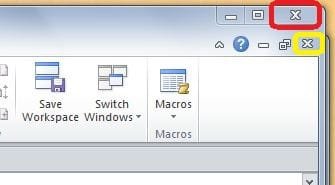
I suspect that you are using the lower of the X's (highlighted in yellow below) on the top right of your workbook. This will close only the current workbook, leaving the Excel program open for further use. The X (highlighted in red) will close the program and workbook. See the first illustration below.

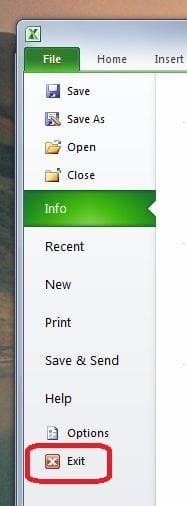
Alternatively, you can close the program and worksheet by the method in the second illustration below.


Attachments

  • Close Excel.JPG
    Close Excel.JPG
    15.9 KB · Views: 15
  • Close Excel_1.JPG
    Close Excel_1.JPG
    19 KB · Views: 12

My Computer My Computer

Computer type
PC/Desktop
Computer Manufacturer/Model Number
Packard Bell
OS
Windows 7 Home Premium 64bit
CPU
Intel(R) Core(TM) i3-2120 CPU @ 3.30GHz
Motherboard
Packard Bell IPISB-AG
Memory
3.00 GB
Graphics Card(s)
(1) Intel(R) HD Graphics (2) VNC Mirror Driver
Sound Card
Realtek High Definition Audio
Monitor(s) Displays
AIO LCD
Screen Resolution
1920 x 1080
Hard Drives
WDC WD10EADX-22TDHB0 ATA Device
Fixed hard disk media
4 partitions
931.51 GB
Keyboard
Wireless
Mouse
Wireless
Antivirus
Microsoft Security Essentials
Browser
IE; Firefox
Other Info
Also:
Samsung N220 Plus Netbook - Windows 7 Home
HP laptop
iPad 5
The blank sheet is caused by the PERSONAL.XLSB page. If you record and save a macro, Excel creates the PERSONAL file and opens it every time you open Excel. If you delete that file, you won't see the blank page anymore.
 

My Computer My Computer

OS
Win7
Hi Ric
Thanks for the info. but i dont think i have a marco in the excel sheet. and i dont know what a Personal.xlsb page is or how to get rid of it.
The only thung i can say is the file was password protected, and now i have remover the password the blank page is not there anymore.

Thanks again
 

My Computer My Computer

Computer Manufacturer/Model Number
Custom Made
OS
Windows 7 Professional 64 Bit
CPU
Intel Core I7 920 @ 2.6 GHz
Motherboard
Asus P6T SE
Memory
12 Meg Triple Channel DDR3
Graphics Card(s)
Nvidia Gforce GTX 260
Sound Card
On Board
Monitor(s) Displays
DGM
Hard Drives
500 gig Sata
PSU
Not sure
Case
Thermalite
Cooling
Standard cooling
Keyboard
Usb
Mouse
Usb
Internet Speed
7meg
Blank page in Excel 2010

Sam49, I have the same problem and I think you describe the situation perfectly. I also do not have any macros recorded since I recently just got the Office 2010 upgrade. It's very annoying to have the Book1 automatically load when I just double click an existing spreadsheet to open.

Even if I use that blank worksheet, book1, to open another file from the menu the original Book1 remains open along with the one I just opened.
 

My Computer My Computer

OS
Windows 7 Professional 64-bit
I know this thread is a little old, but it describes EXACTLY what I'm experiencing with Excel 2010. I have never created any macros either.

I will say that Word has been exhibiting even stranger behavior when I try to close those files. It states that changes have been made to the global template and do I want to save it, etc. I have to go through about 3 annoying steps when I close out a Word file. In comparison this Excel bug is less annoying so I guess I should count my blessings.

I use Office 2010 at work too, and don't experience these problems, so it probably has something to do with my HP laptop, or how the program is installed, etc. I use Norton anti-virus and have never surfed any suspicious sites with this computer. Besides, the computer isn't exhibiting any odd behavior other than these Office 2010 bugs, so I don't think it's malware causing it.
 

My Computer My Computer

Computer Manufacturer/Model Number
HP Pavilion dv7
OS
Windows 7 Home Premium x64
CPU
Intel Core i7-2670QM
Memory
8G
Graphics Card(s)
1GB AMD Radeon
Hard Drives
750GB 7200RPM
Back
Top