
You are using an out of date browser. It may not display this or other websites correctly.
You should upgrade or use an alternative browser.
You should upgrade or use an alternative browser.
Block sender list does not work
- Thread starter geopops
- Start date

I know this is probably redundant but:
Block a Sender in Windows Live Mail
To add a sender to your list of blocked senders in Windows Live Mail or Windows Mail:
Block a Sender in Windows Live Mail
To add a sender to your list of blocked senders in Windows Live Mail or Windows Mail:
- Highlight a message from the undesired sender in the message list.
- Make sure the Home ribbon is active.
- Click the down arrow beneath Junk in the Home ribbon.
- Select Add sender to blocked sender list from the menu.
- Select Add sender's domain to blocked sender list from the menu to block messages not only from this sender but from all addresses at the same domain (what follows the '@' sign).
My Computer
At a glance
7 Pro
- OS
- 7 Pro

- Local time
- 2:24 PM
- Messages
- 2,066
IIRC, it's a bug in WLM 2011 that you have to do a "repair" to fix this problem. Use "Control Panel>>Programs and Features" to do a repair of "Windows Live Essentials".When I add an Email sender's address to the blocked senders list in Live Mail 2011, I continue to receive incoming Emails from that address. Is there a fix?
My Computer
At a glance
Windows 8 Pro w/MC 32-bitIntel Atom 1.86 GHz2 GBIntel GMA 500
- Computer type
- PC/Desktop
- Computer Manufacturer/Model Number
- OQO 2+
- OS
- Windows 8 Pro w/MC 32-bit
- CPU
- Intel Atom 1.86 GHz
- Motherboard
- OQO 2+
- Memory
- 2 GB
- Graphics Card(s)
- Intel GMA 500
- Sound Card
- IDT
- Monitor(s) Displays
- LCD
- Screen Resolution
- 800 x 480 (portable) 1280 x 1024 (docked)
- Hard Drives
- 64 GB SSD
- PSU
- 9 Ah Battery (portable) or OQO Brick (docked)
- Case
- Shirt Pocket Sized
- Cooling
- Tiny Fan
- Keyboard
- Slide out (portable) DiNovo Edge (docked)
- Mouse
- Eraser head (portable) Logitech Bluetooth (docked)
- Internet Speed
- WWAN or 802.11G (portable) T1 (docked)
- Browser
- IE 10
- Other Info
- DVD-RW OQO Docking Station
IIRC, it's a bug in WLM 2011 that you have to do a "repair" to fix this problem. Use "Control Panel>>Programs and Features" to do a repair of "Windows Live Essentials".When I add an Email sender's address to the blocked senders list in Live Mail 2011, I continue to receive incoming Emails from that address. Is there a fix?
Could you possibly provide a little more detail/explanation as to "how to do this repair"? I went to the "Control Panel" then "Programs and Features" but I do not see anything for a repair of "Windows Live Essentials".
Thanks
RonMcD
My Computer
At a glance
Windows 7
- OS
- Windows 7

Welcome to the Seven Forums
I do not have WLM but look at this tutorial it may help http://www.sevenforums.com/tutorials/77761-programs-features-uninstall-change-program.html
Jerry
I do not have WLM but look at this tutorial it may help http://www.sevenforums.com/tutorials/77761-programs-features-uninstall-change-program.html
Jerry
My Computer
At a glance
Win 7 Pro x64 / Win 10 ProIntel(R) Core(TM) i7-3630QM CPU @ 2.40GHz12 GB(1) Intel(R) HD Graphics 4000 (2) NVIDIA GeFo...
- Computer type
- Laptop
- Computer Manufacturer/Model Number
- Sager NP9170
- OS
- Win 7 Pro x64 / Win 10 Pro
- CPU
- Intel(R) Core(TM) i7-3630QM CPU @ 2.40GHz
- Motherboard
- CLEVO P170EM
- Memory
- 12 GB
- Graphics Card(s)
- (1) Intel(R) HD Graphics 4000 (2) NVIDIA GeForce GTX 675M
- Sound Card
- (1) Realtek High Definition Audio (2) Intel(R) Display Aud
- Monitor(s) Displays
- 17.3
- Screen Resolution
- 1920x1080
- Hard Drives
- (1) Samsung 860 EVO 500GB(OS) (1) Samsung 860 EVO 500GB(Data)
- Keyboard
- Backlite
- Antivirus
- MSE, Malwarebytes Pro
- Browser
- Firefox
- Other Info
- DESKTOP: Custom-built.
OS: Win 10 Pro x64.
CASE: Rosewill R5.
CPU: Intel I5 4670K CPU @ 3.40GHz.
CPU COOLER: Cool Master Hyper 212 EVO.
MOTHERBOARD: Asus Z87-A.
MEMORY: Kingston HyperX 2x4 GB.
GPU: Nvidia Geforce 650 TI.
PSU: Corsair TX750.
DRIVES: (1) Samsung 840 120 GB SSD (2) Western Digital blue 500 GB 7200 RPM.
blazer999
Re the "repair" of Windows Live Essentials.........
You're almost there.........
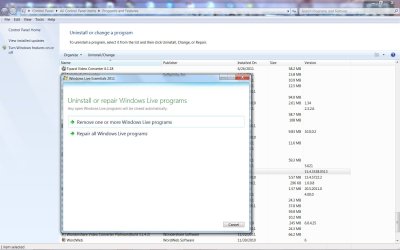
To do the repair, once you're in Programs and Features, right click on Windows Live Essentials, left click on "uninstall/change", and then you'll receive the option to repair Windows Live Essentials........left click on the repair and let it rip.........(see the attached)
Re the "repair" of Windows Live Essentials.........
You're almost there.........
To do the repair, once you're in Programs and Features, right click on Windows Live Essentials, left click on "uninstall/change", and then you'll receive the option to repair Windows Live Essentials........left click on the repair and let it rip.........(see the attached)
Attachments
My Computer
At a glance
windows 7 home premium 64 bit3.0 ghz4gb
- Computer Manufacturer/Model Number
- generic
- OS
- windows 7 home premium 64 bit
- CPU
- 3.0 ghz
- Motherboard
- p7h55-m lx
- Memory
- 4gb
IIRC, it's a bug in WLM 2011 that you have to do a "repair" to fix this problem. Use "Control Panel>>Programs and Features" to do a repair of "Windows Live Essentials".When I add an Email sender's address to the blocked senders list in Live Mail 2011, I continue to receive incoming Emails from that address. Is there a fix?
roncurr; I carried out the repair ok. It appeared to solve the problem in that a junk address is added to the blocked senders list and a message saying so is displayed. However; when you restart Windows Live mail and recheck the blocked senders list; the offending item has removed itself. Example is "[email protected]" A similar address "[email protected]" is blocked and remains on the blocked senders list
My Computer
At a glance
Windows 7 Home Premium 64 bitIntel Pentium SU 41003 GBATI Mobility Radeon HD4330
- Computer type
- Laptop
- Computer Manufacturer/Model Number
- Acer 5810TZG
- OS
- Windows 7 Home Premium 64 bit
- CPU
- Intel Pentium SU 4100
- Motherboard
- Intel Centrino 2
- Memory
- 3 GB
- Graphics Card(s)
- ATI Mobility Radeon HD4330
- Sound Card
- Not known
- Monitor(s) Displays
- 15.6" 16 9 HD LCD
- Screen Resolution
- 1366 x 768
- Hard Drives
- 320 GB
- PSU
- What is a PSU
- Case
- Laptop
- Cooling
- Fan
- Keyboard
- Part of laptop
- Mouse
- Technika wireless
- Internet Speed
- 7 Mb
- Antivirus
- M.S.E. & Malwarebytes Pro.
- Browser
- SurfEasy/Chrome/Firefox/Internet Explorer
- Other Info
- Tiscali ISP
Connection to internet via Wifi or - if none - Vodafone dongle in UK & MIFI with International data sim when abroad
Similar threads
- Replies
- 6
- Views
- 15K


- Replies
- 18
- Views
- 10K
