spaceboy909
New member
- Local time
- 2:18 AM
- Messages
- 7
Hi all. This is my very first smartphone, but I'm pretty well versed with computers (not an expert).
(edit) The phone is a BLU Studio C 5+5 with a Mediatek MT6582 CPU I have also updated my PC specs in my profile.
First off, I'm pretty sure when I first hooked it up it was fine, because I managed to get some mp3's moved to it, but now it will only connect in camera mode. So, I can transfer pictures, but that's it.
The problem seemed to begin after Windows Update alerted me to an MTP driver update, which I attempted to install, but it failed every time. I tried a clean boot and install but it still failed. After that, I can only connect in camera mode.
I have contacted BLU about drivers and they said they don't provide them, and to contact OS support.
I have attempted to contact Mediatek but got no response.
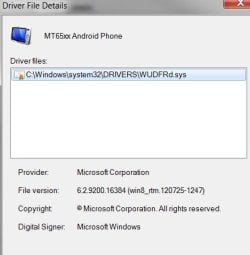
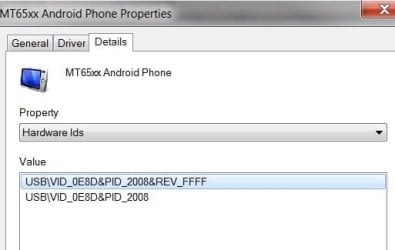
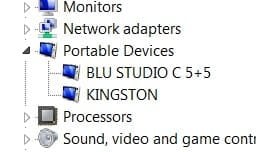
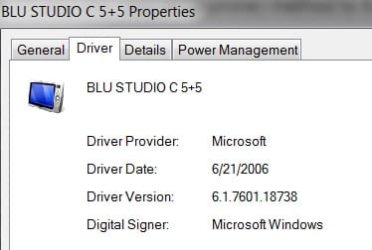
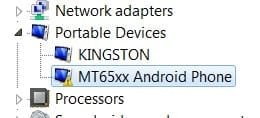
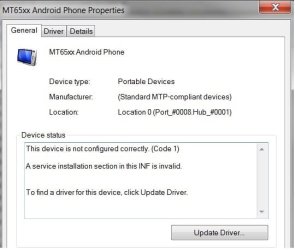
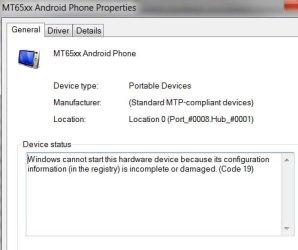
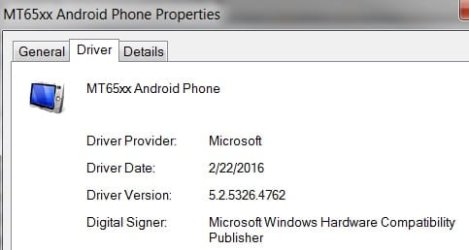
I am including several pics of of errors and info. Take note of the two different messages in the same window that I got at two different times.
Things I have tried:
* Uninstall followed by clean boot install
* Uninstalling some (not all) other USB listings in device manager. Not all at once, as some lock up my USB keyboard and mouse.
* Different USB ports
* Unplugging USB harddrive
One last thing: Windows update seems to have an issue with 'disappearing' updates after multiple failed attempted installs. It has done this with the MTP driver and now my Intel graphics driver, which was also failing to install.
Any help is greatly appreciated! (It only let me upload 5 pics...I'll do the rest in the next post)

(edit) The phone is a BLU Studio C 5+5 with a Mediatek MT6582 CPU I have also updated my PC specs in my profile.
First off, I'm pretty sure when I first hooked it up it was fine, because I managed to get some mp3's moved to it, but now it will only connect in camera mode. So, I can transfer pictures, but that's it.
The problem seemed to begin after Windows Update alerted me to an MTP driver update, which I attempted to install, but it failed every time. I tried a clean boot and install but it still failed. After that, I can only connect in camera mode.
I have contacted BLU about drivers and they said they don't provide them, and to contact OS support.
I have attempted to contact Mediatek but got no response.
I am including several pics of of errors and info. Take note of the two different messages in the same window that I got at two different times.
Things I have tried:
* Uninstall followed by clean boot install
* Uninstalling some (not all) other USB listings in device manager. Not all at once, as some lock up my USB keyboard and mouse.
* Different USB ports
* Unplugging USB harddrive
One last thing: Windows update seems to have an issue with 'disappearing' updates after multiple failed attempted installs. It has done this with the MTP driver and now my Intel graphics driver, which was also failing to install.
Any help is greatly appreciated!
(It only let me upload 5 pics...I'll do the rest in the next post)My Computer
At a glance
Win 7 Ultimate 64 bitIntel i7-4790K 4GHz16 GbIntel IGP HD 4600
- Computer type
- PC/Desktop
- Computer Manufacturer/Model Number
- custom build
- OS
- Win 7 Ultimate 64 bit
- CPU
- Intel i7-4790K 4GHz
- Motherboard
- Gigabyte Z97X-UD3H-CF
- Memory
- 16 Gb
- Graphics Card(s)
- Intel IGP HD 4600
- Sound Card
- onboard
- Monitor(s) Displays
- Acer and HP 22"
- Screen Resolution
- 1024x768
- Hard Drives
- Samsung SSD 850 EVO 250GB
Toshiba DT01ACA300 3TB
WD 10EACS External USB 1TB
- PSU
- PC Power & Cooling ModXStream Pro Series OCZ700MXSP 700 Watt
- Case
- Rosewill THOR V2 Gaming ATX Full Tower
- Cooling
- CORSAIR Hydro Series H50 120mm Quiet Edition Liquid CPU Cool
- Keyboard
- MS Wifi Comfort 4000
- Mouse
- Microsoft SideWinder X5 Mouse
- Internet Speed
- 4mb
- Antivirus
- Avast
- Browser
- Chromodo Dragon, Opera, IE, Firefox, Chrome
- Other Info
- System built a few weeks before Christmas 2015.
Also running Comodo Firewall, with OS FW on too. I never have problems running two. I use a Belkin router with wired connection.