Solved Blue folders in Documents folder

Kevinr

New member
Local time
12:11 AM
Messages
4
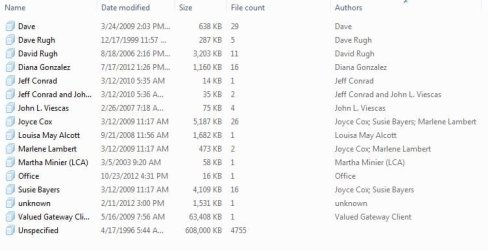
My dad had his files transfered from a computer with a Windows XP OS, and now there are blue folders in the "My Documents" shortcut. (they don't actually look like folders, more like a symbol for a stack of paper). Anyway, what are they? I can't seem to do anything with them. I can view them, go to the location (which is anyfolder on the hard drive), and delete them, which deletes them from the HD as well. Please see attachment. Please help figure this out.
Thanks,
Kevin R.
 

Attachments

  • Capture.JPG
    Capture.JPG
    43.5 KB · Views: 12
Last edited:

My Computer

OS
Windows XP 32 bit

My Computer

Computer type
PC/Desktop
Computer Manufacturer/Model Number
Golden Mk. I.4
OS
Windows 10 Pro x64 ; Xubuntu x64
CPU
Intel i7 860 @ 2.80 GHz O/C'ed to 4.0GHz
Motherboard
Gigabyte P55A-UD3R Rev.1. Award BIOS F13
Memory
16GB Corsair Vengance DDR3 @ 661 MHz Dual Channel (9-9-9-24)
Graphics Card(s)
EVGA NVidia GTX 560 1024MB
Sound Card
Realtek Integrated
Monitor(s) Displays
Dual Samsung SyncMaster 2494HS
Screen Resolution
1920*1080 and 1920*1080
Hard Drives
1*Samsung 840 EVO 120GB SSD;
1*OCZ Vertex 2 60GB SSD;
2*Samsung F3 SpinPoint 1TB in RAID0;
1*Samsung F1 SpinPoint 1TB;
2*Western Digital 1TB External USB 3.0
1*Western Digital 500GB External USB 3.0
1*Seagate 500GB External USB 2.0
PSU
Thermaltake ToughPower QFan 750W
Case
Thermaltake Element S VK60001W2Z
Cooling
Corsair H60 Water Cooling, 2*230mm and 2*80mm case fans
Keyboard
Logitech G110
Mouse
Logitech MX518
Here is a screenshot. It's in the shortcut 'My Documents", sorry. It should be attached.
 

Attachments

  • Capture.JPG
    Capture.JPG
    43.5 KB · Views: 12

My Computer

OS
Windows XP 32 bit
What you are seeing is a filtered view with in the Documents Library, at the top right of the window, there should be "Arrange by" next to some blue text and an error, click it and select Folder.
 

My Computer

Computer type
PC/Desktop
Computer Manufacturer/Model Number
Alienware Aurora ALX R4
OS
Windows 10 Pro (x64)
CPU
Intel Core i7-3930K (3.2GHz - 4.5GHz)
Motherboard
Alienware Aurora-R4 x79
Memory
4x Samsung 4GB PC3-12800 DDR3 (16GB 1600MHz)
Graphics Card(s)
Nvidia Geforce GTX 690
Sound Card
SteelSeries Siberia Elite
Monitor(s) Displays
Dell UltraSharp U3011
Screen Resolution
2560x1600
Hard Drives
Samsung 850 Pro 256 GB, Seagate 1TB Desktop Hybrid HDD, 2x Western Digital 4TB Green HDD
PSU
875W Some Dell PSU <.<
Case
Alienware Aurora ALX
Cooling
Custom Liquid Cooling (EK CPU & GPU blocks) dual EK 480RAD
Keyboard
Logitech G710+ Mechanical
Mouse
Logitech G700s
Internet Speed
Verizon Fios (50 mbps average)
Other Info
Server: Intel NUC D54250WYK: i5-4250U, 16GB, 256 GB mSATA, Windows Server 2012 R2
Unwanted folders

Thanks. I looked and didn't see anything. He's using the computer right now, so I will look deeper later.
Thanks again,
KevinR
 

My Computer

OS
Windows XP 32 bit
Folder viewing problem

Thank you!!! That fixed it! It was set to arrange by Author.
Kevin
 

My Computer

OS
Windows XP 32 bit
Back
Top