Bluetooth headphones disconnected - no matter what!!

RegSK

New member
Local time
12:29 PM
Messages
3
Got myself an used Acer Travelmate 5520 a few weeks back. Windows 7 Professional, 64 bit.

It didn't have a bult in blue tooth adapter, so I bought one off Ebay. I plugged it in and tried to install the Bluetooth driver for the laptop model off of Acer website (Bluetooth_Broadcom_v6.1.0.2000_Win7x86x64). During install I got the message that no bluetooth device was detected (see image).Acer BT driver failure.png
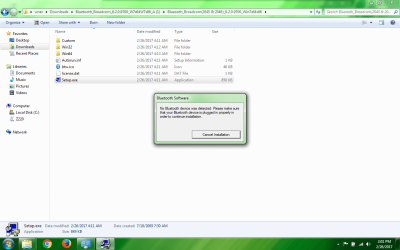
I then came across this thread (Error: Bluetooth peripheral device driver not found - Microsoft Community) and installed Broadcomm Driver 6.2.1.500. I also installed Intel bluetooth patch. Following this, one of my two BT headsets paired and played music. I wanted to get the other one to work too, but in Sounds it's status was always show Disconnected (see image). As I was more keen on getting the second unit to work, I uninstalled all bluetooth related components, and freshly installed the Broadcomm Driver 6.2.1.500. Now the first headset has started to react like the second - remains disconnected. .
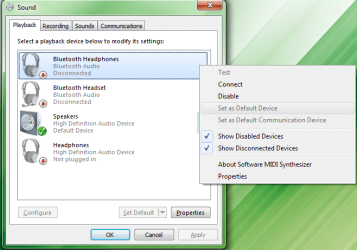
BT headset recognized but disconnected.png

See image of all bluetooth related software I now have installed. BT software.png
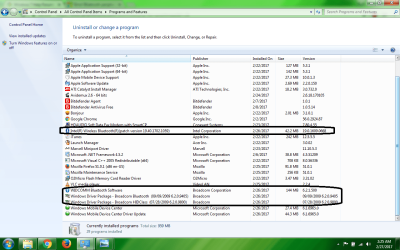
I have tried just about everything on forums and what not. Can someone please help me out?
 

My Computer My Computer

At a glance

Windows 7 Professional 64 bit
Computer type
Laptop
Computer Manufacturer/Model Number
Acer Travelmate 5520
OS
Windows 7 Professional 64 bit
Hello and welcome RegSK now mate first we need more specs than you have given us so please follow this
Now before we can help we do need to know what is in your machine so please do this System Info - See Your System Specs
or either enter the specs of your system in your forum profile the specs will appear when we click on that little box bottom left of the post screen it is for me the preferable option as it is easy. As you may appreciate it is very hard when you don’t know what one is working with for example a diesel or petrol engine.
*(pretyped to save time)

Now you have me at a disadvantage here too in that you say you bought a Blu tooth adaptor and then downloaded a Blu tooth driver from the Acer site. What has me foxed is why would you do that? if indeed the machine has a Blu tooth card inside it - which I cannot find Googling the Acer site for and then plug in a further adaptor for Blu tooth??

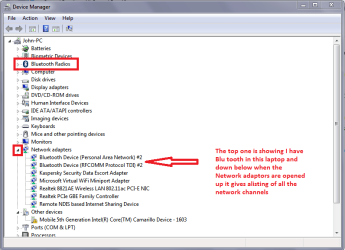
I myself think the machine does not have an internal Blu tooth card and so could you look in Control Panel > Device Manager open up what is in my pic if they are there.
 

Attachments

  • BLU TOOTH.PNG
    BLU TOOTH.PNG
    22.5 KB · Views: 0

My Computer My Computer

At a glance

Desk1 7 Home Prem / Desk2 10 Pro / Main lap A...Desk1 i5 3750K / Laptop i7 GTX 860M / Desk2 i...Desk1 8GB (1866) / Desk2 16GB (1333) / Laptop...Desk 1& 2NVidia GTX 650 & Laptops on board Intel
Computer type
PC/Desktop
Computer Manufacturer/Model Number
Own build (new) Desk1 / Asus ROG Win 7 / Desk2 1st build
OS
Desk1 7 Home Prem / Desk2 10 Pro / Main lap Asus ROG 10 Pro 2 laptop Toshiba 7 Pro Asus P2520 7 & 10
CPU
Desk1 i5 3750K / Laptop i7 GTX 860M / Desk2 i5 2500
Motherboard
Desk1 Asus P877-V / Desk2 Gigabyte H67 UD3H / Laptop ?
Memory
Desk1 8GB (1866) / Desk2 16GB (1333) / Laptop 8Gb DDR3
Graphics Card(s)
Desk 1& 2NVidia GTX 650 & Laptops on board Intel
Sound Card
Desk 1 & 2 -XONAR DG Realtek High Def audio Laptop
Monitor(s) Displays
Desk 1 Benq HD 2450 / Desk2 Philips 24" / Laptop 17.5"
Screen Resolution
1920x1080 D1 & D2 & Laptop 1
Hard Drives
Desk1 Samsung 120GB 830 SSD
Asus ROG 256GB 850 Pro SSD
Desk2 Samsung 840 256 SSD
Toshiba 120GB EVO
PSU
Desk 1 Corsair HX 1050/ Laptop ? / Desk 2 Corsair HX 650
Case
Desk 1 Cooler HAF XM ? Toshiba laptop / Desk2 Coolermaster
Cooling
Fans on all Desk1 -2 Desk2 - all Coolermasters 5 Laptop ?
Keyboard
Desk 1 MS Sidewinder X6 Desk 2 MS Sidewinder X 4
Mouse
Desk 1&2 - Gigabyte MS 900 gamer - laptop - Logitec wireless
Internet Speed
ADSL2+
Other Info
One other Desktop (tester) and spare Toshba laptop both with SSD's
Running Kaspersky 2016 ISS on all machines config'd identically
Logitec audio stereo systems on each machine (x3)
Canon MG5250MFC
Router/modem TP-Link running WPA2SK
Hi, sorry for any confusion. Here is the deal - My laptop did not have a built-in bluetooth radio. Therefore I bought a dongle.
Anything you can shed light on as far the connectivity problem I described? Thanks much!
 

My Computer My Computer

At a glance

Windows 7 Professional 64 bit
Computer type
Laptop
Computer Manufacturer/Model Number
Acer Travelmate 5520
OS
Windows 7 Professional 64 bit
Now I have found a Blu tooth driver for that machine on the Acer site and it is a different version than the one you quoted so it is worth try Product support
The address of this site is worth keeping and that is easy done by adding it to the Favourites on the browser header - whatever you are using because it has all the other drivers you might need if need be in the future;)

However when you plug that dongle in do you get the Windows USB plug in sound?

As well as that mate did the dongle come with any software or instructions on how to load a driver for it? Just out of curiosity what is the dongle brand and model number maybe we can track down something if the driver above does not work.
 

My Computer My Computer

At a glance

Desk1 7 Home Prem / Desk2 10 Pro / Main lap A...Desk1 i5 3750K / Laptop i7 GTX 860M / Desk2 i...Desk1 8GB (1866) / Desk2 16GB (1333) / Laptop...Desk 1& 2NVidia GTX 650 & Laptops on board Intel
Computer type
PC/Desktop
Computer Manufacturer/Model Number
Own build (new) Desk1 / Asus ROG Win 7 / Desk2 1st build
OS
Desk1 7 Home Prem / Desk2 10 Pro / Main lap Asus ROG 10 Pro 2 laptop Toshiba 7 Pro Asus P2520 7 & 10
CPU
Desk1 i5 3750K / Laptop i7 GTX 860M / Desk2 i5 2500
Motherboard
Desk1 Asus P877-V / Desk2 Gigabyte H67 UD3H / Laptop ?
Memory
Desk1 8GB (1866) / Desk2 16GB (1333) / Laptop 8Gb DDR3
Graphics Card(s)
Desk 1& 2NVidia GTX 650 & Laptops on board Intel
Sound Card
Desk 1 & 2 -XONAR DG Realtek High Def audio Laptop
Monitor(s) Displays
Desk 1 Benq HD 2450 / Desk2 Philips 24" / Laptop 17.5"
Screen Resolution
1920x1080 D1 & D2 & Laptop 1
Hard Drives
Desk1 Samsung 120GB 830 SSD
Asus ROG 256GB 850 Pro SSD
Desk2 Samsung 840 256 SSD
Toshiba 120GB EVO
PSU
Desk 1 Corsair HX 1050/ Laptop ? / Desk 2 Corsair HX 650
Case
Desk 1 Cooler HAF XM ? Toshiba laptop / Desk2 Coolermaster
Cooling
Fans on all Desk1 -2 Desk2 - all Coolermasters 5 Laptop ?
Keyboard
Desk 1 MS Sidewinder X6 Desk 2 MS Sidewinder X 4
Mouse
Desk 1&2 - Gigabyte MS 900 gamer - laptop - Logitec wireless
Internet Speed
ADSL2+
Other Info
One other Desktop (tester) and spare Toshba laptop both with SSD's
Running Kaspersky 2016 ISS on all machines config'd identically
Logitec audio stereo systems on each machine (x3)
Canon MG5250MFC
Router/modem TP-Link running WPA2SK
You could look through device manager for a clue as to what make / model the dongle may be.

Be sure to have the dongle already plugged in before trying either method.

Click Start > Run and copy / paste the bolded text into the run box then hit enter to access device manager.

devmgmt.msc

Look for anything that has a question mark or exclamation mark next to it. You should be able to right click the problem hardware and choose to update the drivers this way.

If you have no luck identifying the dongle you can also use a great little utility called SIW to try and identify the hardware for you.

The standalone version is freeware and can be run from a flash drive or directly from the PC. Link below:

SIW Trial Version - SIW Freeware has been discontinued

There is every possibility that either of these methods won't work due to unrecognised device or obscure hardware manufacturer, but this is where I would start to try to solve the issue.

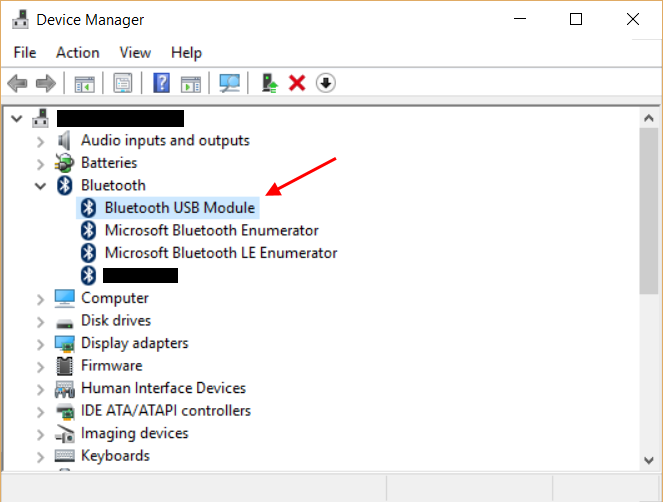
Right-click this item and select "Properties". Then go to the "Advanced" tab and note the LMP (link management protocol) version displayed for the device:

Rm60N.png
 

My Computer My Computer

At a glance

Both Windows 7 64 & Windows 10 LTSBIntel 2.8Ghz,8GB DDR2Nvidia 260+
Computer type
PC/Desktop
Computer Manufacturer/Model Number
Custom
OS
Both Windows 7 64 & Windows 10 LTSB
CPU
Intel 2.8Ghz,
Motherboard
Gigabyte
Memory
8GB DDR2
Graphics Card(s)
Nvidia 260+
Monitor(s) Displays
42" Samsung Plasma Display
Screen Resolution
1080
Hard Drives
Too many to list!
Case
Custom
Cooling
Custom
Keyboard
MS Sidewinder
Mouse
2 dollar ali-express mouse! It is the best ever!
Internet Speed
100MB
Antivirus
Avast
Browser
Firefox & Opera
Other Info
Helpdesk Technician
Yes Reg try what John has suggested and if you still cannot find the device you might try this
Using HW Info
PART A:
You can test the volts on the PSU with HW Info HWiNFO - Download < download the right bit version and close the right hand window select Sensors and scroll down to the power section where you will see what the volts are doing see my pic. In my pic the section (Nuvoton) with VBATT as a dead give away you are in the section for the rail voltages. There are other section titles and one that pops up often is ITE (sometimes the usual one for Gigabyte boards)
Now the voltage on the different rails have to be within 5% =+/- of what is required or the machine will not work properly if at all.
Limits +/- (minimum - correct - maximum)
12v1 = 11.4 - 12 - 12.6v
12v2 = 11.4 - 12- 12.6v
5v = 4.75 – 5 - 5.25v
3.3v = 3.135 – 3 – 3.465v
-12v = -10.80 - -12 - -13.20v
+5VSB = 4.75 – 5 - 5.25v
The Power good signal voltage at pin 8 on the 24 pin plug (grey cable) should be the same as the 5v rail reading/s
See this for the rail voltage info
PSUs 101: A Detailed Look Into Power Supplies (Section 2.)
The original right hand window shows the machine running and is handy for that but for looking at the components in some detail close it and use the main left hand side panel
FOR OTHER COMPONENTS
PART B:
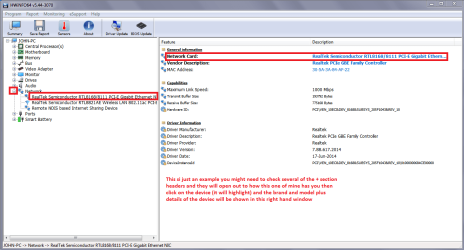
Open each small square with + in it on the section the components are in and then click on the individual component/s (it will highlight in blue) - in the right hand side will appear all sorts of details including brands speeds and other essential info that particular device. See pic for example.

Use PART B: see pic and by the way did you try the link I sent for the Blu tooth driver on the Acer site??
 

Attachments

  • REG 2.PNG
    REG 2.PNG
    37.9 KB · Views: 0

My Computer My Computer

At a glance

Desk1 7 Home Prem / Desk2 10 Pro / Main lap A...Desk1 i5 3750K / Laptop i7 GTX 860M / Desk2 i...Desk1 8GB (1866) / Desk2 16GB (1333) / Laptop...Desk 1& 2NVidia GTX 650 & Laptops on board Intel
Computer type
PC/Desktop
Computer Manufacturer/Model Number
Own build (new) Desk1 / Asus ROG Win 7 / Desk2 1st build
OS
Desk1 7 Home Prem / Desk2 10 Pro / Main lap Asus ROG 10 Pro 2 laptop Toshiba 7 Pro Asus P2520 7 & 10
CPU
Desk1 i5 3750K / Laptop i7 GTX 860M / Desk2 i5 2500
Motherboard
Desk1 Asus P877-V / Desk2 Gigabyte H67 UD3H / Laptop ?
Memory
Desk1 8GB (1866) / Desk2 16GB (1333) / Laptop 8Gb DDR3
Graphics Card(s)
Desk 1& 2NVidia GTX 650 & Laptops on board Intel
Sound Card
Desk 1 & 2 -XONAR DG Realtek High Def audio Laptop
Monitor(s) Displays
Desk 1 Benq HD 2450 / Desk2 Philips 24" / Laptop 17.5"
Screen Resolution
1920x1080 D1 & D2 & Laptop 1
Hard Drives
Desk1 Samsung 120GB 830 SSD
Asus ROG 256GB 850 Pro SSD
Desk2 Samsung 840 256 SSD
Toshiba 120GB EVO
PSU
Desk 1 Corsair HX 1050/ Laptop ? / Desk 2 Corsair HX 650
Case
Desk 1 Cooler HAF XM ? Toshiba laptop / Desk2 Coolermaster
Cooling
Fans on all Desk1 -2 Desk2 - all Coolermasters 5 Laptop ?
Keyboard
Desk 1 MS Sidewinder X6 Desk 2 MS Sidewinder X 4
Mouse
Desk 1&2 - Gigabyte MS 900 gamer - laptop - Logitec wireless
Internet Speed
ADSL2+
Other Info
One other Desktop (tester) and spare Toshba laptop both with SSD's
Running Kaspersky 2016 ISS on all machines config'd identically
Logitec audio stereo systems on each machine (x3)
Canon MG5250MFC
Router/modem TP-Link running WPA2SK
Back
Top