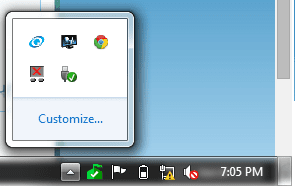
You need to click on "customise"
Then look for "Bluetooth Tray Application" [or other reference to bluetooth adapter] and select "show icon and notifications"
Samsung EVO 970 NVMe 1TB [Boot drive]
Samsung EVO 850 SSD 500GB
Western Digital DC WD10EFRX-68PJCN0 1TB
Western Digital DC WD1002FBYS-02A6B0 Enterprise 1TB
PSU
Corsair TX750M
Case
Zalman Z9 Plus
Cooling
Thermalright True Spirit 120 BW
Keyboard
Havit KB432L blue key mechanical
Mouse
Havit KB 432L Programmable
Internet Speed
Fibre To The Home 100Mbps from KCom
Antivirus
Avast Free
Browser
Firefox
Other Info
Logitech C525 HD Webcam
Epson XP-640 Expression-Premium printer with direct CD/DVD printing
After customization the result is same.
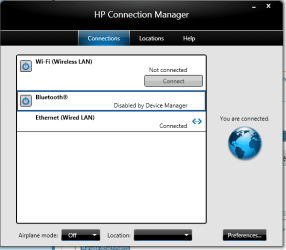
"Disable by Device Manager" shown in hp connection manager.
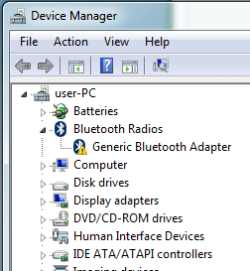
after so many times uninstalling and re-installing of so many driver, the result is the same.
Samsung EVO 970 NVMe 1TB [Boot drive]
Samsung EVO 850 SSD 500GB
Western Digital DC WD10EFRX-68PJCN0 1TB
Western Digital DC WD1002FBYS-02A6B0 Enterprise 1TB
PSU
Corsair TX750M
Case
Zalman Z9 Plus
Cooling
Thermalright True Spirit 120 BW
Keyboard
Havit KB432L blue key mechanical
Mouse
Havit KB 432L Programmable
Internet Speed
Fibre To The Home 100Mbps from KCom
Antivirus
Avast Free
Browser
Firefox
Other Info
Logitech C525 HD Webcam
Epson XP-640 Expression-Premium printer with direct CD/DVD printing
I did this several times, it installs by itself ,
after installation it says your device is ready to use.
but after then nothing.
disabled by device manager