Solved Bluetooth only works when connected to the Internet!!

Others

New member
Local time
11:55 PM
Messages
8
Hello,

I'm running an HP EliteBook 6930p (quite old), with Windows 7. Recently Bluetooth stopped working, I had to reinstall the laptop for other reasons anyway, since the reinstall I can only use Bluetooth when connected to the Internet. As a test I connected to the Internet and Bluetooth started working, I then touched the touch button that disconnects Internet, as soon as I did that the Bluetooth icon disappeared and wouldn't let me use it.
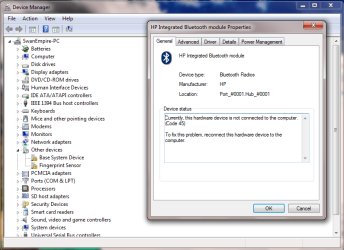
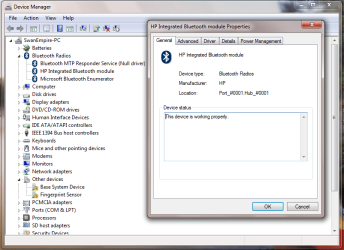
When I checked in 'Device Manager' when Internet was connected, there was a Bluetooth driver section shown, if I cut off the connection it disappeared. I went to properties of the Bluetooth driver, in the device status section on the general tab, it says 'The device is working properly', as soon as Internet is cut off it changes to 'Currently, this hardware device is not connected to the computer (Code 45)'.


Anyone with any suggestions is kindly appreciated,

Many thanks,
Others
 

Attachments
  • Capture.PNG
    Capture.PNG
    41.6 KB · Views: 0
  • Capture2.PNG
    Capture2.PNG
    39.3 KB · Views: 0

My Computer My Computer

At a glance

Windows 7 Professional x64Intel(R) Core(TM)2 Duo CPU P8400 @ 2.26GHz 2....4GBInbuilt
Computer type
Laptop
Computer Manufacturer/Model Number
HP EliteBook 6930p
OS
Windows 7 Professional x64
CPU
Intel(R) Core(TM)2 Duo CPU P8400 @ 2.26GHz 2.27 GHz
Memory
4GB
Graphics Card(s)
Inbuilt
I don't have an answer for this, but I am amazed that this happens. You should never have to have your wifi active in order to have an active Bluetooth connection. This would bug me to no end if it were the case on my computer.

Not knowing about this particular model of laptop, it looks to me like there is a hardware quirk in your laptop which is linking both wifi and Bluetooth to the wifi button on your laptop.

Have you tried to do a factory restore? Doing so would wipe your drive clean, but it would also tell you if the problem is with Windows or with the laptop.

Another way you could test that would be to boot to Linux Live and see if the problem exists there. If it exists in Linux Live, then the problem is with the laptop. If it doesn't exist with Linux Live, then the problem is somewhere in Windows.
 

My Computer My Computer

At a glance

Linux Mint 18.2 xfce 64-bit (VMWare host) / W...Haswell4 GB
Computer type
PC/Desktop
Computer Manufacturer/Model Number
Dell
OS
Linux Mint 18.2 xfce 64-bit (VMWare host) / Windows 8.1 Pro 32-bit (VMWare guest)
CPU
Haswell
Memory
4 GB
Monitor(s) Displays
Acer 23"
Screen Resolution
1920 x 1080
Hard Drives
Two hard drives, 1TB each: One for Linux, one for my data.
Keyboard
IBM Model M
Antivirus
Sophos (Linux), Trend Micro (Windows)
Browser
Firefox, Opera
Other Info
I use Samba to share my data drive with the other computers at my house and with my guest session in VMWare Workstation Player.
Thanks mrjimphelps for your reply,

I've just done a clean reinstall of Windows last week, and it was there before that reinstall and is still there now, I don't particularly want to do I t again as you can well imagine.
As you wrote it definitely bugs me to no end, which is why I'm trying to sort it out.
It therefore does seem to me like it would be a hardware issue, if so how would I go about it?

EDIT:

I just had a thought from what you wrote, that it may be connected to the Wi-Fi button. Well I tested it out, and just by disconnecting the Internet without switching off Wi-Fi, it has sorted the problem, regarding that I can still use the Bluetooth. That seems to imply that your assumption is correct, and the button is connected for Bluetooth and Wi-Fi.
This has definitely sorted the problem as a short term solution, but I still wish to see if they can be run independently.

Thanks again for your help,
Others
 

My Computer My Computer

At a glance

Windows 7 Professional x64Intel(R) Core(TM)2 Duo CPU P8400 @ 2.26GHz 2....4GBInbuilt
Computer type
Laptop
Computer Manufacturer/Model Number
HP EliteBook 6930p
OS
Windows 7 Professional x64
CPU
Intel(R) Core(TM)2 Duo CPU P8400 @ 2.26GHz 2.27 GHz
Memory
4GB
Graphics Card(s)
Inbuilt
Just out of curiosity, what happens if you soft-disable (disable via software) the WiFi? You can do this in the Mobility Centre (Win+X)

What the laptop most likely is doing is (just a wild guess) disabling the little WiFi card (which has built-in bluetooth as well) altogether, also disabling the bluetooth.
 

My Computer My Computer

At a glance

Windows 7 x64
OS
Windows 7 x64
Hi TheDeerDude,

Sorry for my late response. I tried that and Bluetooth still works.
I believe that the problem isn't actually a problem, rather my lack of knowledge which made me assume that the touch button is just for Wi-Fi when in actual fact its for all the connections.
Which means there never was a problem to begin with.

Thanks for everyone's help!
Others
 

My Computer My Computer

At a glance

Windows 7 Professional x64Intel(R) Core(TM)2 Duo CPU P8400 @ 2.26GHz 2....4GBInbuilt
Computer type
Laptop
Computer Manufacturer/Model Number
HP EliteBook 6930p
OS
Windows 7 Professional x64
CPU
Intel(R) Core(TM)2 Duo CPU P8400 @ 2.26GHz 2.27 GHz
Memory
4GB
Graphics Card(s)
Inbuilt
Back
Top