

Hi there,
I did buy an bluetooth stereo-headset and would like to use it with my Sony Vaio laptop. Yet pairing doesn't work, it doesn't get detected. Here are my questions:
1. Could it be, that my bluetooth mouse is at fault for this, is blocking it? I have it connected now (before trying it the first time) with the optional cable (it's a Razer Orochi). How can I know if I can exclude the mouse as an error source or not?
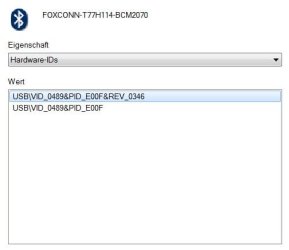
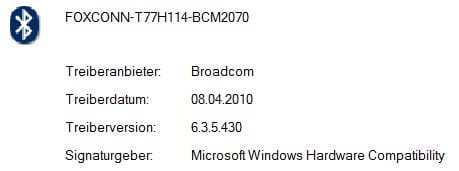
2. Are laptops "multipoint"-capable at all? (I bought my one soon after its release in Q1/Q2 of 2010!) My one has "Bluetooth® 2.1 + EDR". You find a screenshot of my Bluetooth-Hardware-ID attached. It's a Broadcom thingy, I just updated it with their tool (as a Sony update didn't help/wasn't available), yet this didn't help too.
3. I've heard that Microsoft Windows (7) does not natively support A2DP-capable bluetooth hardware (as my headset), is that true? In this context I heard too, that for compatibility, you need a "bluetooth stack" software which costs a dime? Is that true? Do I need it, where do I get it and which would be the suitable one for my laptop?
Thanks for your help in advance!
Kind regards
I did buy an bluetooth stereo-headset and would like to use it with my Sony Vaio laptop. Yet pairing doesn't work, it doesn't get detected. Here are my questions:
1. Could it be, that my bluetooth mouse is at fault for this, is blocking it? I have it connected now (before trying it the first time) with the optional cable (it's a Razer Orochi). How can I know if I can exclude the mouse as an error source or not?
2. Are laptops "multipoint"-capable at all? (I bought my one soon after its release in Q1/Q2 of 2010!) My one has "Bluetooth® 2.1 + EDR". You find a screenshot of my Bluetooth-Hardware-ID attached. It's a Broadcom thingy, I just updated it with their tool (as a Sony update didn't help/wasn't available), yet this didn't help too.
3. I've heard that Microsoft Windows (7) does not natively support A2DP-capable bluetooth hardware (as my headset), is that true? In this context I heard too, that for compatibility, you need a "bluetooth stack" software which costs a dime? Is that true? Do I need it, where do I get it and which would be the suitable one for my laptop?
Thanks for your help in advance!
Kind regards
Attachments
Last edited:
My Computer
- Computer Manufacturer/Model Number
- Self-built
- OS
- Windows 7 Professional (final) x64
- CPU
- INTEL Core2 Duo E8500
- Motherboard
- ASUS P5Q
- Memory
- OCZ Reaper HPC Edition 4GB PC2-8500U CL5-5-5-18
- Graphics Card(s)
- NVIDIA GeForce 8800GS
- Sound Card
- Creative X-Fi Soundblaster Music
- Monitor(s) Displays
- LG FLATRON W2252TE
- Screen Resolution
- 1680x1050
- Hard Drives
- 1x Intel SSD X25-M 160 GB
1x Samsung HD642JJ 640 GB (SpinPoint F1 DT)
- PSU
- OCZ ModXStream Pro OCZ500MXSP
- Case
- Lian Li PC-7F
- Cooling
- Apack Zerotherm FZ120 Nanoxia Edition
- Keyboard
- Logitech Media Keyboard Elite (2005 model)
- Mouse
- Logitech RX-1500 (2008)
- Internet Speed
- 16.000 KB
- Other Info
- Plantronics GameCom® 377
SteelSeries Siberia In-Ear Headphones (black)

 , yet do I need one or might it be just a driver issue? And I didn't find any example e.g. on Broadcom's website to buy such a thing, I might need to see a specific example. *edit* And is there a public download source for BlueSoleil? I don't want to register on yet another website! thx.
 The problem was more with Broadcom, and with both I'd need the specific subsite link, because for Broadcom I don't find the proper site (they have so much content) at all and for Bluesoleil, where do they offer an older software for free?? I see this nowhere! And I'd doubt they'd do it, because for most people they're happy if everything is running and don't always need they very newest software.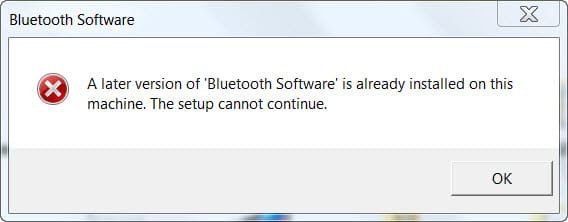

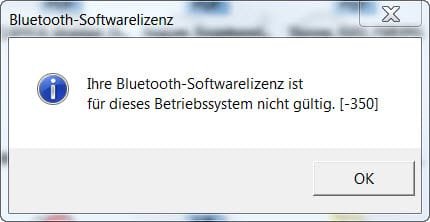

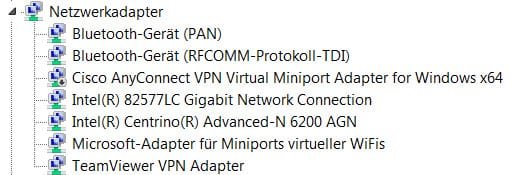
 for the iPhone and HeadSet..Though first to remove the headset from iphone to connect to the laptop as you said it doesn't connect anymore.
 Because I already re-installed the "original" (?) drivers several times, but "original" here for me is only from Sony, I have no idea how to find out if there were any older drivers in the first place, before I updated them anyways, sorry. But as the other items work, the issue is clearly with the Jabra CLIPPER / A2DP or sth. related, so I doubt an older/other driver would solve that?