Bluetooth stack software needed? (for x64)

KnowledgeWorker

New member
Power User
Local time
4:45 PM
Messages
119
Location
Germany
Hi there,

I did buy an bluetooth stereo-headset and would like to use it with my Sony Vaio laptop. Yet pairing doesn't work, it doesn't get detected. Here are my questions:

1. Could it be, that my bluetooth mouse is at fault for this, is blocking it? I have it connected now (before trying it the first time) with the optional cable (it's a Razer Orochi). How can I know if I can exclude the mouse as an error source or not?

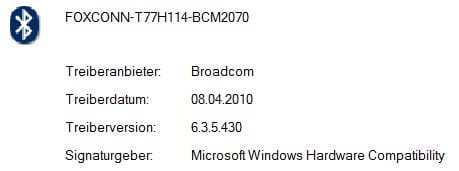
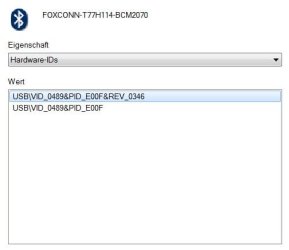
2. Are laptops "multipoint"-capable at all? (I bought my one soon after its release in Q1/Q2 of 2010!) My one has "Bluetooth® 2.1 + EDR". You find a screenshot of my Bluetooth-Hardware-ID attached. It's a Broadcom thingy, I just updated it with their tool (as a Sony update didn't help/wasn't available), yet this didn't help too.

3. I've heard that Microsoft Windows (7) does not natively support A2DP-capable bluetooth hardware (as my headset), is that true? In this context I heard too, that for compatibility, you need a "bluetooth stack" software which costs a dime? Is that true? Do I need it, where do I get it and which would be the suitable one for my laptop?

Thanks for your help in advance!

Kind regards
 

Attachments
  • bt_hardware_id.jpg
    bt_hardware_id.jpg
    12.6 KB · Views: 33
  • bt_driver.jpg
    bt_driver.jpg
    8.8 KB · Views: 15
Last edited:

My Computer

Computer Manufacturer/Model Number
Self-built
OS
Windows 7 Professional (final) x64
CPU
INTEL Core2 Duo E8500
Motherboard
ASUS P5Q
Memory
OCZ Reaper HPC Edition 4GB PC2-8500U CL5-5-5-18
Graphics Card(s)
NVIDIA GeForce 8800GS
Sound Card
Creative X-Fi Soundblaster Music
Monitor(s) Displays
LG FLATRON W2252TE
Screen Resolution
1680x1050
Hard Drives
1x Intel SSD X25-M 160 GB
1x Samsung HD642JJ 640 GB (SpinPoint F1 DT)
PSU
OCZ ModXStream Pro OCZ500MXSP
Case
Lian Li PC-7F
Cooling
Apack Zerotherm FZ120 Nanoxia Edition
Keyboard
Logitech Media Keyboard Elite (2005 model)
Mouse
Logitech RX-1500 (2008)
Internet Speed
16.000 KB
Other Info
Plantronics GameCom® 377
SteelSeries Siberia In-Ear Headphones (black)
If your looking to softwares try a search for BlueSoleil, Broadcom, Widcomm...
 

My Computer

Computer type
PC/Desktop
Computer Manufacturer/Model Number
Custom Build
OS
Windows 7 Professional SP1 - x64 [Non-UEFI Boot]
CPU
Ivy Bridge Core i5 3570K (Delidded)
Motherboard
Asus P8Z77-V LE PLUS
Memory
G.Skill "Ares" DDR3 PC3-12800 - 1600MHz (16Gb)
Graphics Card(s)
Asus Dual-RX480-O4G
Sound Card
Creative Sound Blaster Z w/5.1 sound system
Monitor(s) Displays
Asus IPS 23"
Screen Resolution
16/9
Hard Drives
Internal:
500Go Sata 6Gb/s (x2)
500Go Sata 3Gb/s (x2)
SSD 60Go Sata 6Gb/s
PSU
In Win C 900W Series 80+ Platinum
Case
Thermaltake Chaser A71
Cooling
Custom Water Cooling Loop
Keyboard
Cooler Master QuickFire XTi
Mouse
Razer Imperator 2012 (4G)
Antivirus
MSE
Browser
IE 11.0.xxx Rtm
Other Info
"Raid0" with Intel Smart Response Technology (HDD/SSD)
Hi NoN, yeah I know the supply side :), yet do I need one or might it be just a driver issue? And I didn't find any example e.g. on Broadcom's website to buy such a thing, I might need to see a specific example. *edit* And is there a public download source for BlueSoleil? I don't want to register on yet another website! thx.
 

My Computer

Computer Manufacturer/Model Number
Self-built
OS
Windows 7 Professional (final) x64
CPU
INTEL Core2 Duo E8500
Motherboard
ASUS P5Q
Memory
OCZ Reaper HPC Edition 4GB PC2-8500U CL5-5-5-18
Graphics Card(s)
NVIDIA GeForce 8800GS
Sound Card
Creative X-Fi Soundblaster Music
Monitor(s) Displays
LG FLATRON W2252TE
Screen Resolution
1680x1050
Hard Drives
1x Intel SSD X25-M 160 GB
1x Samsung HD642JJ 640 GB (SpinPoint F1 DT)
PSU
OCZ ModXStream Pro OCZ500MXSP
Case
Lian Li PC-7F
Cooling
Apack Zerotherm FZ120 Nanoxia Edition
Keyboard
Logitech Media Keyboard Elite (2005 model)
Mouse
Logitech RX-1500 (2008)
Internet Speed
16.000 KB
Other Info
Plantronics GameCom® 377
SteelSeries Siberia In-Ear Headphones (black)
Hi NoN, yeah I know the supply side :), yet do I need one or might it be just a driver issue? And I didn't find any example e.g. on Broadcom's website to buy such a thing, I might need to see a specific example. *edit* And is there a public download source for BlueSoleil? I don't want to register on yet another website! thx.

I was wondering if you could have a look at Control Panel=>Sound, then see what is listed there and if the Bluetooth Headset appear....

Otherwise you might need a bluetooth stack. I was using bluesoleil software 2.4 as it cames with a dongle i bought. You might try to look at an older version than the v6 on their site in order to have it free.

Bluesoleil:
http://www.bluesoleil.com/
 

My Computer

Computer type
PC/Desktop
Computer Manufacturer/Model Number
Custom Build
OS
Windows 7 Professional SP1 - x64 [Non-UEFI Boot]
CPU
Ivy Bridge Core i5 3570K (Delidded)
Motherboard
Asus P8Z77-V LE PLUS
Memory
G.Skill "Ares" DDR3 PC3-12800 - 1600MHz (16Gb)
Graphics Card(s)
Asus Dual-RX480-O4G
Sound Card
Creative Sound Blaster Z w/5.1 sound system
Monitor(s) Displays
Asus IPS 23"
Screen Resolution
16/9
Hard Drives
Internal:
500Go Sata 6Gb/s (x2)
500Go Sata 3Gb/s (x2)
SSD 60Go Sata 6Gb/s
PSU
In Win C 900W Series 80+ Platinum
Case
Thermaltake Chaser A71
Cooling
Custom Water Cooling Loop
Keyboard
Cooler Master QuickFire XTi
Mouse
Razer Imperator 2012 (4G)
Antivirus
MSE
Browser
IE 11.0.xxx Rtm
Other Info
"Raid0" with Intel Smart Response Technology (HDD/SSD)

My Computer

Computer type
PC/Desktop
Computer Manufacturer/Model Number
Custom Build
OS
Windows 7 Professional SP1 - x64 [Non-UEFI Boot]
CPU
Ivy Bridge Core i5 3570K (Delidded)
Motherboard
Asus P8Z77-V LE PLUS
Memory
G.Skill "Ares" DDR3 PC3-12800 - 1600MHz (16Gb)
Graphics Card(s)
Asus Dual-RX480-O4G
Sound Card
Creative Sound Blaster Z w/5.1 sound system
Monitor(s) Displays
Asus IPS 23"
Screen Resolution
16/9
Hard Drives
Internal:
500Go Sata 6Gb/s (x2)
500Go Sata 3Gb/s (x2)
SSD 60Go Sata 6Gb/s
PSU
In Win C 900W Series 80+ Platinum
Case
Thermaltake Chaser A71
Cooling
Custom Water Cooling Loop
Keyboard
Cooler Master QuickFire XTi
Mouse
Razer Imperator 2012 (4G)
Antivirus
MSE
Browser
IE 11.0.xxx Rtm
Other Info
"Raid0" with Intel Smart Response Technology (HDD/SSD)
@NoN: No, no headset appears there. As it wasn't recognized in the first place.

So if I get you right, you say one definitely needs this bluetooth stack software? Why is that not common knowledge? Where can I find proof of this / a source talking about this on the www?

And concerning Bluesoleil, I found their site by Google, thanks. :P The problem was more with Broadcom, and with both I'd need the specific subsite link, because for Broadcom I don't find the proper site (they have so much content) at all and for Bluesoleil, where do they offer an older software for free?? I see this nowhere! And I'd doubt they'd do it, because for most people they're happy if everything is running and don't always need they very newest software.
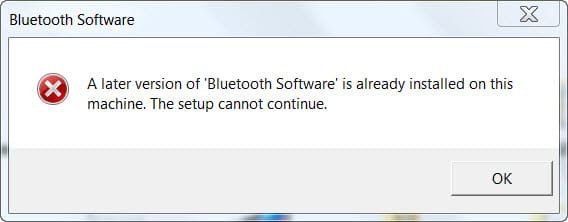
I had a look at every thread here (and elsewhere) I could find! Sadly I found no solution. If I tried to upgrade to the above driver with the main *.exe, please see the attached screenshot, fits the one in the first post obviously.
Also there are around five different *.msi and *.exe installers in the "x64" folder, how should I know which to install and which does what? If I use one of those, they'd install, but I don't know what they install? (No proper description or readme!) So I won't install it until I know what I do!
 

Attachments

  • BT later.jpg
    BT later.jpg
    14 KB · Views: 16

My Computer

Computer Manufacturer/Model Number
Self-built
OS
Windows 7 Professional (final) x64
CPU
INTEL Core2 Duo E8500
Motherboard
ASUS P5Q
Memory
OCZ Reaper HPC Edition 4GB PC2-8500U CL5-5-5-18
Graphics Card(s)
NVIDIA GeForce 8800GS
Sound Card
Creative X-Fi Soundblaster Music
Monitor(s) Displays
LG FLATRON W2252TE
Screen Resolution
1680x1050
Hard Drives
1x Intel SSD X25-M 160 GB
1x Samsung HD642JJ 640 GB (SpinPoint F1 DT)
PSU
OCZ ModXStream Pro OCZ500MXSP
Case
Lian Li PC-7F
Cooling
Apack Zerotherm FZ120 Nanoxia Edition
Keyboard
Logitech Media Keyboard Elite (2005 model)
Mouse
Logitech RX-1500 (2008)
Internet Speed
16.000 KB
Other Info
Plantronics GameCom® 377
SteelSeries Siberia In-Ear Headphones (black)
OK, I found the solution!! I did not pair it right! OMG sorry lol.
I already had wondered why it was blinking and not staying solid blue as in the description.
Took 10 seconds to hold instead of 4 as in the description! :(

Thanks man for your help!
 

My Computer

Computer Manufacturer/Model Number
Self-built
OS
Windows 7 Professional (final) x64
CPU
INTEL Core2 Duo E8500
Motherboard
ASUS P5Q
Memory
OCZ Reaper HPC Edition 4GB PC2-8500U CL5-5-5-18
Graphics Card(s)
NVIDIA GeForce 8800GS
Sound Card
Creative X-Fi Soundblaster Music
Monitor(s) Displays
LG FLATRON W2252TE
Screen Resolution
1680x1050
Hard Drives
1x Intel SSD X25-M 160 GB
1x Samsung HD642JJ 640 GB (SpinPoint F1 DT)
PSU
OCZ ModXStream Pro OCZ500MXSP
Case
Lian Li PC-7F
Cooling
Apack Zerotherm FZ120 Nanoxia Edition
Keyboard
Logitech Media Keyboard Elite (2005 model)
Mouse
Logitech RX-1500 (2008)
Internet Speed
16.000 KB
Other Info
Plantronics GameCom® 377
SteelSeries Siberia In-Ear Headphones (black)
OK, I found the solution!! I did not pair it right! OMG sorry lol.
I already had wondered why it was blinking and not staying solid blue as in the description.
Took 10 seconds to hold instead of 4 as in the description! :(

Thanks man for your help!

OK, that's mean your windows 7 taking the A2DP. Now you know you have a software already installed.

If you feel it is definitely resolved issue, click upper right panel "!", type solved for those that might read this thread.
 
Last edited:

My Computer

Computer type
PC/Desktop
Computer Manufacturer/Model Number
Custom Build
OS
Windows 7 Professional SP1 - x64 [Non-UEFI Boot]
CPU
Ivy Bridge Core i5 3570K (Delidded)
Motherboard
Asus P8Z77-V LE PLUS
Memory
G.Skill "Ares" DDR3 PC3-12800 - 1600MHz (16Gb)
Graphics Card(s)
Asus Dual-RX480-O4G
Sound Card
Creative Sound Blaster Z w/5.1 sound system
Monitor(s) Displays
Asus IPS 23"
Screen Resolution
16/9
Hard Drives
Internal:
500Go Sata 6Gb/s (x2)
500Go Sata 3Gb/s (x2)
SSD 60Go Sata 6Gb/s
PSU
In Win C 900W Series 80+ Platinum
Case
Thermaltake Chaser A71
Cooling
Custom Water Cooling Loop
Keyboard
Cooler Master QuickFire XTi
Mouse
Razer Imperator 2012 (4G)
Antivirus
MSE
Browser
IE 11.0.xxx Rtm
Other Info
"Raid0" with Intel Smart Response Technology (HDD/SSD)
@Non: I think I marked it right "solved", did I?

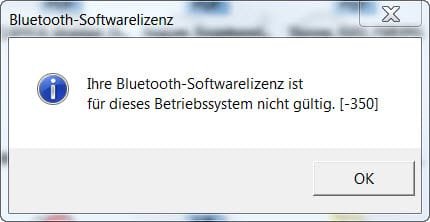
Yet the issue isn't yet over. :( Now I get the message I'd not have proper/valid bluetooth licence for this PC!! :( (See screenshot, yet it's German, sorry...) Even though I already went back to my old, initial BT drivers, before I used the OFFICIAL Broadcom tool!

Why does Broadcom update me on their cr*p and then gives me such a message? I hate such things!...
 

Attachments

  • BT.jpg
    BT.jpg
    12.5 KB · Views: 12

My Computer

Computer Manufacturer/Model Number
Self-built
OS
Windows 7 Professional (final) x64
CPU
INTEL Core2 Duo E8500
Motherboard
ASUS P5Q
Memory
OCZ Reaper HPC Edition 4GB PC2-8500U CL5-5-5-18
Graphics Card(s)
NVIDIA GeForce 8800GS
Sound Card
Creative X-Fi Soundblaster Music
Monitor(s) Displays
LG FLATRON W2252TE
Screen Resolution
1680x1050
Hard Drives
1x Intel SSD X25-M 160 GB
1x Samsung HD642JJ 640 GB (SpinPoint F1 DT)
PSU
OCZ ModXStream Pro OCZ500MXSP
Case
Lian Li PC-7F
Cooling
Apack Zerotherm FZ120 Nanoxia Edition
Keyboard
Logitech Media Keyboard Elite (2005 model)
Mouse
Logitech RX-1500 (2008)
Internet Speed
16.000 KB
Other Info
Plantronics GameCom® 377
SteelSeries Siberia In-Ear Headphones (black)
@Non: I think I marked it right "solved", did I?

Yet the issue isn't yet over. :( Now I get the message I'd not have proper/valid bluetooth licence for this PC!! :( (See screenshot, yet it's German, sorry...) Even though I already went back to my old, initial BT drivers, before I used the OFFICIAL Broadcom tool!

Why does Broadcom update me on their cr*p and then gives me such a message? I hate such things!...

Are those Broadcom that came with windows update?
 

Attachments

  • Capture.PNG
    Capture.PNG
    3 KB · Views: 34

My Computer

Computer type
PC/Desktop
Computer Manufacturer/Model Number
Custom Build
OS
Windows 7 Professional SP1 - x64 [Non-UEFI Boot]
CPU
Ivy Bridge Core i5 3570K (Delidded)
Motherboard
Asus P8Z77-V LE PLUS
Memory
G.Skill "Ares" DDR3 PC3-12800 - 1600MHz (16Gb)
Graphics Card(s)
Asus Dual-RX480-O4G
Sound Card
Creative Sound Blaster Z w/5.1 sound system
Monitor(s) Displays
Asus IPS 23"
Screen Resolution
16/9
Hard Drives
Internal:
500Go Sata 6Gb/s (x2)
500Go Sata 3Gb/s (x2)
SSD 60Go Sata 6Gb/s
PSU
In Win C 900W Series 80+ Platinum
Case
Thermaltake Chaser A71
Cooling
Custom Water Cooling Loop
Keyboard
Cooler Master QuickFire XTi
Mouse
Razer Imperator 2012 (4G)
Antivirus
MSE
Browser
IE 11.0.xxx Rtm
Other Info
"Raid0" with Intel Smart Response Technology (HDD/SSD)
No, I downloaded the Bluetooth updater tool on the Broadcom website, as this was recommended to me or I saw it there. So no, not original Vaio drivers. But yeah you're right, I'll just try to overwrite it with the Sony package, was so confused I didn't even think of it. ^^
 

My Computer

Computer Manufacturer/Model Number
Self-built
OS
Windows 7 Professional (final) x64
CPU
INTEL Core2 Duo E8500
Motherboard
ASUS P5Q
Memory
OCZ Reaper HPC Edition 4GB PC2-8500U CL5-5-5-18
Graphics Card(s)
NVIDIA GeForce 8800GS
Sound Card
Creative X-Fi Soundblaster Music
Monitor(s) Displays
LG FLATRON W2252TE
Screen Resolution
1680x1050
Hard Drives
1x Intel SSD X25-M 160 GB
1x Samsung HD642JJ 640 GB (SpinPoint F1 DT)
PSU
OCZ ModXStream Pro OCZ500MXSP
Case
Lian Li PC-7F
Cooling
Apack Zerotherm FZ120 Nanoxia Edition
Keyboard
Logitech Media Keyboard Elite (2005 model)
Mouse
Logitech RX-1500 (2008)
Internet Speed
16.000 KB
Other Info
Plantronics GameCom® 377
SteelSeries Siberia In-Ear Headphones (black)
No, I downloaded the Bluetooth updater tool on the Broadcom website, as this was recommended to me or I saw it there. So no, not original Vaio drivers. But yeah you're right, I'll just try to overwrite it with the Sony package, was so confused I didn't even think of it. ^^

Well, give it a shot, and take us informed....
 

My Computer

Computer type
PC/Desktop
Computer Manufacturer/Model Number
Custom Build
OS
Windows 7 Professional SP1 - x64 [Non-UEFI Boot]
CPU
Ivy Bridge Core i5 3570K (Delidded)
Motherboard
Asus P8Z77-V LE PLUS
Memory
G.Skill "Ares" DDR3 PC3-12800 - 1600MHz (16Gb)
Graphics Card(s)
Asus Dual-RX480-O4G
Sound Card
Creative Sound Blaster Z w/5.1 sound system
Monitor(s) Displays
Asus IPS 23"
Screen Resolution
16/9
Hard Drives
Internal:
500Go Sata 6Gb/s (x2)
500Go Sata 3Gb/s (x2)
SSD 60Go Sata 6Gb/s
PSU
In Win C 900W Series 80+ Platinum
Case
Thermaltake Chaser A71
Cooling
Custom Water Cooling Loop
Keyboard
Cooler Master QuickFire XTi
Mouse
Razer Imperator 2012 (4G)
Antivirus
MSE
Browser
IE 11.0.xxx Rtm
Other Info
"Raid0" with Intel Smart Response Technology (HDD/SSD)
Hi NoN,

ok it did not work. Even worse, now my Jabra CLIPPER bluetooth stereo headset doesn't work with my laptop anymore. But I assume it is my new iPhone that is blocking it, even when in standby. Because somehow it (first) connects to the iPhone and even though I readded the Jabra CLIPPER to the Windows 7 Bluetooth items, it does not transmit the audio to the Clipper. (The CLIPPER is multipoint capable, I just don't get it to work! :()

I also planned to add my bluetooth landline phone, but for the time being I'd be happy just with the laptop!

Shall I maybe after all buy the BlueSoleil software? Yet will it get better with it??

Kind regards
 

My Computer

Computer Manufacturer/Model Number
Self-built
OS
Windows 7 Professional (final) x64
CPU
INTEL Core2 Duo E8500
Motherboard
ASUS P5Q
Memory
OCZ Reaper HPC Edition 4GB PC2-8500U CL5-5-5-18
Graphics Card(s)
NVIDIA GeForce 8800GS
Sound Card
Creative X-Fi Soundblaster Music
Monitor(s) Displays
LG FLATRON W2252TE
Screen Resolution
1680x1050
Hard Drives
1x Intel SSD X25-M 160 GB
1x Samsung HD642JJ 640 GB (SpinPoint F1 DT)
PSU
OCZ ModXStream Pro OCZ500MXSP
Case
Lian Li PC-7F
Cooling
Apack Zerotherm FZ120 Nanoxia Edition
Keyboard
Logitech Media Keyboard Elite (2005 model)
Mouse
Logitech RX-1500 (2008)
Internet Speed
16.000 KB
Other Info
Plantronics GameCom® 377
SteelSeries Siberia In-Ear Headphones (black)
Hi NoN,

ok it did not work. Even worse, now my Jabra CLIPPER bluetooth stereo headset doesn't work with my laptop anymore. But I assume it is my new iPhone that is blocking it, even when in standby. Because somehow it (first) connects to the iPhone and even though I readded the Jabra CLIPPER to the Windows 7 Bluetooth items, it does not transmit the audio to the Clipper. (The CLIPPER is multipoint capable, I just don't get it to work! :()

I also planned to add my bluetooth landline phone, but for the time being I'd be happy just with the laptop!

Shall I maybe after all buy the BlueSoleil software? Yet will it get better with it??

Kind regards

Try first to clean a little all that BT mess by removing broadcom from windows update in "Program & Features" and try to restart FRESH from the beginning by removing all the BT devices connected to the laptop and inside the iPhone...And recover the laptop built-in bluetooth.

Might be cheaper to buy a BT dongle...

In my system Specs is a TrendNet TBW-106UB Bluetooth v2.0 class 1 + EDR usb 2.0, that came with the software bluesoleil. Also exist the new one TBW-107UB.
 

My Computer

Computer type
PC/Desktop
Computer Manufacturer/Model Number
Custom Build
OS
Windows 7 Professional SP1 - x64 [Non-UEFI Boot]
CPU
Ivy Bridge Core i5 3570K (Delidded)
Motherboard
Asus P8Z77-V LE PLUS
Memory
G.Skill "Ares" DDR3 PC3-12800 - 1600MHz (16Gb)
Graphics Card(s)
Asus Dual-RX480-O4G
Sound Card
Creative Sound Blaster Z w/5.1 sound system
Monitor(s) Displays
Asus IPS 23"
Screen Resolution
16/9
Hard Drives
Internal:
500Go Sata 6Gb/s (x2)
500Go Sata 3Gb/s (x2)
SSD 60Go Sata 6Gb/s
PSU
In Win C 900W Series 80+ Platinum
Case
Thermaltake Chaser A71
Cooling
Custom Water Cooling Loop
Keyboard
Cooler Master QuickFire XTi
Mouse
Razer Imperator 2012 (4G)
Antivirus
MSE
Browser
IE 11.0.xxx Rtm
Other Info
"Raid0" with Intel Smart Response Technology (HDD/SSD)

My Computer

Computer type
PC/Desktop
Computer Manufacturer/Model Number
Custom Build
OS
Windows 7 Professional SP1 - x64 [Non-UEFI Boot]
CPU
Ivy Bridge Core i5 3570K (Delidded)
Motherboard
Asus P8Z77-V LE PLUS
Memory
G.Skill "Ares" DDR3 PC3-12800 - 1600MHz (16Gb)
Graphics Card(s)
Asus Dual-RX480-O4G
Sound Card
Creative Sound Blaster Z w/5.1 sound system
Monitor(s) Displays
Asus IPS 23"
Screen Resolution
16/9
Hard Drives
Internal:
500Go Sata 6Gb/s (x2)
500Go Sata 3Gb/s (x2)
SSD 60Go Sata 6Gb/s
PSU
In Win C 900W Series 80+ Platinum
Case
Thermaltake Chaser A71
Cooling
Custom Water Cooling Loop
Keyboard
Cooler Master QuickFire XTi
Mouse
Razer Imperator 2012 (4G)
Antivirus
MSE
Browser
IE 11.0.xxx Rtm
Other Info
"Raid0" with Intel Smart Response Technology (HDD/SSD)
NoN, thanks for your answer and many tips.

There is no Broadcom stuff in Windows Update history. Also I did uninstall the BT drivers etc. in the device manager (yet installed the Sony/Windows drivers afterwards - is this wrong to do, why??), what else should I have done? And why/what to remove from the iPhone? It isn't connected to the laptop, only to the headset!

And the Bluetooth on this laptop works, it's just 1. that annoying error message popup and 2. that it does not work for the Jabra headset. Yet it indeed works for my Razer mouse.

*edit* Please find attached my network devices from device manager.

Thanks in advance.
 

Attachments

  • network_adapters.jpg
    network_adapters.jpg
    20.5 KB · Views: 27

My Computer

Computer Manufacturer/Model Number
Self-built
OS
Windows 7 Professional (final) x64
CPU
INTEL Core2 Duo E8500
Motherboard
ASUS P5Q
Memory
OCZ Reaper HPC Edition 4GB PC2-8500U CL5-5-5-18
Graphics Card(s)
NVIDIA GeForce 8800GS
Sound Card
Creative X-Fi Soundblaster Music
Monitor(s) Displays
LG FLATRON W2252TE
Screen Resolution
1680x1050
Hard Drives
1x Intel SSD X25-M 160 GB
1x Samsung HD642JJ 640 GB (SpinPoint F1 DT)
PSU
OCZ ModXStream Pro OCZ500MXSP
Case
Lian Li PC-7F
Cooling
Apack Zerotherm FZ120 Nanoxia Edition
Keyboard
Logitech Media Keyboard Elite (2005 model)
Mouse
Logitech RX-1500 (2008)
Internet Speed
16.000 KB
Other Info
Plantronics GameCom® 377
SteelSeries Siberia In-Ear Headphones (black)
NoN, thanks for your answer and many tips.

There is no Broadcom stuff in Windows Update history. Also I did uninstall the BT drivers etc. in the device manager (yet installed the Sony/Windows drivers afterwards - is this wrong to do, why??), what else should I have done? And why/what to remove from the iPhone? It isn't connected to the laptop, only to the headset!

And the Bluetooth on this laptop works, it's just 1. that annoying error message popup and 2. that it does not work for the Jabra headset. Yet it indeed works for my Razer mouse.

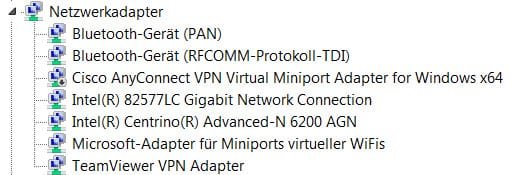
*edit* Please find attached my network devices from device manager.

Thanks in advance.

Oops, sorry:o for the iPhone and HeadSet..Though first to remove the headset from iphone to connect to the laptop as you said it doesn't connect anymore.

On my XP computer i had to deal with some probs with Widcomm driver, and the best solution was to clear all then reinstall properly from the beginning.

On Windows 7 i didn't have any probs and Broadcom installed directly from WU some proper drivers at the same time i plugged the BTdongle...Then i installed the Bluesoleil 2.4 Software that came with the dongle.

In device manager all appeared in good order, but as i do not own a BT headset i couldn't test it on my.

I asked you to reinstall the original drivers to put back in order.
 

My Computer

Computer type
PC/Desktop
Computer Manufacturer/Model Number
Custom Build
OS
Windows 7 Professional SP1 - x64 [Non-UEFI Boot]
CPU
Ivy Bridge Core i5 3570K (Delidded)
Motherboard
Asus P8Z77-V LE PLUS
Memory
G.Skill "Ares" DDR3 PC3-12800 - 1600MHz (16Gb)
Graphics Card(s)
Asus Dual-RX480-O4G
Sound Card
Creative Sound Blaster Z w/5.1 sound system
Monitor(s) Displays
Asus IPS 23"
Screen Resolution
16/9
Hard Drives
Internal:
500Go Sata 6Gb/s (x2)
500Go Sata 3Gb/s (x2)
SSD 60Go Sata 6Gb/s
PSU
In Win C 900W Series 80+ Platinum
Case
Thermaltake Chaser A71
Cooling
Custom Water Cooling Loop
Keyboard
Cooler Master QuickFire XTi
Mouse
Razer Imperator 2012 (4G)
Antivirus
MSE
Browser
IE 11.0.xxx Rtm
Other Info
"Raid0" with Intel Smart Response Technology (HDD/SSD)
Interesting thread.

I have an Advent dongle and can access my HP all-in-one but when trying to upload images from my cell to the computer, sometimes it connects, sometimes the cell isn't recognised, even though the two devices are inches apart.

And Windows doesn't always recognise the dongle and re-downloads the software at random.

Thoughts?
 

My Computer

Computer type
PC/Desktop
Computer Manufacturer/Model Number
Dell Inspiron 580
OS
Windows 7 Professional 64-bit SP1
CPU
Intel Quad Core i5 750 2.67Ghz 8Mb
Motherboard
Dell 033FF6 A00
Memory
6Gb DDR3 Dual Channel
Graphics Card(s)
1Gb ATI Radeon HD 5450
Sound Card
Integrated 7.1
Monitor(s) Displays
Dell 23" ST 2310 HDMI; Samsung 21" HDMI
Screen Resolution
1920 x 1080; 1920 x 1080
Hard Drives
1TB WD Serial ATA 7200RPM
Iomega 500Gb Remote
PSU
300w
Case
Dell
Cooling
1 x Case; 1 x Processor; 1 x Video Card
Keyboard
Microsoft Comfort Curve 3000
Mouse
Microsoft Wireless Touch (Intellipoint)
Internet Speed
down 200Mb; up 12Mb (Virgin Media SuperHub 2)
Antivirus
MSE
Browser
IE11, Google Chrome
Other Info
HP Photosmart Premium 309g-m
Compaq Presario Laptop CQ70 with 7 Pro 32-bit.
Huawei MediaPad 32GB
Several Raspberry Pi's B2,B3 and Zero
Several varieties of Arduinos
@prospero: Yeah, actually the devices are near each other just separated a little bit. Nothing to worry about.

Yet it won't function. With my old Nokia phone I wouldn't expect it as of 2006 build, but not only is my laptop only some months old, the Jabra CLIPPER is too! (I just bought it, but it was introduced in 2010.) So I really as usual don't get it why it stopped working.

@NoN: Frankly I don't get your description, I know I should uninstall the stuff, please quote my stuff so that we both see what belongs where. ;) Because I already re-installed the "original" (?) drivers several times, but "original" here for me is only from Sony, I have no idea how to find out if there were any older drivers in the first place, before I updated them anyways, sorry. But as the other items work, the issue is clearly with the Jabra CLIPPER / A2DP or sth. related, so I doubt an older/other driver would solve that?

Again, the basic question was, from a legal/licencing perspective, do they expect from you to buy a(n additional) bluetooth driver/software when you want to use A2DP/multipoint BT, even when something was installed on your (expensive!) PC already? Or which reason should I have to use BlueSoleil? Is it pure "usability" (for n00bs that don't know how to work with a PC and like it flashy and colourful) or is there really a technical reason behind it? I mean a better BT manager would be nice of course, because I already have a 1. mouse 2. mobile phone 3. a presenter and 4. the Jabra CLIPPER which all use Bluetooth! (Plus several old BT headsets. ^^)

Thanks for your help in advance! @all
 

My Computer

Computer Manufacturer/Model Number
Self-built
OS
Windows 7 Professional (final) x64
CPU
INTEL Core2 Duo E8500
Motherboard
ASUS P5Q
Memory
OCZ Reaper HPC Edition 4GB PC2-8500U CL5-5-5-18
Graphics Card(s)
NVIDIA GeForce 8800GS
Sound Card
Creative X-Fi Soundblaster Music
Monitor(s) Displays
LG FLATRON W2252TE
Screen Resolution
1680x1050
Hard Drives
1x Intel SSD X25-M 160 GB
1x Samsung HD642JJ 640 GB (SpinPoint F1 DT)
PSU
OCZ ModXStream Pro OCZ500MXSP
Case
Lian Li PC-7F
Cooling
Apack Zerotherm FZ120 Nanoxia Edition
Keyboard
Logitech Media Keyboard Elite (2005 model)
Mouse
Logitech RX-1500 (2008)
Internet Speed
16.000 KB
Other Info
Plantronics GameCom® 377
SteelSeries Siberia In-Ear Headphones (black)
Hi All!

Im a newbie here and got a Jabra Clipper as a gift just recently. I have somehow a similar problem with KnowledgeWorker it's just that my Clipper totally doesnt connect successfully with my laptop. Im using an ACER Aspire 4730Z on Windows7 Professional x32. It (my acer) comes with a Broadcomm 2045 Bluetooth 2.0+EDR USB device. Whenever i attempt to connect my Clipper with my acer, windows will look for the drivers however will find nothing. No driver found for three (i dont know why there are three since im connecting only 1 headset) Bluetooth Peripheral Device. The Clipper works perfectly for my other handheld devices (I used it with my iPod Touch and Samsung Corby II). But i want to use it for my laptop since I use skype always. I tried calling Jabra's support but they dont seem to be of any help! T.T So can you guys help me? I dont understand this A2DP thing that you talk abou, so can you help me with that also? If ever that's the problem. I only use my bluetooth in this laptop for file transfers with other bluetooth devices and they work fine. What should I install to make the Clipper work?

Thanks a lot in advance!
 

My Computer

OS
Windows 7 Professional 32bit
Back
Top