bluetooth wont turn on without acer epowermanagement

jorpe

New member
Power User
VIP
Local time
2:44 AM
Messages
278
Location
mile high
Acer c314 with ultimate 7600 x86. It has bluetooth but it will only turn on via the epowermanagement tool, which will not work in Windows 7 except for the first time you install it. After that, trying to start the program gets a compatiblity message no matter what compatibility you try to run it with. Is there a way for me to enable bluetooth by default?
 

My Computer My Computer

At a glance

7600x64 ultimate, not SP1i7 93012gb ddr3 1600 triple channel Corsair XMS3Radeon 5850 1gb OC edition
OS
7600x64 ultimate, not SP1
CPU
i7 930
Motherboard
Gigabye X58A-ud5
Memory
12gb ddr3 1600 triple channel Corsair XMS3
Graphics Card(s)
Radeon 5850 1gb OC edition
Sound Card
Asus Xonar Essence STX
Monitor(s) Displays
Acer 24'', Dell 23'' display port
Screen Resolution
1920x1200, 1920x1080
Hard Drives
3x64GB Microcenter SSDs RAID0
1tb spinpoint f3 (system)
1tb spinpoint f3 (media)
1tb spinpoint f3 OSX
1x2TB WD green images
1tb 7200.12 (time machine)
2x 500gb western digital green drives for archiving,keeping install files.
PSU
700 modular
Case
Antec 1200
Cooling
Promlimatech Megahalems
Keyboard
logitech 2.4ghz wireless wave something
Mouse
logitech laser wireless mouse.
Internet Speed
50/10
Other Info
4 systems currently:
1. sig rig
2. 930 i7 x64 ultimate (backup, media center PC)
3. c314 2gb ram tablet 7600 ultimate
4. athlon 6000+ home server (still in progress)
5. ipad for on the go
Is there a W7 version of the tool on the manufacturer's website?
 

My Computer My Computer

At a glance

Windows 7 Ultimate 64BitGenuineIntel Intel(R) Core(TM) DuoCore T2400 ...2.00 GBMobile Intel(R) 945 Express Chipset
Computer Manufacturer/Model Number
Lenovo ThinkPad T60
OS
Windows 7 Ultimate 64Bit
CPU
GenuineIntel Intel(R) Core(TM) DuoCore T2400 @ 1.83GHz
Motherboard
Intel(R) 82801G (ICH7 Family)
Memory
2.00 GB
Graphics Card(s)
Mobile Intel(R) 945 Express Chipset
Sound Card
SoundMAX Integrated Digital HD Audio
Monitor(s) Displays
ThinkPad Display
Screen Resolution
1400x1050
Hard Drives
100Gb SATA
Keyboard
Standard Keyboard
Mouse
HID-compliant Mouse
Internet Speed
Cable Broadband - 54Mbps
Other Info
Intel(R) PRO/1000 PL Network Connection
11a/b/g Wireless LAN Mini PCI Express Adapter
Is there a W7 version of the tool on the manufacturer's website?

not that I have been able to locate, there seemed to be some serious issues according to what I skimmed trying to figure out whether or not it would work for win7
 

My Computer My Computer

At a glance

7600x64 ultimate, not SP1i7 93012gb ddr3 1600 triple channel Corsair XMS3Radeon 5850 1gb OC edition
OS
7600x64 ultimate, not SP1
CPU
i7 930
Motherboard
Gigabye X58A-ud5
Memory
12gb ddr3 1600 triple channel Corsair XMS3
Graphics Card(s)
Radeon 5850 1gb OC edition
Sound Card
Asus Xonar Essence STX
Monitor(s) Displays
Acer 24'', Dell 23'' display port
Screen Resolution
1920x1200, 1920x1080
Hard Drives
3x64GB Microcenter SSDs RAID0
1tb spinpoint f3 (system)
1tb spinpoint f3 (media)
1tb spinpoint f3 OSX
1x2TB WD green images
1tb 7200.12 (time machine)
2x 500gb western digital green drives for archiving,keeping install files.
PSU
700 modular
Case
Antec 1200
Cooling
Promlimatech Megahalems
Keyboard
logitech 2.4ghz wireless wave something
Mouse
logitech laser wireless mouse.
Internet Speed
50/10
Other Info
4 systems currently:
1. sig rig
2. 930 i7 x64 ultimate (backup, media center PC)
3. c314 2gb ram tablet 7600 ultimate
4. athlon 6000+ home server (still in progress)
5. ipad for on the go
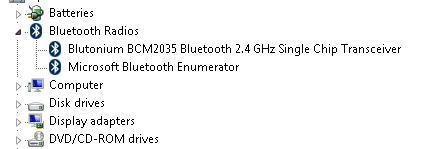
What's showing under your Bluetooth device in Device Manager? Can you screnshot?
 

My Computer My Computer

At a glance

Windows 7 Ultimate 64BitGenuineIntel Intel(R) Core(TM) DuoCore T2400 ...2.00 GBMobile Intel(R) 945 Express Chipset
Computer Manufacturer/Model Number
Lenovo ThinkPad T60
OS
Windows 7 Ultimate 64Bit
CPU
GenuineIntel Intel(R) Core(TM) DuoCore T2400 @ 1.83GHz
Motherboard
Intel(R) 82801G (ICH7 Family)
Memory
2.00 GB
Graphics Card(s)
Mobile Intel(R) 945 Express Chipset
Sound Card
SoundMAX Integrated Digital HD Audio
Monitor(s) Displays
ThinkPad Display
Screen Resolution
1400x1050
Hard Drives
100Gb SATA
Keyboard
Standard Keyboard
Mouse
HID-compliant Mouse
Internet Speed
Cable Broadband - 54Mbps
Other Info
Intel(R) PRO/1000 PL Network Connection
11a/b/g Wireless LAN Mini PCI Express Adapter
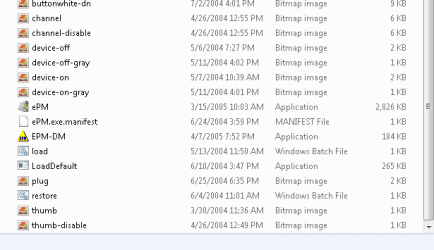
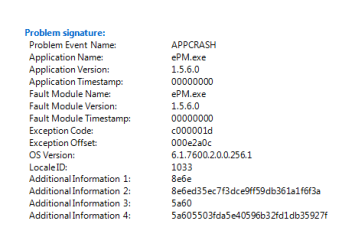
I can run the file EPM-DM and manually change the bluetooth to on, but the EPM program will crashes everything.

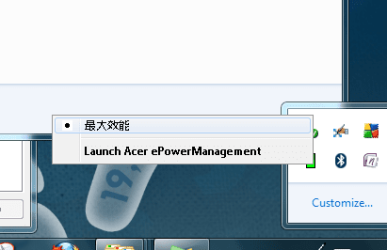
When I right click on the icon on the notifications tray there's a bunch of what look like chinese characters I have no clue what they say.

Unless I manually start epm-dm as an admin in compatibility mode with xp sp2 I cant get anything to start and there is no bluetooth radio icon in device manager.
 

Attachments

  • Appcrash.PNG
    Appcrash.PNG
    5.1 KB · Views: 62
  • bluetooth driver.PNG
    bluetooth driver.PNG
    17.9 KB · Views: 97
  • device manager capture.PNG
    device manager capture.PNG
    2.8 KB · Views: 30
  • file folder capture.PNG
    file folder capture.PNG
    6.9 KB · Views: 48
  • funky characters.PNG
    funky characters.PNG
    14.8 KB · Views: 39

My Computer My Computer

At a glance

7600x64 ultimate, not SP1i7 93012gb ddr3 1600 triple channel Corsair XMS3Radeon 5850 1gb OC edition
OS
7600x64 ultimate, not SP1
CPU
i7 930
Motherboard
Gigabye X58A-ud5
Memory
12gb ddr3 1600 triple channel Corsair XMS3
Graphics Card(s)
Radeon 5850 1gb OC edition
Sound Card
Asus Xonar Essence STX
Monitor(s) Displays
Acer 24'', Dell 23'' display port
Screen Resolution
1920x1200, 1920x1080
Hard Drives
3x64GB Microcenter SSDs RAID0
1tb spinpoint f3 (system)
1tb spinpoint f3 (media)
1tb spinpoint f3 OSX
1x2TB WD green images
1tb 7200.12 (time machine)
2x 500gb western digital green drives for archiving,keeping install files.
PSU
700 modular
Case
Antec 1200
Cooling
Promlimatech Megahalems
Keyboard
logitech 2.4ghz wireless wave something
Mouse
logitech laser wireless mouse.
Internet Speed
50/10
Other Info
4 systems currently:
1. sig rig
2. 930 i7 x64 ultimate (backup, media center PC)
3. c314 2gb ram tablet 7600 ultimate
4. athlon 6000+ home server (still in progress)
5. ipad for on the go
Same Problem with Acer Extensa 3100

Hi there,

I installed Windows 7 on an Acer Extensa 3100 Notebook. When I start Windows, the Bluetooth Hardware is switched off by default. In Device Manager it is not shown at all, just as if it would not exist. When I install Acer ePowerManagement, the Program first runs correctly, I can activate Bluetooth and all devices shown in the BT environment. But when I shut down the system and boot up again, the service terminates at once when started. But when I start the setup again and choose the repair-option, everythings all right again until next shutdown.

Does anyone have an idea what I could do?

Thanks by Alex
 

My Computer My Computer

At a glance

WIndows 7
Computer Manufacturer/Model Number
Acer Extensa 3100
OS
WIndows 7
Back
Top