
Computer shut of and wont turn on.

Hallon

New member
Local time
2:52 PM
Messages
8
Hi, today my computer turned off randomly and i cant get it to start again.
When i try to turn it on the fans doesen't start but a blue light in my computer is on as usual. Its like the computer is on, exept the fans. My monitor isent responding either.
This have happened a few times this week but i have had it going again after i have turned the power source of and on. Could it be something with the smart fan?
And if, how to i turn it on/off without starting the computer.

Sorry for my bad knowlegde.
 

My Computer My Computer

At a glance

Windows 7 64bit
OS
Windows 7 64bit
Given what you have told us, my first instinct is that the power supply has failed.

This would be particularly true if you can disconnect the power cord from the power supply for a while (15-30 minutes) and then when you plug it back in the PC will start. That is a classic symptom of a bad capacitor.

If you have not been getting any system errors, warnings, or any other indications of a failing device then I would first try replacing the power supply.

If you can borrow one from another computer to test with that would be best.
 

My Computer My Computer

At a glance

Windows 7 64 Bit Home Premium SP1i7-3820GSkill F3-14900CL9Q - 16GBEVGA GeForce GTX660 - Driver 352.86
Computer type
PC/Desktop
Computer Manufacturer/Model Number
Home Built - Jan 2013
OS
Windows 7 64 Bit Home Premium SP1
CPU
i7-3820
Motherboard
Asus P9X79-PRO - Bios 4608
Memory
GSkill F3-14900CL9Q - 16GB
Graphics Card(s)
EVGA GeForce GTX660 - Driver 352.86
Sound Card
On board Realtek ALC898
Monitor(s) Displays
Acer S271HL
Screen Resolution
1920 x 1080
Hard Drives
#1- Samsung 840 Pro Series
#2- Western Digital WD1002FAEX Sata3 Black
#3- Western Digital WD1002FAEX Sata3 Black
PSU
Corsair CMPSU-850TX-V2 - 850 watt (by Seasonic)
Case
Corsair Obsidian 550D
Cooling
Standard 3 120mm case fans, Cooler Master Hyper 212 EVO
Keyboard
MS KC-0405
Mouse
Intellimouse 5-button
Internet Speed
56 Mbits/Sec (on a good day)
Antivirus
Avast & Malwarebytes
Browser
Firefox
Other Info
Asus DVD - DRW-24B1ST 24X
Hi, today my computer turned off randomly and i cant get it to start again.
When i try to turn it on the fans doesen't start but a blue light in my computer is on as usual. Its like the computer is on, exept the fans. My monitor isent responding either.
This have happened a few times this week but i have had it going again after i have turned the power source of and on. Could it be something with the smart fan?
And if, how to i turn it on/off without starting the computer.

Sorry for my bad knowlegde.

Given what you have told us, my first instinct is that the power supply has failed.

This would be particularly true if you can disconnect the power cord from the power supply for a while (15-30 minutes) and then when you plug it back in the PC will start. That is a classic symptom of a bad capacitor.

If you have not been getting any system errors, warnings, or any other indications of a failing device then I would first try replacing the power supply.

If you can borrow one from another computer to test with that would be best.
I tryed that, it dident work.. or what do you mean with changing the power supply?
 

My Computer My Computer

At a glance

Windows 7 64bit
OS
Windows 7 64bit
Mmmm. Let me guess - this is a laptop?

Changing the power supply applies to a desktop computer. It is the literal removal of the old power supply unit and replacing it with a new one. Not applicable if you have a laptop.

A laptop uses a battery and an external power supply/charger. The symptom you describe can be caused by a failing battery. To test, remove the battery from the laptop and plug in the PS/charger and see if it will run that way.

If it does then you need a new battery.
 

My Computer My Computer

At a glance

Windows 7 64 Bit Home Premium SP1i7-3820GSkill F3-14900CL9Q - 16GBEVGA GeForce GTX660 - Driver 352.86
Computer type
PC/Desktop
Computer Manufacturer/Model Number
Home Built - Jan 2013
OS
Windows 7 64 Bit Home Premium SP1
CPU
i7-3820
Motherboard
Asus P9X79-PRO - Bios 4608
Memory
GSkill F3-14900CL9Q - 16GB
Graphics Card(s)
EVGA GeForce GTX660 - Driver 352.86
Sound Card
On board Realtek ALC898
Monitor(s) Displays
Acer S271HL
Screen Resolution
1920 x 1080
Hard Drives
#1- Samsung 840 Pro Series
#2- Western Digital WD1002FAEX Sata3 Black
#3- Western Digital WD1002FAEX Sata3 Black
PSU
Corsair CMPSU-850TX-V2 - 850 watt (by Seasonic)
Case
Corsair Obsidian 550D
Cooling
Standard 3 120mm case fans, Cooler Master Hyper 212 EVO
Keyboard
MS KC-0405
Mouse
Intellimouse 5-button
Internet Speed
56 Mbits/Sec (on a good day)
Antivirus
Avast & Malwarebytes
Browser
Firefox
Other Info
Asus DVD - DRW-24B1ST 24X
It isen't a laptop. Sorry for my bad knowlegde of computers, this is just driving me insane :eek: You mean the little box in the corner of the inside? Where the powercable is connected to?
 

My Computer My Computer

At a glance

Windows 7 64bit
OS
Windows 7 64bit
They are both laptop thing? I still dont have a laptop.
 

My Computer My Computer

At a glance

Windows 7 64bit
OS
Windows 7 64bit
Yes, in a desktop computer the power supply is typically here:

Capture 1.jpg

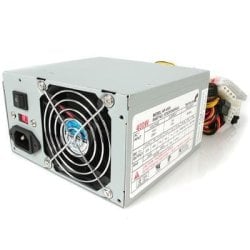
And a typical power supply looks like this:

Capture 2.jpg

However, given your lack of knowledge concerning PC hardware I would strongly advise you to find someone who has done this kind of thing before, or take the PC to a repair shop. Replacing a power supply is relatively easy, but there are a lot of connections that have to be made just so.
 

My Computer My Computer

At a glance

Windows 7 64 Bit Home Premium SP1i7-3820GSkill F3-14900CL9Q - 16GBEVGA GeForce GTX660 - Driver 352.86
Computer type
PC/Desktop
Computer Manufacturer/Model Number
Home Built - Jan 2013
OS
Windows 7 64 Bit Home Premium SP1
CPU
i7-3820
Motherboard
Asus P9X79-PRO - Bios 4608
Memory
GSkill F3-14900CL9Q - 16GB
Graphics Card(s)
EVGA GeForce GTX660 - Driver 352.86
Sound Card
On board Realtek ALC898
Monitor(s) Displays
Acer S271HL
Screen Resolution
1920 x 1080
Hard Drives
#1- Samsung 840 Pro Series
#2- Western Digital WD1002FAEX Sata3 Black
#3- Western Digital WD1002FAEX Sata3 Black
PSU
Corsair CMPSU-850TX-V2 - 850 watt (by Seasonic)
Case
Corsair Obsidian 550D
Cooling
Standard 3 120mm case fans, Cooler Master Hyper 212 EVO
Keyboard
MS KC-0405
Mouse
Intellimouse 5-button
Internet Speed
56 Mbits/Sec (on a good day)
Antivirus
Avast & Malwarebytes
Browser
Firefox
Other Info
Asus DVD - DRW-24B1ST 24X
Thank you, i will probebly give it to a repair shop as you said. But i might look into changing the power supply if i find another.
 

My Computer My Computer

At a glance

Windows 7 64bit
OS
Windows 7 64bit
Please fill in completely your ((My System Specs)) it will help us help you.
 

My Computer My Computer

At a glance

Windows 10 Pro. 64/ version 1709 Windows 7 Pr...Intel i7-6800K @ 4.3Corsair Platinum 16 gig @2400EVGA GTX 1070 OC
Computer type
PC/Desktop
Computer Manufacturer/Model Number
Home made Desktop
OS
Windows 10 Pro. 64/ version 1709 Windows 7 Pro/64
CPU
Intel i7-6800K @ 4.3
Motherboard
ASUS X-99 Deluxe II
Memory
Corsair Platinum 16 gig @2400
Graphics Card(s)
EVGA GTX 1070 OC
Monitor(s) Displays
Asus 27" LED LCD/VE278Q
Screen Resolution
1920-1080 or 1280-720 HDMI
Hard Drives
INTEL SSD 730-240 Gb Sata 3.0/
PSU
EVGA Platium 1200W
Case
Phanteks Luxe Tempered Glass 8 fans/ one radiator
Cooling
XSPC/ Water Cooled CPU
Keyboard
Das 4 Professional
Mouse
Logitech M705/MX Anywhere 2-S
Internet Speed
100 mbits
Antivirus
Microsoft Security Essentials/ Malwarebytes Premium 3.0/ SAS
Browser
I.E. 11 default/Firefox/ ISP Time Warner Cable/Spectrum
Other Info
LG BluRay Burner/
Sound system-KLipsch-THX/
Icy Dock ssd Hot Swap bays.
Dont realy know what all this is but yeah here it is:
Kab CM Elite 341 Inet
CPU Core i3 2100
HDITB Samsung
Corsair 4BG
MK MSI H67EMA-E45
GK PCle SP GF GTX 450*
PSU Corsair CX 500W
Window 7 64 bit
 

My Computer My Computer

At a glance

Windows 7 64bit
OS
Windows 7 64bit
OK. Yours is a fairly new system and that is a good quality power supply, so now I am doubting my original diagnosis.

Do you get any response at all when you push the power button to turn on the computer? For instance, does it look like the fans are trying to start but then don't?
 

My Computer My Computer

At a glance

Windows 7 64 Bit Home Premium SP1i7-3820GSkill F3-14900CL9Q - 16GBEVGA GeForce GTX660 - Driver 352.86
Computer type
PC/Desktop
Computer Manufacturer/Model Number
Home Built - Jan 2013
OS
Windows 7 64 Bit Home Premium SP1
CPU
i7-3820
Motherboard
Asus P9X79-PRO - Bios 4608
Memory
GSkill F3-14900CL9Q - 16GB
Graphics Card(s)
EVGA GeForce GTX660 - Driver 352.86
Sound Card
On board Realtek ALC898
Monitor(s) Displays
Acer S271HL
Screen Resolution
1920 x 1080
Hard Drives
#1- Samsung 840 Pro Series
#2- Western Digital WD1002FAEX Sata3 Black
#3- Western Digital WD1002FAEX Sata3 Black
PSU
Corsair CMPSU-850TX-V2 - 850 watt (by Seasonic)
Case
Corsair Obsidian 550D
Cooling
Standard 3 120mm case fans, Cooler Master Hyper 212 EVO
Keyboard
MS KC-0405
Mouse
Intellimouse 5-button
Internet Speed
56 Mbits/Sec (on a good day)
Antivirus
Avast & Malwarebytes
Browser
Firefox
Other Info
Asus DVD - DRW-24B1ST 24X
Only the powersupply fan is working but the other 2 isent starting at all. Its like half of the computer is dead.
 

My Computer My Computer

At a glance

Windows 7 64bit
OS
Windows 7 64bit
If you are up to it you could try this diagnostic routine below to try and determine what is causing the no-boot problem:

Please use proper anti-static precautions!

New System Failure Diagnostic

Basic diagnostic procedure is to uninstall the entire build and start over. Some people do this out of the case by placing the motherboard on an anti-static surface. This eliminates the possibility that there is a short circuit between the motherboard and the case through the connection posts (stand-offs). A standoff in the wrong location or a sloppy job will cause a short.

The Test (power off, power cord unplugged):

  • Disconnect everything externally connected except the mouse and keyboard (printers, USB devices, etc). If you are not using a wired mouse and keyboard see if you can borrow one. The wireless device is just another component you have to deal with.
  • Disconnect the power and data cables from all the drives inside the computer (Hard drives, DVD/CD drives, etc).
  • Remove all the cards installed in the expansion slots (PCI/PCI-e) including the video card. (Be careful handling them and place them on a non conductive surface while testing).
  • Remove all the RAM sticks (same rules as above).
Now connect the power cord and turn the PC on.

  • The motherboard should start beeping. You should get a beep code that tells you there is no memory. This is good, it means the processor is functioning and the motherboard is good so far.
  • Now add one stick of memory in Slot A1 and power on. More beeping: "no video card" beep code. This is good.
  • Then add the video card and connect it to the monitor. You should get no beeping and you should see the BIOS start screens, ending with the message that there is no boot device.
  • If you get no video then switch the one memory stick installed for another one and test.
  • If you do get video then start adding components back, one at a time, until the system fails to boot. The last component you added is then the problem component.
If you do not feel comfortable doing the above tests then I suggest bringing it to a repair shop.
 

My Computer My Computer

At a glance

Windows 7 64 Bit Home Premium SP1i7-3820GSkill F3-14900CL9Q - 16GBEVGA GeForce GTX660 - Driver 352.86
Computer type
PC/Desktop
Computer Manufacturer/Model Number
Home Built - Jan 2013
OS
Windows 7 64 Bit Home Premium SP1
CPU
i7-3820
Motherboard
Asus P9X79-PRO - Bios 4608
Memory
GSkill F3-14900CL9Q - 16GB
Graphics Card(s)
EVGA GeForce GTX660 - Driver 352.86
Sound Card
On board Realtek ALC898
Monitor(s) Displays
Acer S271HL
Screen Resolution
1920 x 1080
Hard Drives
#1- Samsung 840 Pro Series
#2- Western Digital WD1002FAEX Sata3 Black
#3- Western Digital WD1002FAEX Sata3 Black
PSU
Corsair CMPSU-850TX-V2 - 850 watt (by Seasonic)
Case
Corsair Obsidian 550D
Cooling
Standard 3 120mm case fans, Cooler Master Hyper 212 EVO
Keyboard
MS KC-0405
Mouse
Intellimouse 5-button
Internet Speed
56 Mbits/Sec (on a good day)
Antivirus
Avast & Malwarebytes
Browser
Firefox
Other Info
Asus DVD - DRW-24B1ST 24X
My dad just went by the repair shop and got som advice and fixed it! It was some dust that had come between some cables. But Thank you verry much for your support anyway! :)
 

My Computer My Computer

At a glance

Windows 7 64bit
OS
Windows 7 64bit
Good to know you got it fixed.
Always a good idea to keep the insides clean.
Enjoy!
 

My Computer My Computer

At a glance

Windows 7 64 Bit Home Premium SP1i7-3820GSkill F3-14900CL9Q - 16GBEVGA GeForce GTX660 - Driver 352.86
Computer type
PC/Desktop
Computer Manufacturer/Model Number
Home Built - Jan 2013
OS
Windows 7 64 Bit Home Premium SP1
CPU
i7-3820
Motherboard
Asus P9X79-PRO - Bios 4608
Memory
GSkill F3-14900CL9Q - 16GB
Graphics Card(s)
EVGA GeForce GTX660 - Driver 352.86
Sound Card
On board Realtek ALC898
Monitor(s) Displays
Acer S271HL
Screen Resolution
1920 x 1080
Hard Drives
#1- Samsung 840 Pro Series
#2- Western Digital WD1002FAEX Sata3 Black
#3- Western Digital WD1002FAEX Sata3 Black
PSU
Corsair CMPSU-850TX-V2 - 850 watt (by Seasonic)
Case
Corsair Obsidian 550D
Cooling
Standard 3 120mm case fans, Cooler Master Hyper 212 EVO
Keyboard
MS KC-0405
Mouse
Intellimouse 5-button
Internet Speed
56 Mbits/Sec (on a good day)
Antivirus
Avast & Malwarebytes
Browser
Firefox
Other Info
Asus DVD - DRW-24B1ST 24X
Back
Top