
After a clean reinstall by sysprepping along the lines of this tutorial, there are a few instances where some parts of my screen are displayed in a fuzzy manner. Fonts look out of focus, the way they do in a screen grab. The rest of the screen is correct.
Here are two examples :
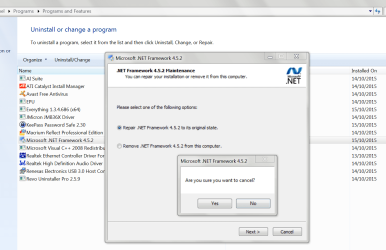
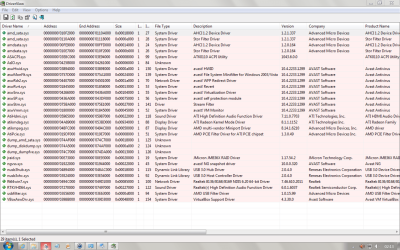
This happens in a small number of dialog boxes of software installers (example #1), but also with the working screen of Driver View, portable version (example #2). Note how the top line of Driver View's screen is rendered correctly.
I suspect either a bad driver or a bad Windows Update. I had some trouble with the latter : Checking Updates getting nowhere, Installing Updates taking ages for a single update, computer forcefully stopped during one install, error not repaired by Microsoft Fixit, Updates uninstalled then reinstalled...
Now my Windows Updates are (seemingly) complete and correct. The computer is just out of Sysprep, with only Windows installed, two user accounts, most drivers in place, almost no application software and data not yet restored.
Windows Update substituted some drivers after I had installed the chipset drivers from Asus' site. During the installation of drivers and Windows Updates, I observed, at one point, the opposite effect from the one I just described : some software installers' dialog boxes would display in-focus fonts, but with a very light, rudimentary font, difficult to read.
On the other hand, the general appearance of Windows has been noticeably enhanced, compared to my previous installation. The fonts are more crispy, the GUI itself seems to have a different, more pleasant look. The graphic driver now installed is an update to the one I had before, but it's not the latest.
Any ideas ?
Here are two examples :
This happens in a small number of dialog boxes of software installers (example #1), but also with the working screen of Driver View, portable version (example #2). Note how the top line of Driver View's screen is rendered correctly.
I suspect either a bad driver or a bad Windows Update. I had some trouble with the latter : Checking Updates getting nowhere, Installing Updates taking ages for a single update, computer forcefully stopped during one install, error not repaired by Microsoft Fixit, Updates uninstalled then reinstalled...
Now my Windows Updates are (seemingly) complete and correct. The computer is just out of Sysprep, with only Windows installed, two user accounts, most drivers in place, almost no application software and data not yet restored.
Windows Update substituted some drivers after I had installed the chipset drivers from Asus' site. During the installation of drivers and Windows Updates, I observed, at one point, the opposite effect from the one I just described : some software installers' dialog boxes would display in-focus fonts, but with a very light, rudimentary font, difficult to read.
On the other hand, the general appearance of Windows has been noticeably enhanced, compared to my previous installation. The fonts are more crispy, the GUI itself seems to have a different, more pleasant look. The graphic driver now installed is an update to the one I had before, but it's not the latest.
Any ideas ?
Last edited:
My Computer
At a glance
Windows 7 Home Premium 64-bit (OEM)AMD Athlon II X4 640 (3 GHz, 4 cores)Patriot 16Gb DDR3 1600 (2 kits of 2)ATI Radeon HD 4290 (integrated)
- Computer type
- PC/Desktop
- Computer Manufacturer/Model Number
- Custom build
- OS
- Windows 7 Home Premium 64-bit (OEM)
- CPU
- AMD Athlon II X4 640 (3 GHz, 4 cores)
- Motherboard
- Asus M4A 89 GTD Pro/USB3
- Memory
- Patriot 16Gb DDR3 1600 (2 kits of 2)
- Graphics Card(s)
- ATI Radeon HD 4290 (integrated)
- Sound Card
- AMD + Realtek HD Audio (integrated)
- Monitor(s) Displays
- Hewlett-Packard ZR2440w (24")
- Screen Resolution
- 1920 x 1200
- Hard Drives
- Internal : Samsung SSD 860 EVO 250 Gb (system), Seagate Barrcuda 1 Tb (data), Western Digital Caviar Blue 500 Gb (archives).
External (USB) : 2 x 1 Tb 2,5" Seagate Barracuda (backups).
- PSU
- Corsair VX 450 W
- Case
- Antec Solo
- Cooling
- Cooler Master Hyper 212 Plus, 2 Nexus Real Silent Case fans
- Keyboard
- Cherry KC 1000
- Mouse
- Logitech M 90
- Internet Speed
- Fiber, 300 Mbit/s down, 200 Mbit/s up
- Antivirus
- Microsoft Security Essentials
- Browser
- Vivaldi, Tor
- Other Info
- BIOS Date: 07/18/11 Ver: 08.00.15.
Modem-router : provided by ISP


