
Bookmarks folder in FF4 Bookmarks toolbar

Zoloft

New member
Power User
VIP
Local time
3:46 PM
Messages
226
Location
Las Vegas
Probably should ask this over in the Mozilla forums, hell, there is probably an answer already there, but you guys are much faster, and smarter.

In the new Firefox 4, on the bookmarks toolbar, there is an additional folder of the bookmarks

t6a2oi.jpg


The bookmarks folder under the firefox tab at the top right is more than enough for me, the one on the toolbar just takes up space for other bookmarks! Can this folder be removed?

Thanks all!
 

My Computer

Computer type
PC/Desktop
Computer Manufacturer/Model Number
HP Pavillion Elite HPE-590t
OS
Win7 Home Premium x64
CPU
Intel Core i7 Extreme 990X @ 3.47GHz x6
Motherboard
PEGATRON CORPORATION 2A86
Memory
16GB DDR3
Graphics Card(s)
NVidia GeForce GTX460
Monitor(s) Displays
Samsung SyncMaster 2443ewx
Screen Resolution
1920x1200
Hard Drives
160 GB SSD @ 2 TB 7200 Internal
750 GB HP, 2 TB WD, 2 TB Samsung External & 3 TB G-Tech firewire external
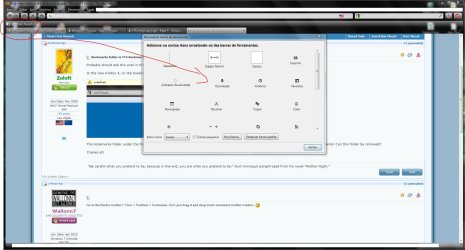
Go to the Firefox toolbar > View > Toolbars > Customize. Now just drag it and drop it into customize toolbar window. :)


Attachments

  • Capturar.JPG
    Capturar.JPG
    228.8 KB · Views: 25

My Computer

Computer Manufacturer/Model Number
WALLONN7 / LIN BLACK SERIES II
OS
Windows 7 Ultimate x64 SP1
CPU
AMD PHENOM II X6 1090T 3.2GHz
Motherboard
GIGABYTE GA-890FXA-UD7
Memory
8GB G.SKILL RIPJAWS - F3-10666CL7D
Graphics Card(s)
SAPPHIRE ATI RADEON HD 5870 VAPOR X OC
Sound Card
REALTEK DOLBY HOME THEATER
Monitor(s) Displays
LED LG W2486L
Screen Resolution
1080p
Hard Drives
SEAGATE 1TB -ST31000528AS - AHCI MODE - AS SATA
PSU
ZALMAN ZM1000-HP 1000W
Case
THERMALTAKE XASER VI VG4000SWA
Cooling
140MM x3 / 120MM x1 AIR COOLING - THERMALTAKE
Keyboard
MICROSOFT DIGITAL MEDIA KEYBOARD 3000 - USB
Mouse
MICROSOFT BASIC OPTICAL MOUSE 2.0 - USB
Internet Speed
600KBPS
Other Info
MICROSOFT XBOX 360 CONTROLLER
Open up your FF menu. Navigate to options, untick bookmarks toolbar.
 

My Computer

Computer Manufacturer/Model Number
D3f's Customs
OS
Win 7 Ultimate SP1 x64
CPU
Intel Pentium Dual Core E5300 OC'd @ 3GHz
Motherboard
Asus P5G41-M LE
Memory
Kingston 2x2GB DDR2-800 Dual Channel SDRAM
Graphics Card(s)
Integrated Intel GMA X4500
Sound Card
Realtek 5.1 HD Audio (ALC887)
Monitor(s) Displays
LG Flatron W1943S @ 60Hz
Screen Resolution
1360 x 768
Hard Drives
Internal - WD Caviar Blue 500GB, External - WD My Passport Essential 500GB
PSU
Headway 450w PSU
Case
Pixxo Slim Black mATX Case
Cooling
Stock Cpu Fan, 1 x Top Case Fan
Keyboard
Logitech K120
Mouse
Logitech LS1 Laser Mouse
Internet Speed
17.66Mb/s Down, 0.82Mb/s Up
Other Info
Creative SBS A300 2.1 Speaker System, LG GH22NS50 22x Internal Super-Multi DVD-RW, 2Wire 5012NV Wireless Modem Router
Wallonn7, that was actually the first thing I tried, but it doesn't seem to remove it, unless there is some sort of "delete" option I am missing.

D3ft0n3Z, I want to keep the toolbar itself, I like it there, I just want to remove that excess link/folder at the end of the toolbar.

Thanks for your efforts though!

Russell
 

My Computer

Computer type
PC/Desktop
Computer Manufacturer/Model Number
HP Pavillion Elite HPE-590t
OS
Win7 Home Premium x64
CPU
Intel Core i7 Extreme 990X @ 3.47GHz x6
Motherboard
PEGATRON CORPORATION 2A86
Memory
16GB DDR3
Graphics Card(s)
NVidia GeForce GTX460
Monitor(s) Displays
Samsung SyncMaster 2443ewx
Screen Resolution
1920x1200
Hard Drives
160 GB SSD @ 2 TB 7200 Internal
750 GB HP, 2 TB WD, 2 TB Samsung External & 3 TB G-Tech firewire external
Wallonn7, that was actually the first thing I tried, but it doesn't seem to remove it, unless there is some sort of "delete" option I am missing.

D3ft0n3Z, I want to keep the toolbar itself, I like it there, I just want to remove that excess link/folder at the end of the toolbar.

Thanks for your efforts though!

Russell

That's weird. I play the process about three times and in all the folder was removed...
 

My Computer

Computer Manufacturer/Model Number
WALLONN7 / LIN BLACK SERIES II
OS
Windows 7 Ultimate x64 SP1
CPU
AMD PHENOM II X6 1090T 3.2GHz
Motherboard
GIGABYTE GA-890FXA-UD7
Memory
8GB G.SKILL RIPJAWS - F3-10666CL7D
Graphics Card(s)
SAPPHIRE ATI RADEON HD 5870 VAPOR X OC
Sound Card
REALTEK DOLBY HOME THEATER
Monitor(s) Displays
LED LG W2486L
Screen Resolution
1080p
Hard Drives
SEAGATE 1TB -ST31000528AS - AHCI MODE - AS SATA
PSU
ZALMAN ZM1000-HP 1000W
Case
THERMALTAKE XASER VI VG4000SWA
Cooling
140MM x3 / 120MM x1 AIR COOLING - THERMALTAKE
Keyboard
MICROSOFT DIGITAL MEDIA KEYBOARD 3000 - USB
Mouse
MICROSOFT BASIC OPTICAL MOUSE 2.0 - USB
Internet Speed
600KBPS
Other Info
MICROSOFT XBOX 360 CONTROLLER
D3ft0n3Z, I want to keep the toolbar itself, I like it there, I just want to remove that excess link/folder at the end of the toolbar.
My bad.. I thought you want to remove it completely. :)
 

My Computer

Computer Manufacturer/Model Number
D3f's Customs
OS
Win 7 Ultimate SP1 x64
CPU
Intel Pentium Dual Core E5300 OC'd @ 3GHz
Motherboard
Asus P5G41-M LE
Memory
Kingston 2x2GB DDR2-800 Dual Channel SDRAM
Graphics Card(s)
Integrated Intel GMA X4500
Sound Card
Realtek 5.1 HD Audio (ALC887)
Monitor(s) Displays
LG Flatron W1943S @ 60Hz
Screen Resolution
1360 x 768
Hard Drives
Internal - WD Caviar Blue 500GB, External - WD My Passport Essential 500GB
PSU
Headway 450w PSU
Case
Pixxo Slim Black mATX Case
Cooling
Stock Cpu Fan, 1 x Top Case Fan
Keyboard
Logitech K120
Mouse
Logitech LS1 Laser Mouse
Internet Speed
17.66Mb/s Down, 0.82Mb/s Up
Other Info
Creative SBS A300 2.1 Speaker System, LG GH22NS50 22x Internal Super-Multi DVD-RW, 2Wire 5012NV Wireless Modem Router
Go to the Firefox toolbar > View > Toolbars > Customize. Now just drag it and drop it into customize toolbar window. :)

I tested your suggestion. It works for me. No bookmarks folder left, only the toolbar.
 

My Computer

Computer Manufacturer/Model Number
D3f's Customs
OS
Win 7 Ultimate SP1 x64
CPU
Intel Pentium Dual Core E5300 OC'd @ 3GHz
Motherboard
Asus P5G41-M LE
Memory
Kingston 2x2GB DDR2-800 Dual Channel SDRAM
Graphics Card(s)
Integrated Intel GMA X4500
Sound Card
Realtek 5.1 HD Audio (ALC887)
Monitor(s) Displays
LG Flatron W1943S @ 60Hz
Screen Resolution
1360 x 768
Hard Drives
Internal - WD Caviar Blue 500GB, External - WD My Passport Essential 500GB
PSU
Headway 450w PSU
Case
Pixxo Slim Black mATX Case
Cooling
Stock Cpu Fan, 1 x Top Case Fan
Keyboard
Logitech K120
Mouse
Logitech LS1 Laser Mouse
Internet Speed
17.66Mb/s Down, 0.82Mb/s Up
Other Info
Creative SBS A300 2.1 Speaker System, LG GH22NS50 22x Internal Super-Multi DVD-RW, 2Wire 5012NV Wireless Modem Router
Hells bells, don't know what I did wrong last time, but it worked this time, greatly appreciated guys. Sometimes I think I'm to dumb to own a computer lol. Always the "simple" stuff that flubbs me up!
 

My Computer

Computer type
PC/Desktop
Computer Manufacturer/Model Number
HP Pavillion Elite HPE-590t
OS
Win7 Home Premium x64
CPU
Intel Core i7 Extreme 990X @ 3.47GHz x6
Motherboard
PEGATRON CORPORATION 2A86
Memory
16GB DDR3
Graphics Card(s)
NVidia GeForce GTX460
Monitor(s) Displays
Samsung SyncMaster 2443ewx
Screen Resolution
1920x1200
Hard Drives
160 GB SSD @ 2 TB 7200 Internal
750 GB HP, 2 TB WD, 2 TB Samsung External & 3 TB G-Tech firewire external
AHHH! I see! When the menu bar is visible, it's not there, when the menu bar is hidden, it comes back! I guess I will just leave the menu bar active, it's better than the extra link on the bookmarks toolbar!
 

My Computer

Computer type
PC/Desktop
Computer Manufacturer/Model Number
HP Pavillion Elite HPE-590t
OS
Win7 Home Premium x64
CPU
Intel Core i7 Extreme 990X @ 3.47GHz x6
Motherboard
PEGATRON CORPORATION 2A86
Memory
16GB DDR3
Graphics Card(s)
NVidia GeForce GTX460
Monitor(s) Displays
Samsung SyncMaster 2443ewx
Screen Resolution
1920x1200
Hard Drives
160 GB SSD @ 2 TB 7200 Internal
750 GB HP, 2 TB WD, 2 TB Samsung External & 3 TB G-Tech firewire external
Hells bells, don't know what I did wrong last time, but it worked this time, greatly appreciated guys. Sometimes I think I'm to dumb to own a computer lol. Always the "simple" stuff that flubbs me up!

Glad I did not lose my sanity ...
:p
 

My Computer

Computer Manufacturer/Model Number
WALLONN7 / LIN BLACK SERIES II
OS
Windows 7 Ultimate x64 SP1
CPU
AMD PHENOM II X6 1090T 3.2GHz
Motherboard
GIGABYTE GA-890FXA-UD7
Memory
8GB G.SKILL RIPJAWS - F3-10666CL7D
Graphics Card(s)
SAPPHIRE ATI RADEON HD 5870 VAPOR X OC
Sound Card
REALTEK DOLBY HOME THEATER
Monitor(s) Displays
LED LG W2486L
Screen Resolution
1080p
Hard Drives
SEAGATE 1TB -ST31000528AS - AHCI MODE - AS SATA
PSU
ZALMAN ZM1000-HP 1000W
Case
THERMALTAKE XASER VI VG4000SWA
Cooling
140MM x3 / 120MM x1 AIR COOLING - THERMALTAKE
Keyboard
MICROSOFT DIGITAL MEDIA KEYBOARD 3000 - USB
Mouse
MICROSOFT BASIC OPTICAL MOUSE 2.0 - USB
Internet Speed
600KBPS
Other Info
MICROSOFT XBOX 360 CONTROLLER
Sorry, had to go to work, this new comp doesn't pay for itself. . . not exactly what I wanted to accomplish, but yes, satisfied with the resolution, greatly appreciate the input.
 

My Computer

Computer type
PC/Desktop
Computer Manufacturer/Model Number
HP Pavillion Elite HPE-590t
OS
Win7 Home Premium x64
CPU
Intel Core i7 Extreme 990X @ 3.47GHz x6
Motherboard
PEGATRON CORPORATION 2A86
Memory
16GB DDR3
Graphics Card(s)
NVidia GeForce GTX460
Monitor(s) Displays
Samsung SyncMaster 2443ewx
Screen Resolution
1920x1200
Hard Drives
160 GB SSD @ 2 TB 7200 Internal
750 GB HP, 2 TB WD, 2 TB Samsung External & 3 TB G-Tech firewire external
Back
Top