Boot critical file is corrupt

Regulus Leonis

New member
Local time
9:20 PM
Messages
16
The problems started yesterday when my computer went to blue screen and automatically shut down and restarted. This happened twice, then I did an AVG scan in Safe Mode. It placed several infections and a few malwares into the virus vault. However, it "did not test" dozens of files because they were "locked". There were Boot directeries that were listed among the locked files.

I restarted in Normal Mode, and got a message that Windows found a malicious file and "partially removed" it. When I clicked on the message to find details about the file, this webpage popped up: Encyclopedia entry: Trojan:DOS/Alureon.A - Learn more about malware - Microsoft Malware Protection Center
So the infection was Trojan:DOS/Alureon.A (edited to add: the smiley face appears where : D [without the space] is in the trojan filename)

About an hour later, the computer crashed and restarted again, then again a few minutes later. I did another scan and no malicious files were found.

When I turned the computer on 20 minutes ago, I got a screen telling me that the computer was unable to start, and Windows was searching for solutions. It apparently worked because I'm using the computer now. However, when I clicked to see the details of what happened, I saw this: "Boot critical file c:\windows\system32\kdcom.dll is corrupt".

So I don't know if it fixed the file or if it's still corrupt. I'm concerned my computer will have trouble rebooting. Thanks for any help in advance. What do I need to do to fix this problem?

Should I download Windows Defender Offline? If so, would I need to uninstall AVG to get it to work properly?


My Computer

Computer Manufacturer/Model Number
ASUS Notebook K72Jk Series
OS
MS Windows 7 Home Premium 64-bit
CPU
Intel Core i5 M450
Motherboard
ASUSTek Computer Inc. K72JK (Socket 989)
Memory
4 GB Dual-channel DDR3 @548MHz (7-7-7-20)
Hard Drives
466 GB Seagate ST9500420A5(SATA)
Other Info
Optical Drive: Matshita DVD-RAM UJ890AS
BIOS
Brand American Megatrends Inc.
Version K72Jk.205

My Computer

Computer type
PC/Desktop
Computer Manufacturer/Model Number
HP Pavilion P7-1010
OS
Windows 7 Professional x64 Service Pack 1
CPU
AMD Athlon X4 645
Motherboard
Foxxcon N-Alvorix RS880
Memory
6GB DDR3 1066
Graphics Card(s)
Sapphire Radeon HD 5670 512MB GDDR5
Sound Card
Realtek Integrated Audio
Monitor(s) Displays
HP 2011x
Screen Resolution
1600x900
Hard Drives
1. Crucial M4 128GB SSD
2. 1TB Seagate Barracuda 7200.12 RPM
3. 1TB Western Digital Caviar Green 5400RPM
PSU
Seasonic S12 II Bronze 380 Watt
Case
HP OEM
Cooling
Coolermaster Heatsink, AVC Case Fan
Keyboard
HP OEM- Made by Chicony
Mouse
HP OEM- Made by Logitech
Internet Speed
20MBit Down/4 Up
Antivirus
Microsoft Security Essentials
Browser
Internet Explorer 10
Thank you, I'll give those a try. AVG tech support told me they think Windows needs to be reinstalled, and they graciously offered to do that for $129.
 

My Computer

Computer Manufacturer/Model Number
ASUS Notebook K72Jk Series
OS
MS Windows 7 Home Premium 64-bit
CPU
Intel Core i5 M450
Motherboard
ASUSTek Computer Inc. K72JK (Socket 989)
Memory
4 GB Dual-channel DDR3 @548MHz (7-7-7-20)
Hard Drives
466 GB Seagate ST9500420A5(SATA)
Other Info
Optical Drive: Matshita DVD-RAM UJ890AS
BIOS
Brand American Megatrends Inc.
Version K72Jk.205
No one has recommended AVG for 10 years since it bloated up and became a problem more than a solution.

Use MSE with Win7 Firewall.

There are steps as a last resort to get a Perfect Reinstall in the Troubleshooting tutorial.
 
I can't find my Windows 7 installation discs :o, so I can't run the startup repair yet.

So I started working through the Troubleshooting list. I did a malwarebytes scan, and it found several dozen malware files and infections. While it was scanning, AVG popped up with a notice that it found two Trojan horses. When malwarebytes was done, I removed all the malicious files it found. Then I tried to get AVG to delete the Trojan horses, and it froze (it did warn me after I clicked the Remove button that it could cause a system crash). Out of desperation, I did a ctrl-alt-del and got a black screen.

I did a hard shut down, then rebooted in Safe Mode and ran the SFC /SCANNOW command. It ran through the "verification process" which ended when the DOS screen disappeared. It apparently found nothing. I then did an AVG scan and it also found nothing--not even "locked" files, of which there were dozens last night when AVG said it "did not test" them because they were locked.

My computer boots up just fine now. I don't know if c:\windows\system32\kdcom.dll was fixed or not. With every reboot, however, Malwarebytes gives a message about svchost.exe, which apparently has a Trojan Agent that AVG never caught, and it quarantines the file. I've found other forums where trojans in svchost.exe are discussed, but if anyone would like to offer advice on that, it would be appreciated.

Actually, would it be worth a try to run "sfc /scanfile=c:\windows\svchost.exe" to fix it? Should I try "sfc /scanfile=c:\windows\system32\kdcom.dll" as well?

I am wondering about #5 in the Troubleshooting list: "5. If you need an installer for your licensed version to boot to run Repairs or possible Clean Reinstall, download the latest official Win7 installer w/SP1 ISO, burn to DVD or write to flash stick using Windows 7 USB-DVD Download Tool. "

Should I download that Win7 installer to run the startup repair? Would it wipe out my hard drive? (There's one more place where I might find my Windows 7 installation discs, but it's an hour's drive away.) If I'm not mistaken, I could order new copies on monday from Microsoft if I can't find them...

Thanks again for the advice, including that regarding AVG; I'll remove it sometime soon...
 

My Computer

Computer Manufacturer/Model Number
ASUS Notebook K72Jk Series
OS
MS Windows 7 Home Premium 64-bit
CPU
Intel Core i5 M450
Motherboard
ASUSTek Computer Inc. K72JK (Socket 989)
Memory
4 GB Dual-channel DDR3 @548MHz (7-7-7-20)
Hard Drives
466 GB Seagate ST9500420A5(SATA)
Other Info
Optical Drive: Matshita DVD-RAM UJ890AS
BIOS
Brand American Megatrends Inc.
Version K72Jk.205

My Computer

Computer type
PC/Desktop
Computer Manufacturer/Model Number
Home made Desktop
OS
Windows 10 Pro. 64/ version 1709 Windows 7 Pro/64
CPU
Intel i7-6800K @ 4.3
Motherboard
ASUS X-99 Deluxe II
Memory
Corsair Platinum 16 gig @2400
Graphics Card(s)
EVGA GTX 1070 OC
Monitor(s) Displays
Asus 27" LED LCD/VE278Q
Screen Resolution
1920-1080 or 1280-720 HDMI
Hard Drives
INTEL SSD 730-240 Gb Sata 3.0/
PSU
EVGA Platium 1200W
Case
Phanteks Luxe Tempered Glass 8 fans/ one radiator
Cooling
XSPC/ Water Cooled CPU
Keyboard
Das 4 Professional
Mouse
Logitech M705/MX Anywhere 2-S
Internet Speed
100 mbits
Antivirus
Microsoft Security Essentials/ Malwarebytes Premium 3.0/ SAS
Browser
I.E. 11 default/Firefox/ ISP Time Warner Cable/Spectrum
Other Info
LG BluRay Burner/
Sound system-KLipsch-THX/
Icy Dock ssd Hot Swap bays.
I would uninstall AVG now and install MSE, run a full scan. Do another scan with Malwarebytes to make sure it got everything.

Make a System Repair Disk now in case you lose the boot, in which case use Defender to disinfect more thoroughly from booted CD.

Run SFC as given in the steps until it tells you whether it finds damaged System files or not. It should say clearly after the scan. Are you paying attention?

Continue with the steps in the tutorial.
 
Regulus Leonis,

First you must have a virus-free system in order to do anything.

This is the reason I concur with Layback Bear.

Now after you follow the procedure I give, then:
UNINSTALL AVG
INSTALL MSE

The link of MSE is in my signature.
Here is a link for removing AVG. Before removing, disconnect from the internet.
Download tools and utilities | AVG Worldwide

=========================================
HOW TO USE WINDOWS DEFENDER OFFLINE ON A USB STICK
Windows Defender Offline
· is a free standalone, bootable malware and virus remover from Microsoft.
· performs an offline scan of an infected PC to remove viruses, rootkits and other advanced malware.

Download Windows Defender Offline (about 764 kB)

You will have the choice of downloading the 32bit version (x86) or the 64 bit version (x64).
The link will help you determine whether you are running a 32 bit version or 64 bit version of Windows

NOTE!! You can download and prepare a 32 bit version using a 64 bit version of Windows
NOTE!! You can download and prepare a 64 bit version using a 32bit version of Windows.

You run the 32 bit version on a 32 bit version of Windows.
You run the 64 bit version on a 64 bit version of Windows.

The 32 bit download file name is: mssstool32.exe
The 64 bit download file name is: mssstool64.exe

For the curious, this program was originally name Microsoft Standalone System Sweeper.


INSTALLATION:
You will need an Internet Connection.
Insert 512 mB (Microsoft’s 256 mB is no longer accurate) or larger USB stick into a usb port.
Run the downloaded program--mssstool64.exe or mssstool32.exe
NEXT button
Choose the option On a USB flash drive that is not password protected
NEXT button
NEXT button
.
The install program will format the usb stick using the NTFS format.
The install program will download about 210 mB.
The install program will name the USB stick WDO_Media32 or WDO_Media64
The WDO_Media32 usb stick will have used space of 255 mB (268,140,544 bytes)
The WDO_Media64 usb stick will have used space of 282 mB (296,165,376 bytes)
You can expect the number of mB to increase as more malware appears.

UPDATE Windows Defender Offline USB stick:
· reinsert the usb stick
· run the installation program, mssstool64.exe or mssstool32.exe, again.
· the update will download about 66 mB (mssstool32.exe) and 68 mB (mssstool64.exe).

Since the malware database is sometimes updated several times in a day, always update before running.

PERFORM AN OFFLINE SCAN
Bootup your computer from the USB stick
Windows Defender Offline will automatically perform a quick scan.
After the quick scan finishes, Choose Full Scan
Select all of your drives

The initial, full scan can easily take several hours, but
Remember, your computer is being very thoroughly checked for all types of malware.
 

My Computer

Computer Manufacturer/Model Number
Toshiba Satellite S875D-S7239 laptop
OS
MS Windows 7 Ultimate SP1 64-bit
CPU
AMD A10-4600M
Motherboard
AMD Pumori (Socket FT1)
Memory
6.00 GB Dual-Channel DDR3 @ 798MHz (11-11-12-28)
Graphics Card(s)
AMD Radeon HD 7660G
Sound Card
High Definition Audio Device
Monitor(s) Displays
Generic PnP Monitor (1600x900@60Hz)
Screen Resolution
1600x900@60Hz
Hard Drives
SSD 119GB Corsair CSSD-V128GB2 ATA Device
Keyboard
Standard PS/2 Keyboard
Mouse
HP Wireless Optical Mobile Mouse Model FHA-3410
Internet Speed
What the local pub, local coffee shop offers.
Other Info
Optical Drive:MATSHITA BD-CMB UJ160B ATA Device


Also have an Asus ha1002xp netbook with Win 7 Ultimate installed.
Thank you, Karlsnooks. I haven't worked on this for the past few hours because I'm stuck on how to boot from cd.

I actually downloaded and installed MSE, and uninstalled AVG. The initial scan MSE did immediately after its installation found just Trojan
biggrin.gif
OS/Alureon.A. It finds this and "suspends" it automatically every time I boot up now.

Also downloaded Windows Defender Offline and installed it on cd. So I'm trying to reach ASUS for them to tell me which function key to hit on startup to get in to temporarily change the BIOS or Boot Setup, then to hopefully get them walk me through it if it's not self-explanatory. I'm assuming I would need to change the the Boot Setup if I installed Defender Offline on a USB drive, as well.

I just did another sfc /scannow, this time from the DOS screen instead of from the command field in the start menu. In the system32 folder, the result was: "Windows Resource Protection did not find any threats to the integrity of this system," or something to that effect.
 

My Computer

Computer Manufacturer/Model Number
ASUS Notebook K72Jk Series
OS
MS Windows 7 Home Premium 64-bit
CPU
Intel Core i5 M450
Motherboard
ASUSTek Computer Inc. K72JK (Socket 989)
Memory
4 GB Dual-channel DDR3 @548MHz (7-7-7-20)
Hard Drives
466 GB Seagate ST9500420A5(SATA)
Other Info
Optical Drive: Matshita DVD-RAM UJ890AS
BIOS
Brand American Megatrends Inc.
Version K72Jk.205
Regulus Leonis,

Go to the ASUS website. Download the manual for your computer. That manual will tell you how to change the boot order.

I strongly recommend putting WDO onto a USB stick. Heck, that DVD you burn will only be good once since the AV database is updated several times a day!

Even department stores, large food stores sell USB sticks. Get a 4 GB so that you have plenty of room (hard to find anything smaller nowadays).

Let's fluff out those system specs a little. Here is how:

Update your SevenForums System Specs
User CP (located on the top menu bar) |
Your Profile | Edit System Spec
(left-hand column)

To gather info, use Speccy (my favorite) or SIW or System Info

In the System Manufacturer Block, enter:
Manufacturer and Model and
ADD the word laptop, desktop, netbook or tablet.
For example:
Toshiba Satellite L305D notebook.

Provide full windows version info, for example:
MS Windows 7 Ultimate SP1 64-bit

Use the “Other Info” block for Optical Reader,
Mouse, touchpad, wifi adapter, speakers, monitor, etc

Scroll down and click on SAVE CHANGES.

You will find that in Speccy, you can select info from the display
using your mouse/touchpad and then paste that info into your specs.

SIW is a marvelous program, but the free version does not offer
this capability.
 

My Computer

Computer Manufacturer/Model Number
Toshiba Satellite S875D-S7239 laptop
OS
MS Windows 7 Ultimate SP1 64-bit
CPU
AMD A10-4600M
Motherboard
AMD Pumori (Socket FT1)
Memory
6.00 GB Dual-Channel DDR3 @ 798MHz (11-11-12-28)
Graphics Card(s)
AMD Radeon HD 7660G
Sound Card
High Definition Audio Device
Monitor(s) Displays
Generic PnP Monitor (1600x900@60Hz)
Screen Resolution
1600x900@60Hz
Hard Drives
SSD 119GB Corsair CSSD-V128GB2 ATA Device
Keyboard
Standard PS/2 Keyboard
Mouse
HP Wireless Optical Mobile Mouse Model FHA-3410
Internet Speed
What the local pub, local coffee shop offers.
Other Info
Optical Drive:MATSHITA BD-CMB UJ160B ATA Device


Also have an Asus ha1002xp netbook with Win 7 Ultimate installed.
Reboot and tap the Asus F8 key repeatedly and vigorously to get a BIOS Boot Menu and boot the CD.

Defender may also not clean up Alureon rootkit. Below is the recommended tool. We may also need to call on specialists from our Security forum.

Next Download TDSSKiller from Kaspersky to your directly onto your Desktop
  • Now double click the TDSSkiller.exe file to run it ( if using Vista or Windows 7 do not double click on it but rather, right click and select Run As Administrartor. )
  • Allow the application to run if prompted by Windows or any security programs you have installed
  • It will start the scan and run rather quickly and will notify you of whether anything is found or not.
  • Follow the instructions to delete/quarantine if asks you what to do when if finds something.
  • Whether an infection is found or not, a log file should be created on your C: drive ( or whatever drive you boot from) in the root folder named something like TDSSKiller.2.1.1_27.12.2009_14.17.04_log.txt which is based on the program version # and date and time run. Please attach this log to your next reply.
 
Regulus,

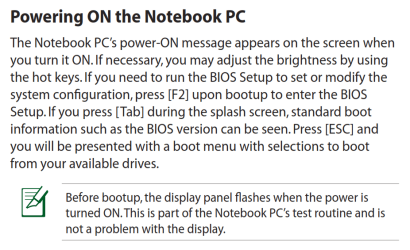
First: how to get to your bios:
boot to bios asus notebook.PNG
 

My Computer

Computer Manufacturer/Model Number
Toshiba Satellite S875D-S7239 laptop
OS
MS Windows 7 Ultimate SP1 64-bit
CPU
AMD A10-4600M
Motherboard
AMD Pumori (Socket FT1)
Memory
6.00 GB Dual-Channel DDR3 @ 798MHz (11-11-12-28)
Graphics Card(s)
AMD Radeon HD 7660G
Sound Card
High Definition Audio Device
Monitor(s) Displays
Generic PnP Monitor (1600x900@60Hz)
Screen Resolution
1600x900@60Hz
Hard Drives
SSD 119GB Corsair CSSD-V128GB2 ATA Device
Keyboard
Standard PS/2 Keyboard
Mouse
HP Wireless Optical Mobile Mouse Model FHA-3410
Internet Speed
What the local pub, local coffee shop offers.
Other Info
Optical Drive:MATSHITA BD-CMB UJ160B ATA Device


Also have an Asus ha1002xp netbook with Win 7 Ultimate installed.
Once inside the BIOS, then go to the BOOT options, from that point on, select a device and you'll probably get still another display.

ASUS does wierd things when it comes to selecting the boot device and the boot order.

Toshiba is much better, but you've got an ASUS. (I also have an asus netbook and changing the boot order is a pain).
 

My Computer

Computer Manufacturer/Model Number
Toshiba Satellite S875D-S7239 laptop
OS
MS Windows 7 Ultimate SP1 64-bit
CPU
AMD A10-4600M
Motherboard
AMD Pumori (Socket FT1)
Memory
6.00 GB Dual-Channel DDR3 @ 798MHz (11-11-12-28)
Graphics Card(s)
AMD Radeon HD 7660G
Sound Card
High Definition Audio Device
Monitor(s) Displays
Generic PnP Monitor (1600x900@60Hz)
Screen Resolution
1600x900@60Hz
Hard Drives
SSD 119GB Corsair CSSD-V128GB2 ATA Device
Keyboard
Standard PS/2 Keyboard
Mouse
HP Wireless Optical Mobile Mouse Model FHA-3410
Internet Speed
What the local pub, local coffee shop offers.
Other Info
Optical Drive:MATSHITA BD-CMB UJ160B ATA Device


Also have an Asus ha1002xp netbook with Win 7 Ultimate installed.
Shouldn't the F8 BIOS Boot Menu key work, as long as it doesn't get to Starting Windows when it turns into Advanced Boot Options pumpkin?
 
No.

He wants to boot into the bios.
See the previously attached snip which is directly from the manual for his notebook.
 

My Computer

Computer Manufacturer/Model Number
Toshiba Satellite S875D-S7239 laptop
OS
MS Windows 7 Ultimate SP1 64-bit
CPU
AMD A10-4600M
Motherboard
AMD Pumori (Socket FT1)
Memory
6.00 GB Dual-Channel DDR3 @ 798MHz (11-11-12-28)
Graphics Card(s)
AMD Radeon HD 7660G
Sound Card
High Definition Audio Device
Monitor(s) Displays
Generic PnP Monitor (1600x900@60Hz)
Screen Resolution
1600x900@60Hz
Hard Drives
SSD 119GB Corsair CSSD-V128GB2 ATA Device
Keyboard
Standard PS/2 Keyboard
Mouse
HP Wireless Optical Mobile Mouse Model FHA-3410
Internet Speed
What the local pub, local coffee shop offers.
Other Info
Optical Drive:MATSHITA BD-CMB UJ160B ATA Device


Also have an Asus ha1002xp netbook with Win 7 Ultimate installed.
Yes I saw that is how to access BIOS setup which is normally a separate key.

Is the F8 key which has always been the BIOS Boot Menu key for Asus' no longer that on netbooks?
 
It hadn't crashed all day until 15 minutes ago and it's crashed a few times since then. F2 takes me to the Boot Setup menu. When I get there, I see:
"CD/DVD ROM DRIVE BBS PRIORITIES"
When I hit enter on that, it takes me to one priority and nothing happens. F10 = Save, so should I hit F10 after selecting "CD/DVD ROM DRIVE BBS PRIORITIES" ? Then Esc to exit?

Edit to add:
I just came back to type that message as fast as I could without reading other recent posts because I thought I only had 2 minutes before another crash. But it has yet to crash so far this time.

Karlsnooks, I saw that page in the manual, as well, and it seems to suggest pressing Esc will give me options of where to boot up to. But it seemed like Esc is just exit. I don't know what a splash screen is so I don't know when to hit Tab.
 

My Computer

Computer Manufacturer/Model Number
ASUS Notebook K72Jk Series
OS
MS Windows 7 Home Premium 64-bit
CPU
Intel Core i5 M450
Motherboard
ASUSTek Computer Inc. K72JK (Socket 989)
Memory
4 GB Dual-channel DDR3 @548MHz (7-7-7-20)
Hard Drives
466 GB Seagate ST9500420A5(SATA)
Other Info
Optical Drive: Matshita DVD-RAM UJ890AS
BIOS
Brand American Megatrends Inc.
Version K72Jk.205
Download the manual. The manual , at about A-15, shows how to use the boot options.
 

My Computer

Computer Manufacturer/Model Number
Toshiba Satellite S875D-S7239 laptop
OS
MS Windows 7 Ultimate SP1 64-bit
CPU
AMD A10-4600M
Motherboard
AMD Pumori (Socket FT1)
Memory
6.00 GB Dual-Channel DDR3 @ 798MHz (11-11-12-28)
Graphics Card(s)
AMD Radeon HD 7660G
Sound Card
High Definition Audio Device
Monitor(s) Displays
Generic PnP Monitor (1600x900@60Hz)
Screen Resolution
1600x900@60Hz
Hard Drives
SSD 119GB Corsair CSSD-V128GB2 ATA Device
Keyboard
Standard PS/2 Keyboard
Mouse
HP Wireless Optical Mobile Mouse Model FHA-3410
Internet Speed
What the local pub, local coffee shop offers.
Other Info
Optical Drive:MATSHITA BD-CMB UJ160B ATA Device


Also have an Asus ha1002xp netbook with Win 7 Ultimate installed.
Greg,
What I know is that for his notebook, one uses the F2 key.

I also know that WDO will remove his malware (the same one has been removed from others).
 

My Computer

Computer Manufacturer/Model Number
Toshiba Satellite S875D-S7239 laptop
OS
MS Windows 7 Ultimate SP1 64-bit
CPU
AMD A10-4600M
Motherboard
AMD Pumori (Socket FT1)
Memory
6.00 GB Dual-Channel DDR3 @ 798MHz (11-11-12-28)
Graphics Card(s)
AMD Radeon HD 7660G
Sound Card
High Definition Audio Device
Monitor(s) Displays
Generic PnP Monitor (1600x900@60Hz)
Screen Resolution
1600x900@60Hz
Hard Drives
SSD 119GB Corsair CSSD-V128GB2 ATA Device
Keyboard
Standard PS/2 Keyboard
Mouse
HP Wireless Optical Mobile Mouse Model FHA-3410
Internet Speed
What the local pub, local coffee shop offers.
Other Info
Optical Drive:MATSHITA BD-CMB UJ160B ATA Device


Also have an Asus ha1002xp netbook with Win 7 Ultimate installed.
Back
Top