Boot Failure

Mitch656

New member
Power User
VIP
Local time
12:15 AM
Messages
722
Location
Australia
Hi,
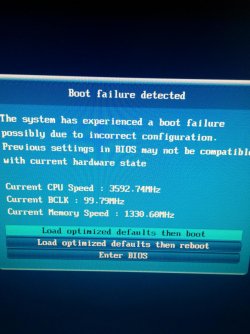
Evertime I boot my PC up, I get a message saying boot failure occur, and so I have to enter the BIOS in order to select my drive and boot windows.


The first time I saw this message was when I woke my PC up from sleep and it kind of kept restarting itself. I would hear the mobo beep, then turn off, turn back on beep, and turn off etc.


I don't know what option to choose and what setting are needed.
So right now I enter BIOS and choose my drive
 

Attachments
  • IMG_20150127_155910.jpg
    IMG_20150127_155910.jpg
    933.6 KB · Views: 1

My Computer

Computer type
PC/Desktop
Computer Manufacturer/Model Number
Custom Build
OS
Windows 7 Professional 64bit
CPU
Intel Core i5 - 2500K @ 3.30GHz
Motherboard
Gigabyte Z77-HD3
Memory
4GB DDR3
Graphics Card(s)
EVGA Nvidia GeForce GT 740 2GB DDR3
Screen Resolution
1680 x 1050
Hard Drives
1T Samaung HD/ 1T toshiba external drive/ 1T western digital external drive/ 2T seagate external drive/ 250gb samaung SSD
PSU
Antec 430W
Keyboard
Microsoft Wireless Keyboard 800
Mouse
Microsoft Wireless Mouse 1000
Antivirus
AVG
Browser
Internet Explorer
Hi,
Evertime I boot my PC up, I get a message saying boot failure occur, and so I have to enter the BIOS in order to select my drive and boot windows.

If I'm reading that right, you may need to check the battery on your motherboard...
 

My Computer

Computer type
PC/Desktop
Computer Manufacturer/Model Number
iBuyPower NZXT
OS
Microsoft Windows 10 Home Build 15036
CPU
Intel(R) Core(TM) i7-860 @ 2.80GHz
Motherboard
Gigabyte Technology Co., Ltd. P55-UD3L
Memory
4.00 GB
Graphics Card(s)
NVIDIA GeForce GTX 750
Sound Card
(1) Line 6 UX2 (2) Realtek High Definition Audio
Monitor(s) Displays
23" acer
Screen Resolution
1920 x 1080 x 32 bits (4294967296 colors) @ 60 Hz
Hard Drives
(1) WDC WD5000AAKS-00D2B0 ATA Device (2) Seagate FreeAgent Go 250G USB Device
Cooling
Corsair H75 liquid cooler (Very easy to install, actually)
Internet Speed
60M cable modem-->Linksys E1200-->1Gbps net card
Browser
Chrome
Other Info
This is probably the longest I've ever had a Windows machine run without having to restore it to scratch. I'm used to restoring to "factory" about every 2 yrs. I've run with Win7 since new in 2009 and only recently (Nov, '14) restored to clean up the machine from all my 'xperimenting. LOL!! I may never need another machine.

Upgraded to 10 when it was still free, then installed 2017 update.
Hi,
Evertime I boot my PC up, I get a message saying boot failure occur, and so I have to enter the BIOS in order to select my drive and boot windows.

If I'm reading that right, you may need to check the battery on your motherboard...


My motherboard has a battery?

Haha
 

My Computer

Computer type
PC/Desktop
Computer Manufacturer/Model Number
Custom Build
OS
Windows 7 Professional 64bit
CPU
Intel Core i5 - 2500K @ 3.30GHz
Motherboard
Gigabyte Z77-HD3
Memory
4GB DDR3
Graphics Card(s)
EVGA Nvidia GeForce GT 740 2GB DDR3
Screen Resolution
1680 x 1050
Hard Drives
1T Samaung HD/ 1T toshiba external drive/ 1T western digital external drive/ 2T seagate external drive/ 250gb samaung SSD
PSU
Antec 430W
Keyboard
Microsoft Wireless Keyboard 800
Mouse
Microsoft Wireless Mouse 1000
Antivirus
AVG
Browser
Internet Explorer
Is the clock in BIOS accurate now?

Enter BIOS setup, take note of the setting for SATA controller (probably AHCI) then Reset to Optimized Defaults.
 
Is the clock in BIOS accurate now?

Enter BIOS setup, take note of the setting for SATA controller (probably AHCI) then Reset to Optimized Defaults.

By clock do you mean, like date and time? :P

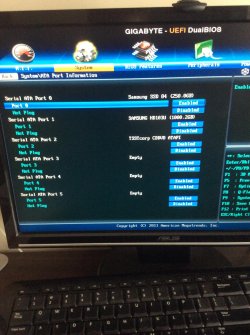
I couldn't really find anything.... I found something called ATA if that what you wanted?

I have reset to default yet
 

Attachments

  • photo 1.jpg
    photo 1.jpg
    531.1 KB · Views: 0
  • photo 2.jpg
    photo 2.jpg
    546.6 KB · Views: 1

My Computer

Computer type
PC/Desktop
Computer Manufacturer/Model Number
Custom Build
OS
Windows 7 Professional 64bit
CPU
Intel Core i5 - 2500K @ 3.30GHz
Motherboard
Gigabyte Z77-HD3
Memory
4GB DDR3
Graphics Card(s)
EVGA Nvidia GeForce GT 740 2GB DDR3
Screen Resolution
1680 x 1050
Hard Drives
1T Samaung HD/ 1T toshiba external drive/ 1T western digital external drive/ 2T seagate external drive/ 250gb samaung SSD
PSU
Antec 430W
Keyboard
Microsoft Wireless Keyboard 800
Mouse
Microsoft Wireless Mouse 1000
Antivirus
AVG
Browser
Internet Explorer
There is something causing the BIOS to fail to boot automatically. It could be a failing CMOS battery normally revealed by the clock in BIOS being off. It could simply need resetting to defaults because a setting slipped. Or it could need updating to the latest BIOS version if there is an Update available on your mobo's Support Downloads webpage.

You see no clock or time on any tab? There are other tabs along the top.

If not then let's not assume it's CMOS battery yet. Go ahead and reset the Optimal defaults. If it won't boot, enter BIOS setup to set SATA controller to AHCI as shown in your second screenshot - this is the only setting that might change causing failure to boot.
 
There is something causing the BIOS to fail to boot automatically. It could be a failing CMOS battery normally revealed by the clock in BIOS being off. It could simply need resetting to defaults because a setting slipped. Or it could need updating to the latest BIOS version if there is an Update available on your mobo's Support Downloads webpage.

You see no clock or time on any tab? There are other tabs along the top.

If not then let's not assume it's CMOS battery yet. Go ahead and reset the Optimal defaults. If it won't boot, enter BIOS setup to set SATA controller to AHCI as shown in your second screenshot - this is the only setting that might change causing failure to boot.


So date and time is correct is BIOS. I loaded optimised default and then it the motherboard beeps and restarted and then it will get a BSOD on the windows boot logo. So then I change sata back to AHCI and windows boot.


I restarted it twice and I haven't had a boot failure......

Don't know if it's fixed tho because I remember when I first got this motherboard I had the problem of restarting after beeping but it kind of fixed itself
 

My Computer

Computer type
PC/Desktop
Computer Manufacturer/Model Number
Custom Build
OS
Windows 7 Professional 64bit
CPU
Intel Core i5 - 2500K @ 3.30GHz
Motherboard
Gigabyte Z77-HD3
Memory
4GB DDR3
Graphics Card(s)
EVGA Nvidia GeForce GT 740 2GB DDR3
Screen Resolution
1680 x 1050
Hard Drives
1T Samaung HD/ 1T toshiba external drive/ 1T western digital external drive/ 2T seagate external drive/ 250gb samaung SSD
PSU
Antec 430W
Keyboard
Microsoft Wireless Keyboard 800
Mouse
Microsoft Wireless Mouse 1000
Antivirus
AVG
Browser
Internet Explorer
Back
Top