Boot from a VHD using Windows 7

How to Boot from a VHD using Windows 7 and Windows 8

   Information
Windows 7 and Windows 8 includes support for creating, mounting and booting from VHD images but not many seem to know how to use this functionality to boot VHDs at boot time... I will detail the steps required to have another OS bootable using Windows 7...

This tutorial will show you how to setup Windows 7 or Windows 8 to boot from an existing VHD (Virtual Hard Disk).

All Vista, Windows 7, and Windows 8 (except Windows 8 RT) editions support booting from a VHD.

You must have either Windows 7 Ultimate, Windows 7 Enterprise, Windows 8 Pro, or Windows 8 Enterprise installed on the VHD to be able to boot from the VHD.


   Warning
If you do not have a good knowledge of how to reset your VirtualOS configuration like HAL type and driver configuration then your VHD will fail to boot. It must be cleaned of VirtualOS configuration correctly before Windows can boot your VHD!!


Step 1: If you have not already, create or attach an existing a VHD using the tutorial below.
http://www.sevenforums.com/tutorials/566-virtual-hard-disk-create-attach-vhd.html


Step 2: Open an elevated command prompt.


Step 3: Copy and Paste this command below and press Enter.
NOTE: Substitute VHD_Boot in the command below for what you want to be displayed as the name in Windows Boot Manager.
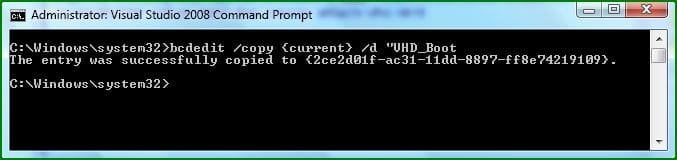
bcdedit /copy {current} /d "VHD_Boot"

If the command succeeds, BCDEdit displays a message similar to the following:


The entry was successfully copied to {CLSID_Number}
832d1227210633-boot-vhds-using-windows-7-step1.jpg

Take note of the CLSID number as you will need this during the next step ;)

Step 4: Then type this command below and press Enter.
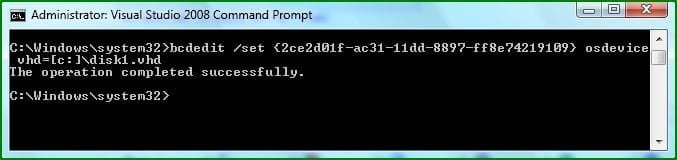
NOTE: Substitute C with the drive letter your VHD is on, and substitute disk1 with the name of your VHD file.
bcdedit /set {CLSID_Number} osdevice vhd=[C:]\disk1.vhd

833d1227210633-boot-vhds-using-windows-7-step2.jpg


Step 5: Thats it, You can now boot VHDs using Windows 7 :geek:
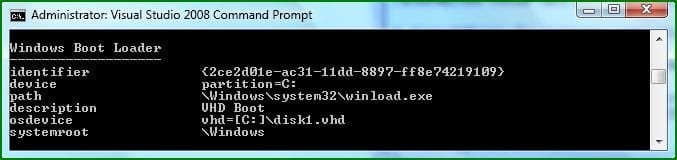
To confirm the settings simply type bcdedit
834d1227210633-boot-vhds-using-windows-7-step3.jpg

If your VHD is configured correctly You can reboot and select the extra boot-option to boot from your VHD :party:
   Warning
VirtualPC VHDs can not be used for booting with Windows because VirtualPC uses a Pentium 3 HAL and this prevents them from being used as boot media, You can however use this Tutorial: http://www.sevenforums.com/tutorials/566-virtual-hard-disk-create-attach-vhd.html and create then mount a VHD for use with VMWare Workstation....

You simply set VMWare workstation to use a Physical Disk, you can then Install a separate OS onto this mounted VHD for use with Windows.​


   Tip
You Must reset your VHD VirtualOS configuration like HAL type and driver configuration or your VHD will fail to boot!!! It must be cleaned of VirtualOS configuration correctly before windows 7 can boot your VHD!! ;)


   Note
There are still many bugs associated with VHD booting with Windows 7 at this time, I suspect Microsoft will be releasing a new Version of VirtualPC that's able to manage this entire process of creating, installing and booting separate VHDs at boot-time easily and without so many problems ;)


Attachments

  • Step1.JPG
    Step1.JPG
    22.2 KB · Views: 128,601
  • Step2.JPG
    Step2.JPG
    23.5 KB · Views: 128,208
  • Step3.JPG
    Step3.JPG
    24.9 KB · Views: 126,286
Last edited by a moderator:
how exactly should we update to newer builds if we have installed in this way through vhd booting??
 

My Computer

OS
windows xp
Hello Conqrr,

Since the VHD is now acts like a bootable drive, you would just select it during installation to format and install the new Windows 7 version to. :)

Shawn
 

My Computer

Computer type
PC/Desktop
Computer Manufacturer/Model Number
Self built custom
OS
64-bit Windows 11 Pro for Workstations
CPU
Intel i7-8700K OC'd to 5 GHz
Motherboard
ASUS ROG Maximus XI Formula Z390
Memory
64 GB (4x16GB) G.SKILL TridentZ RGB DDR4 3600 MHz
Graphics Card(s)
ASUS ROG-STRIX-GTX1080TI-O11G-GAMING
Sound Card
Integrated
Monitor(s) Displays
2 x Samsung Odyssey G7 27"
Screen Resolution
2560x1440
Hard Drives
1TB Samsung 990 PRO M.2,
4TB Samsung 990 PRO PRO M.2,
TerraMaster F8 SSD Plus NAS
PSU
Seasonic Prime Titanium 850W
Case
Thermaltake Core P3
Cooling
Corsair Hydro H115i
Keyboard
Logitech wireless K800
Mouse
Logitech MX Master 4
Internet Speed
2 Gb/s Download and 100 Mb/s Upload
Antivirus
Malwarebyte Anti-Malware Premium
Browser
Google Chrome
Other Info
Logitech Z625 speaker system,
Logitech BRIO 4K Pro webcam,
HP Color LaserJet Pro MFP M477fdn,
APC SMART-UPS RT 1000 XL - SURT1000XLI,
Galaxy S23 Plus phone
Hello Conqrr,

Since the VHD is now acts like a bootable drive, you would just select it during installation to format and install the new Windows 7 version to. :)

Shawn
thanks Shawn, but have you tried it ?? absolutely sure there wont be any problem?
sorry but i am completely not the risk taker.
 

My Computer

OS
windows xp
thanks Shawn, but have you tried it ?? absolutely sure there wont be any problem?
sorry but i am completely not the risk taker.


conqrr it should act like any other drive....
all in reality is doing is emulating a drive and catching all your reads and writes and directing it to your VHD file....
and as long as there are no problems with the drives you have there should be no problems with your VHD file being updated...;)
 

My Computer

Computer Manufacturer/Model Number
Tx2500z Tablet Pc/Homemade Server
OS
Windows 7 Ult x64(x2), HomePrem x32(x4), Server 08 (+VM), 08 R2 (VM) , SuSe 11.2 (VM), XP 32 (VM)
CPU
Turion X2 ultra (oh well came with laptop)/P4 @3.2 (yes P4)
Motherboard
IDK HP Motherboard / Intel DG965SS
Memory
OCZ Dual Channel 4GB kit/ 1gb Dual Channel
Graphics Card(s)
HD 3200 graphics /GMA x3100 (yay for intergrated!!)
Sound Card
Realtek HD Audio(mic working, well sort of)/Siig IC-70012
Monitor(s) Displays
built-in Hp 12" laptop screen/ Acer 19"
Screen Resolution
1280x800 /1440x900
Cooling
All Air Cooled
Mouse
Logi MX Rev. /MS Wheel Optical 1.1A /Logitech Optical Mouse
Internet Speed
College baby but its still routed through vpn to 1536k...
Other Info
love my wacom pen and pressure sensitivity...
wished it worked in 7, SUSE for that matter though
thanks Shawn, but have you tried it ?? absolutely sure there wont be any problem?
sorry but i am completely not the risk taker.

I can't guarantee that you wil have no problems. Every setup is different with it's own unique problems that could happen. However, I have done this several times, and it works fine for me. I hope it does for you as well.

As the others have mentioned above, risk taking is what beta testing is all about. If you cannot afford to or do not want to take risks, then you should not use a beta OS as Windows 7 on your production or only computer. Instead, you should use a more proven stable OS that has been released to retail such as XP or Vista until Windows 7 is ready for primetime.
 

My Computer

Computer type
PC/Desktop
Computer Manufacturer/Model Number
Self built custom
OS
64-bit Windows 11 Pro for Workstations
CPU
Intel i7-8700K OC'd to 5 GHz
Motherboard
ASUS ROG Maximus XI Formula Z390
Memory
64 GB (4x16GB) G.SKILL TridentZ RGB DDR4 3600 MHz
Graphics Card(s)
ASUS ROG-STRIX-GTX1080TI-O11G-GAMING
Sound Card
Integrated
Monitor(s) Displays
2 x Samsung Odyssey G7 27"
Screen Resolution
2560x1440
Hard Drives
1TB Samsung 990 PRO M.2,
4TB Samsung 990 PRO PRO M.2,
TerraMaster F8 SSD Plus NAS
PSU
Seasonic Prime Titanium 850W
Case
Thermaltake Core P3
Cooling
Corsair Hydro H115i
Keyboard
Logitech wireless K800
Mouse
Logitech MX Master 4
Internet Speed
2 Gb/s Download and 100 Mb/s Upload
Antivirus
Malwarebyte Anti-Malware Premium
Browser
Google Chrome
Other Info
Logitech Z625 speaker system,
Logitech BRIO 4K Pro webcam,
HP Color LaserJet Pro MFP M477fdn,
APC SMART-UPS RT 1000 XL - SURT1000XLI,
Galaxy S23 Plus phone
okay, i admit i am very much the risk taker and have installed windows 7 for that.thanks for our replies, i will update once the rc version comes out.
 

My Computer

OS
windows xp
Ok Conqrr. Welcome to risk takers club. :)
 

My Computer

Computer type
PC/Desktop
Computer Manufacturer/Model Number
Self built custom
OS
64-bit Windows 11 Pro for Workstations
CPU
Intel i7-8700K OC'd to 5 GHz
Motherboard
ASUS ROG Maximus XI Formula Z390
Memory
64 GB (4x16GB) G.SKILL TridentZ RGB DDR4 3600 MHz
Graphics Card(s)
ASUS ROG-STRIX-GTX1080TI-O11G-GAMING
Sound Card
Integrated
Monitor(s) Displays
2 x Samsung Odyssey G7 27"
Screen Resolution
2560x1440
Hard Drives
1TB Samsung 990 PRO M.2,
4TB Samsung 990 PRO PRO M.2,
TerraMaster F8 SSD Plus NAS
PSU
Seasonic Prime Titanium 850W
Case
Thermaltake Core P3
Cooling
Corsair Hydro H115i
Keyboard
Logitech wireless K800
Mouse
Logitech MX Master 4
Internet Speed
2 Gb/s Download and 100 Mb/s Upload
Antivirus
Malwarebyte Anti-Malware Premium
Browser
Google Chrome
Other Info
Logitech Z625 speaker system,
Logitech BRIO 4K Pro webcam,
HP Color LaserJet Pro MFP M477fdn,
APC SMART-UPS RT 1000 XL - SURT1000XLI,
Galaxy S23 Plus phone
but anyway back to my problem on page one when i try this guide booting from windows xp still wating to finish install i get a error message but no boot entry ? if some one can please help
 

My Computer

OS
Windows 7 rtm
but anyway back to my problem on page one when i try this guide booting from windows xp still wating to finish install i get a error message but no boot entry ? if some one can please help

You cant boot XP based VHDs, XP`s HAL (Hardware Access Layer) is incompatible with Windows 7`s HAL unless you rebuild XP with virtualization support :(
 
then what can i boot or is it possible to boot xp ?
 

My Computer

OS
Windows 7 rtm
reboots machine when trying to boot from copy

Well I coppied my Win7Beta.vhd(that boots fine) to GenCode.vhd

then I tried the above to see if I could boot from my copy, when I do the entire machine reboots before I even see anything.

The first Win7Beta boots fine still and Vista.

Any ideas where I may have went wrong :confused:


C:\Windows\system32>bcdedit
Windows Boot Manager
--------------------
identifier {bootmgr}
device partition=C:
path \bootmgr
description Windows Boot Manager
locale en-US
inherit {globalsettings}
default {current}
resumeobject {ecc68358-0dfb-11de-a1bf-b400729aa187}
displayorder {ecc68359-0dfb-11de-a1bf-b400729aa187}
{current}
{ecc68360-0dfb-11de-a1bf-b400729aa187}
toolsdisplayorder {memdiag}
timeout 30
Windows Boot Loader
-------------------
identifier {ecc68359-0dfb-11de-a1bf-b400729aa187}
device file=[C:]\Win7Beta.vhd
path \Windows\system32\winload.exe
description Win7Beta
locale en-US
inherit {bootloadersettings}
recoverysequence {ecc6835a-0dfb-11de-a1bf-b400729aa187}
recoveryenabled Yes
osdevice vhd=[C:]\Win7Beta.vhd
systemroot \Windows
resumeobject {ecc68358-0dfb-11de-a1bf-b400729aa187}
nx OptIn
Windows Boot Loader
-------------------
identifier {current}
device partition=C:
path \Windows\system32\winload.exe
description Microsoft Windows Vista
locale en-US
inherit {bootloadersettings}
osdevice partition=C:
systemroot \Windows
resumeobject {0dbf36ef-0ae6-11de-80d3-f53a3b2b7793}
nx OptIn
Windows Boot Loader
-------------------
identifier {ecc68360-0dfb-11de-a1bf-b400729aa187}
device file=[C:]\GenCode.vhd
path \Windows\system32\winload.exe
description GenCode VHD
locale en-US
inherit {bootloadersettings}
recoverysequence {ecc6835a-0dfb-11de-a1bf-b400729aa187}
recoveryenabled Yes
osdevice vhd=[C:]\GenCode.vhd
systemroot \Windows
resumeobject {ecc68358-0dfb-11de-a1bf-b400729aa187}
nx OptIn
 

My Computer

OS
Windows Vista
Any ideas where I may have went wrong
I don't see any error.

But you can try following step-by-step and reboot after each step:
Make a backup of your bcd database:
bcdedit /export "c:\bcd.old"
Later on you can import it with:
bcdedit /import "c:\bcd.old"

1. delete "recoverysequence" and "resumeobject". Perhaps these parameters belongs to your old "Win7Beta.vhd". I don't have them.
bcdedit /deletevalue {ecc68360-0dfb-11de-a1bf-b400729aa187} recoverysequence
bcdedit /deletevalue {ecc68360-0dfb-11de-a1bf-b400729aa187} resumeobject

2. change "device" to "vhd=". In my bcd database "device" AND "osdevice" are identically:
bcdedit /set {ecc68360-0dfb-11de-a1bf-b400729aa187} device vhd=[C:]\GenCode.vhd

3. delete "nx OptIn". I don't have it.
bcdedit /deletevalue {ecc68360-0dfb-11de-a1bf-b400729aa187} nx

4. delete "inherit". I don't have it.
bcdedit /deletevalue {ecc68360-0dfb-11de-a1bf-b400729aa187} inherit

5. delete "recoveryenabled". I don't have it.
bcdedit /deletevalue {ecc68360-0dfb-11de-a1bf-b400729aa187} recoveryenabled

6. add "detecthal". I have it.
bcdedit /set {ecc68360-0dfb-11de-a1bf-b400729aa187} detecthal Yes
 

My Computer

OS
Windows XP and 7
Its Working now!!

Well I did get it working, I have normal partition Vista and a Win7 vhd
When I was running bcdedit I was actually using the Vista sessoin to make the bcdedit /copy to gencode.vhd.

Thinking that may be the problem I deleted my bcdedit copy entry
Then I rebooted to Win7 vhd
cmd out and ran the bcdedit /copy again and all was fine.

Not 100% sure if it was because I was doing it in the vista partition but anyhow its good now.

Thanks unawave for the reply, but I already did this about the same time you replied.

Once again thanks!
 

My Computer

OS
Windows Vista
Can you boot to Vista and then post the new created part of bcdedit (part with "GenCode.vhd")?
I would like to see the differences.
 

My Computer

OS
Windows XP and 7
Heres the boot section now

Well here it is, looks pretty much the same, wierd thing is device is pointing somewhere else, the Vista one was like that too but I had changed it to the gencode.vhd jsut to try, but that does not seem to affect it.

this one was made in Win7

Windows Boot Loader
-------------------
identifier {ecc68361-0dfb-11de-a1bf-b400729aa187}
device file=[C:]\Win7Beta.vhd
path \Windows\system32\winload.exe
description test
locale en-US
inherit {bootloadersettings}
recoverysequence {ecc6835a-0dfb-11de-a1bf-b400729aa187}
recoveryenabled Yes
osdevice vhd=[C:]\GenCode.vhd
systemroot \Windows
resumeobject {ecc68358-0dfb-11de-a1bf-b400729aa187}
nx OptIn
 

My Computer

OS
Windows Vista
Old, not booting:
device file= [C:]\GenCode.vhd
osdevice vhd=[C:]\GenCode.vhd

New, booting:
device file= [C:]\Win7Beta.vhd
osdevice vhd=[C:]\GenCode.vhd

I don’t know why this works. "device" and "osdevice" are different.

I have something read about "master" and "clone" vhd files.
That means: You can create several clone vhd files which all based on the same master vhd file. If you than make changes on the master vhd file the clone vhd files are also effected.

So I don't know if you have a real independent second installation or if you have a second (clone) installation "GenCode.vhd" which based on a master installation "Win7Beta.vhd".


You can test this:
  • Boot Vista
  • Rename "Win7Beta.vhd" e.g. to "Win7Beta-x.vhd"
  • Reboot (you will get an error, because "Win7Beta.vhd" doesn't exist)
  • Boot "test" (means your "GenCode.vhd")
Does this work?
 

My Computer

OS
Windows XP and 7
Hi unawave,

> You can test this...
Yes, I changed it and the boot screen said corrupt boot or something, and let me go past that error with only the other 2 items listed.


Also when I tried to set it to the right
device file=[C:]\GenCode.vhd

Then I started to get back to my fisrst issue, where teh system just reboots before I ever see even a windows loading screen.

....so, I changed it back to
device file= [C:]\Win7Beta.vhd
and all is well again.

One would think maybe I am just booting the same VHD and don’t know it.

Well that’s not the case cause the c: directories are different and apps installed are different, i.e. I installed fiddler on one and not the other, and 2 directories are on one and not the other.

It seems to work as is, but its odd.
 

My Computer

OS
Windows Vista
hi guys
just wanted to add my 5 cents hereyou know you can do the boot from vhd thing even if u currently have xp(this way you dont messup your partitions or xp)
cool stuff
 

My Computer

OS
seven
Back
Top