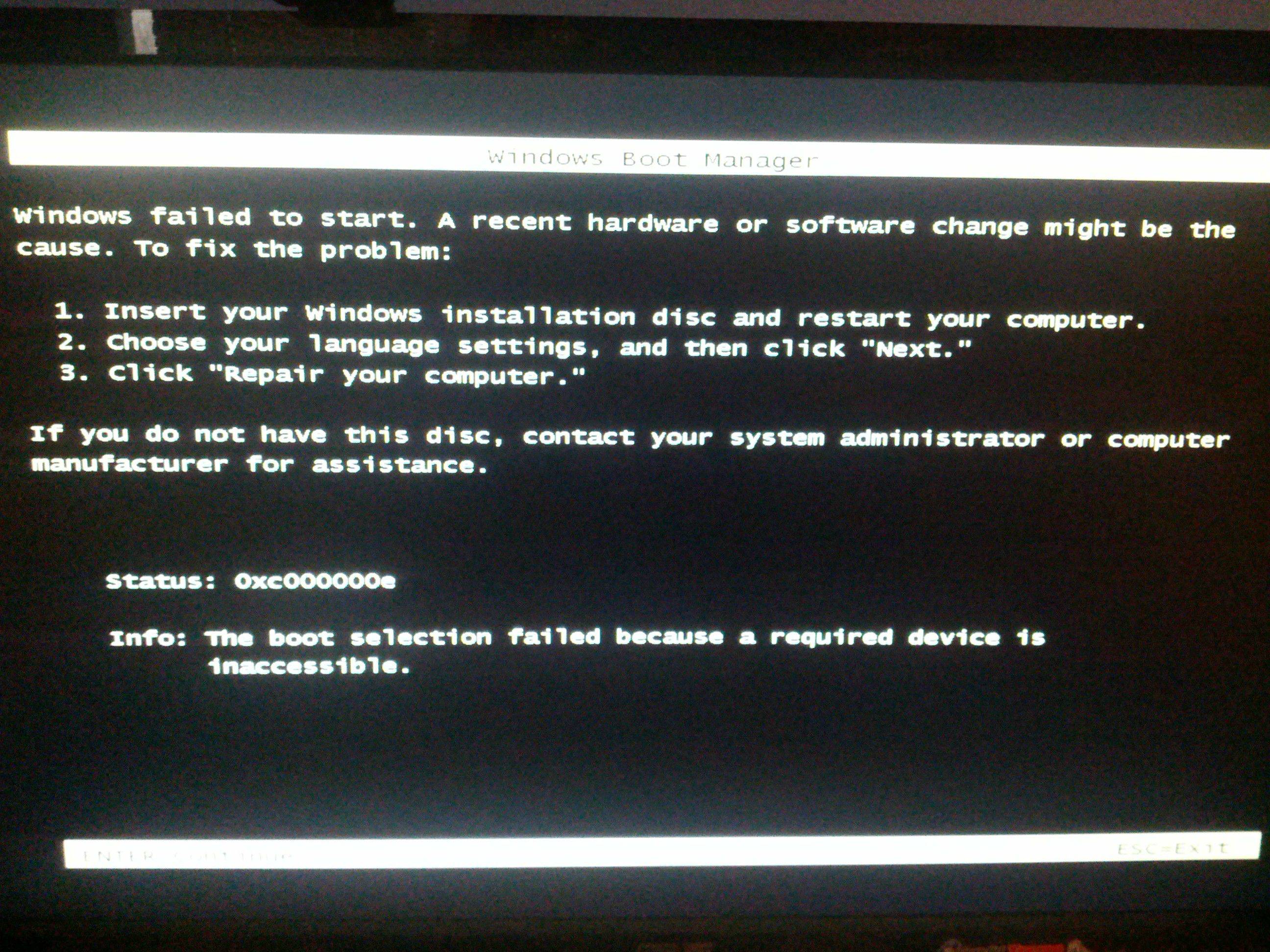
Boot Manager Error (Not sure if this is technically a BSOD)

voiplo

New member
Local time
10:42 AM
Messages
47
wLx16.jpg


I posted not too long ago about getting a ton of these, and then they turned into actual BSODs. I decided to reformat, reinstall and reupdate all my drivers. I am getting these again.
 

My Computer My Computer

Computer Manufacturer/Model Number
Custom
OS
Windows 7
Ran SF Diagnostic Tool, here it is. There are no dmp files inside.. I am using Kernel memory dump.

Since reformatting, I have done the following:
Windows updates
Realtek audio update
Realtek LAN update
Marvell Miniport driver installation
Marvel Adapter update
P67 chipset update
Intel rapid storage update
GTX460 update
Asmedia USB 3.0 update
Asmedia XHCI update
INF update utility
Update bios

Installed Avast
Ai suite ii
Skype
Chrome
SlimDrivers (I used this to install the chipset, marvell and asmedia updates.)
 

My Computer My Computer

Computer Manufacturer/Model Number
Custom
OS
Windows 7
Bump
 

My Computer My Computer

Computer Manufacturer/Model Number
Custom
OS
Windows 7

My Computer My Computer

Computer type
PC/Desktop
Computer Manufacturer/Model Number
Self Assembled
OS
Microsoft Windows 10 Pro Insider Preview 64-bit
CPU
Intel(R) Core(TM) i3-4130 CPU @ 3.40GHz
Motherboard
Gigabyte Technology Co., Ltd. B85M-D3H
Memory
Corsair Vengence 4GB x2 (8.00GB Dual-Channel DDR3 @ 798MHz)
Graphics Card(s)
2047MB GeForce GTS 450 (ZOTAC International)
Sound Card
Onboard (Realtek High Definition Audio)
Monitor(s) Displays
LG Flatron E2040T
Screen Resolution
1600x900
Hard Drives
Western Digital 1 TB
Seagate 500 GB
PSU
Corsair VS550
Case
Cooler Master K380
Cooling
Cooler Master Seidon 120V Plus
Keyboard
Logitech MK260r
Mouse
Logitech MK260r
Internet Speed
PMPL Broadband
Antivirus
Windows Defender + MBAM
Browser
Firefox
Other Info
Dell Studio 15" Laptop
Follow it:
Troubleshooting Windows 7 Failure to Start

Or, run Startup Repair for three separate times, with restarts after every single run.
Startup Repair: Run three separate times.

Disk Management hangs at Connecting to Virtual Disk Service. Could this be a hard drive problem? I know if I restart my computer, it will work properly, as it is always the case, but if it is a hard drive problem, will this startup repair make a difference?

Edit: I left it open for about 5 minutes and it finally loaded the list.. Does it normally take that long?
 

My Computer My Computer

Computer Manufacturer/Model Number
Custom
OS
Windows 7

My Computer My Computer

Computer Manufacturer/Model Number
Custom
OS
Windows 7

My Computer My Computer

Computer type
PC/Desktop
Computer Manufacturer/Model Number
Self Assembled
OS
Microsoft Windows 10 Pro Insider Preview 64-bit
CPU
Intel(R) Core(TM) i3-4130 CPU @ 3.40GHz
Motherboard
Gigabyte Technology Co., Ltd. B85M-D3H
Memory
Corsair Vengence 4GB x2 (8.00GB Dual-Channel DDR3 @ 798MHz)
Graphics Card(s)
2047MB GeForce GTS 450 (ZOTAC International)
Sound Card
Onboard (Realtek High Definition Audio)
Monitor(s) Displays
LG Flatron E2040T
Screen Resolution
1600x900
Hard Drives
Western Digital 1 TB
Seagate 500 GB
PSU
Corsair VS550
Case
Cooler Master K380
Cooling
Cooler Master Seidon 120V Plus
Keyboard
Logitech MK260r
Mouse
Logitech MK260r
Internet Speed
PMPL Broadband
Antivirus
Windows Defender + MBAM
Browser
Firefox
Other Info
Dell Studio 15" Laptop
Repair option is not there in advanced boot .... you will ge it by booting from the installer Disc.
View attachment 247071

Follow it ..... http://www.sevenforums.com/tutorials/668-system-recovery-options.html
When at step 6, follow the first option .... http://www.sevenforums.com/tutorials/681-startup-repair.html

Run it for three consecutive times, with restarts in between every single run.

Depending on the situation, sometimes windows installer may take a long time to load files.

Done. Each repair took ~3-5 seconds. I'm not sure if that's supposed to happen. I did it 3 times with restarts between.

The Boot Manager error hadn't happened again since yesterday, but instead, it seemed that files/programs stopped opening. I would click on them, but they wouldn't open. But then when I would shut down, it would give me a screen telling me "Are you sure you want to shut down, these files are open:" and all the programs I had clicked on were open, they just weren't showing up on my screen for some reason. And then the shut down hangs forever pretty much. I have to power my PC down via power button.

ie. Open Chrome. It doesn't open or show up. When I shut down, it tells me it is open, am I sure I want to end the process without saving.
 

My Computer My Computer

Computer Manufacturer/Model Number
Custom
OS
Windows 7

My Computer My Computer

Computer type
PC/Desktop
Computer Manufacturer/Model Number
Self Assembled
OS
Microsoft Windows 10 Pro Insider Preview 64-bit
CPU
Intel(R) Core(TM) i3-4130 CPU @ 3.40GHz
Motherboard
Gigabyte Technology Co., Ltd. B85M-D3H
Memory
Corsair Vengence 4GB x2 (8.00GB Dual-Channel DDR3 @ 798MHz)
Graphics Card(s)
2047MB GeForce GTS 450 (ZOTAC International)
Sound Card
Onboard (Realtek High Definition Audio)
Monitor(s) Displays
LG Flatron E2040T
Screen Resolution
1600x900
Hard Drives
Western Digital 1 TB
Seagate 500 GB
PSU
Corsair VS550
Case
Cooler Master K380
Cooling
Cooler Master Seidon 120V Plus
Keyboard
Logitech MK260r
Mouse
Logitech MK260r
Internet Speed
PMPL Broadband
Antivirus
Windows Defender + MBAM
Browser
Firefox
Other Info
Dell Studio 15" Laptop
Scan the system for possible virus infection.

WDO First, then TDSSKiller. Let us know the results.


As this computer is not working properly, you may make the WDO disc/ Flash drive in another computer.

These problems were before the 3x startup repair. Would startup repair solve the described problems? I have yet to see them occur again. Or should I do these things anyway?
 

My Computer My Computer

Computer Manufacturer/Model Number
Custom
OS
Windows 7
Startup repair deals with the 100 MB hidden system partition only, usually it does not do anything in the C drive. Sometimes it does, an automates SFC/Scannow, but in that case it takes much more time to be completed than that you told. Moreover, SFC deals with the system files only, Chrome etc are not windows system files, so those are totally untouched by this process. So in general, this issue should not be recovered by a startup repair, logically.

That situation you described may occur due to various reasons. Such an issue+startup failure leads to the smell of a malware, so I suggested those tests. If you take those tests right now, it will harm nothing at all. But its success or failure will give some idea about the situation.
 

My Computer My Computer

Computer type
PC/Desktop
Computer Manufacturer/Model Number
Self Assembled
OS
Microsoft Windows 10 Pro Insider Preview 64-bit
CPU
Intel(R) Core(TM) i3-4130 CPU @ 3.40GHz
Motherboard
Gigabyte Technology Co., Ltd. B85M-D3H
Memory
Corsair Vengence 4GB x2 (8.00GB Dual-Channel DDR3 @ 798MHz)
Graphics Card(s)
2047MB GeForce GTS 450 (ZOTAC International)
Sound Card
Onboard (Realtek High Definition Audio)
Monitor(s) Displays
LG Flatron E2040T
Screen Resolution
1600x900
Hard Drives
Western Digital 1 TB
Seagate 500 GB
PSU
Corsair VS550
Case
Cooler Master K380
Cooling
Cooler Master Seidon 120V Plus
Keyboard
Logitech MK260r
Mouse
Logitech MK260r
Internet Speed
PMPL Broadband
Antivirus
Windows Defender + MBAM
Browser
Firefox
Other Info
Dell Studio 15" Laptop

My Computer My Computer

Computer Manufacturer/Model Number
Custom
OS
Windows 7
Is the problem occurring still?
 

My Computer My Computer

Computer type
PC/Desktop
Computer Manufacturer/Model Number
Self Assembled
OS
Microsoft Windows 10 Pro Insider Preview 64-bit
CPU
Intel(R) Core(TM) i3-4130 CPU @ 3.40GHz
Motherboard
Gigabyte Technology Co., Ltd. B85M-D3H
Memory
Corsair Vengence 4GB x2 (8.00GB Dual-Channel DDR3 @ 798MHz)
Graphics Card(s)
2047MB GeForce GTS 450 (ZOTAC International)
Sound Card
Onboard (Realtek High Definition Audio)
Monitor(s) Displays
LG Flatron E2040T
Screen Resolution
1600x900
Hard Drives
Western Digital 1 TB
Seagate 500 GB
PSU
Corsair VS550
Case
Cooler Master K380
Cooling
Cooler Master Seidon 120V Plus
Keyboard
Logitech MK260r
Mouse
Logitech MK260r
Internet Speed
PMPL Broadband
Antivirus
Windows Defender + MBAM
Browser
Firefox
Other Info
Dell Studio 15" Laptop
Boot Manager Error again just now.
 

My Computer My Computer

Computer Manufacturer/Model Number
Custom
OS
Windows 7
Hello there!

Try to rebuild the MBR it may fix the problem, follow this article http://www.sevenforums.com/tutorials/20864-mbr-restore-windows-7-master-boot-record.html

Seems like there are a couple of activation failure errors in the log Windows license activation failed. Error 0x80070005. Is your Windows retail version or OEM? Because I have seen this most commonly in Volume Activation. Disconnect any USB devices when you reboot the system even your USB Hard drive.
 

My Computer My Computer

Computer Manufacturer/Model Number
Samsung NP550P5C-S02IN
OS
Windows 7 Ultimate - 64-bit | Windows 8 Pro - 64-bit
CPU
Intel® Core™ i7 Processor 3,610QM (2.30Hz, 6MB L3 Cach
Memory
8 GB
Graphics Card(s)
NVIDIA® GeForce® GT 650M 2GB Graphics, Optimus™ techno
Sound Card
SoundAlive™ JBL 3 Speakers (With sub-Woofer)
Monitor(s) Displays
39.62cm (15.6) SuperBright 300nit HD+ LED Display
Screen Resolution
1,600 x 900, Anti-Reflective
Hard Drives
1TB S-ATA II Hard Drive (5,400RPM)
Hello there!

Try to rebuild the MBR it may fix the problem, follow this article http://www.sevenforums.com/tutorials/20864-mbr-restore-windows-7-master-boot-record.html

Seems like there are a couple of activation failure errors in the log Windows license activation failed. Error 0x80070005. Is your Windows retail version or OEM? Because I have seen this most commonly in Volume Activation. Disconnect any USB devices when you reboot the system even your USB Hard drive.

So after I follow the instructions in that link, reboot my system with all USBs unplugged? Does this include mouse and keyboard? Also my Windows is retail, not OEM. I have a custom desktop, so I have no OEM OS.
 

My Computer My Computer

Computer Manufacturer/Model Number
Custom
OS
Windows 7
How many in your long list of drivers you installed overrode the drivers WIn7 provided in the installer and via optional WIndows Updates? This can be trouble.

If Shyam's suggestion to rebuild MBR doesn't solve your issue then I would start over and follow the best practices shown in Clean Reinstall - Factory OEM Windows 7 (same for retail) to get a perfect baseline install which will be easier to troubleshoot having not overridden WIn7 driver choices.

In addition your boot problem can be caused by conflicting code in the boot sector, so before reinstall I would wipe the HD using Diskpart Clean Command

 
How many in your long list of drivers you installed overrode the drivers WIn7 provided in the installer and via optional WIndows Updates? This can be trouble.

If Shyam's suggestion to rebuild MBR doesn't solve your issue then I would start over and follow the best practices shown in Clean Reinstall - Factory OEM Windows 7 (same for retail) to get a perfect baseline install which will be easier to troubleshoot having not overridden WIn7 driver choices.

In addition your boot problem can be caused by conflicting code in the boot sector, so before reinstall I would wipe the HD using Diskpart Clean Command
Out of the list, I overrode none of them. I only downloaded drivers externally from the ones I didn't download from windows updates.

I will try MBR, a disk clean and then another reformat and see if the problem is solved. If I reformat, do you recommend that I stay away from downloading drivers outside of windows updates? My problem is that I have a custom desktop, so I don't have designated updates based on the brand or website of my computer. I have to do all of them manually. If anything, I just want to update the important drivers as most of them are 2 years old once I reformat.
 

My Computer My Computer

Computer Manufacturer/Model Number
Custom
OS
Windows 7
Win7 delivers newer and missing drivers it wants via Windows Updates. These drivers should have preference unless performance problems point to one specifically.

In WIn8 you don't even interact with drivers - it's all done in the background. These improvements were developed in Win7.

I did not suggest you "format" if rebuilding the MBR doesn't help your boot problem. Formatting is a nearly-insignificant step which would be done by the installer even if you forgot it. I suggested you wipe the HD of code to clear the boot sector before reinstalling correctly this time.

Read the tutorials provided and feel free to ask back any questions.
 
Back
Top