Solved boot:\physicaldrive0\partition3 (type 17) Alureon.E (virus)trojan

kylemiller

New member
Local time
5:25 AM
Messages
12
Location
tampa
Good afternoon/evening, Sevenforums professionals:o


My name is kyle and I'm looking for help to remove/cure some issues I'm having with my desktop Gateway PC. This is on a Windows 7 home premium 64bit, i3 processor.

Here are the problems detected by Microsoft Security Essentials:

boot:\device\hardiskVolume4
boot:\device\harddiskVolume4\

boot:\physicaldrive0\partition3 (type 17)

I've tried over and over to remove this trojan virus Microsoft Security Essential will not remove it...However it will detect it once the computer has been started and then every 3 minutes the notification pops up via MSE saying pc at risk threats detected. Then its lists what I've typed in RED fonts above.

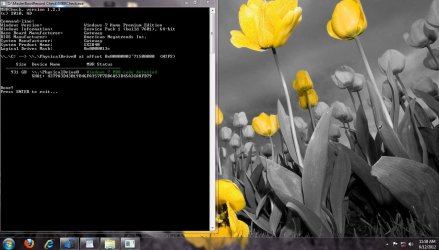
I've taken one screen shot of the of MBRcheck.exe scan and I will attach it. Also I've taken one data log of aswMBR.log scan and will attach that as well.

Any help on this will be greatly appreciated, thanks in advance for you're expertise and precision.

warmest regards,

kyle miller


Attachments
  • Screenshot 1.JPG
    Screenshot 1.JPG
    112.8 KB · Views: 70
  • aswMBR.logs.txt
    aswMBR.logs.txt
    1.6 KB · Views: 20

My Computer My Computer

Computer Manufacturer/Model Number
Gateway
OS
Windows 7 home premium 64bit
CPU
intel i3
Memory
6gb
Graphics Card(s)
nvidia
Monitor(s) Displays
samsung plasma 50'
Hard Drives
1tb
Case
factory
Cooling
1 fan

My Computer My Computer

Computer type
Laptop
Computer Manufacturer/Model Number
Sony Vaio VPCEB47GM Laptop
OS
Win 7 Pro 64-bit
CPU
Intel i5 2.4 Ghz
Memory
8GB DDR3
Graphics Card(s)
Intel HD 3000
Sound Card
IDT High Definition
Monitor(s) Displays
15.6 WGXA Anti-Glare LED
Screen Resolution
1280x800
Hard Drives
640Gb 7200rpm
Antivirus
MSE
Browser
Opera (primary) with IE9 backup
Good afternoon, Marsmimar


Thanks for the suggestion and I will definitely go have and read that entire thread.

Once again thanks for having me as a newcomer to SevenForums.

best regards,

kyle miller
 

My Computer My Computer

Computer Manufacturer/Model Number
Gateway
OS
Windows 7 home premium 64bit
CPU
intel i3
Memory
6gb
Graphics Card(s)
nvidia
Monitor(s) Displays
samsung plasma 50'
Hard Drives
1tb
Case
factory
Cooling
1 fan
Marsmimar,

I finished reading the thread you suggested,:cool: I can say unequivocally..... that "MalwareBytes does not work on this Alureon.E virus/trojan as I've tried it at least 40+ times. :mad:"The backdoor.Tidserv removal Tool" by symantec Locates the virus/trojan on my computer. And it runs and attempts to remove the Alureon.E virus and then my computer reboots and fails to starts the windows logo on process. :shock:I've tried this 3 times already. So then I have to Reboot the computer in Safe Mode and then restore the computer to point that working prior to running "The backdoor.Tiderv Removal Tool". This Does not work for my computer Windows 7 home prem....only makes the computer NOT boot. This virus is very very NASTY. :(

TDSSkiller finds the virus also and then.... cures it and reboots the pc..... and the computer boots fine into the desktop. All is well for 45 seconds..... However... Microsoft Essentials Security then alerts of me Detected threats and of course its the Alureon.E virus again ..... with the details saying...

boot:\device\hardiskVolume4
boot:\device\harddiskVolume4\

boot:\physicaldrive0\partition3 (type 17).

I understand the clean install maybe a factor I have to perform... Only as can we exhaust all other options first. What are you thoughts or suggestions I am open to all ideas and task..I am very capable and have no problem following instructions...

Anyone that can help or provide further insight or feedback to a possible cure... I am yours


Sincerely,

Kyle Miller


My Computer My Computer

Computer Manufacturer/Model Number
Gateway
OS
Windows 7 home premium 64bit
CPU
intel i3
Memory
6gb
Graphics Card(s)
nvidia
Monitor(s) Displays
samsung plasma 50'
Hard Drives
1tb
Case
factory
Cooling
1 fan
Here is a link to Hiren's BootCD. Borg has already posted instructions but to repeat, you need to delete the small partition that was created by Alureon. If you see more than one partition that you don't know what they are, you can post a list of the different partitions and we will help you identify which one it is.

http://www.hirensbootcd.org/download/
 

My Computer My Computer

Computer type
Laptop
Computer Manufacturer/Model Number
Toshiba P775-S7100
OS
Windows 7 Professional SP1 64-bit
CPU
Intel Core i5-2450M @2.5 GHz
Memory
6 GB DDR3 1333MHz
Graphics Card(s)
Intel HD 3000
Monitor(s) Displays
Built-in 17.3" LED; 22" Insignia NS-L22Q-10A
Screen Resolution
1600x900; 1360x768
Hard Drives
750 GB Hitachi
1TB Seagate FreeAgent External
Internet Speed
Verizon DSL Speed(Down/Up): 3360 Kbps / 800 Kbps
Antivirus
MSE and MBAM Pro
Browser
IE10
Thanks Petey!!! :D

I'm in the process of booting the infected computer now....

Will post shortly.
 

My Computer My Computer

Computer Manufacturer/Model Number
Gateway
OS
Windows 7 home premium 64bit
CPU
intel i3
Memory
6gb
Graphics Card(s)
nvidia
Monitor(s) Displays
samsung plasma 50'
Hard Drives
1tb
Case
factory
Cooling
1 fan


One moment
 
Last edited:

My Computer My Computer

Computer Manufacturer/Model Number
Gateway
OS
Windows 7 home premium 64bit
CPU
intel i3
Memory
6gb
Graphics Card(s)
nvidia
Monitor(s) Displays
samsung plasma 50'
Hard Drives
1tb
Case
factory
Cooling
1 fan
Good afternoon Petey,

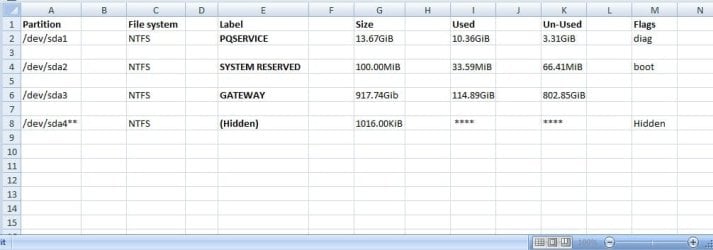
Listed below is exactly what I see after running the( HirenBootCD ) on my desktop.. I attached the information After putting it into Excel and screen capturing it. So that it is organized. This the information displays on screen of the partitions on my Gateway PC. I'm playing it safe and do not want to delete any partitions myself.. for obvious ramifications will result. Have a look at the the information below and advise me what to do next once you get a chance and what to keep and want to delete.

Thanks for your expertise in these matters,

Kyle Miller.
 

Attachments

  • Paritions on HDD Gateway..JPG
    Paritions on HDD Gateway..JPG
    47.7 KB · Views: 239

My Computer My Computer

Computer Manufacturer/Model Number
Gateway
OS
Windows 7 home premium 64bit
CPU
intel i3
Memory
6gb
Graphics Card(s)
nvidia
Monitor(s) Displays
samsung plasma 50'
Hard Drives
1tb
Case
factory
Cooling
1 fan
The partition that says (Hidden) is the partition that contains the virus. Delete the partition using Hiren's BootCD. Download and burn Windows Defender Offline (WDO) to a CD. Immediately after deleteing the partition, boot-up WDO and run it. It should completely remove the virus. After booting into Windows, go ahead and run a virus scan with your regular AV just to be sure.

http://windows.microsoft.com/en-US/windows/what-is-windows-defender-offline <-- WDO
 

My Computer My Computer

Computer type
Laptop
Computer Manufacturer/Model Number
Toshiba P775-S7100
OS
Windows 7 Professional SP1 64-bit
CPU
Intel Core i5-2450M @2.5 GHz
Memory
6 GB DDR3 1333MHz
Graphics Card(s)
Intel HD 3000
Monitor(s) Displays
Built-in 17.3" LED; 22" Insignia NS-L22Q-10A
Screen Resolution
1600x900; 1360x768
Hard Drives
750 GB Hitachi
1TB Seagate FreeAgent External
Internet Speed
Verizon DSL Speed(Down/Up): 3360 Kbps / 800 Kbps
Antivirus
MSE and MBAM Pro
Browser
IE10
Petey you are the SEALS TEAM 6 of the PC world !!! YOU F8CKING ROCK!!!

I DELETED THE partition you directed me to and rebooted as asked then ran the WDO and you are 100% correct sir it did remove the virus, No let me call it what it really is... ALUREON.E is the HIV of the PC world. I been up 38 hours no sleep looking for a cure and you had the answer.:D

And I did run MALWAREbytes and Microsoft Essentials, TDSSkiller as well, NOT all at the same time of course. :) Just to make sure I ran MBRcheck and aswMBR... Nothing detected!!!

You sir are a GENIUS!!! If I wasn't a man I would kiss you!! But obviously I can't because real men don't do those things. However I am forever grateful to you and I will make a donation!

Sincerely Grateful Hopeful wishing you all the best in the world PETEY,

Kyle Miller
 

My Computer My Computer

Computer Manufacturer/Model Number
Gateway
OS
Windows 7 home premium 64bit
CPU
intel i3
Memory
6gb
Graphics Card(s)
nvidia
Monitor(s) Displays
samsung plasma 50'
Hard Drives
1tb
Case
factory
Cooling
1 fan
I'm glad that your computer is now clean. If you ever need help again, Sevenforums is always here.
 

My Computer My Computer

Computer type
Laptop
Computer Manufacturer/Model Number
Toshiba P775-S7100
OS
Windows 7 Professional SP1 64-bit
CPU
Intel Core i5-2450M @2.5 GHz
Memory
6 GB DDR3 1333MHz
Graphics Card(s)
Intel HD 3000
Monitor(s) Displays
Built-in 17.3" LED; 22" Insignia NS-L22Q-10A
Screen Resolution
1600x900; 1360x768
Hard Drives
750 GB Hitachi
1TB Seagate FreeAgent External
Internet Speed
Verizon DSL Speed(Down/Up): 3360 Kbps / 800 Kbps
Antivirus
MSE and MBAM Pro
Browser
IE10
Glad you got it sorted...keep an eye on your PC's behavior just to be safe. Alureon is known for introducing a slew of viruses/malware into your PC.

You may wish to run TDSSKiller one more time - click the "Change Parameters", check the 2 lower boxes (Additional Options) then run it so it can clean up any remnants.
 

My Computer My Computer

Computer type
PC/Desktop
Computer Manufacturer/Model Number
Dell Hell oh Well
OS
Win 7 32 Home Premium, Win 7 64 Pro, Win 8.1, Win 10
CPU
Intel Core 2 Duo 2.93GHz
Memory
Not much with my ADHD
Graphics Card(s)
ATI Radeon HD 4350
Monitor(s) Displays
24" HDTV/Monitor
Screen Resolution
Blurry after a Scotch or 2
Hard Drives
1 HDD 250 GB, 1 HDD 1 TB, 3 - 1 TB Externals
Case
Don't get on my case...man :D
Cooling
I have an Air Conditioner & Diet Pepsi
Keyboard
Saitek Cyborg
Mouse
10 yr old MS optical mouse that still works
Internet Speed
Never fast enough
Antivirus
Various
Browser
Various
Good Morning SevenForums Professionals (PETEY & Borg) :)


Just doing a courtesy follow up to let you guys know everything is okay and that I ran TDSSkiller, MBRcheck, aswMBR, MSE, WDO, MalwareBytes, Hitman pro. NO THREATS DETECTED!! :) As directed I will continue to monitor my system more carefully with these tools from time to time.

Alureon.E is a very very NASTY:eek:, to anyone that has this virus... Listen to my personal short story on this..

This will save you $1500.00 in damages :cool:

Personally I think the Alureon.E partition boots before your windows partition does... By the time you get to the login screen your computer is already a (DRONE OR SLAVE PC) and under complete control of the attacker/controllers of this vicious malware.:devil: To say this Alureon.E virus is bad, terrible, malicious is an complete utter understatement....

The Alureon.E virus took control of my entire COMPUTER as well as explorer.exe and firefox browser. I have an tree cutter website that I own through GoDaddy. Not knowing I logged into my Godaddy Desk account via Firefox about 5 days ago..... This Alureon.E virus injected an js. file into my HTML files and SQL data base servers over at GoDaddy turns out this file was the Alureon.E Malware file itself.

My tree cutting website had been taken over to spread the virus.. COMPLETELY Hijacked, and was a complete malware site.... So that anyone that visited my site was infected. :shock:

GOOGLE AND FIREFOX/Mozilla Flagged my site and it was not viewable thru chrome or FireFox.

I had pay to have a professional web master 3 days ago take my entire site down (EVERY SINGLE FILE) that was on GoDaddy to prevent further infection of innocent viewers. ($1100.00) spent.

And have them scanned before bringing up the site again. And added HTMLpurifier to prevent the takeover of my site in the future. (labor to have this done) $400.00 by a webmaster.... Currently having GOOGLE reviewing my site so that it is released as safe to surf and view. (FREE)
Which will be shortly...

The moral of the story... Do exactly as (Petey and Borg) instructs you.

Take the computer completely offline (NO INTERNET ACCESS for the INFECTED COMPUTER) this thing will respawn and download the missing parts of itself taken out by Antivirus software.

If you're stubborn and wish to continue using the infected PC... (ALL of your BANKING DATA, WEBSITE, PROFILE INFORMATION, External Flash drives, External Harddrive is ALREADY STOLEN AND the VIRUS LIVES THERE) Let me repeat this in RED... YOUR INFORMATION IS ALREADY STOLEN!!! transferring files OLD files to your new COMPUTER only spreads the virus in parts #FACT !!! Buying a new COMPUTER won't save you and isn't the answer and putting your old files on you're new computer or Harddrive or clean install harddrive... is like buying a new car and cutting the wires and expecting it to function properly.:cool:

Alureon.E is more than a virus I think personally... This DAMN thing NEEDS TO BE renamed ASAP!!

Someone figure out a name........ Do NOT down play the fact that it says TROJAN or VIRUS... this thing (ALUREON.E) means either you delete the partition with the help of professional like (PETEY & Borg) or simply replace your harddrive and/or entire COMPUTER. (No Internet Access).

DO NOT ATTEMPT TO DELETE ANYTHING ON YOUR COMPUTER Without the HELP of professionals here!! Alureon.E is damn near indeathless,everliving,ceaseless!!

As a personal precaution... My computer that was infected (BUT NOW CURED) is on punishment/grounded:p from dealing with personal data like (Banking, FB,twitter..etc):D and will be monitored extensively over the next 30 days.

To ensure it can be trusted once again.

Feel free to ask any question.... as to my experience with (Alureon.E/redirecting browser/trojan/virus) I am here to tell you about my personal experience.

ever grateful, YES MY COMPUTER IS FIXED

Kyle Miller
 

My Computer My Computer

Computer Manufacturer/Model Number
Gateway
OS
Windows 7 home premium 64bit
CPU
intel i3
Memory
6gb
Graphics Card(s)
nvidia
Monitor(s) Displays
samsung plasma 50'
Hard Drives
1tb
Case
factory
Cooling
1 fan
Glad it's working well again, keep an eye on things. Glad we could help.

Yes, Alureon writes a cloaked partition that it boots from every time you launch your system. It's already running once Windows starts to boot. Sometimes it shows up in Windows disk management, most of the time it won't.

You might want to consider adding NoScript to your Firefox browser. It's good for stopping "fly by" infections. A web site can have a hidden code embedded in it and just by going there, it will d/l & infect the machine without your knowledge.

https://addons.mozilla.org/en-US/firefox/addon/noscript/?src=cb-dl-mostpopular

As a general rule, never keep anything personal on a PC that's connected to the web. SS numbers, bank accounts & other personal info should be left off whenever possible.

Safe computing to you....
 

My Computer My Computer

Computer type
PC/Desktop
Computer Manufacturer/Model Number
Dell Hell oh Well
OS
Win 7 32 Home Premium, Win 7 64 Pro, Win 8.1, Win 10
CPU
Intel Core 2 Duo 2.93GHz
Memory
Not much with my ADHD
Graphics Card(s)
ATI Radeon HD 4350
Monitor(s) Displays
24" HDTV/Monitor
Screen Resolution
Blurry after a Scotch or 2
Hard Drives
1 HDD 250 GB, 1 HDD 1 TB, 3 - 1 TB Externals
Case
Don't get on my case...man :D
Cooling
I have an Air Conditioner & Diet Pepsi
Keyboard
Saitek Cyborg
Mouse
10 yr old MS optical mouse that still works
Internet Speed
Never fast enough
Antivirus
Various
Browser
Various
Back
Top