Boot problem

netsoul

New member
Local time
12:55 PM
Messages
16
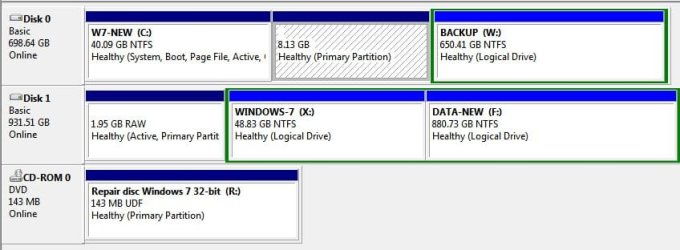
Dear folks,

I have 2 HDDs on my system.

Disk 0 has 3 partitions (1) W7 (another installation), (2) DATA, (3) EMPTY for Linux
Disk 1 has 3 partitions - (1) Win XP, (2) W7, (3) DATA

I boot from one disk or another (via switching the boot order in BIOS) depending on what system I need to use.

Yesterday, i was installing UBUNTU on Disk 0 partition 3, and when installation asked me for a SWAP partition I set Partition 1 of Disk 1 since I do not use WinXP anymore. Linux installation was successful and it marked that partition as SWAP type, however...

When I tried to boot W7 from Drive 1 it said "Operating System is missing".

I tried System Recovery's bootrec.exe /fixmbr /fixboot but it did not help.

What would you recommend to make it boot W7 from Disk 1 partition 2?

Thanks.
 
Last edited:

My Computer

OS
Windows 7 Ultimate x32
Hello netsoul, welcome to Seven Forums!


Will you please post a snip/screen-shot of the entire disk management drive map so we can see what you have going on and be sure to provide a list of what OS is on which partition/HDD.

In the Windows start menu right click computer and click manage, in the left pane of the "Computer Management" window that opens click disk management and post a snip of that.

How to Post a Screenshot in Seven Forums
 

My Computer

Computer Manufacturer/Model Number
* BFK Customs *
OS
W 7 64-bit Ultimate
CPU
Intel Q9550 Yorkfield
Motherboard
ASUS P5Q Pro
Memory
8GB Dominator 8500C5D
Graphics Card(s)
ATI : XFX 5870
Sound Card
Realtek HD Audio 7-1
Monitor(s) Displays
1x 47" LCD HDMI & 3x 26" LCD HDMI
Screen Resolution
1920x1080P & 1920x1200
Hard Drives
1x 80GB Intel X25-M G2 SSD : 1x 500GB & 1x 640GB WD Caviar Black(s)
PSU
Corsair 620HX
Case
Cooler Master RC-690
Cooling
Tuniq Tower 120, 2x 140mm and 3x 120mm case fans
Keyboard
Microsoft 500
Mouse
Razer Diamondback 3G
Internet Speed
14 Mb/s
Other Info
1x Koutech 3Gb/s SATA HDD Hot Swap Rack
Screenshot

What I need is to make W7 boot from Disk 1 Partition X from the screenshot.
 

Attachments

  • screen.jpg
    screen.jpg
    38.3 KB · Views: 22
Last edited:

My Computer

OS
Windows 7 Ultimate x32
First off, Windows will not boot / is not able to boot from an "Extended, Logical" partition, you will have to convert the partition to a "Primary" partition; are there other partitions to the right of that "Extended" partition?

Have a look at Option Four in this tutorial at the link below to change from logical to primary, if it's possible depending on if there are other primaries on that same HDD, there can be only 4.

Partition Wizard : Use the Bootable CD
 
Last edited:

My Computer

Computer Manufacturer/Model Number
* BFK Customs *
OS
W 7 64-bit Ultimate
CPU
Intel Q9550 Yorkfield
Motherboard
ASUS P5Q Pro
Memory
8GB Dominator 8500C5D
Graphics Card(s)
ATI : XFX 5870
Sound Card
Realtek HD Audio 7-1
Monitor(s) Displays
1x 47" LCD HDMI & 3x 26" LCD HDMI
Screen Resolution
1920x1080P & 1920x1200
Hard Drives
1x 80GB Intel X25-M G2 SSD : 1x 500GB & 1x 640GB WD Caviar Black(s)
PSU
Corsair 620HX
Case
Cooler Master RC-690
Cooling
Tuniq Tower 120, 2x 140mm and 3x 120mm case fans
Keyboard
Microsoft 500
Mouse
Razer Diamondback 3G
Internet Speed
14 Mb/s
Other Info
1x Koutech 3Gb/s SATA HDD Hot Swap Rack
"Is there another boot manager on the "Disk 1 partition 1"?"

Before I installed Ubuntu it was W7's boot loader. Now it's GRUB that also boot W7.

On Disk 2 partition 1 it was WinXP, then dual boot WinXP/W7. Now - nothing :-0
 

My Computer

OS
Windows 7 Ultimate x32
First off, Windows will not boot / is not able to boot from an "Extended, Logical" partition, you will have to convert the partition to a "Primary" partition; are there other partitions to the right of that "Extended" partition?

Well, as I said before the WinXp/W7 dual boot loader was on Disk 2 partition 1 before I screwed up with SWAP space. I thought that I need to fix MBR on Disk 1 regrdles on what partition type W7 is installed...

There are no more partitions to the right. these are all that I have.
 

My Computer

OS
Windows 7 Ultimate x32
"Is there another boot manager on the "Disk 1 partition 1"?"

Before I installed Ubuntu it was W7's boot loader. Now it's GRUB that also boot W7.

On Disk 2 partition 1 it was WinXP, then dual boot WinXP/W7. Now - nothing :-0


That's why I asked, that complicates everything, I have no experience with Grub so I'll have to let others help you from here on in, if handled the wrong way Grub will destroy everything.
 

My Computer

Computer Manufacturer/Model Number
* BFK Customs *
OS
W 7 64-bit Ultimate
CPU
Intel Q9550 Yorkfield
Motherboard
ASUS P5Q Pro
Memory
8GB Dominator 8500C5D
Graphics Card(s)
ATI : XFX 5870
Sound Card
Realtek HD Audio 7-1
Monitor(s) Displays
1x 47" LCD HDMI & 3x 26" LCD HDMI
Screen Resolution
1920x1080P & 1920x1200
Hard Drives
1x 80GB Intel X25-M G2 SSD : 1x 500GB & 1x 640GB WD Caviar Black(s)
PSU
Corsair 620HX
Case
Cooler Master RC-690
Cooling
Tuniq Tower 120, 2x 140mm and 3x 120mm case fans
Keyboard
Microsoft 500
Mouse
Razer Diamondback 3G
Internet Speed
14 Mb/s
Other Info
1x Koutech 3Gb/s SATA HDD Hot Swap Rack
You may have to move the data off the data partition and delete it before PW CD will allow you to Modify>Convert to Primary the logical partition containing Win7 on DISK1.

Once it's converted then Modify>Mark Active, set DISK1 as first to boot in BIOS setup, boot the Win7 DVD Repair console and run Startup Repair 3 separate times with reboots until it starts.

You would be much better having your Win7 installations on one HD booted separately via BIOS (the smart way) with Ubuntu on its own HD. GRUB will corrupt Win7. Look at the Move feature on PW CD to copy your Win7 partition onto the Win7 HD. Then use EASYBCD 2.0 to set up a Dual Boot on the same HD for both Win7.
 
Well, I would not worry about GRUB since it's on another physical drive. As i said before - I boot from different drives by swithching the boot order in BIOS. So we need to treat my problematic disc as a separate isolated system.
 

My Computer

OS
Windows 7 Ultimate x32
You may have to move the data off the data partition and delete it before PW CD will allow you to Modify>Convert to Primary the logical partition containing Win7 on DISK1.

Once it's converted then Modify>Mark Active, set DISK1 as first to boot in BIOS setup, boot the Win7 DVD Repair console and run Startup Repair 3 separate times with reboots until it starts.

You would be much better having your Win7 installations on one HD booted separately via BIOS (the smart way) with Ubuntu on its own HD. GRUB will corrupt Win7. Look at the Move feature on PW CD to copy your Win7 partition onto the Win7 HD.

Folks, I do not quite understand why you think that logical partition is a problem. before I screwed up with SWAP space the WinXP/W7 boot loader was on DISK 2 and booted XP from Partition 1 and W7 from partition 2. My understanding is that boot loader is in MBR regardless on what type of partition the WIN system is installed. Am I incorrect?
 

My Computer

OS
Windows 7 Ultimate x32
You may have to move the data off the data partition and delete it before PW CD will allow you to Modify>Convert to Primary the logical partition containing Win7 on DISK1.

Once it's converted then Modify>Mark Active, set DISK1 as first to boot in BIOS setup, boot the Win7 DVD Repair console and run Startup Repair 3 separate times with reboots until it starts.

You would be much better having your Win7 installations on one HD booted separately via BIOS (the smart way) with Ubuntu on its own HD. GRUB will corrupt Win7. Look at the Move feature on PW CD to copy your Win7 partition onto the Win7 HD. Then use EASYBCD 2.0 to set up a Dual Boot on the same HD for both Win7.

I probably confused you with my description that differs form the screenshot. I edited the original post to match the screenshot, maybe it'll be less confusing.
 

My Computer

OS
Windows 7 Ultimate x32
"Is there another boot manager on the "Disk 1 partition 1"?"

Before I installed Ubuntu it was W7's boot loader. Now it's GRUB that also boot W7.

On Disk 2 partition 1 it was WinXP, then dual boot WinXP/W7. Now - nothing :-0


That's why I asked, that complicates everything, I have no experience with Grub so I'll have to let others help you from here on in, if handled the wrong way Grub will destroy everything.


I probably confused you with my description that differs form the screenshot. I edited the original post to match the screenshot, maybe it'll be less confusing.
 

My Computer

OS
Windows 7 Ultimate x32
Have a look at the tutorial at the link below, you will have to mark the partition as "Active" after it has been converted to a "Primary" and then run the startup repairs to get Windows booting.


Startup Repair - Run 3 Separate Times


First off, Windows will not boot / is not able to boot from an "Extended, Logical" partition, you will have to convert the partition to a "Primary" partition.
 

My Computer

Computer Manufacturer/Model Number
* BFK Customs *
OS
W 7 64-bit Ultimate
CPU
Intel Q9550 Yorkfield
Motherboard
ASUS P5Q Pro
Memory
8GB Dominator 8500C5D
Graphics Card(s)
ATI : XFX 5870
Sound Card
Realtek HD Audio 7-1
Monitor(s) Displays
1x 47" LCD HDMI & 3x 26" LCD HDMI
Screen Resolution
1920x1080P & 1920x1200
Hard Drives
1x 80GB Intel X25-M G2 SSD : 1x 500GB & 1x 640GB WD Caviar Black(s)
PSU
Corsair 620HX
Case
Cooler Master RC-690
Cooling
Tuniq Tower 120, 2x 140mm and 3x 120mm case fans
Keyboard
Microsoft 500
Mouse
Razer Diamondback 3G
Internet Speed
14 Mb/s
Other Info
1x Koutech 3Gb/s SATA HDD Hot Swap Rack
Have a look at the tutorial at the link below, you will have to mark the partition as "Active" after it has been converted to a "Primary" and then run the startup repairs to get Windows booting.


Startup Repair - Run 3 Separate Times


First off, Windows will not boot / is not able to boot from an "Extended, Logical" partition, you will have to convert the partition to a "Primary" partition.

Well, but it's already Primary and Active! Do you see that on the screenshot? Or am I missing something?
 

My Computer

OS
Windows 7 Ultimate x32
Here disks are in the reverse order. What I need is to make W7 boot from Disk 1 Partition X from the screenshot.


Is this not correct?
 

My Computer

Computer Manufacturer/Model Number
* BFK Customs *
OS
W 7 64-bit Ultimate
CPU
Intel Q9550 Yorkfield
Motherboard
ASUS P5Q Pro
Memory
8GB Dominator 8500C5D
Graphics Card(s)
ATI : XFX 5870
Sound Card
Realtek HD Audio 7-1
Monitor(s) Displays
1x 47" LCD HDMI & 3x 26" LCD HDMI
Screen Resolution
1920x1080P & 1920x1200
Hard Drives
1x 80GB Intel X25-M G2 SSD : 1x 500GB & 1x 640GB WD Caviar Black(s)
PSU
Corsair 620HX
Case
Cooler Master RC-690
Cooling
Tuniq Tower 120, 2x 140mm and 3x 120mm case fans
Keyboard
Microsoft 500
Mouse
Razer Diamondback 3G
Internet Speed
14 Mb/s
Other Info
1x Koutech 3Gb/s SATA HDD Hot Swap Rack
Here disks are in the reverse order. What I need is to make W7 boot from Disk 1 Partition X from the screenshot.


Is this not correct?

" What I need is to make W7 boot from Disk 1 Partition X from the screenshot"

That's correct. but please re-read the original post - I edited it to match the screenshot so that it would not be in reverse order. I may need to remove those confusing posts about reverse order now... Sorry!
 

My Computer

OS
Windows 7 Ultimate x32
PLEASE, just start here and show what you neeed, don't edit anything that's TOO confusing!
 

My Computer

Computer Manufacturer/Model Number
* BFK Customs *
OS
W 7 64-bit Ultimate
CPU
Intel Q9550 Yorkfield
Motherboard
ASUS P5Q Pro
Memory
8GB Dominator 8500C5D
Graphics Card(s)
ATI : XFX 5870
Sound Card
Realtek HD Audio 7-1
Monitor(s) Displays
1x 47" LCD HDMI & 3x 26" LCD HDMI
Screen Resolution
1920x1080P & 1920x1200
Hard Drives
1x 80GB Intel X25-M G2 SSD : 1x 500GB & 1x 640GB WD Caviar Black(s)
PSU
Corsair 620HX
Case
Cooler Master RC-690
Cooling
Tuniq Tower 120, 2x 140mm and 3x 120mm case fans
Keyboard
Microsoft 500
Mouse
Razer Diamondback 3G
Internet Speed
14 Mb/s
Other Info
1x Koutech 3Gb/s SATA HDD Hot Swap Rack
PLEASE, just start here and show what you neeed, don't edit anything that's TOO confusing!


Ooops, it's too late, i edited. But starting over:


Join Date: Sep 2010

Windows 7 Ultimate x32
10 posts


user_online.gif


Boot problem
Dear folks,

I have 2 HDDs on my system.

Disk 0 has 3 partitions (1) Windows 7 (another installation), (2) DATA, (3) EMPTY for Linux
Disk 1 has 3 partitions - (1) Win XP, (2) Windows 7, (3) DATA

I boot from one disk or another (via switching the boot order in BIOS) depending on what system I need to use.

Yesterday, i was installing UBUNTU on Disk 0 partition 3, and when installation asked me for a SWAP partition I set Partition 1 of Disk 1 since I do not use WinXP anymore. Linux installation was successful and it marked that partition as SWAP type, however...

When I tried to boot Windows 7 from Drive 1 it said "Operating System is missing".

I tried System Recovery's bootrec.exe /fixmbr /fixboot on Disk 1 (!) but it did not help.

What would you recommend to make it boot Windows 7 from Disk 1 partition 2 (drive X)?
 

Attachments

  • screen.jpg
    screen.jpg
    38.3 KB · Views: 6

My Computer

OS
Windows 7 Ultimate x32
So you need to get "Disk 0 C:" booting?


You need to run 3 separate startup repairs with a system restart between each repair to create boot files to the "Disk 0 C:" while it's the only HDD connected.


Startup Repair - Run 3 Separate Times
 

My Computer

Computer Manufacturer/Model Number
* BFK Customs *
OS
W 7 64-bit Ultimate
CPU
Intel Q9550 Yorkfield
Motherboard
ASUS P5Q Pro
Memory
8GB Dominator 8500C5D
Graphics Card(s)
ATI : XFX 5870
Sound Card
Realtek HD Audio 7-1
Monitor(s) Displays
1x 47" LCD HDMI & 3x 26" LCD HDMI
Screen Resolution
1920x1080P & 1920x1200
Hard Drives
1x 80GB Intel X25-M G2 SSD : 1x 500GB & 1x 640GB WD Caviar Black(s)
PSU
Corsair 620HX
Case
Cooler Master RC-690
Cooling
Tuniq Tower 120, 2x 140mm and 3x 120mm case fans
Keyboard
Microsoft 500
Mouse
Razer Diamondback 3G
Internet Speed
14 Mb/s
Other Info
1x Koutech 3Gb/s SATA HDD Hot Swap Rack

My Computer

OS
Windows 7 Ultimate x32
Back
Top