
(SOLVED)
I really don't know how this happens, but unless I go to my setup screen while booting up and select ' disable Driver Signature Enforcement ' my computer can not start up.
If I try and boot up without disabling the DSE it'll continue as normal, but then it'll show a screen with a bar saying ' loading files ', after that it opens a screen for system restore and saying the system can't start up.
The only driver I can think of that I installed and didn't have a signature was the MotionJoy driver for the DS3. But I deleted that one already.
Help would be appreciated, it's annoying having to go and disable the DSE for it to start up.
---
(SOLVED)
I thought I'd throw in this second question to avoid making another thread.
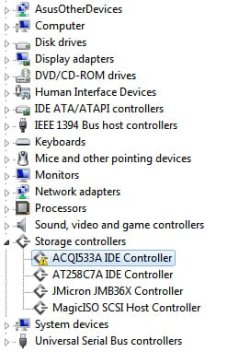
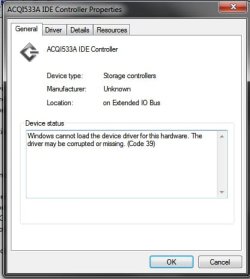
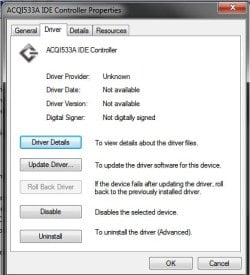
This shows as having a problem of some sort. I uninstall it but refreshing the device manager just shows it again. So what is this exactly? Anyone know?
I really don't know how this happens, but unless I go to my setup screen while booting up and select ' disable Driver Signature Enforcement ' my computer can not start up.
If I try and boot up without disabling the DSE it'll continue as normal, but then it'll show a screen with a bar saying ' loading files ', after that it opens a screen for system restore and saying the system can't start up.
The only driver I can think of that I installed and didn't have a signature was the MotionJoy driver for the DS3. But I deleted that one already.
Help would be appreciated, it's annoying having to go and disable the DSE for it to start up.
---
(SOLVED)
I thought I'd throw in this second question to avoid making another thread.
This shows as having a problem of some sort. I uninstall it but refreshing the device manager just shows it again. So what is this exactly? Anyone know?
Last edited:
My Computer
- OS
- Windows 7 Ultimate x64
- CPU
- Intel(R) Core(TM) i7 CPU 920 @ 2.67GHz
- Motherboard
- ASUS P6T SE
- Memory
- 6GB DDR3 RAM
- Graphics Card(s)
- NVIDIA GeForce GTX 275
- Sound Card
- ASUS Xonar DX
- Monitor(s) Displays
- SONY BRAVIA - KDL-40EX720
- Screen Resolution
- 1920x1080


