Solved Boot Problems.

Necrosis

New member
Member
Local time
4:32 PM
Messages
25
Location
Belgium
(SOLVED)

I really don't know how this happens, but unless I go to my setup screen while booting up and select ' disable Driver Signature Enforcement ' my computer can not start up.

If I try and boot up without disabling the DSE it'll continue as normal, but then it'll show a screen with a bar saying ' loading files ', after that it opens a screen for system restore and saying the system can't start up.

The only driver I can think of that I installed and didn't have a signature was the MotionJoy driver for the DS3. But I deleted that one already.

Help would be appreciated, it's annoying having to go and disable the DSE for it to start up.

---
(SOLVED)

I thought I'd throw in this second question to avoid making another thread.
n1.jpg

n2.jpg

n3.jpg

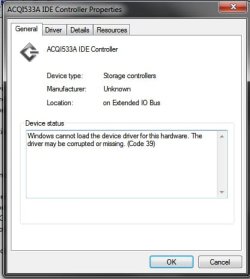
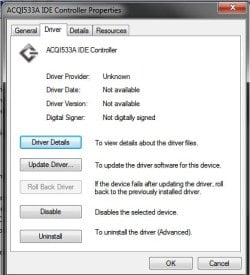
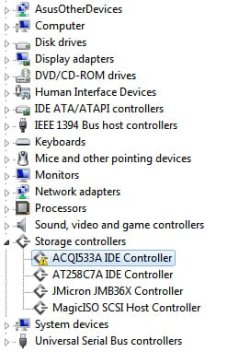
This shows as having a problem of some sort. I uninstall it but refreshing the device manager just shows it again. So what is this exactly? Anyone know?
 
Last edited:

My Computer

OS
Windows 7 Ultimate x64
CPU
Intel(R) Core(TM) i7 CPU 920 @ 2.67GHz
Motherboard
ASUS P6T SE
Memory
6GB DDR3 RAM
Graphics Card(s)
NVIDIA GeForce GTX 275
Sound Card
ASUS Xonar DX
Monitor(s) Displays
SONY BRAVIA - KDL-40EX720
Screen Resolution
1920x1080
I see you have Magic ISO.
Do you have also Daemon Tools or Alcohol 120% installed by any chance?
 

My Computer

Computer Manufacturer/Model Number
HP m8000n
OS
Windows 7 Ultimate x86
CPU
DualCore AMD Athlon 64 X2, 2600 MHz 5200+
Motherboard
Asus M2N68-LA (Narra)
Memory
Samsung 2GB DDR2
Graphics Card(s)
Onboard NVIDIA GeForce 6150SE nForce 430
Sound Card
Onboard nVIDIA nForce 6100-430 (MCP61P)
Monitor(s) Displays
Westinghouse 19" LED
Screen Resolution
1280x1024
Hard Drives
SATA II Seagate Barracuda 500GB
USB II WD Elements 500GB
USB II WD My Book 1TB
USB II WD My Book 2TB
PSU
Stock (HP)
Case
Stock (HP)
Cooling
Stock
Keyboard
Logitech Classic KB 200
Mouse
Standard HP opticle USB mouse
Ah yes I have, are they conflicting?
 
Last edited:

My Computer

OS
Windows 7 Ultimate x64
CPU
Intel(R) Core(TM) i7 CPU 920 @ 2.67GHz
Motherboard
ASUS P6T SE
Memory
6GB DDR3 RAM
Graphics Card(s)
NVIDIA GeForce GTX 275
Sound Card
ASUS Xonar DX
Monitor(s) Displays
SONY BRAVIA - KDL-40EX720
Screen Resolution
1920x1080
This is what Google search gives me:
Your search - ACQ1533A IDE Controller - did not match any documents.
 

My Computer

Computer type
PC/Desktop
Computer Manufacturer/Model Number
Bruce ... somewhere in his 40's
OS
Windows 7 Ultimate 32bit SP1
CPU
Intel(R) Core(TM)2 Quad CPU @ 2.40GHz, 2400 MHz
Motherboard
INTEL/D975XBX2
Memory
4 GB
Graphics Card(s)
ATI Radeon HD 2600 Pro
Monitor(s) Displays
Samsung SyncMaster 914v
Screen Resolution
1280 x 1024
Hard Drives
2/500GB each ... ST3500630AS ATA Device.
One is not connected
PSU
Rocketfish 700 W
Case
G.Skill Gigabyte Chassis
Keyboard
Standard PS/2 Keyboard
Mouse
Microsoft PS/2 Mouse
Internet Speed
DSL
Antivirus
Avira Internet Security
Browser
IE 11
Other Info
ATI HDMI Audio

My Computer

Computer type
PC/Desktop
Computer Manufacturer/Model Number
Bruce ... somewhere in his 40's
OS
Windows 7 Ultimate 32bit SP1
CPU
Intel(R) Core(TM)2 Quad CPU @ 2.40GHz, 2400 MHz
Motherboard
INTEL/D975XBX2
Memory
4 GB
Graphics Card(s)
ATI Radeon HD 2600 Pro
Monitor(s) Displays
Samsung SyncMaster 914v
Screen Resolution
1280 x 1024
Hard Drives
2/500GB each ... ST3500630AS ATA Device.
One is not connected
PSU
Rocketfish 700 W
Case
G.Skill Gigabyte Chassis
Keyboard
Standard PS/2 Keyboard
Mouse
Microsoft PS/2 Mouse
Internet Speed
DSL
Antivirus
Avira Internet Security
Browser
IE 11
Other Info
ATI HDMI Audio
Ah yes I have, are they conflicting?

That's what I thought. this ACQ file is a part of it and another part of Daemontools (SPTD) is known to cause trouble with Windows 7 (including BSOD's!)
(They have usually names starting with A followed by 7 random alphanumeric digits, that's why Jacee wasn't able to find anything about it.
So your best bet would be uninstall Daemontools, then remove SPTD like so:

To remove SPTD, simply download SPTD setup file "SPTDinst-v178-x64.exe" for Windows XP/2003/Vista (64-bit) [720,952 bytes] and execute it.
In dialog that appears press "Uninstall" button and then SPTD will remove itself from your Windows installation.
If you want to install it again then execute same setup and press "Install".
You can check it out here: DuplexSecure - FAQ

There are other Virtual Disk drivers that don't rely on SPTD try to use them they usually don't cause half as much trouble ;)

-DG
 

My Computer

Computer Manufacturer/Model Number
HP m8000n
OS
Windows 7 Ultimate x86
CPU
DualCore AMD Athlon 64 X2, 2600 MHz 5200+
Motherboard
Asus M2N68-LA (Narra)
Memory
Samsung 2GB DDR2
Graphics Card(s)
Onboard NVIDIA GeForce 6150SE nForce 430
Sound Card
Onboard nVIDIA nForce 6100-430 (MCP61P)
Monitor(s) Displays
Westinghouse 19" LED
Screen Resolution
1280x1024
Hard Drives
SATA II Seagate Barracuda 500GB
USB II WD Elements 500GB
USB II WD My Book 1TB
USB II WD My Book 2TB
PSU
Stock (HP)
Case
Stock (HP)
Cooling
Stock
Keyboard
Logitech Classic KB 200
Mouse
Standard HP opticle USB mouse

I'm not actually looking to install a controller. I did have the DS3 motionjoy driver and knew that I had to disable the DSE at start up, but the problem is that even after deleting it I need to start up my computer with DSE disabled otherwise it won't boot up and goes to system restore, every single time. I'm not saying this is related to the motionjoy driver in any way though.

Ah yes I have, are they conflicting?

That's what I thought. this ACQ file is a part of it and another part of Daemontools (SPTD) is known to cause trouble with Windows 7 (including BSOD's!)
(They have usually names starting with A followed by 7 random alphanumeric digits, that's why Jacee wasn't able to find anything about it.
So your best bet would be uninstall Daemontools, then remove SPTD like so:

To remove SPTD, simply download SPTD setup file "SPTDinst-v178-x64.exe" for Windows XP/2003/Vista (64-bit) [720,952 bytes] and execute it.
In dialog that appears press "Uninstall" button and then SPTD will remove itself from your Windows installation.
If you want to install it again then execute same setup and press "Install".
You can check it out here: DuplexSecure - FAQ

There are other Virtual Disk drivers that don't rely on SPTD try to use them they usually don't cause half as much trouble ;)

-DG

Thx, the problem has gone away in device manager. Much appreciated.
 

My Computer

OS
Windows 7 Ultimate x64
CPU
Intel(R) Core(TM) i7 CPU 920 @ 2.67GHz
Motherboard
ASUS P6T SE
Memory
6GB DDR3 RAM
Graphics Card(s)
NVIDIA GeForce GTX 275
Sound Card
ASUS Xonar DX
Monitor(s) Displays
SONY BRAVIA - KDL-40EX720
Screen Resolution
1920x1080
You're very welcome. Just remember if the problems come back to de-install the divers in question with the method outlined in my former post.

Thanks for the feedback
-DG
 

My Computer

Computer Manufacturer/Model Number
HP m8000n
OS
Windows 7 Ultimate x86
CPU
DualCore AMD Athlon 64 X2, 2600 MHz 5200+
Motherboard
Asus M2N68-LA (Narra)
Memory
Samsung 2GB DDR2
Graphics Card(s)
Onboard NVIDIA GeForce 6150SE nForce 430
Sound Card
Onboard nVIDIA nForce 6100-430 (MCP61P)
Monitor(s) Displays
Westinghouse 19" LED
Screen Resolution
1280x1024
Hard Drives
SATA II Seagate Barracuda 500GB
USB II WD Elements 500GB
USB II WD My Book 1TB
USB II WD My Book 2TB
PSU
Stock (HP)
Case
Stock (HP)
Cooling
Stock
Keyboard
Logitech Classic KB 200
Mouse
Standard HP opticle USB mouse
I notice this thread now has a ' solved ' mark next to it, but my main problem still isn't solved so perhaps that can be removed? I wouldn't want people to ignore this thread because they see the solved mark next to it, while I still very much need assistance, lol.
 

My Computer

OS
Windows 7 Ultimate x64
CPU
Intel(R) Core(TM) i7 CPU 920 @ 2.67GHz
Motherboard
ASUS P6T SE
Memory
6GB DDR3 RAM
Graphics Card(s)
NVIDIA GeForce GTX 275
Sound Card
ASUS Xonar DX
Monitor(s) Displays
SONY BRAVIA - KDL-40EX720
Screen Resolution
1920x1080
Without knowing, which driver is blamed to have no digital signature I can only answer general
Don't you get notified which driver lacks the digital signature?
Do you have ATI command center perhaps?
The only solution besides acquire digitally signed driver would be this:
Driver Signature Enforcement Overrider 1.3b

-DG
 

My Computer

Computer Manufacturer/Model Number
HP m8000n
OS
Windows 7 Ultimate x86
CPU
DualCore AMD Athlon 64 X2, 2600 MHz 5200+
Motherboard
Asus M2N68-LA (Narra)
Memory
Samsung 2GB DDR2
Graphics Card(s)
Onboard NVIDIA GeForce 6150SE nForce 430
Sound Card
Onboard nVIDIA nForce 6100-430 (MCP61P)
Monitor(s) Displays
Westinghouse 19" LED
Screen Resolution
1280x1024
Hard Drives
SATA II Seagate Barracuda 500GB
USB II WD Elements 500GB
USB II WD My Book 1TB
USB II WD My Book 2TB
PSU
Stock (HP)
Case
Stock (HP)
Cooling
Stock
Keyboard
Logitech Classic KB 200
Mouse
Standard HP opticle USB mouse
I fixed the problem.

I let the system restore run again while booting up and it couldn't complete it. In the logs it said a driver called ' sfsync02.sys ' was corrupted and it was basically preventing the computer from restoring itself or booting up.

I deleted it but the problem remained. So a quick search on google revealed to me that it was an annoying StarForce driver. I deleted every driver that carried the StarForce name in it's description and my computer is now able to boot up fine without disabling the DSE.

Thx for all your help though. If anyone else ever gets this problem, delete any StarForce drivers before anything else, lol.
 
Last edited:

My Computer

OS
Windows 7 Ultimate x64
CPU
Intel(R) Core(TM) i7 CPU 920 @ 2.67GHz
Motherboard
ASUS P6T SE
Memory
6GB DDR3 RAM
Graphics Card(s)
NVIDIA GeForce GTX 275
Sound Card
ASUS Xonar DX
Monitor(s) Displays
SONY BRAVIA - KDL-40EX720
Screen Resolution
1920x1080
Back
Top