Boot Time Analyzer

MichiganPride

New member
Local time
8:42 AM
Messages
1
Anyone have a good suggestion for a Boot time analyzer?

-I found a handful, and I like "Bootracer" and "Startup Delayer"

Bootracer tells me my boot times ( i know i can get these times from event logs )
Startup Delayer lets me delay certain apps that eat up CPU ( antivirus = usual suspect )

- I discovered "SYstem Mechanic Pro" and I like it , but I wont pay for the Pro version.
Also, used Soluto, and like it too, but dont like the web-based aspect of it.

-I prefer to find freeware, or opensource code.

Any suggestions?
 

My Computer

Computer type
PC/Desktop
Computer Manufacturer/Model Number
Hp Dell
OS
Win 7 - 8 - & - 10 -64bit
CPU
i7
Memory
32gb
Graphics Card(s)
Nvidia K2000
Hard Drives
ssd
Antivirus
avg
Browser
opera,firefox,Orbot
See if Autoruns has anything you might find useful.

It's a Microsoft product. I've never used it, but it appears to be powerful. Don't know if it is cryptic or will cause you to rend your own flesh.

https://technet.microsoft.com/en-us/sysinternals/bb963902.aspx

There's also this little script you can download and run:

http://www.sevenforums.com/performance-maintenance/294833-reboot-time-2-a.html

It just gives you the time required for the ENTIRE restart procedure---not just Windows loading per se. Pretty much like bootracer I think.
 
Last edited:

My Computer

Computer type
PC/Desktop
Computer Manufacturer/Model Number
Ignatz Special; 4 speed manual gearbox; factory air conditioning; one of one
OS
Windows 7 Home Premium SP1, 64-bit
CPU
Intel Skylake i5-6600K, not overclocked
Motherboard
AsRock Z170M Extreme 4, micro ATX
Memory
8 GB HyperX DDR4-2666 (2 x 4 GB)
Graphics Card(s)
none; graphics are integrated on CPU
Sound Card
onboard: Realtek ALC1150; external: USB Behringer UF0-202
Monitor(s) Displays
Dell S2340M 23 inch IPS
Screen Resolution
1600 x 900
Hard Drives
System: Crucial MX100 series SSD, 128 GB;
Data: Samsung Spinpoint 103SJ, 1 TB;
Backup: WD Caviar Green WD30EZRX-00D8PB0, 3 TB
PSU
Rosewill SilentNight 500 watt fanless, semi-modular
Case
Antec Solo II
Cooling
Noctua NH-U12S; Noctua F12 intake, Noctua S12A exhaust
Keyboard
Microsoft 200 6JH-00001 USB
Mouse
Dell or Microsoft optical wired; USB
Antivirus
Microsoft Security Essentials and Malwarebytes Premium
Browser
Pale Moon
Other Info
All fans PWM; speeds at idle: CPU circa 500 rpm; intake circa 600 rpm; exhaust circa 600 rpm; CPU temps 27 idle and 47 C load in a warm room (27 C/81 F) when running Intel Extreme Tuning Utility stress test.
I've used Soluto for this though not in a long time (several years). Don't know what it's like now.
 

My Computer

Computer type
PC/Desktop
Computer Manufacturer/Model Number
Lenovo IdeaCenter 450
OS
Windows 10 Pro X64
CPU
Intel Quad Core i7-4770 @ 3.4Ghz
Memory
16.0GB PC3-12800 DDR3 SDRAM 1600 MHz
Graphics Card(s)
Intel Integrated HD Graphics
Sound Card
Realtek HD Audio
Monitor(s) Displays
HP 22" LCD
Screen Resolution
1680 x 1050
Hard Drives
250GB Samsung EVO SATA-3 SSD
2TB Seagate ST2000DM001 SATA-2
1.5TB Seagate ST3150041AS SATA
Keyboard
Dell USB
Mouse
Lenovo USB
Internet Speed
Cable via Road Runner 3MB Upload, 30MB Download
Antivirus
Windows Defender, MBAM Pro, MBAE
Browser
Seamonkey
Other Info
UEFI/GPT
PLDS DVD-RW DH16AERSH
Suggestion

Well I've used Soluto and Bootracer. Soluto was okay when it was available as the desktop version but I don't like the web based version at all.

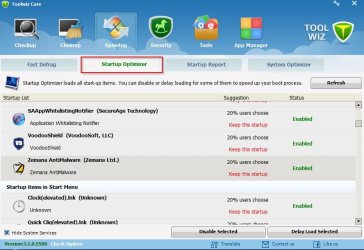
If you just want an idea of what takes time on boot consider:

Download Toolwiz Care - MajorGeeks - ToolwizCare (majorgeeks download)

It's no longer available from the manufacturer's site. In my opinion it should be run without installation - the option exists when you run the setup file.

Screenshots from my machine:

Toolwiz Care 1.jpg

Toolwiz Care 2.jpg

Suggest: Ignore the advice given by this software and make your own decisions on what to disable based on your own knowledge.
 

My Computer

Computer type
Laptop
Computer Manufacturer/Model Number
ASUS
OS
Microsoft Windows 7 Home Premium 64-bit 7601 Multiprocessor Free Service Pack 1
CPU
AMD C-60 APU with Radeon(tm) HD Graphics
Motherboard
ASUSTeK COMPUTER INC. X501U
Memory
4.00 GB
Graphics Card(s)
AMD Radeon HD 6290 Graphics
Sound Card
(1) AMD High Definition Audio Device (2) Realtek High Defi
Screen Resolution
1366 x 768 x 32 bits (4294967296 colors) @ 60 Hz
Hard Drives
Hitachi HTS545050A7E380 SATA Disk Device
Antivirus
Comodo CIS & FW, SecureAplus App Whitelisting, Threatfire
Browser
Cyberfox 64bit, Opera 64bit, Airfox
Other Info
Spy-The-Spy, HitmanPro.Alert, Norton Connect Safe, MJRegWatcher, BitDefender TrafficLight, Voodoo Shield, Zemana AntiMalware
Back
Top