
I have an old HP Z200 that died. I would like to boot up the hard drive from that machine (I don't just want to copy files from it). I have tried booting the drive in a little HP EliteDesk Mini - that got as far as where the Windows 7 boot animation starts and then it rebooted and next boot went to startup recovery. I ran startup recovery but it didn't fix anything. I tried whacking F8 lots of times and attempted Safe Mode boot but that wouldn't boot either.
I read on StackExchange that it's possible to create a VM using the harddrive and boot the virtual machine using HyperV on Windows 10. That does exactly the same thing as the HP EliteDesk Mini did - it goes to the startup recovery.
Is there anyway I can find out what the offending driver is and somehow remove it? I can get Windows 7 drivers for the EliteDesk Mini so I was hoping I'd be able to run this Win7 hard drive on that machine for a short while.
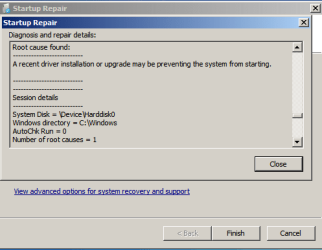
Below is a screenshot from the recovery app - I couldn't get a copy and paste of everything. The VM host wouldn't let me copy and paste text from the VM.
I read on StackExchange that it's possible to create a VM using the harddrive and boot the virtual machine using HyperV on Windows 10. That does exactly the same thing as the HP EliteDesk Mini did - it goes to the startup recovery.
Is there anyway I can find out what the offending driver is and somehow remove it? I can get Windows 7 drivers for the EliteDesk Mini so I was hoping I'd be able to run this Win7 hard drive on that machine for a short while.
Below is a screenshot from the recovery app - I couldn't get a copy and paste of everything. The VM host wouldn't let me copy and paste text from the VM.
My Computer
At a glance
Windows 7 Ultimate x64
- OS
- Windows 7 Ultimate x64


