Boot up time slower then it should be. Why?

Colinjbro

Irish Mad Man!!
Member
Local time
4:31 AM
Messages
57
Hey guys, My computer is quite a good one and work fine in every aspect but it takes longer then I think it should to boot up or even to restart.

I have my 1TB hard drive and a secondary 500GB hard drive, I also have an external 500GB hard drive as well.

My hard drives are mostly full of media, TV shows, Movies, Games and music, things like that. I've been trying to figure out why my computer takes so long to boot up.

I have another computer that is a lot older then my one and it runs windows vista. It is no were near my one in terms of performance etc but it takes less time to boot up.

I have run msconfig and disabled the things which are not needed but I haven't noticed any difference in the start up time. Also I feel like my computer should be well able to boot up much faster as it is a very good one and the /msconfig method is for computers that are older and need every bit of juice they can get to improve their performance.

Any help/suggestions would be greatly appreciated.

P.S It takes my computer 2 minutes and 21 seconds to boot up from shut down.
 

My Computer My Computer

Computer type
PC/Desktop
Computer Manufacturer/Model Number
Self Made =)
OS
Windows 7 Ultimate 64x
CPU
AMD Phenom II X6 1090T
Motherboard
GA-870A-UD3
Memory
8GB DDR3
Graphics Card(s)
NVIDIA GTX 570 SC
Monitor(s) Displays
BenQ XL2420T
Screen Resolution
1980x1080
Hard Drives
Western Digital 500GB
Barracuda 1TB
PSU
Corsair 850W
Case
Cooler Master 690 II Advanced
Mouse
Logitech MX518

My Computer My Computer

Computer Manufacturer/Model Number
HP Pavilion Elite 495UK
OS
Windows 7 Ultimate SP1 64-Bit
CPU
Intel Core i7 870 @ 2.93GHz
Motherboard
MSI 2A9C (CPU1)
Memory
8Gb Dual-Channel DDR3 @ 664MHz
Graphics Card(s)
nVidia GeForce GTX 460 1024MB dedicated RAM
Sound Card
Realtek HD Audio
Monitor(s) Displays
HP2310i
Screen Resolution
1920 x 1080
Hard Drives
1x1954GB Hitachi HDS22020ALA 330 (RAID), 1x1954GB Hitachi External for backup and storage
PSU
460W
Case
HP Elite
Cooling
Air cooled
Keyboard
Logitech K750 solar-powered keyboard
Mouse
Logitech Wireless M180 mouse
Internet Speed
2Mb
Other Info
Pure Avanti Flow Internet Radio with iPod Dock, 64Gb iPod, HP USB Speakers, Sony MDR-V500 Headphones, Sony Vaio F-Series Laptop
I would check your bios and make sure the boot drive is first in the order. Then get back to us with the boot drives capacity, free space, rpm speed and cache size. Also you can try disc defrag which may help and never hurts unless it's an SSD which we know it's not.
 

My Computer My Computer

Computer type
PC/Desktop
Computer Manufacturer/Model Number
A blend of brains, brawn and dumb luck.
OS
Windows 7 Ultimate 64
CPU
i7 3770k OC'd 4.6 @ 1.17v, also FX 8120 & i5 miniITX
Motherboard
MSI P67A-GD80 b3
Memory
32 gb G.Skill Sniper DDR3 10-12-12-31 @ 2133
Graphics Card(s)
XFX Radeon 7870 2GB DDR5
Sound Card
Sound Blaster Z Series Card
Monitor(s) Displays
(2) LG LED 23" 1920 x 1080 2ms Monitors via mini d-port
Screen Resolution
1680 X 1050 p
Hard Drives
Samsung 256 gb 830 SSD sata III
(1) 1 tb WD Black
(2) 1 tb Hitachi deskmates/sata II
(2) 1 tb WD green/sata II
(2) 3 tb Seagate Barracuda
(1) 120 gb OCZ Vertex SS
(1) Drobo 5N w/5 Seagate 3tb
PSU
EVGA modular 1000G2 80% gold rating & APC 1200 RS
Case
CoolerMaster Storm Styker
Cooling
7 case fans 140mm & 120mm, NZXT Kraken X60
Keyboard
(2) Logitech Illuminated Keyboards (1) usb (1) wireless
Mouse
Logitech G700 & T-BC21 - nano nx for the laptop
Internet Speed
Basic 120mbps down
Antivirus
Trend Micro Titanium Max Security & Malwarebytes Premium
Browser
Chrome and IE 10
Other Info
5 Noctua case fans + 3 Noctua in p/p on NZXT cooler
Integrated hot swap drive bays for 2.5" Drives
(2) Lite-on dvd/cd/Blu Ray optical 22X
Integrated fan controller and led on/off
HP Officejet Pro 8630 all-n-one
Hot-swappable 3.5" hard drive bay
Netgear Nighthawk router
Asus USB 3 & sata 6 PCIe card
Vantec IDE to sata adptr./Ultra sata adptr
Lenovo L420 i5 lappy with m sata
Drobo 5N advanced NAS

My Computer My Computer

Computer type
PC/Desktop
Computer Manufacturer/Model Number
Custom
OS
Windows 10 Pro x64
CPU
Intel Core i7 4790K @ 4.5GHz
Motherboard
Asus Maximus Hero VII
Memory
32GB DDR3
Graphics Card(s)
Nvidia GeForce GTX970
Sound Card
Realtek HD Audio
Screen Resolution
1920x1200
Hard Drives
1x Samsung 250GB SSD
4x WD RE 2TB (RAIDZ)
PSU
Corsair AX760i
Case
Fractal Design Define R4
Cooling
Noctua NH-D15

My Computer My Computer

Computer type
PC/Desktop
OS
Windows 10 Home x64
CPU
INTEL Core i5-750 Quad-Core 3.37GHz
Motherboard
ASUS P7P55D
Memory
HyperX Fury Black Series 8GB (2 x 4GB) 1866Mhz
Graphics Card(s)
EVGA GeForce GTX 750 Superclocked 1GB 128-Bit GDDR5
Monitor(s) Displays
LG 32MA68HY 32" IPS
Screen Resolution
1920 x 1080
Hard Drives
Samsung 840 Evo 120GB, SEAGATE 500GB Barracuda® 7200.12, SATA 3 Gb/s, 7200 RPM, 16MB cache
PSU
ANTEC TruePower New TP-550, 80 PLUS, 550W
Case
ANTEC Three Hundred Illusion
Cooling
COOLER MASTER Hyper 212 Plus, 4 x 120mm 1 x 140mm Noctua's
Internet Speed
85 + Mbps
Antivirus
Avast
Browser
Vivaldi
Thank you very much guys, I'll check these out and get back to you.

Colin
 

My Computer My Computer

Computer type
PC/Desktop
Computer Manufacturer/Model Number
Self Made =)
OS
Windows 7 Ultimate 64x
CPU
AMD Phenom II X6 1090T
Motherboard
GA-870A-UD3
Memory
8GB DDR3
Graphics Card(s)
NVIDIA GTX 570 SC
Monitor(s) Displays
BenQ XL2420T
Screen Resolution
1980x1080
Hard Drives
Western Digital 500GB
Barracuda 1TB
PSU
Corsair 850W
Case
Cooler Master 690 II Advanced
Mouse
Logitech MX518
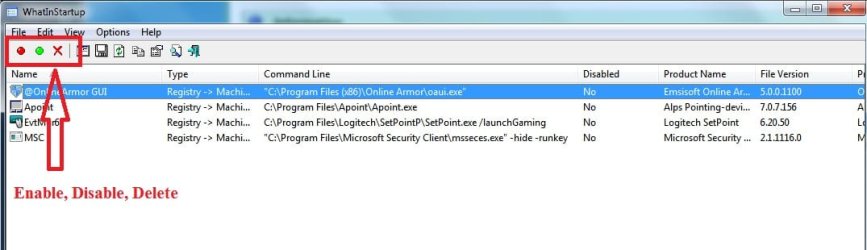
I use What's In Startup to check what's starting with Windows, then deleting most of them. You do not need to have most apps starting with Windows. They will start just fine when you need them, they do not need to be running in the background.
 

Attachments

  • WhatsInStartup.jpg
    WhatsInStartup.jpg
    40.8 KB · Views: 20

My Computer My Computer

OS
64
Back
Top