Booting Problem related to Windows not genuine error

Thank you for your response.

So I used FREE Rescue Kit Express | PARAGON Software Group as you described. I correctly reassigned the partitions, but when I rebooted the computer, once again I got the longer than normal boot where it said "Preparing your desktop..." and the "This copy of Windows is not genuine."
I just checked and somehow windows changed all the drives letters back to the incorrect one. Now I'm really stumped. Any ideas now?
 

My Computer My Computer

OS
Win 7, 64bit
Yes, that is normal - after you correct the letters with Paragon - on first reboot, you will still get the not genuine message - but it goes away .

Paragon did that - not Windows.
 

My Computers My Computers

System One System Two

  • Computer type
    PC/Desktop
    OS
    7 X64
    CPU
    i5 8400
    Motherboard
    gigabyte b365m ds3h
    Memory
    2x8gb 3200mhz
    Hard Drives
    various
    PSU
    pure power 11 400w cm
    Case
    Coolermaster
    Cooling
    cryorig m9i
  • Computer type
    PC/Desktop
    OS
    7x64
    CPU
    g5400
    Motherboard
    ga b365m ds3h
    Memory
    8gb ddr4 2400
    PSU
    xfx pro 450w
SOLVED- Thanks to SIW2 & Prodigy

Actually, what I meant was the reassignment of drives didn't work. When Windows booted it went back to the incorrect assignments for some reason. I tried it twice to no avail.

But then I re-read Prodigy's instructions and realized I was skipping over the very first instruction to boot into Safe mode. That made the difference. I followed these instructions and wa-la - my computer is back.

BIG thanks to SIW2, Prodigy and all who posted their findings here. Greatly appreciated.

1. Boot windows in safe mode
2. After loading, there should be a blank screen with no desktop, press ctrl+alt+del
3. Click Start Task Manager
4. Click File then Run
5. type regedit.exe then press enter
6. Navigate to HKEY_LOCAL_MACHINE\SYSTEM\MountedDevices
7. Try to remember your old working drive letter, mine was drive D, and windows changed its drive letter to C. So i swapped the D and C paths in the registry; now windows knows to access the correct drive to boot.
8. To swap drives, find the drive letter you want changed, it should look something like "\DosDevices\C:" where "C" is the drive letter you need swapped.
9. Right click on the key and rename it to a drive letter that is not in use, for example, I renamed mine to "\DosDevices\Z:" This will free up the letter that you need swapped.
10. Right click on the other key and rename it to the first key's letter, for example, if i wanted the D drive swapped with C, I would now rename "\DosDevices\D:" to "\DosDevices\C:".
11. Now rename "\DosDevices\Z:" (Which was previously "\DosDevices\C:") to "\DosDevices\D:"
12. The drive letters are now successfully swapped, close regedit and reboot, tell me if it worked!!
 

My Computer My Computer

OS
Win 7, 64bit
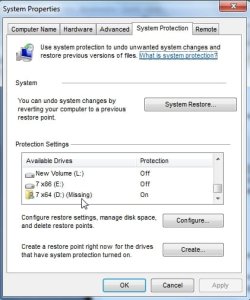
I may have spoke to soon. While the computer is working, this might be a problem having to do with Prodigy's solution. I'm not sure. I noticed that the System Restore protection was turned off. When I went in to turn it on, I received the following error message, "Could not apply the settings for the following reason: The filename, directory name, or volume label syntax is incorrect. (0x8007007B)"

Any ideas about this?
 

My Computer My Computer

OS
Win 7, 64bit
Yes , that will work. It is the old way of doing it - usually you try to run diskmgmt first - to see the new drive letter - that makes it easier to identify the correct reg entry you want to change.

The Paragon app.does exactly the same thing - it just makes it a lot easier.

I have never heard of it not working before.


Actually, what I meant was the reassignment of drives didn't work. When Windows booted it went back to the incorrect assignments for some reason. I tried it twice to no avail.

But then I re-read Prodigy's instructions and realized I was skipping over the very first instruction to boot into Safe mode. That made the difference. I followed these instructions and wa-la - my computer is back.

BIG thanks to SIW2, Prodigy and all who posted their findings here. Greatly appreciated.

1. Boot windows in safe mode
2. After loading, there should be a blank screen with no desktop, press ctrl+alt+del
3. Click Start Task Manager
4. Click File then Run
5. type regedit.exe then press enter
6. Navigate to HKEY_LOCAL_MACHINE\SYSTEM\MountedDevices
7. Try to remember your old working drive letter, mine was drive D, and windows changed its drive letter to C. So i swapped the D and C paths in the registry; now windows knows to access the correct drive to boot.
8. To swap drives, find the drive letter you want changed, it should look something like "\DosDevices\C:" where "C" is the drive letter you need swapped.
9. Right click on the key and rename it to a drive letter that is not in use, for example, I renamed mine to "\DosDevices\Z:" This will free up the letter that you need swapped.
10. Right click on the other key and rename it to the first key's letter, for example, if i wanted the D drive swapped with C, I would now rename "\DosDevices\D:" to "\DosDevices\C:".
11. Now rename "\DosDevices\Z:" (Which was previously "\DosDevices\C:") to "\DosDevices\D:"
12. The drive letters are now successfully swapped, close regedit and reboot, tell me if it worked!!
 

My Computers My Computers

System One System Two

  • Computer type
    PC/Desktop
    OS
    7 X64
    CPU
    i5 8400
    Motherboard
    gigabyte b365m ds3h
    Memory
    2x8gb 3200mhz
    Hard Drives
    various
    PSU
    pure power 11 400w cm
    Case
    Coolermaster
    Cooling
    cryorig m9i
  • Computer type
    PC/Desktop
    OS
    7x64
    CPU
    g5400
    Motherboard
    ga b365m ds3h
    Memory
    8gb ddr4 2400
    PSU
    xfx pro 450w
Type SystemPropertiesProtection.exe in start search box.

When it pops up , find the drive with the folder icon.

SYSPROPPROTECTION.jpg

Highlight it.

Click Configure.

Dot "Turn off system restore" for that drive. Apply . OK.

Then make sure it is turned on for your other drive (s).
 

My Computers My Computers

System One System Two

  • Computer type
    PC/Desktop
    OS
    7 X64
    CPU
    i5 8400
    Motherboard
    gigabyte b365m ds3h
    Memory
    2x8gb 3200mhz
    Hard Drives
    various
    PSU
    pure power 11 400w cm
    Case
    Coolermaster
    Cooling
    cryorig m9i
  • Computer type
    PC/Desktop
    OS
    7x64
    CPU
    g5400
    Motherboard
    ga b365m ds3h
    Memory
    8gb ddr4 2400
    PSU
    xfx pro 450w
I know this is old but I have a bit of a problem...


I have windows vista ultimate on an acre aspire laptop and one day out of nothing, when I booted it up it showed me a black "Windows not genuine" screen.

I tried prodigy's solution but when I try and open SYSTEM it says it's already in use.

Help I really need my computer back. It's my only one.
 

My Computer My Computer

OS
Windows Vista Ultimate 32 bit
Ok never mind now...

I found SYSTEM in another folder and tried to keep going with the instructions. I rebooted and it said in a black screen that it needed to be reinstalled because of new hardware. I don't have the disk, my laptop came with vista. By the way, this screen came up before I clicked to log in... It came up during the boot up. Please help, I am really stuck here.
 

My Computer My Computer

OS
Windows Vista Ultimate 32 bit
Please start a NEW thread of your own, and post an MGADiag report.

To properly analyse and solve problems with Activation and Validation, we need to see a full copy of the report produced by the MGADiag tool (download and save to desktop - http://go.microsoft.com/fwlink/?linkid=52012 )
Once saved, run the tool.
Click on the Continue button, which will produce the report.
To copy the report to your response, click on the Copy button in the tool (ignore any error messages at this point), and then paste (using either r-click/Paste, or Ctrl+V ) into your response.
- **in your own thread**, please
Please also state the Version and Edition of Windows quoted on your COA sticker (if you have one) on the case of your machine, but do NOT quote the Key on the sticker!
How to Tell - Home
 

My Computer My Computer

Computer type
Laptop
Computer Manufacturer/Model Number
Asus K52F or Lenovo B51-80
OS
Win 7 x64 Home Premium (and x86 VirtualBox VM)/Win10
CPU
i3 370M/i7 6500U
Motherboard
Asus/Lenovo
Memory
8GB - finally :)/8GB
Graphics Card(s)
it's an i3, dude!/dual Intel&nVidia
Sound Card
onboard
Monitor(s) Displays
15.6" built-in
Screen Resolution
1366x768/1920x1080
Hard Drives
750GB Seagate internal
Sundry external drives attached to other computers on the local network
1TB SSD on the Lenovo
PSU
n/a
Internet Speed
as much as I can get - usually on a dongle/phone, so <1MB/s
Antivirus
MSE/Defender
Browser
IE11/12/Edge/Chrome/FF(if I must)
Umm

No I can't save that program to the desktop because I can't access the desktop, it says I need to reinstall it doesn't even go to the log in screen
 

My Computer My Computer

OS
Windows Vista Ultimate 32 bit
Can you boot to Safe Mode, or Safe Mode with Networking? If you save the file to a USB sitck, you can run it from that, and we may get some idea.
If you boot the machine and tap F8 you should get an option to 'Repair Your Computer' take that option, and then the option for Startup Repair - see if that helps.
 

My Computer My Computer

Computer type
Laptop
Computer Manufacturer/Model Number
Asus K52F or Lenovo B51-80
OS
Win 7 x64 Home Premium (and x86 VirtualBox VM)/Win10
CPU
i3 370M/i7 6500U
Motherboard
Asus/Lenovo
Memory
8GB - finally :)/8GB
Graphics Card(s)
it's an i3, dude!/dual Intel&nVidia
Sound Card
onboard
Monitor(s) Displays
15.6" built-in
Screen Resolution
1366x768/1920x1080
Hard Drives
750GB Seagate internal
Sundry external drives attached to other computers on the local network
1TB SSD on the Lenovo
PSU
n/a
Internet Speed
as much as I can get - usually on a dongle/phone, so <1MB/s
Antivirus
MSE/Defender
Browser
IE11/12/Edge/Chrome/FF(if I must)
Ok...

Let me see if this helps:

A couple of weeks ago I turned on the laptop and it showed that dreadful crash blue screen so I restarted and it started loading the desktop but instead of showing the desktop it showed a black screen that in the corner it said Vista Error: Build 6000 This copy of windows is not genuine. I could still enter in safe mode but after that I did the thing that prodigy suggested and when I rebooted here's what it says up to now:
Can not boot up windows. It is possible that this was caused by a change of hardware or software recently. To fix this problem:
1: insert the installation disk and reboot the system
2: choose the language settings and then click "next"
3: click on "repair the system"

If you do not have this disc, contact your system administrator or computer manufacturer for help.

Status: 0xc0000001
Information: Unexpected error.

If I press enter it takes me to another screen: there I can only click my windows type: windows vista and press enter and it takes me too the screen where I can choose to go in safe mode but if I do it starts the loop again with the error and everything. I don't know what to do at this point.
 

My Computer My Computer

OS
Windows Vista Ultimate 32 bit
Let me see if this helps:

A couple of weeks ago I turned on the laptop and it showed that dreadful crash blue screen so I restarted and it started loading the desktop but instead of showing the desktop it showed a black screen that in the corner it said Vista Error: Build 6000 This copy of windows is not genuine. I could still enter in safe mode but after that I did the thing that prodigy suggested and when I rebooted here's what it says up to now:
Can not boot up windows. It is possible that this was caused by a change of hardware or software recently. To fix this problem:
1: insert the installation disk and reboot the system
2: choose the language settings and then click "next"
3: click on "repair the system"

If you do not have this disc, contact your system administrator or computer manufacturer for help.

Status: 0xc0000001
Information: Unexpected error.

If I press enter it takes me to another screen: there I can only click my windows type: windows vista and press enter and it takes me too the screen where I can choose to go in safe mode but if I do it starts the loop again with the error and everything. I don't know what to do at this point.


Oh and i have a question.... my uncle has a Windows 7 installation CD, if i put it in when i get his error, will i be able to fix it like that by just installing 7?
 

My Computer My Computer

OS
Windows Vista Ultimate 32 bit
That screen should take you to the Advanced Noot Menu - the option at the very top is 'Repair Your Computer' - have you taken that option?
Do so, and see what it does. after it's mad an attempt at reparing the system, it may either suggest you reboot to complete the repai, or it may offoer a number of options. One will be a Windows Repair Envornment Commmand Prompt screen.
Open the RE CP .
At tha command prompt, enter the following command.
SFC /SCANNOW /OFFBOOTDIR=C:\ /OFFWINDIR=C:\Windows
See what happens.
 

My Computer My Computer

Computer type
Laptop
Computer Manufacturer/Model Number
Asus K52F or Lenovo B51-80
OS
Win 7 x64 Home Premium (and x86 VirtualBox VM)/Win10
CPU
i3 370M/i7 6500U
Motherboard
Asus/Lenovo
Memory
8GB - finally :)/8GB
Graphics Card(s)
it's an i3, dude!/dual Intel&nVidia
Sound Card
onboard
Monitor(s) Displays
15.6" built-in
Screen Resolution
1366x768/1920x1080
Hard Drives
750GB Seagate internal
Sundry external drives attached to other computers on the local network
1TB SSD on the Lenovo
PSU
n/a
Internet Speed
as much as I can get - usually on a dongle/phone, so <1MB/s
Antivirus
MSE/Defender
Browser
IE11/12/Edge/Chrome/FF(if I must)
it means a lot that you replied to my post, i was hoping it helped someone! Glad i could help, and good job finding the rest of the solution. have fun with windows 7!


Helped me too! Many many THANKS for posting the solution, Prodigy!!!
 

My Computer My Computer

OS
Windows 7 64bit
Fixed it

Hey guys,

New to this forum, only joined to tell you guys a possible solution. I've been trying to tackle this problem for about 2 hours and I was very happy when i successfully changed drive letters to fix the "not genuine" problem. Follow these steps:

1. Boot windows in safe mode
2. After loading, there should be a blank screen with no desktop, press ctrl+alt+del
3. Click Start Task Manager
4. Click File then Run
5. type regedit.exe then press enter
6. Navigate to HKEY_LOCAL_MACHINE\SYSTEM\MountedDevices
7. Try to remember your old working drive letter, mine was drive D, and windows changed its drive letter to C. So i swapped the D and C paths in the registry; now windows knows to access the correct drive to boot.
8. To swap drives, find the drive letter you want changed, it should look something like "\DosDevices\C:" where "C" is the drive letter you need swapped.
9. Right click on the key and rename it to a drive letter that is not in use, for example, I renamed mine to "\DosDevices\Z:" This will free up the letter that you need swapped.
10. Right click on the other key and rename it to the first key's letter, for example, if i wanted the D drive swapped with C, I would now rename "\DosDevices\D:" to "\DosDevices\C:".
11. Now rename "\DosDevices\Z:" (Which was previously "\DosDevices\C:") to "\DosDevices\D:"
12. The drive letters are now successfully swapped, close regedit and reboot, tell me if it worked!!

Hopefully my directions are clear enough for you guys, I understand the frustration!


Thanks so much you saved me hours of greef:D
 

My Computer My Computer

OS
Win7 pro x64
CPU
i7 2600k @ 4.5
Motherboard
Asus Pro Evo p68
Memory
12 Gig Corsair dom 1600
Graphics Card(s)
2 GTX 570 SLI
Sound Card
sound blaster XFI Fatality Edition
Monitor(s) Displays
40" sony LED tv
Hard Drives
5 Hdd
1tb
2 tb
3tb
x2 300 gb drivers
PSU
Corsairs 1000
Case
Gigabyte 3D Aurora
Cooling
Corsairs h 70
Back
Top