Hi,
I'm receiving the Bootmgr is missing messagem e.I looked up solutions for it and most of them said that the best thing to do is run the startup repair on the recovery disc/windows disc. I tried that but it failed saying it cannot repair it automatically(one of the things listed in details under Problem Signature 7 was MissingBootManager. I tried another solution to this by rebuilding the BCD but it said that there aren't any Windows installations(only the drive with Windows is plugged in) and I tried this solution:
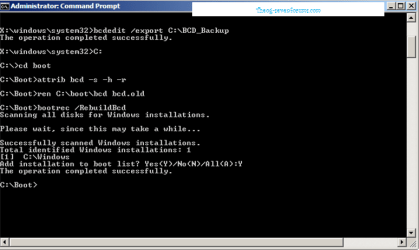
•If the Bootrec.exe tool cannot locate any missing Windows installations, you must remove the BCD store, and then you must re-create it. To do this, type the following commands in the order in which they are presented. Press ENTER after each command.
Bcdedit /export C:\BCD_Backup ren c:\boot\bcd bcd.old
Bootrec /rebuildbcd
But with the second line, it can't find the file to rename
Is there a way to get it booting again without re-installing Windows?
I'm receiving the Bootmgr is missing messagem e.I looked up solutions for it and most of them said that the best thing to do is run the startup repair on the recovery disc/windows disc. I tried that but it failed saying it cannot repair it automatically(one of the things listed in details under Problem Signature 7 was MissingBootManager. I tried another solution to this by rebuilding the BCD but it said that there aren't any Windows installations(only the drive with Windows is plugged in) and I tried this solution:
•If the Bootrec.exe tool cannot locate any missing Windows installations, you must remove the BCD store, and then you must re-create it. To do this, type the following commands in the order in which they are presented. Press ENTER after each command.
Bcdedit /export C:\BCD_Backup ren c:\boot\bcd bcd.old
Bootrec /rebuildbcd
But with the second line, it can't find the file to rename
Is there a way to get it booting again without re-installing Windows?
My Computer
- Computer type
- PC/Desktop
- Computer Manufacturer/Model Number
- Gigabyte
- OS
- Windows 7 Ultimate 64-bit
- CPU
- AMD Athlon FX 4100 ~3.6GHZ
- Motherboard
- Gigabyte 970A-D3
- Memory
- 16GB DDR3
- Graphics Card(s)
- Gigabyte 4GB GeForce GTX 760
- Sound Card
- Asus Xonar DG
- Monitor(s) Displays
- BenQ GL2230
- Screen Resolution
- 1920x1080
- Hard Drives
- 1x Western Digital 80GB
1x Western Digital 500GB
1x Western Digital 1TB Caviar Green
- PSU
- Antec 900W High Current Gaming
- Case
- Thermaltake Level 10 GTS(Black)
- Cooling
- Corsair Hydro Series H55 Water Cooler
- Keyboard
- Razer Deathstalker
- Mouse
- Razer DeathAdder
- Internet Speed
- 4G
- Browser
- Google Chrome