Solved Bootmgr missing and hard disk error

Beg For Mercy

New member
Local time
5:19 PM
Messages
37
Hello,
This is my problem which is haunting me...
Before 5-6 months when I booted my laptop it showed me SMART hard disk error and a brief description that my hard disk is facing imminent failure and that to replace my data, I didn't care much about it, so what I did was used the laptop... Before a month or less than that time or note than a month my laptop became very very slow... When I click something it loads after like 10 mins at first but later all goes fine. This happened after each reboot. It look like 1 5mins to boot. And sometimes comes to the desktop and freeze that I'm forced to use the on/off button to switch it off and reboot it again,likewise 5-6 reboots will make the laptop boot properly.. So it happened continuously. So one day when I tried to on the laptop,it worked fine till that WINDOWS STARTING LOGO and after that it showed me the blue colour windows and it vanished from less than a second. So it happened continuously and then I tried to format it,, and it couldn't be formatted at a point called WINDOWS EXPANDING FILE 0% it stuck there and I've kept it like 30 minutes which at last ends up with a error. Then I again booted up, it showed me BOOTMGR is missing and to press certain keys to reboot. This was what happened. It is a laptop which was used 5 years without a virus guard and I was an internet surfer... Played many online games...
 

My Computer

Computer type
PC/Desktop
OS
windows 7 home premium 64 bit
What you explained that may be a virus issue, may be a hard disc failure, and many more things. .

If windows installation is not complete after formatting the hard drive, it should show a missing bootmgr.

In general (it has some exceptions as well), a virus should not be there after formatting a hard drive, so we can keep that possibility aside for the time being. Do the HDD test only right now.

As you cannot boot to the computer, you need to do a bootable disc check. Test the HDD using Seatools for DOS. See how it goes.

If it is free from errors, try to do a clean reinstall again.

If still fails, we need to blame any other hardware components .... but that comes later.
 

My Computer

Computer type
PC/Desktop
Computer Manufacturer/Model Number
Self Assembled
OS
Microsoft Windows 10 Pro Insider Preview 64-bit
CPU
Intel(R) Core(TM) i3-4130 CPU @ 3.40GHz
Motherboard
Gigabyte Technology Co., Ltd. B85M-D3H
Memory
Corsair Vengence 4GB x2 (8.00GB Dual-Channel DDR3 @ 798MHz)
Graphics Card(s)
2047MB GeForce GTS 450 (ZOTAC International)
Sound Card
Onboard (Realtek High Definition Audio)
Monitor(s) Displays
LG Flatron E2040T
Screen Resolution
1600x900
Hard Drives
Western Digital 1 TB
Seagate 500 GB
PSU
Corsair VS550
Case
Cooler Master K380
Cooling
Cooler Master Seidon 120V Plus
Keyboard
Logitech MK260r
Mouse
Logitech MK260r
Internet Speed
PMPL Broadband
Antivirus
Windows Defender + MBAM
Browser
Firefox
Other Info
Dell Studio 15" Laptop
If you receive a SMART warning of imminent disk failure, then what is the question? Believe it.

You can confirm the condition of the hard drive using the maker's bootable HD Diagnostic scan
 
Must I change my Hard disk?
I mean must I replace the hard disk?:sarc:
 

My Computer

Computer type
PC/Desktop
OS
windows 7 home premium 64 bit
I would. If in doubt then run the test to confirm its condition with certainty.
 
I will run hard disk test and post it here gimme some time.
 

My Computer

Computer type
PC/Desktop
OS
windows 7 home premium 64 bit
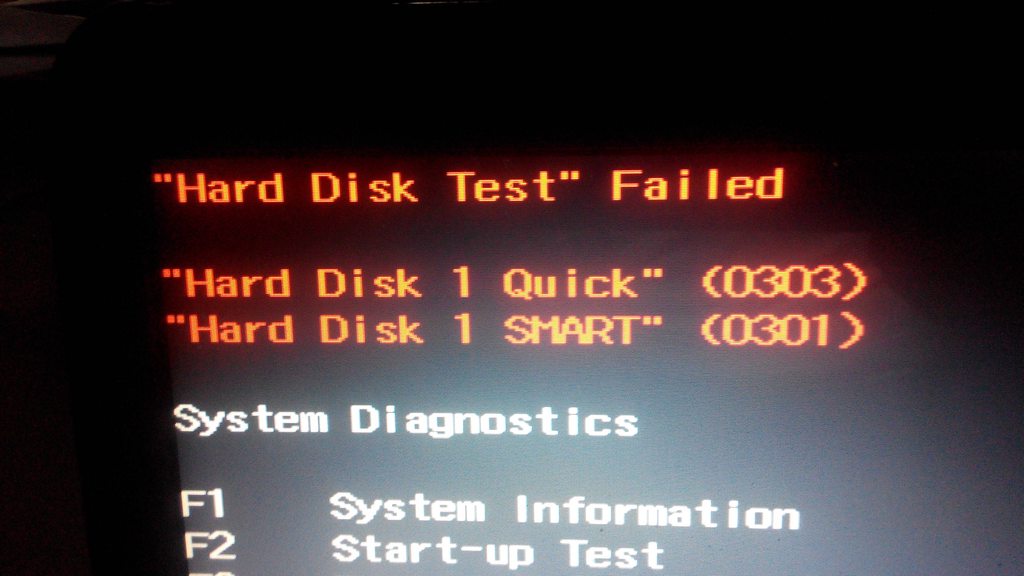
SjOfXMrh.jpg

dCXuiCRh.jpg

Here are the results which are obtained...
 

My Computer

Computer type
PC/Desktop
OS
windows 7 home premium 64 bit
So, I must replace my hard disk ain't it?
 

My Computer

Computer type
PC/Desktop
OS
windows 7 home premium 64 bit

My Computer

Computer type
PC/Desktop
Computer Manufacturer/Model Number
Golden Mk. I.4
OS
Windows 10 Pro x64 ; Xubuntu x64
CPU
Intel i7 860 @ 2.80 GHz O/C'ed to 4.0GHz
Motherboard
Gigabyte P55A-UD3R Rev.1. Award BIOS F13
Memory
16GB Corsair Vengance DDR3 @ 661 MHz Dual Channel (9-9-9-24)
Graphics Card(s)
EVGA NVidia GTX 560 1024MB
Sound Card
Realtek Integrated
Monitor(s) Displays
Dual Samsung SyncMaster 2494HS
Screen Resolution
1920*1080 and 1920*1080
Hard Drives
1*Samsung 840 EVO 120GB SSD;
1*OCZ Vertex 2 60GB SSD;
2*Samsung F3 SpinPoint 1TB in RAID0;
1*Samsung F1 SpinPoint 1TB;
2*Western Digital 1TB External USB 3.0
1*Western Digital 500GB External USB 3.0
1*Seagate 500GB External USB 2.0
PSU
Thermaltake ToughPower QFan 750W
Case
Thermaltake Element S VK60001W2Z
Cooling
Corsair H60 Water Cooling, 2*230mm and 2*80mm case fans
Keyboard
Logitech G110
Mouse
Logitech MX518
Thnx guys.. Thnx all... Looking forward to change my hard disk..
Thnx arc,gregrocker and golden :D
 

My Computer

Computer type
PC/Desktop
OS
windows 7 home premium 64 bit
Thnx guys, thnx all
Thnx arc,gregrocker and golden :D
 

My Computer

Computer type
PC/Desktop
OS
windows 7 home premium 64 bit
Any suggestion for a good brand of hard disk.. And how to buy a new one?
 
Last edited:

My Computer

Computer type
PC/Desktop
OS
windows 7 home premium 64 bit
Again, I suggest an SSD which is lightning fast and will seem as good as buying a brand new high-end PC without one. It is said that Samsung is the best, but I have a 2 year old PNY which has 5-10 second startup.

Use the Product Key on the COA to do a Clean Reinstall Windows 7. Step 1 discusses how to locate safe media without anything added.

If you're satsified with your present install and it is properly activated then you can clone or image it to the new drive using a free flexible imaging app like Macrium Imaging - Windows 7 Help Forums . Before doing that I would clean up the install by deleting all unneeded files and programs, running CCleaner and a boot time defragger like Puran which are discussed along with other methods in Clean Up Factory Bloatware. Then you'll know the image is the lightest and cleanest possible.
 
Last edited:
There is a problem, the sdds are very expensive in my country and it's hard to buy one of them for me due to some problems..
I can afford a 500gb Toshiba hdd, although without an operating system..
If I don't have an original win 7 cd, what must I do to install an original windows 7 to it?
 

My Computer

Computer type
PC/Desktop
OS
windows 7 home premium 64 bit
Also, at the moment I don't have an operating system in my laptop and it is corrupted I guess.
 

My Computer

Computer type
PC/Desktop
OS
windows 7 home premium 64 bit
Read Step 1 of Clean Reinstall Windows 7 carefully and think hard about where you might borrow a Win7 disk of any version. Surely you have a friend with Win7 who will loan you their disk for a day?

If the installer you have which you said is questionable matches the SHA1 HASH then you can use it safely after unlocking all versions if necessary.

If this installer contains a crack I would not use it unless it is separated out and can be avoided to install - but I would only do this as a last resort since often there may be more added. If you can find the original download location, sometimes reading the Comments will clue you to what else might be added.

I am sorry we are left in this position by Microsoft removing the downloads, after helping over a million consumers get a perfect reinstall for the past five years.
 
Hello,
I need to know this.
I buy a new hard disk!
What are the requirements needed to install windows 7 to it?
A person said me without a drivers CD you can't play games, watching vids, listen music although you install windows 7 it works.. Something like that!
 

My Computer

Computer type
PC/Desktop
OS
windows 7 home premium 64 bit
I gave you everything you need: Read and follow closely Clean Reinstall Windows 7.

The steps about drivers are important enough they are printed in red.

You will get and keep a perfect install for as long as you stick with the steps, tools and methods in that tutorial which has been used by over a million consumers without a single complaint.
 
And for a change I'm gonna install windows xp!
Have anything to say about it too?
 

My Computer

Computer type
PC/Desktop
OS
windows 7 home premium 64 bit
Back
Top