bootmgr missing error, became bootmgr MISSING.

zombie221

New member
Local time
7:55 AM
Messages
2
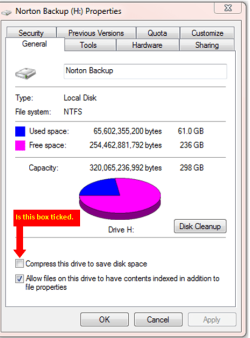
I compressed my entire C drive. When I rebooted I got the error "Bootmgr is compressed"

I don't have a optical drive, so I made a bootable USB drive using YUMI 0.2.3 and added the windows 7 recovery ISO. The USB drive boots and I can enter the recovery console, etc.

It couldn't auto-repair the problem so I tried enterinng the following in the command prompt code:

c:
expand bootmgr temp
attrib bootmgr –s –r –h
del bootmgr
ren temp bootmgr
attrib bootmgr –a +s +h +r


I guess "ren" didn't work or something, because now the error is "Bootmgr is MISSING".

Still, the recovery disk cannot auto-repair.

i tried entering the following in the command prompt (from bootable USB):
bootrec /fixboot

It said the operation has completed successfully. I took the USB drive out and rebooted. bootmgr is still missing.

I also tried:
bootrec /rebuildbcd

Total identified windows installations: 1
Add installation to boot list? yes<y>no<n>all<a>

I selected yes, it said "The requested system device cannot be found".


On that note, I am stuck. How can I restore bootmgr?
 
Last edited:

My Computer

OS
Windows 7 Ultimate 64 bit
CPU
AMD Phenom II X4 955 Processor 3.2GHz
Hard Drives
1TB (SATA)
try uncompact it in commad promt by typing compact /u /a c:\*.*
 

My Computer

Computer Manufacturer/Model Number
custom
OS
windows 7 ultimate x64
CPU
AMD Athlon II X3 445 Rana 45nm Technology
Motherboard
BIOSTAR Group N68S3B
Memory
8gbram
Graphics Card(s)
32MB GeForce 7025 / nForce 630a (Biostar Microtech Int'l)
Screen Resolution
1280x1024
Hard Drives
488GB Seagate ST350041 3AS SCSI Disk Device (ATA)
PSU
400w ?
Keyboard
usb
Mouse
usb
deanolfc - The problem is that bootmgr is MISSING. It's got deleted when I was trying to uncompress it (see my original post for details.

theog - What am I supposed to paste?
 

My Computer

OS
Windows 7 Ultimate 64 bit
CPU
AMD Phenom II X4 955 Processor 3.2GHz
Hard Drives
1TB (SATA)
If you now have the drive uncompressed.

Boot up using the Startup disk CD or Windows 7 DVD. (not the OEM manufacturer's Recovery Disk) If you have a Netbook, needs to be on USB Pendrive.

Do a Strartup Repair:
http://www.sevenforums.com/tutorials/681-startup-repair.html?ltr=S
Note: You may need to do startup repair 3 to 4 times.
http://www.sevenforums.com/tutorials/105541-startup-repair-run-3-separate-times.html
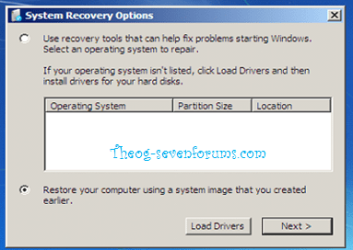
Your Windows installation must show at this screen.

Startup Repair 1.PNG Startup Repair 2.png

If not showing check out the list below.
1) Run Startup Repair once,(drive may be marked inactive) this will mark the drive ACTIVE.

2) Your HD is plugged in to the first Sata port on the MOBO, & first HD boot in BIOS.

3) Make sure your HD is show in BIOS.

4) Check all cables for a good fit.

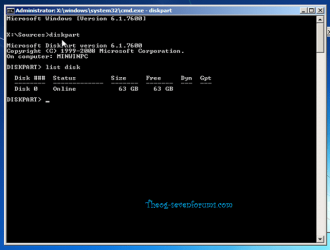
5) Check to see your HD is listed in dartpart.
http://www.sevenforums.com/tutorials/119713-diskpart-pc-startup.html?ltr=D
type list disk.

Startup Repair 3.PNG

6) Load the Sata Controller Drivers:
http://www.sevenforums.com/tutorials/68942-sata-drivers-load-windows-recovery-options.html
Only needed, if you used when installing Windows.

7) Restore MBR.
http://www.sevenforums.com/tutorials/20864-mbr-restore-windows-7-master-boot-record.html

8) Use the Rebuild BCD in this tutorial:
How to use the Bootrec.exe tool in the Windows Recovery Environment to troubleshoot and repair startup issues in Windows

9) Check your computer for virus or malware.
http://www.sevenforums.com/tutorials/166445-microsoft-standalone-system-sweeper.html?ltr=M

10) Mark the Windows HD ACTIVE:
http://www.sevenforums.com/tutorials/71432-partition-mark-active.html?ltr=P

Still not showing.
11) Check the hard drive with the manufacturer's diagnostic tools.
Hard Drive Diagnostics Tools and Utilities (Storage) - TACKtech Corp.
HD Diagnostic

If you have not made your Startup Repair
http://www.sevenforums.com/tutorials/2083-system-repair-disc-create.html
Do you have a mate with Windows 7 & CD/DVD RW Drive, how could burn one off.
If you have a Netbook, you can make a Startup Repair or install disk using Method two of this tutorial:
http://www.sevenforums.com/tutorials/2432-usb-windows-7-installation-key-drive-create.html?ltr=U
on your mate's PC.

http://www.sevenforums.com/tutorials/139576-startup-repair-infinite-loop-recovery.html

http://www.sevenforums.com/tutorials/668-system-recovery-options.html
http://www.sevenforums.com/tutorials/700-system-restore.html?ltr=S
 

My Computer

OS
ME/XP/Vista/Win7
Back
Top