
Solved bootmgr problem, system working with win7 DVD

Yoknee

New member
Member
Local time
1:12 AM
Messages
28
G´day. Been reading and installing tools etc. found on this forum in the attempt to fix my win7 install.

I hade XP installed and cleaned it out of the C:drive before installing win7.
I moved all my important data to E: drive that is a different HD.

C: & D: drives are on the same HD as partitons. D: drive I delated all data.

In bios I have the 1st boot as DVD, coz thats the only way to get win7 running.
I get the bootmgr missing message otherwise.

Ive tryed the command prompt to copy the bootmgr from the DVD to the C: dirve but it wont let me.

I dl´d the EasyBCD tool to attempt to copy the boot file to C:drive but that didnt work either.
I dl´d the partiton Wizard but chickened out on an attempt with that.

Was a bit puzzeled having a bootmgr file in the D: drive, so delated that as win7 is installed in the C: drive.
Im new at this, so all help is apreachiated, only please make it simple so i understand, thanks.

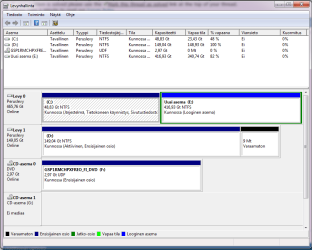
ive attached the diskmgmt.msc picture to show whats in.
system specs edited in bio.
 

Attachments
  • nimetön.png
    nimetön.png
    26.2 KB · Views: 42

My Computer

Computer Manufacturer/Model Number
Home built
OS
windows7 64bit home premium
CPU
Intel 2core 6600 2,40Ghz
Motherboard
HP Compaq G G61 notebook
Memory
4 GB
Graphics Card(s)
Nividea Geforce GTX 460
Sound Card
Realtek high defenition
Monitor(s) Displays
1- Samsung 27"
Hard Drives
2 HDs
C: & D: drives on same HD as partitons
E: drive.
Case
Grey box?
Cooling
Fans?
Keyboard
microsoft 5121
Mouse
microsoft comfout digital 3000
Internet Speed
10000 / 1000
Check your optical drives, USB ports, and floppy drives for media.

Note: If you find that this is the cause of your issue and it's happening regularly, you might want to consider changing the boot order in BIOS so the hard drive is listed as the first boot device.

Perform a Startup Repair of Windows. This type of installation should replace any missing or corrupt files, including BOOTMGR.

Even though a Startup Repair is a common solution for BOOTMGR problems, don't worry if it doesn't fix your problem. Just continue troubleshooting - something will work.
 

My Computer

OS
Windows 7 Ultimate x64
G´day. Been reading and installing tools etc. found on this forum in the attempt to fix my win7 install.

I hade XP installed and cleaned it out of the C:drive before installing win7.
I moved all my important data to E: drive that is a different HD.

C: & D: drives are on the same HD as partitons. D: drive I delated all data.

In bios I have the 1st boot as DVD, coz thats the only way to get win7 running.
I get the bootmgr missing message otherwise.

Ive tryed the command prompt to copy the bootmgr from the DVD to the C: dirve but it wont let me.

I dl´d the EasyBCD tool to attempt to copy the boot file to C:drive but that didnt work either.
I dl´d the partiton Wizard but chickened out on an attempt with that.

Was a bit puzzeled having a bootmgr file in the D: drive, so delated that as win7 is installed in the C: drive.
Im new at this, so all help is apreachiated, only please make it simple so i understand, thanks.

ive attached the diskmgmt.msc picture to show whats in.
system specs edited in bio.

In "disk management" screenshot I see that E is marked active(?) Is that right because I don't understand your language! Is C also marked active?
 

My Computer

Computer type
Laptop
Computer Manufacturer/Model Number
ACER ASPIRE 5742G
OS
Microsoft Windows 7 Home Premium 64-bits 7601 Multiprocessor Free Service Pack 1
CPU
Intel(R) Core(TM) i3 CPU M 370 @ 2.40GHz
Motherboard
Acer Aspire 5742G
Memory
4,00 GB
Graphics Card(s)
ATI Mobility Radeon HD 5400 Series
Sound Card
(1) AMD High Definition Audio Device (2) Realtek High Defi
Screen Resolution
1366 x 768 x 32 bits (4294967296 colors) @ 60 Hz
Hard Drives
WDC WD5000BEVT-22ZAT0
ive tryed the startup repair win with the CD disk several times, it always says everything is working OK.
Ive also changed the boot order in bios to HD a few times, but then i get the bootmgr missing, crtl + alt del.

sorry i dont undestand the USB ports to check.
I have Logitech steering wheel, epson printer, Olympus camera, microsoft mouse.
 

My Computer

Computer Manufacturer/Model Number
Home built
OS
windows7 64bit home premium
CPU
Intel 2core 6600 2,40Ghz
Motherboard
HP Compaq G G61 notebook
Memory
4 GB
Graphics Card(s)
Nividea Geforce GTX 460
Sound Card
Realtek high defenition
Monitor(s) Displays
1- Samsung 27"
Hard Drives
2 HDs
C: & D: drives on same HD as partitons
E: drive.
Case
Grey box?
Cooling
Fans?
Keyboard
microsoft 5121
Mouse
microsoft comfout digital 3000
Internet Speed
10000 / 1000
So if you have the DVD loaded and you get the prompt "press any key to load from cd/dvd" (or something like that), you don't press a key and win7 boots succesfully? is that what happens?
 

My Computer

Computer type
Laptop
Computer Manufacturer/Model Number
ACER ASPIRE 5742G
OS
Microsoft Windows 7 Home Premium 64-bits 7601 Multiprocessor Free Service Pack 1
CPU
Intel(R) Core(TM) i3 CPU M 370 @ 2.40GHz
Motherboard
Acer Aspire 5742G
Memory
4,00 GB
Graphics Card(s)
ATI Mobility Radeon HD 5400 Series
Sound Card
(1) AMD High Definition Audio Device (2) Realtek High Defi
Screen Resolution
1366 x 768 x 32 bits (4294967296 colors) @ 60 Hz
Hard Drives
WDC WD5000BEVT-22ZAT0
In "disk management" screenshot I see that E is marked active(?) Is that right because I don't understand your language! Is C also marked active?

E is marked "Working, logical drive"
C and D are marked "actiive"
 

My Computer

Computer Manufacturer/Model Number
Home built
OS
windows7 64bit home premium
CPU
Intel 2core 6600 2,40Ghz
Motherboard
HP Compaq G G61 notebook
Memory
4 GB
Graphics Card(s)
Nividea Geforce GTX 460
Sound Card
Realtek high defenition
Monitor(s) Displays
1- Samsung 27"
Hard Drives
2 HDs
C: & D: drives on same HD as partitons
E: drive.
Case
Grey box?
Cooling
Fans?
Keyboard
microsoft 5121
Mouse
microsoft comfout digital 3000
Internet Speed
10000 / 1000
So if you have the DVD loaded and you get the prompt "press any key to load from cd/dvd" (or something like that), you don't press a key and win7 boots succesfully? is that what happens?

yes, it will boot win7 up working all right.
 

My Computer

Computer Manufacturer/Model Number
Home built
OS
windows7 64bit home premium
CPU
Intel 2core 6600 2,40Ghz
Motherboard
HP Compaq G G61 notebook
Memory
4 GB
Graphics Card(s)
Nividea Geforce GTX 460
Sound Card
Realtek high defenition
Monitor(s) Displays
1- Samsung 27"
Hard Drives
2 HDs
C: & D: drives on same HD as partitons
E: drive.
Case
Grey box?
Cooling
Fans?
Keyboard
microsoft 5121
Mouse
microsoft comfout digital 3000
Internet Speed
10000 / 1000
In "disk management" screenshot I see that E is marked active(?) Is that right because I don't understand your language! Is C also marked active?

E is marked "Working, logical drive"
C and D are marked "actiive"
Is bootmenu on D or C?
in http://www.sevenforums.com/tutorials/783-elevated-command-prompt.html

bcdedit

Now you see something like this

C:\Windows\system32>bcdedit
Windows-opstartbeheer
---------------------
id {bootmgr}
device partition=C:
path \bootmgr
description Windows Boot Manager
locale nl-NL
inherit {globalsettings}
default {current}
resumeobject {fa1a7f9d-ab26-11df-bc4f-ce7145d50d35}
displayorder {current}
toolsdisplayorder {memdiag}
timeout 10

What is listed after device (marked red)?
 

My Computer

Computer type
Laptop
Computer Manufacturer/Model Number
ACER ASPIRE 5742G
OS
Microsoft Windows 7 Home Premium 64-bits 7601 Multiprocessor Free Service Pack 1
CPU
Intel(R) Core(TM) i3 CPU M 370 @ 2.40GHz
Motherboard
Acer Aspire 5742G
Memory
4,00 GB
Graphics Card(s)
ATI Mobility Radeon HD 5400 Series
Sound Card
(1) AMD High Definition Audio Device (2) Realtek High Defi
Screen Resolution
1366 x 768 x 32 bits (4294967296 colors) @ 60 Hz
Hard Drives
WDC WD5000BEVT-22ZAT0
G´day. Been reading and installing tools etc. found on this forum in the attempt to fix my win7 install.

I hade XP installed and cleaned it out of the C:drive before installing win7.
I moved all my important data to E: drive that is a different HD.

C: & D: drives are on the same HD as partitons. D: drive I delated all data.

In bios I have the 1st boot as DVD, coz thats the only way to get win7 running.
I get the bootmgr missing message otherwise.

Ive tryed the command prompt to copy the bootmgr from the DVD to the C: dirve but it wont let me.

I dl´d the EasyBCD tool to attempt to copy the boot file to C:drive but that didnt work either.
I dl´d the partiton Wizard but chickened out on an attempt with that.

Was a bit puzzeled having a bootmgr file in the D: drive, so delated that as win7 is installed in the C: drive.
Im new at this, so all help is apreachiated, only please make it simple so i understand, thanks.

ive attached the diskmgmt.msc picture to show whats in.
system specs edited in bio.
In screenshot I see D as primary and active I assume(?) So it's not the boot drive. Mark it inactive!

http://www.sevenforums.com/tutorials/71432-partition-mark-active.html
Use diskpart in elevated command prompt . In step 6 type inactive instead of active.

done?
 

My Computer

Computer type
Laptop
Computer Manufacturer/Model Number
ACER ASPIRE 5742G
OS
Microsoft Windows 7 Home Premium 64-bits 7601 Multiprocessor Free Service Pack 1
CPU
Intel(R) Core(TM) i3 CPU M 370 @ 2.40GHz
Motherboard
Acer Aspire 5742G
Memory
4,00 GB
Graphics Card(s)
ATI Mobility Radeon HD 5400 Series
Sound Card
(1) AMD High Definition Audio Device (2) Realtek High Defi
Screen Resolution
1366 x 768 x 32 bits (4294967296 colors) @ 60 Hz
Hard Drives
WDC WD5000BEVT-22ZAT0
Microsoft Windows [versio 6.1.7601]
Copyright (c) 2009 Microsoft Corporation. Kaikki oikeudet pidätetään.

C:\Windows\system32>bcdedit

Windowsin käynnistyksen hallintaohjelma
---------------------------------------
tunnus {bootmgr}
device boot
path \bootmgr
description Windows Boot Manager
locale fi-FI
inherit {globalsettings}
default {current}
resumeobject {-----------------------}
displayorder {current}
toolsdisplayorder {memdiag}
timeout 30

Windowsin lataaminen
--------------------
tunnus {current}
device partition=C:
path \Windows\system32\winload.exe
description Windows 7
locale fi-FI
inherit {bootloadersettings}
osdevice partition=C:
systemroot \Windows
resumeobject {---------------------}
nx OptIn

C:\Windows\system32>
 

My Computer

Computer Manufacturer/Model Number
Home built
OS
windows7 64bit home premium
CPU
Intel 2core 6600 2,40Ghz
Motherboard
HP Compaq G G61 notebook
Memory
4 GB
Graphics Card(s)
Nividea Geforce GTX 460
Sound Card
Realtek high defenition
Monitor(s) Displays
1- Samsung 27"
Hard Drives
2 HDs
C: & D: drives on same HD as partitons
E: drive.
Case
Grey box?
Cooling
Fans?
Keyboard
microsoft 5121
Mouse
microsoft comfout digital 3000
Internet Speed
10000 / 1000
Because win7 is starting fine with DVD inserted it must be a small problem. Let me explain waht's the difference

from DVD:
  • system reads bootsector of dvd and executes it. It displays "press any key to start from cd/dvd".
  • You don't press a key so it continues to start from harddisk.
  • It searches for first active partition and loads its bootsector. Or it loads bootmgr directly (no sure, but I think the first)
For hardisk:
  • it loads and executes MBR. Simple small program that looks for first active partition and loads and excutes it's bootsector
  • in bootsector is code to load bootmgr
  • bootmgr reads the bcd menu and you can select an operating system (not displayed as you have only one)
MBR is fine. At least I think he loads bootsector. Then he can't find bootmgr?? (message comes from bootsector).
Maybe bootsector is corrupt and looks on wrong folder?
Maybe MBR is corrupt (but then this message shouldn't appear). Maybe this is a fake message from a mbr-virus?

Totally confused. Have seen this 2 times earlier!! I know a solution. First waiting for reply
 

My Computer

Computer type
Laptop
Computer Manufacturer/Model Number
ACER ASPIRE 5742G
OS
Microsoft Windows 7 Home Premium 64-bits 7601 Multiprocessor Free Service Pack 1
CPU
Intel(R) Core(TM) i3 CPU M 370 @ 2.40GHz
Motherboard
Acer Aspire 5742G
Memory
4,00 GB
Graphics Card(s)
ATI Mobility Radeon HD 5400 Series
Sound Card
(1) AMD High Definition Audio Device (2) Realtek High Defi
Screen Resolution
1366 x 768 x 32 bits (4294967296 colors) @ 60 Hz
Hard Drives
WDC WD5000BEVT-22ZAT0
Microsoft Windows [versio 6.1.7601]
Copyright (c) 2009 Microsoft Corporation. Kaikki oikeudet pidätetään.

C:\Windows\system32>bcdedit

Windowsin käynnistyksen hallintaohjelma
---------------------------------------
tunnus {bootmgr}
device boot
path \bootmgr
description Windows Boot Manager
locale fi-FI
inherit {globalsettings}
default {current}
resumeobject {-----------------------}
displayorder {current}
toolsdisplayorder {memdiag}
timeout 30

Windowsin lataaminen
--------------------
tunnus {current}
device partition=C:
path \Windows\system32\winload.exe
description Windows 7
locale fi-FI
inherit {bootloadersettings}
osdevice partition=C:
systemroot \Windows
resumeobject {---------------------}
nx OptIn

C:\Windows\system32>
Bootmenu is fine. Did you already mark D as inactive?
 

My Computer

Computer type
Laptop
Computer Manufacturer/Model Number
ACER ASPIRE 5742G
OS
Microsoft Windows 7 Home Premium 64-bits 7601 Multiprocessor Free Service Pack 1
CPU
Intel(R) Core(TM) i3 CPU M 370 @ 2.40GHz
Motherboard
Acer Aspire 5742G
Memory
4,00 GB
Graphics Card(s)
ATI Mobility Radeon HD 5400 Series
Sound Card
(1) AMD High Definition Audio Device (2) Realtek High Defi
Screen Resolution
1366 x 768 x 32 bits (4294967296 colors) @ 60 Hz
Hard Drives
WDC WD5000BEVT-22ZAT0
delete d:\bootmgr and d:\boot (folder) as well. They are useless!! Both are hidden system files.
Nothing to do with problem btw. Mark D as inactive
 

My Computer

Computer type
Laptop
Computer Manufacturer/Model Number
ACER ASPIRE 5742G
OS
Microsoft Windows 7 Home Premium 64-bits 7601 Multiprocessor Free Service Pack 1
CPU
Intel(R) Core(TM) i3 CPU M 370 @ 2.40GHz
Motherboard
Acer Aspire 5742G
Memory
4,00 GB
Graphics Card(s)
ATI Mobility Radeon HD 5400 Series
Sound Card
(1) AMD High Definition Audio Device (2) Realtek High Defi
Screen Resolution
1366 x 768 x 32 bits (4294967296 colors) @ 60 Hz
Hard Drives
WDC WD5000BEVT-22ZAT0
You know this screen because you did startup repair


Select "command prompt" there. Now do:
Code:
bootrec /fixmbr
bootrec /fixboot
Both commands are executed succesfuly? If so, try to reboot normally
(you can also execute only one of the commands to see if that's enough)


The /FixMbr option writes a Windows 7 or Windows Vista-compatible MBR to the system partition. This option does not overwrite the existing partition table. Use this option when you must resolve MBR corruption issues, or when you have to remove non-standard code from the MBR.


The /FixBoot option writes a new boot sector to the system partition by using a boot sector that is compatible with Windows Vista or Windows 7.
 

My Computer

Computer type
Laptop
Computer Manufacturer/Model Number
ACER ASPIRE 5742G
OS
Microsoft Windows 7 Home Premium 64-bits 7601 Multiprocessor Free Service Pack 1
CPU
Intel(R) Core(TM) i3 CPU M 370 @ 2.40GHz
Motherboard
Acer Aspire 5742G
Memory
4,00 GB
Graphics Card(s)
ATI Mobility Radeon HD 5400 Series
Sound Card
(1) AMD High Definition Audio Device (2) Realtek High Defi
Screen Resolution
1366 x 768 x 32 bits (4294967296 colors) @ 60 Hz
Hard Drives
WDC WD5000BEVT-22ZAT0
Bootmenu is fine. Did you already mark D as inactive?[/QUOTE]

ive now sucessfully marked D drive as inactive. Just took me some time to get the PC back up but still hade to with the CD.
 

My Computer

Computer Manufacturer/Model Number
Home built
OS
windows7 64bit home premium
CPU
Intel 2core 6600 2,40Ghz
Motherboard
HP Compaq G G61 notebook
Memory
4 GB
Graphics Card(s)
Nividea Geforce GTX 460
Sound Card
Realtek high defenition
Monitor(s) Displays
1- Samsung 27"
Hard Drives
2 HDs
C: & D: drives on same HD as partitons
E: drive.
Case
Grey box?
Cooling
Fans?
Keyboard
microsoft 5121
Mouse
microsoft comfout digital 3000
Internet Speed
10000 / 1000
delete d:\bootmgr and d:\boot (folder) as well. They are useless!! Both are hidden system files.
Nothing to do with problem btw. Mark D as inactive

i did have a bootmgr file in there, but delated that some time ago already.
never seen a boot folder in the D though. I also opened up the hidden files and D drive is empty.
 

My Computer

Computer Manufacturer/Model Number
Home built
OS
windows7 64bit home premium
CPU
Intel 2core 6600 2,40Ghz
Motherboard
HP Compaq G G61 notebook
Memory
4 GB
Graphics Card(s)
Nividea Geforce GTX 460
Sound Card
Realtek high defenition
Monitor(s) Displays
1- Samsung 27"
Hard Drives
2 HDs
C: & D: drives on same HD as partitons
E: drive.
Case
Grey box?
Cooling
Fans?
Keyboard
microsoft 5121
Mouse
microsoft comfout digital 3000
Internet Speed
10000 / 1000
delete d:\bootmgr and d:\boot (folder) as well. They are useless!! Both are hidden system files.
Nothing to do with problem btw. Mark D as inactive

i did have a bootmgr file in there, but delated that some time ago already.
never seen a boot folder in the D though. I also opened up the hidden files and D drive is empty.
You can see that boot folder on C? It should be there is definitely there. Has nothing to do with problem btw
 

My Computer

Computer type
Laptop
Computer Manufacturer/Model Number
ACER ASPIRE 5742G
OS
Microsoft Windows 7 Home Premium 64-bits 7601 Multiprocessor Free Service Pack 1
CPU
Intel(R) Core(TM) i3 CPU M 370 @ 2.40GHz
Motherboard
Acer Aspire 5742G
Memory
4,00 GB
Graphics Card(s)
ATI Mobility Radeon HD 5400 Series
Sound Card
(1) AMD High Definition Audio Device (2) Realtek High Defi
Screen Resolution
1366 x 768 x 32 bits (4294967296 colors) @ 60 Hz
Hard Drives
WDC WD5000BEVT-22ZAT0
In recovery environment->command prompt

bootrec /fixmbr
bootrec /fixboot

Already done? That should solve the problem
 

My Computer

Computer type
Laptop
Computer Manufacturer/Model Number
ACER ASPIRE 5742G
OS
Microsoft Windows 7 Home Premium 64-bits 7601 Multiprocessor Free Service Pack 1
CPU
Intel(R) Core(TM) i3 CPU M 370 @ 2.40GHz
Motherboard
Acer Aspire 5742G
Memory
4,00 GB
Graphics Card(s)
ATI Mobility Radeon HD 5400 Series
Sound Card
(1) AMD High Definition Audio Device (2) Realtek High Defi
Screen Resolution
1366 x 768 x 32 bits (4294967296 colors) @ 60 Hz
Hard Drives
WDC WD5000BEVT-22ZAT0
Do you have the bootmgr file in C:?
 

My Computer

Computer Manufacturer/Model Number
Self built
OS
Windows 7 Ultimate x64
CPU
Intel Pentium Dual Core E5200 2.5GHz (3.77GHz OC)
Motherboard
Asus P5Q-E
Memory
Corsair 4GB DDR2 (4x1GB CM2X1024-6400C4)
Graphics Card(s)
Palit GeForce GTS 250 (1024MB)
Sound Card
On Board (ADI AD2000B 8ch HD)
Monitor(s) Displays
Samsung 32in LCD TV
Screen Resolution
1360x768
Hard Drives
2 x 1TB Samsung 103SJ (Raid0)
2 x External 500GB Samsung 502IJ (NexStar 3 HD Enclosures)
PSU
550W Antec Neo HE 550
Case
Antec P180
Cooling
Xigmatex Red Scorpion CPU Cooler. 3x120mm Fans
Keyboard
Logitech MX5000 Laser (Combo)
Mouse
Logitech MX5000 Laser (Combo)
Internet Speed
ADSL2+ (avg 10 Mbps Down, 0.80 Mbps up)
Other Info
Gigabyte GN-WP01GS 54g Wireless Lan Card
In recovery environment->command prompt

bootrec /fixmbr
bootrec /fixboot

Already done? That should solve the problem

ok did that now.
when restarted it pulled out the CD and it didnt work, got a message something that boot dosnt work, then hade to go back into the repair/recovery to get it back up with the CD.
btw. i dont have an other PC here, so this is the only way to get online.

Yes, C drive has a boot folder in the windows folder.
 

My Computer

Computer Manufacturer/Model Number
Home built
OS
windows7 64bit home premium
CPU
Intel 2core 6600 2,40Ghz
Motherboard
HP Compaq G G61 notebook
Memory
4 GB
Graphics Card(s)
Nividea Geforce GTX 460
Sound Card
Realtek high defenition
Monitor(s) Displays
1- Samsung 27"
Hard Drives
2 HDs
C: & D: drives on same HD as partitons
E: drive.
Case
Grey box?
Cooling
Fans?
Keyboard
microsoft 5121
Mouse
microsoft comfout digital 3000
Internet Speed
10000 / 1000
Back
Top