I try to explain this the best way I can. I save a lot of web pages on my computer. Sometimes I save them as "HTML with images". This is with the Opera browser. I believe Firefox and IE call it "webpage complete".
When you do this, your browser saves an HTML file and a folder that contains all of the graphics and scripts associated with that web page. If you click on either the HTML file or folder to delete it both items are deleted. Windows treats both the file and folder as one file.
If I decide to delete the folder part because I decided I did not need it but wanted to keep the HTML file I have to rename one or the other first. Windows gives a warning about this association first before allowing you to do anything.
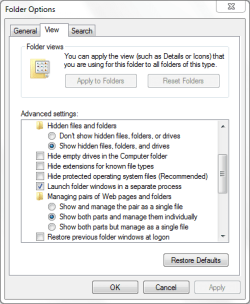
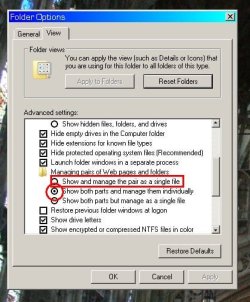
In XP I knew how to disable this association so each part was treated as a separate item. How do you do it in Windows 7?
When you do this, your browser saves an HTML file and a folder that contains all of the graphics and scripts associated with that web page. If you click on either the HTML file or folder to delete it both items are deleted. Windows treats both the file and folder as one file.
If I decide to delete the folder part because I decided I did not need it but wanted to keep the HTML file I have to rename one or the other first. Windows gives a warning about this association first before allowing you to do anything.
In XP I knew how to disable this association so each part was treated as a separate item. How do you do it in Windows 7?
My Computer
- Computer type
- PC/Desktop
- Computer Manufacturer/Model Number
- Acer
- OS
- Windows 7 Home x64
- CPU
- dual core 1.65 GHz
- Motherboard
- Acer Aspire X1430
- Memory
- 4 GB
- Graphics Card(s)
- AMD Radeon HD 6320 Graphics
- Sound Card
- AMD High Definition Audio Device
- Monitor(s) Displays
- hp w1707
- Hard Drives
- 500 GB
- Internet Speed
- Eastlink 20 Mbps
- Antivirus
- Avira
- Browser
- Opera 28


 rb: and typing regedit.exe into the search box. Next, either right click on the program and click Run as administrator or simply press Ctrl + Shift + Enter/Return. Provide administrative credentials when prompted. This is because the area of the registry that we are interested in is the HKLM branch, and to modify the contents of this area of the registry it needs to invoked with administrative privileges.